VPN Hotspot Shield: Proxy VPN
- 85.42K
- 4.5
- Installs
- 100.00M
- Price
- Free

Screenshots
Analysis by Reviewed
If you're anything like me, finding a VPN that actually delivers on its promises can feel like searching for a needle in a haystack. So, when I stumbled across VPN Hotspot Shield: Proxy VPN, I was cautiously optimistic. Could this be the answer to my online privacy prayers? Let's dive in and find out!
What speed claims mean in everyday use
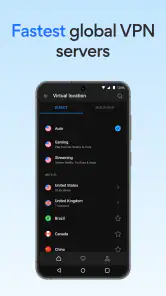
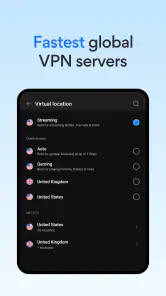
Hotspot Shield is a free privacy and connection tool from Anchorfree LLC, and its description highlights access to more than 1,800 virtual servers. The advertised speed advantage is a useful expectation, not a guarantee for every phone, network, or destination. A VPN adds a route between you and a website, so the result depends on your normal connection as well as the server you choose.
For ordinary browsing, I’d judge it by whether pages load comfortably and calls or streams remain usable, rather than expecting every connection to match an unprotected one. If a particular server feels sluggish, trying another nearby option is a practical first step. A farther-away location may be useful for a specific browsing purpose, but distance can affect responsiveness, especially during video calls or other activities where delays are noticeable.
Setting Up and First Impressions
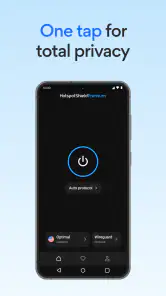
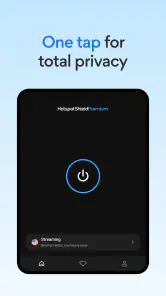
So, first things first, getting VPN Hotspot Shield: Proxy VPN up and running was a breeze. I downloaded it from the app store, and within minutes, I was connected to a secure server. The interface is super user-friendly, sporting a sleek design that makes navigation straightforward even for VPN newbies like myself. No complicated jargon, just easy peasy lemon squeezy!
Choosing a server for the task
A useful habit is to decide what you need before connecting. For routine browsing on public Wi-Fi, a nearby server is usually the sensible starting point: it avoids adding unnecessary distance while encrypting the connection. If you’re comparing how different locations behave, change one thing at a time and revisit the same kind of page or service. That makes it easier to tell whether a change in performance comes from the server or from a busy network.
It also helps to think of a VPN as a privacy layer, not a fix for every online risk. It can protect the traffic routed through the VPN, but it does not make suspicious links safe or replace careful account security. I’d still use strong, unique passwords and avoid entering sensitive details on sites I don’t trust.
The Basics: What Does It Offer?
Now, onto the juicy stuff. This app is all about providing a secure and private internet experience. It boasts high-speed connections across multiple servers worldwide. Whether you’re looking to stream your favorite shows or just want to browse without prying eyes, this app promises to have your back.
More From Our News Desk

Weather by Xiaomi Review: Clear at a Glance, Less Clear Up Close

X Under Pressure: Can It Recover When Posting Goes Wrong?

Clash of Clans Is Won Between the Battles

Android Auto Makes the Case for Quieter Car Software

MobiOffice: Transforming Mobile Productivity with Seamless Integration

EA SPORTS FC™ Mobile Soccer: Redefining Mobile Sports Gaming
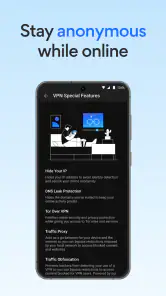
I particularly appreciated the built-in malware protection. In today's digital world, that's a big plus. It also has a feature to bypass geo-restrictions, which is perfect if you’re a fan of international content. Trust me, being able to access shows from different countries without a hitch is a game changer.
When several things are happening at once
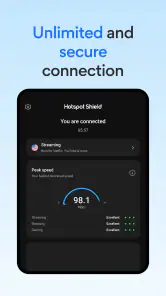
The heavier the task, the more important it is to check the connection rather than assume the VPN will feel identical in every situation. Streaming, downloading, and keeping other apps active can all compete for the same phone and network resources. If playback starts buffering, I’d first test whether the issue persists on a nearby server and on the ordinary connection. That simple comparison helps separate a VPN route problem from weak Wi-Fi or a busy mobile network.
For a work call or a time-sensitive task, I’d favor a stable nearby connection over repeatedly switching countries to chase a theoretical speed boost. Switching can interrupt what you’re doing, and location changes may affect how websites or services behave. For travel, the app is more useful as a straightforward way to add a layer of protection on unfamiliar Wi-Fi than as a promise that every service will work from every region.
Performance: Does It Hold Up?
Alright, so it looks good on paper, but how does it perform? Surprisingly well, actually. I tested out various servers, hopping from the US to Germany to Australia, and each switch was smooth and quick. No significant drops in speed, which is crucial if you’re streaming or gaming.
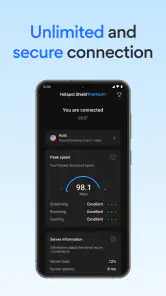
Another thing that stood out was the app’s ability to maintain a stable connection. I didn’t experience any random disconnects, which I’ve had with other VPNs in the past. It’s like having a reliable friend who’s always got your back.
Reliability and recovery habits
No VPN can remove every source of interruption. Signal changes, congested Wi-Fi, or a phone moving between networks can affect a connection, so I wouldn’t treat one smooth session as a guarantee for every future one. Before starting something important, I’d connect first and confirm that the app shows an active VPN session. If a page stops loading, reconnecting or choosing another server is a more useful check than repeatedly refreshing the same page.
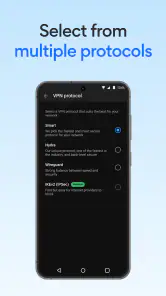
There’s also a trade-off between convenience and control. A simple interface suits people who want to connect without tuning lots of settings, while experienced users who prefer detailed network controls may want to compare it with a VPN that exposes more configuration choices. The best fit depends on whether you value a quick routine or fine-grained control.
Security and Privacy
When it comes to a VPN, security is king. VPN Hotspot Shield: Proxy VPN uses military-grade encryption to keep your data safe. It’s like having a digital bodyguard 24/7. Plus, the app doesn’t log your activity, so you can surf the web with peace of mind knowing your data isn’t being sold to the highest bidder.
The kill switch feature is another highlight. If the VPN connection drops for any reason, it automatically cuts off your internet, ensuring your data isn’t accidentally leaked. This is a must-have feature for anyone serious about privacy.
What to expect from a free option
The app is free to download, though in-app purchases range from $0.99 to $99.99 per item. That makes it worth checking the purchase screen carefully before choosing anything, particularly if you only need occasional protection. Its scale is notable: it has an average rating of 4.5 from around 1.6 million ratings, with more than 85,000 written reviews and over 100 million installs. Those figures suggest many people have tried it, but they don’t tell you whether its performance will suit your own network or needs.
Compared with a browser’s private-browsing mode, a VPN serves a different purpose: private browsing mainly changes what is saved locally in that browser, while a VPN routes network traffic through an encrypted connection. Compared with setting up a VPN manually, Hotspot Shield is a more approachable option for someone who wants a ready-made app rather than handling connection details themselves. If your priority is extensive technical customization, a specialist alternative may be a better match.
Device fit and daily routines
The current version is 11.15.0 and requires Android 8.0 or later. That’s an important first check if you’re installing it on an older phone or tablet. As with other always-connected tools, VPN use can add work for a device and may affect battery life or responsiveness depending on the phone, connection, and how long it stays active. I’d pay attention during a normal day rather than assume the impact will be identical across devices.
One realistic routine is connecting before opening email or browsing on a café’s public Wi-Fi, then disconnecting when you no longer need the extra layer. For someone who frequently uses unfamiliar networks, that quick habit may be more valuable than changing server locations throughout the day. If you rely on a local service that behaves differently while connected, temporarily disconnecting to use it can be a reasonable workaround.
User Experience and Support
One of the things I loved about this app is how intuitive it is. Everything is where you’d expect it to be, and I didn’t find myself lost in a maze of menus. The app also has a handy help section, and for those times I needed extra assistance, customer support was just a click away. The support team was responsive and knowledgeable, which is a huge plus in my book.
Hotspot Shield is rated for Everyone, which makes it broadly accessible, though younger users should still have guidance about safe browsing and online accounts. The app suits people who want an uncomplicated VPN for everyday browsing, travel, or public Wi-Fi. I’d steer someone away if they need a guaranteed route to a particular streaming catalog, expect identical speeds on every server, or want advanced manual control above all else.
Wrapping It Up
So, would I recommend VPN Hotspot Shield: Proxy VPN? Absolutely. It ticks all the right boxes for me: speed, security, and ease of use. Whether you’re a seasoned VPN user or just dipping your toes into the privacy pool, this app is worth checking out.
In a world where online privacy is becoming increasingly important, having a reliable VPN like this one can make all the difference. So, go ahead, give it a try and see just how much more secure your online experience can be. You might just find it’s the perfect fit for your digital life!
My practical verdict is that its appeal is the balance of an approachable setup and a broad server choice, not a promise that every demanding task will run faster. I’d start with a nearby server, test the activities I care about, and keep an eye on how the phone feels during extended use. If that routine works well on your device, it can be a convenient everyday tool; if you need predictable performance for critical work or detailed network tuning, comparing alternatives first is the wiser choice.
VPN Hotspot Shield: Proxy VPN Frequently Asked Questions
Can Hotspot Shield help me access content while traveling?
A VPN routes your internet traffic through a virtual server, which can make your connection appear to come from a different location. Hotspot Shield offers access to virtual servers, so this may help when you’re traveling and want to use services that are available in another region. Access can still depend on the service’s own rules, so a VPN does not guarantee that every website or app will work.
What should I know about Hotspot Shield’s age rating and device compatibility?
Hotspot Shield is rated Everyone and is a tools app. For Android, the listed minimum operating-system requirement is version 8.0, so check your device’s software version before downloading. The app is also available for iOS, Windows, and macOS, making it an option for people who use more than one kind of device.
Can I use Hotspot Shield on public Wi-Fi?
Hotspot Shield is designed to encrypt your internet connection, which can be useful when connecting through public Wi-Fi at places such as cafés, airports, or hotels. The VPN creates a secure tunnel between your device and the internet and masks your IP address. It adds a layer of privacy, though it does not replace sensible browsing habits or protect against every online risk.
Is Hotspot Shield free to download, and are there in-app purchases?
Hotspot Shield is free to download, and the app is rated for Everyone. In-app purchases are available, ranging from $0.99 to $99.99 per item, so check the purchase details shown in your app store before confirming anything. You can begin with the free option, while paid choices may provide access to additional features or services.
What is Hotspot Shield and how does it work?
Hotspot Shield is a VPN (Virtual Private Network) application designed to enhance your online privacy and security by encrypting your internet connection. It creates a secure tunnel between your device and the internet, masking your IP address and allowing you to browse anonymously. This can be especially useful on public Wi-Fi networks.
Pros
- Fast connection speeds for streaming.
- User-friendly interface and setup.
- Strong encryption for privacy protection.
- Supports multiple devices simultaneously.
- Reliable for accessing geo-restricted content.
Cons
- Free version has limited features.
- Occasional ad interruptions.
- Can slow down internet speed.
- Some servers can be overcrowded.
- Limited server locations in free version.
- Category
- Tools
- Version
- 11.15.0








