Files by Google
- 203.48K
- 4.5
- Installs
- 5.00B
- Price
- Free

Screenshots
Analysis by Reviewed
My first useful moment with Files by Google would be finding one item I already know is on my phone. That small test shows me how the app handles browsing and search before I make any decisions about storage. From there, I can explore cleanup suggestions, play media, or share a file offline, one task at a time. It feels approachable for a first-time user, as long as I treat recommendations as things to inspect rather than automatic instructions to follow.
Choosing the right first task
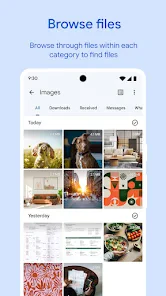
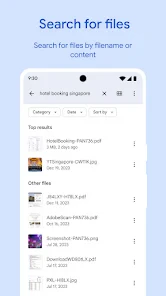
I wouldn’t begin by trying to sort every folder or clear as much space as possible. Instead, I’d search for a recent download, open it, and confirm that I can recognize its location and contents. If that works, I’ve learned something useful without risking an important file. A quick search is also a good way to check whether the app fits how I actually use my phone: if I usually remember a filename or where I saved something, it can make retrieval quicker than browsing folder by folder.
For someone setting up a phone for the first time, that gradual approach matters. File managers can expose folders and file types that are unfamiliar, and a cleanup prompt can make deletion seem like the obvious next step. I’d use the app first as a window into what is stored, then decide whether I want to act. If I’m unsure what a file does, I leave it alone until I can identify it.
The Latest on Files by Google
Who benefits most from having it on hand
I think the app is especially useful for people who save documents, images, and other items directly to an Android phone, then need to find them later without relying on a separate computer. It also suits anyone who wants a single, approachable place to inspect local storage and occasionally pass a file to someone nearby. Because it is free, trying it for a narrow purpose—such as locating downloads—doesn’t require committing to a paid storage plan.
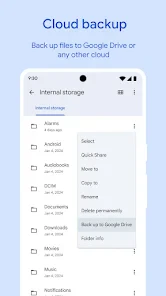
By contrast, I’d skip it as my main solution if my priority were managing a large library across several devices, maintaining a carefully organized archive, or automating repetitive file operations. A cloud-storage app is more appropriate when remote access and syncing are central. A more advanced file manager may be preferable for detailed folder controls or batch work. Files can still be useful alongside those tools, but it doesn’t need to replace them.
A realistic day-to-day example
Imagine I’ve downloaded a travel document and a few images, then a friend asks me to send one image while we’re together somewhere with unreliable internet. I can use search or browse to locate the file, check that I’ve picked the right one, and use offline sharing. Once the transfer is complete, I’d ask the recipient to open it before removing my copy. That sequence is less stressful than assuming a file has arrived simply because I tapped send.
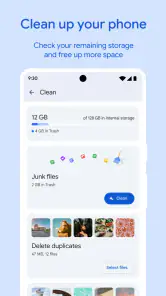
The same habit helps with routine cleanup. If the phone starts feeling crowded, I can review suggestions in manageable groups instead of clearing everything at once. I’d pay particular attention to downloads and duplicate-looking items: similar names or thumbnails do not prove that two files are interchangeable. A quick check of the contents can prevent the irritating mistake of deleting the version I actually needed.
More From Our News Desk

X Under Pressure: Can It Recover When Posting Goes Wrong?

Clash of Clans Is Won Between the Battles

Android Auto Makes the Case for Quieter Car Software

MobiOffice: Transforming Mobile Productivity with Seamless Integration

EA SPORTS FC™ Mobile Soccer: Redefining Mobile Sports Gaming

How Microsoft OneDrive Became a Mobile Productivity Giant
Small habits that prevent avoidable mistakes
One useful trade-off is that an app that actively surfaces files for review saves browsing time but also asks me to make decisions. I’d treat each suggestion as a lead, not a verdict. Before deleting, I’d consider whether I can get the file again, whether it is a personal record, and whether another copy exists somewhere I can reach. That is a better routine than judging an item only by its age or appearance.
For shared files, I’d keep the original until I know the other person received a usable copy. For important documents, I’d also keep a separate backup rather than treating a phone folder as the only safe home. And when I’m using a locked folder for private items, I’d remember that keeping something out of casual view is different from having a recoverable backup if the phone is lost or damaged.
What to expect from a practical file manager
This is a free tools app from Google LLC, rated for Everyone. Its average rating is four and a half from around eight point nine million ratings, with roughly two hundred thousand reviews, and it has passed five billion installs. Those figures suggest broad use, but they don’t tell you whether it suits your habits; what matters in practice is that it brings storage cleanup, browsing, media playback, and offline sharing together in one place. It was released on December first, twenty-seventeen, and its current version is 1.11362.916736205.0-release, with Android eight point zero as the minimum operating system.
If you are moving from a phone’s built-in file browser, expect familiar folder browsing with extra help surfacing items worth reviewing. Compared with a basic manager, Files is more proactive about cleanup and sharing. Compared with a cloud-storage service, it is more focused on files already on your phone and nearby offline transfers; it is not a replacement for syncing a personal library across devices.
Start simply, then choose one task
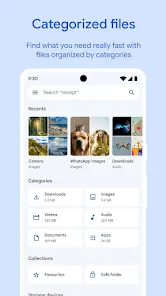
After installing it, I’d begin by opening the app and looking at the storage overview, then choose a single task instead of trying to reorganize everything. Search is a good first test: look for one document or download you already know is on the phone. That confirms you can find your way around before you make decisions about deleting anything. The app is free, so there is no purchase decision to get through before trying that first step.
For cleanup, inspect each suggestion and open the relevant group before removing files. A useful habit is to ask whether an item can be downloaded again or whether it is the only copy you have. This is especially important for documents, photos, and recordings you may need later. The app can make clutter easier to spot, but your judgment should make the final call.
Turn a small success into a useful routine
One realistic first win is finding an old download that you no longer need, checking what it is, and deleting it only after you’re sure. Another is locating a photo or document by search instead of scrolling through folders. Once that works, you can use the app as a regular check-in point when your phone feels crowded, rather than waiting until storage pressure becomes urgent.
Offline sharing is useful when someone nearby needs a file and mobile data or Wi-Fi is unavailable or unreliable. I’d still check that the recipient has received and can open the right item before deleting your copy. For a one-off transfer, this can be less hassle than uploading a file to cloud storage and sending a link; for remote sharing or keeping a backup, a cloud service is the better fit.
A smart and simple organizer
The first thing that struck me about Files by Google is how easy it is to approach. Even if you’re someone who dreads dealing with tech, this app makes basic file tasks feel manageable. When you open it, the main screen gives you a place to begin with storage and files rather than demanding that you understand every folder first. I’d still take a moment to look around before acting, but the overall idea is clear: find something, review it, and decide what to do.
Effortless file management
One of my favorite features is the recommendation system. The app can point out files that may be worth removing to free up space, including items sitting in downloads. It is like having a helper draw attention to possible clutter, but I wouldn’t assume it knows which personal files matter to me. The file search function is also useful when I know roughly what I saved and would rather search than scroll through folders.
And let’s talk about file sharing. Sending a file can be awkward when you’re away from a dependable connection, so offline sharing is a practical option for someone nearby. I’d first try it with a nonessential photo or document, making sure the other person can open the received copy. That quick test gives me a better sense of the handoff than sending something important for the first time under pressure.
Privacy and the limits of a locked folder
A locked folder can be useful when I want certain items kept apart from casual browsing. I see that as a privacy convenience, not a complete security plan for my phone and not a substitute for a backup. Before putting something important there, I’d think about what would happen if I lost access to the device. For irreplaceable records, I’d keep a separate copy somewhere I can recover it.
I’d also be deliberate about what I share and with whom. Offline transfer is handy when people are physically close, but it doesn’t solve remote delivery, ongoing synchronization, or long-term storage. For those needs, a cloud service may be the more fitting choice. That distinction keeps the app’s useful local tools from being mistaken for an all-purpose file system.
Where it fits—and where it doesn’t
The locked folder is handy when you want a separate place for sensitive items, but I wouldn’t treat it as a complete backup plan or a substitute for securing the whole phone. Keep important files somewhere you can recover them if the device is lost or damaged. Likewise, offline sharing is a convenience for people in the same place, not a way to deliver files to someone across town. Those distinctions help set realistic expectations from the start.
Files is a strong choice if you regularly download attachments, save photos locally, or want one straightforward app for browsing and occasional cleanup. It may be less appealing if you need advanced batch-renaming, detailed folder automation, or a cloud-first workflow; a specialist file manager or storage service may suit those needs better. I also wouldn’t delete a file just because it appears in a recommendation. Check its name and location first, especially when a folder contains work or family records.
There is another practical difference from a conventional file browser: the suggestions can make the first cleanup feel easier, but they can also put deletion in front of you before you have built confidence with the folders. I’d postpone cleanup until I can distinguish a disposable download from a document I may need again. If the suggestions don’t match my priorities, I can simply use search and browsing without treating the recommendations as a to-do list.
Making the next step feel manageable
After the first search and a careful cleanup, I’d pick whichever task is most useful rather than exploring every option at once. For a person who mostly wants to reclaim space, that might mean reviewing a single suggested group. For someone who receives attachments, it could mean learning where a saved document appears and using search to retrieve it later. If sharing is the immediate need, I’d try it with a nonessential file first so I understand the handoff before sending something important.
That small, deliberate approach is also a good way to decide whether this should be my everyday file manager. If I find myself wanting deeper controls or a different organization system, I can keep Files for quick searches and local sharing while using another tool for specialized work. There is no reason to force one app to handle every storage habit.
For a first-time user, I’d make the next visit about one concrete question: where did that attachment go, which image do I want to send, or what is taking up space that I can safely clear? Keeping the task narrow makes the app easier to learn and reduces the chance of an avoidable mistake. Once I know how it handles that task, I can decide whether to explore another part of it.
My honest take after trying it
After using this app, I can see why I’d keep it available for ordinary storage jobs. It brings file finding, cleanup prompts, media playback, and nearby sharing into one familiar place, so I don’t have to reach for a separate tool every time I need a quick local task. Its strongest appeal is convenience rather than deep control. I’d recommend it to someone who wants a straightforward way to locate phone files and occasionally review clutter, not to someone expecting a full desktop-style archive manager.
If you are tired of losing track of downloads, start by searching for one you recognize and opening it before making any changes. Then try a cleanup suggestion only when you can judge what it contains, or test offline sharing with a low-stakes file and confirm the recipient can use it. Files by Google is a sensible tool to try for those everyday needs, provided you keep backups and use your own judgment when the app suggests deleting something.
Files by Google Frequently Asked Questions
Is Files by Google free to download?
Yes. Files by Google is free, and it is designed as a practical Android utility for everyday file tasks. It brings together tools for cleaning up your phone, finding files, playing media, and sharing files offline. If you are looking for one app to handle several common file-related needs, its free price makes it easy to consider before downloading.
Which devices can run Files by Google?
Files by Google is made for Android devices and requires Android 8.0 or later. Before downloading, check the Android version installed on your phone or tablet to make sure it meets that requirement. Once installed on a compatible device, you can use the app to browse files, manage storage, play media, and share files offline.
Is Files by Google available for iPhone or iPad?
Files by Google is primarily designed for Android devices and is available for download on the Google Play Store. It is not officially available as an app for iOS devices. However, iOS users can explore similar file management apps available on the App Store that offer comparable functionality for managing storage and organizing files on their devices.
What can I use Files by Google for?
Files by Google is an Android utility for common file tasks. It can help you clean up your phone, find files, play media, and share files offline, bringing several functions together rather than focusing on just one. It can be useful whether you want to browse something saved on your device, manage storage, or send a file to someone nearby.
Does Files by Google need an internet connection for everyday use?
Files by Google includes offline file sharing, so you can transfer files to nearby devices without using the internet. This can be handy when you want to share something in a place with limited connectivity. The app also lets you find and play media on your device, bringing several everyday file tasks together in one utility.
Pros
- User-friendly interface
- Efficient file management
- Offline file sharing
- Smart storage recommendations
- Secure file cleanup
Cons
- Limited cloud integration
- No advanced file editing
- Occasional app crashes
- Requires Google account
- Ads in the free version
- Category
- Tools
- Version
- 1.11362.916736205.0-release








