Ryanair
- 1.08K
- 4.0
- Installs
- 50.00M
- Price
- Free

Screenshots

Analysis by Reviewed
When I rely on an airline app, the important question is not just whether I can book a flight, but what happens when I need travel details while moving between home, the airport and the gate. The Ryanair app is a free travel companion from Ryanair Limited, and its strongest role is keeping booking and trip tasks in one place. I find it most useful when I already know I’m flying with Ryanair and want to handle the practical steps without switching constantly between a browser and other tools.
What the app is best suited to
Ryanair sits in the travel-and-local category, but it is not a general trip planner: it is built around Ryanair journeys. That focus is helpful when you need to search for a flight, manage a booking and check travel information through the same service. If you are comparing several airlines or planning a route that may change, I would still use a broader flight-search tool first, then use this app for the Ryanair part once I have made my choice.
The app has a 4.0 average from around 365,000 ratings and has passed 50 million installs. Those figures suggest it is a familiar option for many travelers, though popularity does not guarantee a friction-free trip. It is rated for Everyone, is free to install, and its current version is 3.219.0. It has been available since October 25, 2012, and requires Android 9 or later. For me, those details make it a practical choice for a wide range of Android users, while the real value still depends on whether Ryanair is part of your travel plans.
Network-dependent moments on a travel day
Booking and trip management are most useful when you have a working connection. Searching for flights, checking details and making changes are tasks I would try to complete before leaving home or while connected to dependable airport Wi-Fi. A phone signal can become unreliable in crowded terminals, underground stations or during a rushed connection, so I would not leave an important booking step until the last moment.
That shapes how I treat the app: as a convenient route to travel information, not as a substitute for preparation. Before setting out, I would check that the booking details are correct and make sure I know where to find the relevant trip information in the app. When connectivity is available, the app’s single-airline focus can reduce the effort of jumping between a booking email, a browser and airline pages. When it is not, having already reviewed the essentials can make a real difference.
A practical routine for unfamiliar airports
I would also use the app as one part of a simple travel routine rather than trying to make it solve every airport problem. Before leaving home, I would confirm the itinerary and any choices I have made, then check that I can access the trip from the phone I intend to carry. At the airport, I would look at the flight information when I have a useful connection and continue to pay attention to the airport’s own screens and announcements. That combination matters because a phone is convenient, but it is still a single device with a battery, a signal and a screen that can be hard to use while moving.
For a traveler who flies Ryanair only occasionally, this preparation can be more valuable than learning every corner of the app. I would focus on knowing how to get back to the booking, where the boarding pass is presented, and which trip details I may need to check. If I am traveling with someone else, I would also make sure we both know the basic plan rather than relying on one person’s phone to carry every detail. That is not a special feature; it is a sensible way to reduce stress if one device becomes unavailable.
More From Our News Desk

Weather by Xiaomi Review: Clear at a Glance, Less Clear Up Close

X Under Pressure: Can It Recover When Posting Goes Wrong?

Clash of Clans Is Won Between the Battles

Android Auto Makes the Case for Quieter Car Software

MobiOffice: Transforming Mobile Productivity with Seamless Integration

EA SPORTS FC™ Mobile Soccer: Redefining Mobile Sports Gaming
Booking Made Easy
First things first, the booking process. With the Ryanair app, you can easily search for flights, filter results based on your preferences, and book your tickets all in one go. The interface is super user-friendly. I mean, even my tech-challenged uncle could navigate it without a hitch. The app lets you save your details, so future bookings are just a few taps away. Plus, you get access to exclusive app-only offers, which means more savings for your travel fund!
Managing a booking when plans shift
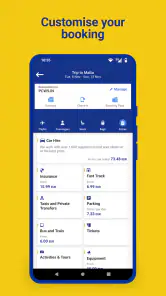
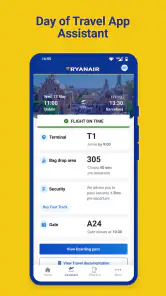
Once you've booked your flight, managing your trip is a breeze. The app allows you to check-in online, select your seat, and even add extras like baggage or priority boarding. It sends you real-time updates about your flight status and gate changes, so you're always in the loop. It's like having a personal assistant who knows all about your travel itinerary. Need to change your flight? No problem. The app lets you make changes without the hassle of calling customer service.
I’d use those tools with a little care rather than assuming every choice is automatic. For example, if I am traveling with a cabin bag and later realize I need more space, I would review the booking before heading to the airport instead of trying to sort it out in a queue. Likewise, I would check the itinerary after making a change, so I can confirm I am looking at the right flight details. It is a small habit, but it helps avoid relying on memory when a travel day is already busy.
Mobile use, passes and recovery
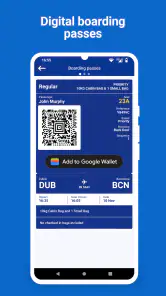
Gone are the days of printing your boarding pass or worrying about losing it. The app provides a digital boarding pass that you can save to your phone. Just show it at the airport, and you're good to go. It's eco-friendly and convenient, which is a win-win in my book.
For a realistic airport routine, I would open the trip before joining the security queue, check the boarding pass is easy to reach, and keep the phone charged. A digital pass saves paper and avoids searching through a bag for a printout, but it also makes the phone part of the travel checklist. If the app is slow or the connection is patchy, I would pause somewhere with a better signal and try again rather than waiting until boarding is underway. Keeping booking confirmation details accessible through another route is sensible backup for any airline journey, especially when time is tight.
Compared with carrying a printed pass, the app is easier to keep with the device I already use for directions and messages. Compared with a general travel app, it is more directly tied to Ryanair bookings, but less useful for coordinating unrelated airlines or a whole multi-stop itinerary. That is the trade-off: fewer places to check for a Ryanair trip, but no reason to expect it to replace every travel tool on your phone.
When a connection fails at the wrong moment
If the app does not load promptly, I would avoid repeatedly tapping through the same screens while walking or standing in a busy queue. I would first step aside, check whether the phone has a usable connection, and try again when I can give the screen my attention. If the issue persists, I would use another route to review the booking information I already have, such as the confirmation details saved in my email, and ask airport staff for help with the immediate airport question. The useful principle is to separate a phone-access problem from a change to the actual trip: a slow screen does not by itself tell me that the booking has changed.
This is where a little redundancy earns its place. I would keep the phone charged and avoid depending on a single notification as my only prompt to act. If I am traveling with another person, sharing the itinerary in advance means they can help check the plan if my phone is out of reach. These are modest precautions, but they are especially helpful during a connection or a crowded boarding period, when there may be little time to troubleshoot calmly.
Extras, trade-offs and who should skip it
One of the cool features of the app is the ability to browse and book hotels, car rentals, and even airport transfers. It's like your one-stop shop for all things travel. The app also has a handy currency converter, which is perfect for those of us who can't do mental math to save our lives. And if you're like me and love to share your adventures on social media, the app lets you share your travel itinerary with friends and family with just a tap.
I see those extras as useful conveniences, not a reason to make the app my only travel resource. If I want to compare accommodation or transport choices across several providers, I would look at dedicated comparison services as well. One practical approach is to use the airline app for the flight and its booking-related tasks, then compare the wider trip separately. That keeps the flight workflow focused without making the rest of the holiday dependent on a single airline’s app.
For someone taking an occasional Ryanair flight, the app is worth having around for trip management, even if they do not use it every week. It is less compelling for travelers who rarely fly Ryanair, prefer to keep airline apps off their phone, or need one place to manage bookings across multiple carriers. I would also avoid treating notifications as the only way to stay informed: check the trip details when you have a reliable connection and keep an eye on airport announcements for changes as you travel.
Who benefits most, and what to compare
I think the app makes the most sense for people who have already chosen Ryanair and want to handle the airline-specific parts of a journey on their phone. It is also a reasonable fit for someone who books occasionally and wants one familiar place to revisit the itinerary, rather than searching old messages each time. On the other hand, a frequent traveler who flies several carriers may prefer a broader organizer for an overall view of trips, while a traveler still deciding between airlines will usually get more value from a comparison service before moving into the Ryanair booking flow.
There is a useful distinction between comparing a flight and managing one. A flight-search service can help weigh routes and carriers, but once I have committed to a Ryanair itinerary, I would rather use the airline’s own app for booking-related tasks than expect a general planner to replace it. For hotels, transfers or car hire, I would compare options independently if price, location or flexibility matters more than convenience. The app’s extra travel services may suit a quick, simple plan, but they do not remove the benefit of checking alternatives when the choice is important.
One question I would ask before relying on it is whether I can complete the next task with the connection I have right now. For browsing or changing a booking, I would plan on being online and deal with it ahead of the airport rush. For an airport moment, I would make sure I have already opened and checked the relevant trip information, then keep a backup route to my confirmation. That approach avoids treating the app as if every action will be available in every network condition.
Another practical question is whether installing it makes sense if I have just one Ryanair trip. In my view, yes, if I expect to manage the booking or use the digital pass; after the journey, whether to keep it is simply a matter of how often I fly with the airline and how much I value having its tools ready. If I travel with multiple airlines, I would still keep the Ryanair app for its own trip while using a separate method to see the whole itinerary. The point is not to choose one app for everything, but to give each tool a clear job.
Connectivity verdict
In conclusion, the Ryanair app is a must-have for anyone flying with them. It simplifies the booking process, keeps you updated on your flights, and offers a bunch of extras to make your trip as enjoyable as possible. So next time you're planning a trip, give the app a try. Trust me, you won't regret it!
My more measured recommendation is to install it if a Ryanair booking is part of your plans, complete the tasks that need a stable connection before travel, and make sure you can retrieve the important trip details when you need them. For that focused job, it is convenient; for broad airline comparison or whole-trip organization, I would pair it with other tools. Used with that distinction in mind, it can make the Ryanair portion of a journey easier to manage without pretending that connectivity will always be perfect.
Ryanair Frequently Asked Questions
Can I use the Ryanair app to plan a trip before booking a flight?
The Ryanair app is intended to support travel planning as well as managing a journey with the airline. You can use it to search for and book flights, then keep trip details together in the app. It may be useful if you prefer to explore options and handle travel tasks from your phone rather than switching between separate services.
Can I use the Ryanair app to check flight information while travelling?
The app includes flight status updates and airport information, which can help you follow your journey as it approaches. It also provides notifications about changes such as delays, cancellations, or gate updates. These tools are useful for keeping travel details accessible on a mobile device, though it is still sensible to pay attention to announcements and information at the airport.
Who develops the Ryanair app, and what is it used for?
Ryanair Limited develops the Ryanair app, a Travel & Local app for planning and managing trips with the airline. Its store summary says, “Europe is at your fingertips, just tap and take off.” The app is free to download and is rated for Everyone. It may suit travelers who want to handle key parts of a Ryanair journey from a mobile device.
What features does the Ryanair app offer?
The Ryanair app provides a range of features designed to enhance your travel experience. Users can easily search and book flights, manage bookings, check-in online, and download boarding passes directly to their mobile devices. Additionally, the app offers real-time flight status updates, airport information, and exclusive offers on car rentals and accommodations.
Is it possible to manage bookings through the Ryanair app?
Yes, the Ryanair app allows users to manage their bookings conveniently. You can modify your flight dates, add baggage, select seats, and even purchase priority boarding. The app ensures that all changes can be made seamlessly without the need to visit a website or contact customer service, making travel management hassle-free.
Pros
- Competitive pricing on flights
- User-friendly booking interface
- Wide range of destinations
- Frequent flight deals
- Efficient mobile check-in
Cons
- Additional fees for extras
- Limited customer service
- Basic in-flight amenities
- No seat selection in basic fare
- App may occasionally crash
- Category
- Travel & Local
- Version
- 3.219.0