ElevenReader - Text to Speech
- 1.12K
- 4.6
- Installs
- 1.00M
- Price
- Free

Screenshots

Analysis by Reviewed
I’d approach Reader by ElevenLabs as a way to make text easier to fit into a busy day, rather than as a replacement for every book or reading app. Its core appeal is simple: instead of keeping your eyes on a page, you can listen to text, audiobooks, PDFs, and eBooks with text. That makes it especially useful when reading with your hands or eyes is inconvenient, while still leaving you in control of what you choose to hear.
What to expect from a listening-first reader
This is a Books & Reference app from Eleven Labs Inc, built around turning written material into spoken audio. It has a 4.6 average from around 53,000 ratings, and has passed a million installs. The app is free to start, rated Everyone, and offers in-app purchases ranging from $0.49 to $100 per item, so I’d check the purchase details before committing to anything paid.
The main benefit is flexibility, not magic: listening can help you make use of time when opening a page is awkward, but it does not make every document pleasant to hear. A clean article or prose chapter is usually a more natural fit than a form, table-heavy PDF, or text that depends on diagrams. I’d treat audio as another way to access material, not assume it will preserve every visual cue or layout detail.
Before you start: choose the right material
For a first session, I’d pick a short article, a few pages of a novel, or a section of a document whose subject I already understand. Familiar material makes it easier to notice whether the narration’s pronunciation, pacing, and phrasing work for me, without also having to learn new ideas. It is a better test than dropping a long, technical PDF into the app and deciding from one difficult passage that text-to-speech is not for me.
Think about what you want the audio to do. If you need a quick overview, listening to a chapter while preparing a meal can be useful. If you are checking a contract, comparing figures, or studying exact terminology, keep the page open and use narration as support rather than as your only way to read. The app can make text audible; it cannot turn visual details into a substitute for examining them.
Diving into the Features
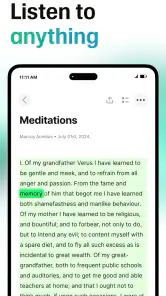
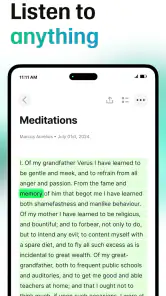
Let me tell you, the features packed into Reader by ElevenLabs are nothing short of amazing. The app transforms any text into audio, making it a seamless experience to "read" while on the go. Imagine having your favorite book or article read out to you while you're driving or sipping coffee – sounds dreamy, right?
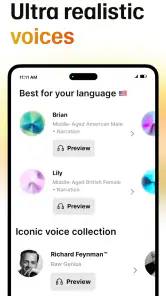
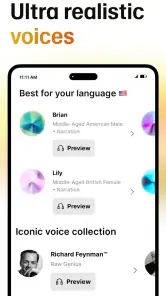
One of the standout features is its advanced AI voice technology. The voices are so natural and soothing that you'll almost forget it's an AI speaking. The customization options are also noteworthy; you can adjust the speed and tone of the narration to suit your preferences. Whether you like a fast-paced read or a leisurely narration, this app has got you covered.
More From Our News Desk

Weather by Xiaomi Review: Clear at a Glance, Less Clear Up Close

X Under Pressure: Can It Recover When Posting Goes Wrong?

Clash of Clans Is Won Between the Battles

Android Auto Makes the Case for Quieter Car Software

MobiOffice: Transforming Mobile Productivity with Seamless Integration

EA SPORTS FC™ Mobile Soccer: Redefining Mobile Sports Gaming
User Experience
Using the app is as easy as pie. The user interface is clean and intuitive, which means you won’t be wasting any time figuring out where things are. Everything is a tap away, and the app’s design ensures that even the least tech-savvy users can navigate it with ease.
For a low-stress first try, start with a short passage rather than a long book. Choose something whose meaning you already know, listen for a minute, and adjust the narration pace until it feels comfortable. This gives you a quick way to judge the voice and rhythm before you build the app into a longer routine. If the text is a PDF, skim it visually first so you know whether it relies on charts, columns, or footnotes that may not translate smoothly into listening.
Making the first session useful
A realistic first win might be listening to a saved article while making breakfast, then returning to the screen only when you want to check a name, figure, or sentence. In a commute, I’d prepare the material before setting off and avoid interacting with the phone while driving; the point is to listen, not to create a new distraction. For study, a useful compromise is to listen through a section once, then revisit the parts that need close attention in visual form.
People often wonder whether a text-to-speech reader works equally well for every kind of file. In practice, I’d expect the best experience from ordinary flowing text. A scanned page, complicated layout, or document with lots of tables can be harder to follow by ear, so check a sample before trusting it with an entire study session. Likewise, speech is handy for review and background listening, but it is not ideal when you need to quote exact wording or compare passages side by side.
Where it fits among reading options
Compared with a standard eBook reader, the advantage here is that listening can occupy time when looking at a screen is inconvenient. A dedicated audiobook app may feel more straightforward if you mainly want professionally narrated books, while a regular reading app is better for highlighting, scanning, and jumping around a page. I’d choose this reader when I want written material to become listenable, and keep a visual reader nearby for precise reference work.
There is also a difference between listening to a book designed for performance and hearing a digital voice read ordinary text. For a favorite novel, a human narrator’s interpretation may be part of the pleasure, and a dedicated audiobook is likely the more satisfying choice. For an article, a reading assignment, or a document you already have, converting the text to speech can be more practical than searching for a separately produced audio edition. I see this app as strongest in that second role.
Another highlight is its offline feature. You can download content for offline listening, which is perfect for those times when you're off the grid. Plus, the app doesn’t drain your battery or demand a ton of storage, so you can keep it running all day without a hitch.
Small habits that prevent frustration
Before relying on offline playback, test the exact material you plan to use while you still have a connection, then confirm it is available offline. That simple check can prevent a frustrating moment when you are away from reliable internet. I’d also save your place or note a section title when listening to reference material, since audio is linear: finding one paragraph again can take longer than scrolling straight to it on a page.
One practical trick is to divide a long reading task into manageable sessions instead of treating it as one uninterrupted stream. A chapter boundary, heading, or topic change gives you a natural point to pause and later resume with context. This is especially helpful for work or study material, where you may want to listen for the broad argument first and then return to a particular section for close reading. Audio is convenient for moving forward; it is less convenient for jumping backward and forth between details.
When a passage sounds confusing, I would not assume the voice is the only problem. Check the source text: broken line breaks, unusual abbreviations, dense punctuation, and a layout built around columns can all make spoken output harder to follow. If the material is important, compare the troublesome part on screen and continue from a clean section. That little bit of preparation can save time and prevent a poor first impression.
Device fit, pricing, and a sensible first try
The app’s current version is 1.4.75, and it first appeared on July 18, 2024. It supports Android 7.0 and later. Those details make it easier to decide whether it suits an older device, but I would still keep the app updated through the store so the installed version matches what is currently available.
Because the app is free to start but includes in-app purchases, I’d explore the basic experience with a short sample before spending money. The listed purchase range runs from $0.49 to $100 per item, a broad span that makes it worth reading the checkout screen carefully and checking exactly what a purchase covers. I would not buy anything simply because I expect every reading task to work equally well; first see whether the voices and the material you actually use suit your ears.
A good first-day routine is deliberately small: open a short text, listen long enough to judge the narration, try a comfortable pace, and then stop to see whether you remember the main point. If you do, try a longer section on a walk or during a routine chore. If you find yourself constantly reaching for the screen, that is useful feedback too: this may be a tool for certain kinds of reading rather than a replacement for your usual reader.
Who will get the most from it
I think it suits people who already have text they want to get through but struggle to set aside screen time: commuters using public transport, people doing routine chores, or anyone who prefers listening for a first pass. It may also help readers who find sustained visual reading tiring, though audio is a personal preference and not a guaranteed substitute for every accessibility need. If your priority is exact page layout, detailed annotation, or a polished human performance of a particular audiobook, another format may be the better choice.
It can also be a useful companion for someone who reads at different levels of attention throughout the day. I might listen to a familiar chapter while doing something repetitive, then switch back to the screen when I reach a passage that needs careful thought. That split approach is more realistic than expecting audio to handle every moment equally well. The app is less compelling for people who already enjoy focused screen reading, rarely have suitable listening time, or need to navigate complex documents visually.
Why You’ll Love It
So, why should you give this app a try? Well, if you’re anything like me, you’ll appreciate the freedom it offers. No longer are you tied to a screen to enjoy your favorite reads. The app gives you the liberty to multitask, and who doesn’t love a bit of productivity?
Moreover, for those of us who are always trying to squeeze in some learning or leisure during our hectic schedules, this app is a godsend. You can consume content while working out, cooking, or even during your commute. It’s like having a personal narrator with you, wherever you go!
My recommendation for getting started
If you are new to text-to-speech, I would not begin by moving your whole reading routine into one app. Try one article you meant to read, or a short stretch of an eBook you already enjoy. Use the first listen to decide whether the voice and pace help you follow the writing, not whether the experience feels identical to a human audiobook. Once you know which kinds of material work for you, it becomes easier to choose what to listen to and what to keep on the page.
For learners, a particularly useful trade-off is to separate exposure from precision. Listen once to get the shape of a topic, then read the sections with definitions, examples, or figures on screen. For leisure, the reverse may suit you: keep a book open for quiet, focused reading and use audio when your hands are busy. Neither approach is a workaround; they simply make different demands on attention.
In conclusion, Reader by ElevenLabs is more than just a text-to-speech app. It’s a companion for those who cherish their reading time but can’t always find the time to sit down with a book. With its superb features, user-friendly interface, and the ability to transform your reading habits, this app is definitely worth checking out. So go ahead, give it a whirl and let it redefine your reading experience!
ElevenReader - Text to Speech Frequently Asked Questions
Can ElevenReader import articles or other web content for listening?
ElevenReader is built around turning written material into audio, which can be useful for more than books alone. Its stated content types include texts, PDFs, audiobooks, and eBooks that contain text. If you regularly save articles or other reading material, the app may fit your listening routine when that content can be brought into a readable form.
Can I listen to ElevenReader while using other apps or with my screen off?
ElevenReader is intended for listening to text rather than keeping your eyes on a page, so it can suit commutes, chores, or other moments when reading on screen is inconvenient. Before relying on it for a particular routine, try the playback controls on your device and see how they behave while you switch apps or turn off the display.
Does ElevenReader work offline, and can I save audio for later?
ElevenReader converts written content into AI audio, making it useful when you want to listen rather than read. If offline listening is important to you, check how the app handles your chosen material and playback before you travel or lose internet access. Keeping a document available on your device does not necessarily mean its generated audio will be available offline.
Can I change the voice or playback speed in ElevenReader?
A personalized listening experience can make a big difference when you spend a long time with spoken text. ElevenReader’s reading experience is described as adjustable, including voice and speed, so you can try different settings and find a pace and sound that work for you. This is particularly useful for switching between relaxed listening and more focused reading.
Is ElevenReader suitable for people who find on-screen reading difficult?
ElevenReader may be helpful if you prefer listening to written material or find it tiring to stay focused on a screen. Its text-to-speech approach turns content such as texts, PDFs, and eBooks into audio, providing another way to follow along. The usefulness of that experience will depend on the document and the voice and speed settings you choose.
Pros
- High-quality text-to-speech output
- Supports multiple languages
- Easy to use interface
- Customizable voice settings
- Seamless integration with other apps
Cons
- Limited free version features
- Requires internet connection
- Subscription can be pricey
- Occasional pronunciation errors
- Limited voice options on free tier
- Category
- Books & Reference
- Version
- 1.4.75