ElevenLabs: AI Voice Generator
- 1.39K
- 4.7
- Installs
- 10.00M
- Price
- Free

Screenshots
Analysis by Reviewed
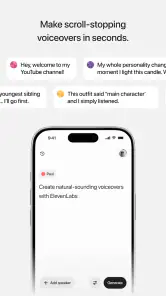
I find voice-generation apps most useful when they remove a specific bottleneck: a script is ready, but recording it would take time, a quiet room, or several retakes. ElevenLabs: AI Voice Generator is built for that kind of task, with an emphasis on turning written material into spoken audio. It can be a practical tool for creators who need narration, but it still takes a little judgment to get a result that sounds right. The app is not a substitute for every human voice, and a smooth workflow depends as much on preparing the text as on choosing a voice.
Pick a first project that makes the app easy to judge
When I am deciding whether a voice tool belongs in a routine, I would not begin with a long, high-stakes script. A short product walkthrough, a draft introduction, or a simple set of instructions gives a clearer first test: I can hear whether the narration suits the subject without spending time reviewing material I may need to redo. This is especially useful if I am choosing between a generated voice and recording my own, because it keeps the comparison focused on the real trade-off rather than on a large project already in progress.
A practical test should include the kind of wording that tends to challenge the finished script: a brand or place name, a number written in context, and a sentence that changes from explanation to instruction. I would listen for whether the words are easy to understand and whether the transitions feel natural. If the result is close, that is a reason to refine the text and test again; if the delivery itself feels wrong for the audience, it may be more efficient to record a human version.
Where the first attempt can get stuck
My first advice is to treat text-to-speech as an editing task, not a one-tap recording replacement. A paragraph that reads naturally on screen may sound rushed, flat, or oddly segmented when spoken. Long sentences, abbreviations, lists, and punctuation used only for visual structure can all make narration harder to follow. Before generating audio, I would read the script aloud once and rewrite any phrase that feels awkward in conversation.
That small check matters especially for short-form videos and social posts. A written caption may rely on line breaks or a punchy fragment that works visually but sounds abrupt when voiced. I get a more usable result by turning fragments into complete spoken thoughts, spelling out an abbreviation when a listener might not recognize it, and using punctuation to signal pauses rather than relying on formatting. These are simple changes, but they can save repeated attempts.
The app is a Music & Audio tool from Eleven Labs Inc, and its audience is clearly broader than people who want to listen to books. I can see it fitting creators who prepare voiceovers, explainers, or other spoken material, as well as people who want to hear a draft rather than silently proofread it. It is less compelling if what you want is a full recording studio or a way to capture the natural quirks of your own performance.
Voice choice also deserves more care than picking the first option that sounds polished. A voice that works for a lively promotional clip may feel distracting in a tutorial, while a restrained delivery can make a personal story sound detached. I would test a short representative passage first, including a sentence with names or technical terms, before committing a full script. That gives you a better sense of tone and pronunciation without spending time evaluating a long output.
More From Our News Desk

Weather by Xiaomi Review: Clear at a Glance, Less Clear Up Close

X Under Pressure: Can It Recover When Posting Goes Wrong?

Clash of Clans Is Won Between the Battles

Android Auto Makes the Case for Quieter Car Software

MobiOffice: Transforming Mobile Productivity with Seamless Integration

EA SPORTS FC™ Mobile Soccer: Redefining Mobile Sports Gaming
Make the script easier to speak
One useful workflow is to keep a clean narration copy separate from the version intended for the screen. Remove stage directions and visual notes that should not be read aloud, then add spoken transitions where a viewer might otherwise lose the thread. For example, a list of steps may need a brief spoken introduction, even if a title card already labels the list. This avoids the familiar problem of audio that sounds like someone reading a document rather than explaining an idea.
I would also be cautious with punctuation experiments. A comma can create a modest pause, but piling on punctuation to force dramatic timing may make the delivery sound unnatural. If a sentence needs several pauses to be understandable, splitting it into shorter sentences is often a cleaner fix. This is a particularly useful trade-off for instructional content: clarity usually matters more than squeezing every detail into a single line of narration.
There is a useful boundary to keep in mind when preparing material for multiple platforms. The narration copy can include context that would clutter a caption, while the caption can stay compact and visually scannable. I would make those edits in separate drafts rather than treating the spoken version as a direct replacement for the written one. That small separation makes later changes less confusing, particularly when a video needs a revised line but its on-screen text should remain brief.
Setup checks before blaming the voice
When something does not sound as expected, I would check the basics before changing everything at once. Confirm that the text is the final version, listen to the opening and a middle section, and note whether the issue is pronunciation, pacing, or tone. Those are different problems. Rewriting a difficult phrase may help pronunciation, while changing the wording or sentence length may improve pacing; swapping voices just because one name sounds wrong can leave the underlying text issue untouched.
It is also sensible to check that the app is current and that the device meets its operating-system requirement. The current release is version 0.0.109, and the minimum Android requirement is version 7.0. If the app behaves inconsistently, a basic restart and another attempt with a short sample are reasonable first checks. I would avoid making several changes simultaneously, because then it becomes difficult to tell what actually resolved the problem.
For a creator working on a phone between other tasks, a short test passage is more than a convenience. It helps catch a mismatch in delivery before the script is ready for publication, and it makes it easier to compare a couple of wording choices. I would use the same sample when comparing voices, rather than giving each one different text. That is a fairer listening test and keeps the decision focused on the voice rather than differences in the script.
Some users will also want to know what trying the app costs. It is free to install, while in-app purchases range from $5.99 to $219.00 per item. I would check the purchase details in the app before relying on a particular amount of use, especially if this is for a recurring project. The range makes it worth deciding whether you need occasional narration or expect to use voice generation regularly, rather than assuming that every workflow will remain free.
Recover a workflow without starting over
If a generated passage is close but not quite right, I would first isolate the troublesome sentence instead of rewriting the entire script. Shortening it, replacing an ambiguous phrase, or spelling out a name in a way that guides pronunciation can be a more targeted fix. Keep a note of the original wording before editing; then you can compare the alternatives and restore the clearer version if the change makes the meaning less precise.
For a longer project, I find it helpful to divide the script into logical sections before generating audio. That makes review less tiring and helps locate the point where a narration begins to feel too fast or changes tone. It also makes revisions more manageable: if one section changes, you can focus your attention there rather than replaying everything. This is a practical editing habit, not a promise that the app automatically organizes or repairs a project.
A realistic example is a creator preparing a short how-to video after work. They have a written outline, but the apartment is noisy and there is no time to record several takes. I would turn the outline into conversational sentences, test a few lines that include the key terms, and listen for whether the voice makes the instructions easy to follow. If a sentence sounds stiff, I would revise the sentence before generating the rest. That approach can be quicker than repeatedly accepting audio that does not fit the video.
It is worth keeping a separate copy of any script you revise. That way, the wording used for narration does not accidentally replace on-screen captions or notes that need to remain concise. The spoken version may require extra context, while the visual version needs to be scanned quickly. Thinking of them as related but distinct edits helps prevent a common production compromise: audio that is understandable only when the viewer is also reading the screen.
For a small creator, another sensible use is to listen back to a draft while doing a routine task, then mark only the lines that need attention. That turns the generated voice into a proofreading aid, not just a finished-output machine. I would avoid trying to judge subtle wording while distracted, though: background listening can reveal obvious awkwardness, but a final check deserves focused attention so that a misheard term or confusing instruction does not pass unnoticed.
When the app may not be the cause
Not every disappointing result points to a technical problem. A voice can sound too formal because the writing is formal; a sentence can feel rushed because it contains several ideas; and a pronunciation can be surprising because a name or acronym is unfamiliar. I would diagnose the text and the intended audience before concluding that the generator has failed. A spoken sample is useful precisely because it reveals weaknesses that are easy to miss while reading silently.
There is also a meaningful distinction between generated narration and a personal recording. If a project depends on your own humor, emotional timing, or recognizable speaking style, recording it yourself may be the better choice. A generated voice can save effort for straightforward narration, but it may not carry the small changes in emphasis that make an unscripted explanation feel personal. For a sensitive message, performance-led story, or brand built around a particular speaker, I would compare the result carefully before committing to it.
Compared with ordinary text-to-speech options, the appeal here is its creator-oriented focus: it is meant to help turn prepared words into voice content, not simply read interface text aloud. Compared with recording software, however, it solves a different problem. A recorder captures a human performance and offers control over delivery; a voice generator starts from text and can reduce the need for a microphone and a quiet recording space. Neither is automatically better. The right choice depends on whether speed and repeatability matter more than a distinct human presence.
That distinction also helps answer whether it can replace a conventional recording app. I would not choose it when I need room sound, a speaker reacting naturally in the moment, or the fine timing that comes from delivering a line several ways. I would consider it when the script is stable, the narration is informational, and recording conditions are inconvenient. Keeping those jobs separate prevents disappointment: this is a route from text to voice, not a general-purpose substitute for every kind of audio production.
ElevenLabs: AI Voice Generator has an average rating of 4.7 from around 241,000 ratings, with about 1,400 written reviews and over 10 million installs. Those figures suggest that many people have tried it, but they do not tell me whether it suits a particular script or voice style. I would still judge it with a short sample from the kind of work I actually make. The age rating is Everyone, which makes the app broadly accessible, though that does not mean every generated voice or use case will fit every audience.
Who will get the most from it
I would recommend trying the app if you regularly turn scripts into narration and want a quicker alternative to recording every line yourself. It is a particularly sensible option for drafts, explainers, and routine content where understandable delivery matters more than a unique personal performance. It may also help someone review a script by listening while doing another task, since awkward phrasing often stands out when heard rather than read.
It is also a good fit for people who work in short batches: someone can prepare a few lines for a tutorial, test the tone, and decide whether to continue before investing in a full narration session. I would be more cautious if your work depends on exact emotional nuance or frequent spontaneous changes, because the time spent reshaping text may outweigh the time saved by not recording. The best candidate is not simply someone who makes videos; it is someone whose material is already written and benefits from clear, repeatable spoken delivery.
I would skip it, or at least compare it with a human recording, if the main value of your content comes from your own voice, spontaneous reactions, or precise emotional nuance. It is also not the right fix for a weak script: polished delivery cannot make unclear instructions informative. People planning frequent use should consider the in-app purchase range before building a production routine around it, while occasional users can begin by testing a small, practical task.
Overall, I see ElevenLabs: AI Voice Generator as a useful way to reduce the friction between a finished script and listenable narration, provided you are willing to prepare the text and review the output. Its biggest practical strength is convenience; its main limitation is that convenience does not remove the need for editorial judgment. I would start with one short passage, check the voice against the audience and subject, and only then decide whether it belongs in a regular workflow.
ElevenLabs: AI Voice Generator Frequently Asked Questions
What is ElevenLabs: AI Voice Generator?
ElevenLabs is an AI audio app for creating spoken voice content from text. Depending on the features available in your version and region, you can generate narration, explore different voice options, and use speech tools for creative or practical projects. It may suit creators, students, and businesses, but it is not a substitute for a human recording when natural personal delivery or precise performance direction is essential.
Is ElevenLabs free to use?
ElevenLabs may offer a free tier or introductory access, but usage limits and available tools can differ by plan, platform, and region. Generating audio can consume credits or other allowances, while higher usage or additional features may require a paid subscription. Check the current pricing and renewal terms in the app or official store listing before subscribing, and confirm how cancellations and unused credits are handled.
Can I use the generated voices for commercial projects?
Commercial-use rights depend on the service’s current terms, your subscription plan, the specific feature used, and the content you provide. Do not assume that every voice or generated clip is automatically cleared for advertising, resale, or client work. Review the applicable licensing rules before publishing, and make sure you have permission to use any scripts, names, recordings, or likenesses involved in your project.
Does ElevenLabs clone voices, and is it safe to use?
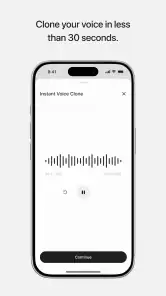
Some ElevenLabs features may support creating or reproducing a voice from audio, subject to the tools and safeguards available at the time. Voice replication raises important consent, privacy, and impersonation concerns: use only recordings you own or have clear permission to process, and never present generated speech as someone’s authentic statement without authorization. Review the app’s privacy policy to understand how submitted audio and generated content are handled.
What should I check before downloading ElevenLabs on Android or iOS?
Check that the listing is the official ElevenLabs app, since similarly named apps may not be affiliated with the service. Review device and operating-system requirements, regional availability, permissions, subscription details, and recent user feedback. A stable internet connection may be needed for cloud-based generation, and audio creation can use data. Also consider whether the app’s supported languages, export options, and features fit your intended workflow.
Pros
- Natural-sounding voices make generated narration feel polished.
- Voice cloning can create personalized audio from a sample.
- Supports multiple languages and accents for wider reach.
- Useful for producing voiceovers without recording equipment.
- Adjustable voice settings help tailor the delivery.
Cons
- High-quality voice generation may require a paid plan.
- Cloning someone’s voice raises consent and impersonation concerns.
- Results can mispronounce names or unfamiliar terms.
- Generated audio may need editing for natural pacing.
- Processing can take time for longer scripts.
- Category
- Music & Audio
- Version
- 0.0.109












