PicCollage: Magic Photo Editor
- 132.25K
- 4.8
- Installs
- 100.00M
- Price
- Free
Screenshots
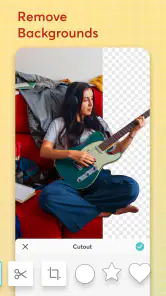
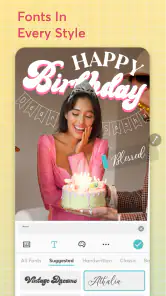
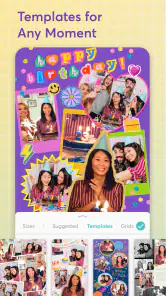
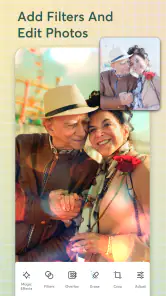
Analysis by Reviewed
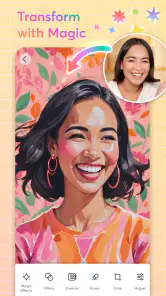
When I have a handful of photos that belong together but no desire to build a design from scratch, a collage app can make the difference between a crowded camera roll and something worth sharing. PicCollage: Magic Photo Editor is a photography app from Cardinal Blue Software, Inc. that I’d consider for quick, playful layouts rather than detailed retouching. It is free to download, rated for Everyone, and has a 4.8 average from around 1.8 million ratings. That gives a useful sense of its broad appeal, though it doesn’t mean every tool will suit every project.
What the free version is good for
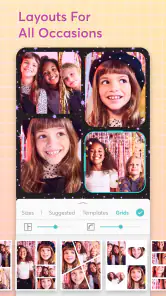
The basic appeal is getting from a group of pictures to a finished composition without learning a full design program. I can start with a blank canvas or a template, arrange images, and add decorative elements. For a family update, a birthday greeting, or a small set of vacation highlights, that quick path is more useful than opening a professional editor and adjusting every detail by hand.
PicCollage is free, but it also offers in-app purchases priced from $0.99 to $35.99 per item. I’d treat the free access as a chance to test whether its workflow fits me before paying for anything. The higher end of that range is a meaningful commitment, so I would check that a particular paid option solves a need I actually have rather than assuming every extra is essential.
Articles Related to PicCollage: Magic Photo Editor
Getting Creative with PicCollage
The first time I launched PicCollage, I was immediately taken by its user-friendly interface. It felt easy to get started: I could choose a blank canvas or a template and begin arranging a design for an occasion or everyday update.
Features that Stand Out
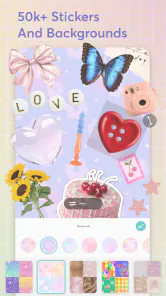
One of the coolest features is the drag-and-drop functionality. It’s super intuitive; you literally drag your photos into the template, and boom, you have a collage! And the stickers? Oh, don’t get me started. They have a plethora of quirky and cute stickers that add that extra pizzazz to your creation.
There’s also a decent selection of fonts and backgrounds. Whether you’re going for a vintage vibe or something more modern, PicCollage has got you covered. The app also supports freestyle collages, which means you can let your creativity run wild without being restricted to a grid layout.
Sharing Your Masterpiece
Once you’ve crafted your masterpiece, sharing it is a breeze. You can directly upload it to your social media platforms or send it to friends and family. The app also allows you to print your collages directly, which is perfect if you’re into scrapbooking or want to create tangible memories.
You May Like

EA SPORTS FC™ Mobile Soccer: Redefining Mobile Sports Gaming

How Microsoft OneDrive Became a Mobile Productivity Giant

How Google Translate Breaks Language Barriers Effortlessly

Why Google Sheets Is the Ultimate Mobile Productivity Tool

Unveiling the Dynamic World of My Talking Tom Friends

Free Fire MAX: Dominating the Battle Royale Arena
PicCollage: Photo Grid Editor also supports video collages, which was a pleasant surprise. You can mix photos and videos in one collage, making your creations even more dynamic and engaging. Plus, the video editing tools are pretty solid for an app primarily focused on photos.
Making a collage that feels deliberate
A useful habit is to choose the photos before opening the editor. For a small event recap, I’d pick one clear lead image, then a few supporting moments, rather than trying to fit every shot into the frame. That gives the main picture room to catch the eye and makes the finished layout easier to read on a phone screen.
Freestyle placement is handy when the photos have different shapes, but it can also make a design feel messy. I’d line up edges or keep similar spacing between images, then use stickers and text sparingly. A decorative element works best when it helps explain the occasion; adding several just because they are available can pull attention away from the photos.
A useful workflow for real-life moments
For a school event or a family gathering, I’d make two passes rather than trying to design while I’m still choosing pictures. First, I’d sort out the handful that tell the story: an establishing shot, a close-up, and a couple of candid moments. Then I’d pick a template if speed matters, or use freestyle if one photo needs more room. This small bit of planning helps prevent a common collage problem: every image competing for equal attention.
For a greeting that will be viewed on a phone, I’d keep any text short and position it away from the busiest parts of the pictures. A longer caption can be sent alongside the image instead. That makes the design easier to understand at a glance and avoids shrinking the photos just to fit a paragraph into the layout.
If I’m making something to print, I’d inspect the final arrangement before sharing and avoid placing important details close to the edges. A collage designed for a screen can feel cramped when printed, especially if a decorative border or caption takes up more room than expected. I’d also save a copy of the chosen images separately before experimenting, so changing the layout doesn’t become a reason to lose track of the originals.
Where it fits among photo apps
Compared with a standard photo editor, PicCollage is aimed at arranging several images together, not perfecting one image at a time. A conventional editor is the better choice if I need precise color adjustments or careful retouching. A simple grid maker may be quicker for a plain side-by-side layout, while PicCollage makes more sense when I want a more personal composition with text, backgrounds, or stickers.
It can also suit a practical everyday task: after a weekend outing, I can select a few varied moments, place the strongest shot prominently, and make a compact recap to send to relatives. That is more inviting than sending a long string of separate pictures. If I need a polished poster with exact spacing and typography, though, I’d use a dedicated design tool instead.
The distinction is mostly about how much creative control I want to trade for speed. A basic grid app has fewer decisions and is convenient when all I need is a tidy arrangement. PicCollage gives me more room to make a collage feel like a greeting or personal keepsake, but that flexibility can add fiddling. A professional layout tool gives finer control over alignment and type, yet it can be excessive for a quick family update. I’d choose based on the finished object, not on which app appears to have the longest feature list.
Trade-offs before you settle on it
The range of decorative choices is a strength, but it can slow down a quick job if I spend too long browsing instead of finishing the layout. Templates save time when the occasion matches, while a blank or freestyle canvas gives more control at the cost of extra decisions. I’d make that choice early: use a template for a fast greeting, and freestyle only when the arrangement itself matters.
Video collages are useful for mixing moving and still memories, but I wouldn’t pick this app as my main tool for a carefully edited video. Its focus is collage-making, so someone who needs a more involved timeline or fine-grained editing should look for a dedicated video editor. The current version is 7.20.13, and the app requires iOS 11 or later; it has been available since June 7, 2012, and has passed 100 million installs.
There is also a difference between having many creative options and needing them. If I’m making the same kind of simple grid every time, the extra freedom may not improve the result enough to justify the additional choices. Conversely, if I enjoy adjusting the balance between photos, lettering, and decoration, those options are part of the point. I’d expect the best experience from someone who likes making small visual decisions, rather than someone who wants a single button to produce a fixed result.
Another practical consideration is that a collage is a designed composition, not a substitute for keeping the original photographs organized. I’d treat the finished image as a shareable summary and keep the originals available for later edits or larger prints. That is especially helpful when a collage includes a crop that hides part of a photo: the layout may look better, but the full image can still matter for another use.
Who is likely to get value
I’d recommend trying it if you regularly share photo collections, make casual greetings, or enjoy adding a handmade touch without starting with a blank professional canvas. It is also approachable for someone who has never arranged a collage before. People who only want basic image corrections, need strict layout precision, or dislike decorative editing may be happier with a simpler editor or a more exact design app.
It particularly suits people who make occasional, personal visuals rather than a stream of uniform business materials. A parent sharing a few moments from a weekend, a friend assembling a birthday greeting, or someone making a small scrapbook-style memory can get more from the templates and decorative choices than a person who only needs to crop a single image. For the latter, a straightforward photo editor is likely to be faster.
It is also worth asking what I want to do after making the collage. If I mainly want to send a single image to family or post a compact recap, the app’s focus makes sense. If the work needs precise brand consistency, exact typography, or repeated layouts that must match one another, I’d move to a dedicated design tool. That is not a knock on PicCollage; it is a practical boundary between a playful collage workflow and more controlled production.
The app is rated for Everyone, which makes its broad, approachable style easy to understand, but I’d still guide a younger user through choices about photos and sharing. The finished image can be personal, and it is sensible to decide which pictures belong in a public post versus a private message before creating the layout. That simple step matters more than any sticker or template.
For someone wondering whether the free download is enough, my answer is to make one real collage before considering an in-app purchase. If the free workflow handles the task, there is no reason to pay just because extra options exist. If a paid item would remove a recurring obstacle or support a project I make often, then I’d weigh that specific benefit against its listed price rather than treating spending as a requirement for getting started.
The app has been around since June 7, 2012, and its 100 million-plus installs suggest that collage-making is a familiar use for it. I wouldn’t take popularity as proof that it suits every taste, though. Some people prefer a clean, undecorated grid, and others find browsing creative elements relaxing. The right fit depends on whether I want the making process to feel playful or simply want the pictures combined as quickly as possible.
Final Thoughts
Overall, I found PicCollage: Photo Grid Editor to be a fantastic tool for anyone who loves to dabble in photo editing. It’s perfect for both beginners and seasoned editors looking for a quick and easy way to create stunning collages. The app is free to download, with optional in-app purchases for those who want to unlock more features.
My main reservation is that the flexible, decorative approach won’t be everyone’s idea of an efficient editor. A plain grid maker is a better fit for no-fuss side-by-side photos, while a specialist image or video editor is more appropriate for detailed corrections and timeline work. I’d choose PicCollage when the goal is a lively, personal arrangement and I’m happy to spend a little time shaping it.
So, if you’re looking for an app that combines ease of use with a robust set of features, give PicCollage a try. It’s a fun, creative way to make your photos pop and stand out. Happy collaging!
PicCollage: Magic Photo Editor Frequently Asked Questions
Can I make video collages with PicCollage: Magic Photo Editor?
Yes. PicCollage’s store summary highlights Christmas video collages made with festive templates and music, making it a suitable option for putting seasonal photos into a more lively format. The app is also focused on photo collage creation, so you can use it to arrange images and add creative touches. If you are mainly looking for video editing beyond collages, consider whether its collage-focused tools match what you want.
What kind of projects is PicCollage best suited for?
PicCollage is a photography app for arranging and personalizing images, so it can suit projects such as greeting-style designs, themed collages, and visual posts. Its emphasis is on combining photos with creative elements rather than offering a full suite of professional image-editing tools. The festive video-collage focus also makes it relevant for seasonal creations, particularly when you want templates and music to help shape the result.
Who develops PicCollage: Magic Photo Editor, and what is it for?
PicCollage: Magic Photo Editor is a photography app from Cardinal Blue Software, Inc. It is designed for making photo collages and personalizing images with creative elements. Its store summary highlights festive video collages with Christmas templates and music, while the app’s broader collage tools make it useful for arranging photos and adding a personal touch to your creations.
What features does PicCollage: Photo Grid Editor offer?
PicCollage: Photo Grid Editor is packed with features that allow users to create stunning photo collages with ease. It offers a variety of templates, backgrounds, and fonts to choose from, making it ideal for personalizing your creations. Additionally, the app provides tools for photo editing such as cropping, adding text, stickers, and doodles, enhancing your creative expression.
Is PicCollage: Photo Grid Editor user-friendly for beginners?
Yes, PicCollage: Photo Grid Editor is designed with user-friendliness in mind, making it accessible for beginners. The intuitive interface allows users to easily navigate through the app's features. With simple drag-and-drop functionality and clear instructions, even those new to photo editing can quickly learn how to create beautiful collages.
Pros
- Easy-to-use interface for quick edits.
- Wide variety of templates available.
- Includes fun stickers and backgrounds.
- Allows photo and video collages.
- Great for social media sharing.
Cons
- Contains in-app purchases and ads.
- Limited features in free version.
- Occasional app crashes reported.
- Requires internet for some features.
- Not suitable for professional editing.

- Category
- Photography
- Version
- 7.20.13











