PhotoScan by Google Photos
- 6.05K
- 4.1
- Installs
- 50.00M
- Price
- Free

Screenshots
Analysis by Reviewed
I think of PhotoScan as a practical way to rescue printed pictures, not a replacement for a dedicated flatbed scanner. Its strength is convenience: I can digitize a few family snapshots with a phone instead of setting up extra equipment. The trade-off is that results depend on the print, the light, and how carefully I follow the capture prompts. For a box of keepsakes, that balance makes sense; for archival work or a large, important collection, I would want more control.
A useful fit for small batches of family photos
The app is most appealing when I want to save a handful of pictures while sorting through albums, or share a scan with relatives before putting the originals away again. It is a photography app from Google LLC, and its focused job is digitizing physical prints rather than editing every kind of image. With a 4.1 average from around 204,000 ratings and over 50 million installs, it has clearly found a broad audience, though popularity alone cannot guarantee that every scan will satisfy.
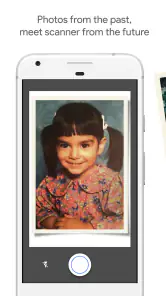
A realistic example: I find a loose childhood photo while clearing a drawer, place it on a steady, evenly lit surface, and use the guided capture before returning it to the envelope. That quick workflow is more useful than postponing the task until I can borrow a scanner. I would avoid harsh direct light, which can create reflections, and take a moment to make sure the print lies flat. A steady hand and sensible lighting can matter as much as the app’s processing.
Where a phone scan differs from a flatbed
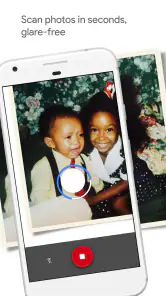
Compared with taking a quick picture in the standard camera app, PhotoScan’s guided multi-point capture is intended to reduce glare and straighten the result. That is a meaningful advantage for glossy prints: a single camera shot can preserve a bright reflection right across someone’s face, while following the scan prompts gives the app more material to work with. Still, it is not magic. Scratches, fading, creases, and damage already present on a print remain part of the source, so I would not expect the app to restore missing detail.
A flatbed scanner is the better choice when consistent framing, fine control, or a carefully organized high-resolution archive matters more than speed. PhotoScan is the easier option for occasional scans and casual sharing, but capturing many pictures one by one can become tedious. I also treat each result as a digital copy, not a reason to discard the original; the paper print may still hold detail and color that a phone capture cannot fully reproduce.
Choosing what to scan first
When I am facing a whole album, I would not begin by trying to digitize every page in one sitting. I start with loose prints that are at risk of being misplaced, or pictures relatives have specifically asked to see. That creates a manageable first batch and lets me learn how the prompts feel before I commit hours to the project. The app’s guided approach works best when I can give each print a little attention rather than rushing through a pile.
I also think about the condition and value of each picture before handling it. For an ordinary snapshot, a quick phone scan is a sensible safeguard. For a brittle, curled, or especially meaningful original, the repeated positioning involved in a phone capture may not be ideal. I would use a gentler, more controlled option for those prints, then reserve PhotoScan for copies that can be placed safely on a flat surface.
You May Like

Clash of Clans Is Won Between the Battles

Android Auto Makes the Case for Quieter Car Software

MobiOffice: Transforming Mobile Productivity with Seamless Integration

EA SPORTS FC™ Mobile Soccer: Redefining Mobile Sports Gaming

How Microsoft OneDrive Became a Mobile Productivity Giant

How Google Translate Breaks Language Barriers Effortlessly
Bringing Memories to Life
So, what exactly does PhotoScan by Google Photos do? In simple terms, it scans your old photos and turns them into digital images. But this isn't just your average scanner app. No sir! It uses advanced technology to enhance and preserve the quality of your photos, ensuring that even the tiniest details are captured. You know that faded family photo from the 80s? This app will make it look like it was taken yesterday.
How It Works
Using the app is as easy as pie. You point your phone's camera at the photo, follow the on-screen prompts to move your phone around, and voila! The app captures multiple images and stitches them together to create a glare-free scan. It's like having a professional photo lab right in your pocket.
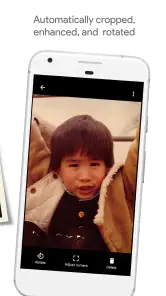
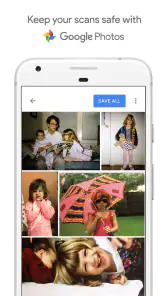
One of the things I love about this app is how it automatically crops and adjusts the perspective of the photo. No more weird angles or awkward edges—everything looks perfectly aligned. Plus, the app integrates seamlessly with Google Photos, so organizing and sharing your newly digitized photos is a breeze.
Practical choices that improve the results
I get better results when I scan one print at a time rather than trying to capture several in a single frame. Keeping the phone centered over the picture before moving to the on-screen points helps avoid an uneven perspective, and checking the crop afterward is worthwhile when a print has a narrow border or an unusually shaped edge. Those small checks take seconds, but they can save me from keeping a scan that trims an important corner.
There is also a useful workflow distinction: scanning creates the digital image, while organizing a growing collection is a separate job. Since PhotoScan works with Google Photos, that connection can make it convenient to put scans alongside other pictures and share them. I would still name or sort batches thoughtfully rather than assuming an app will know which people, event, or album a print belongs to. That matters especially when several relatives are scanning photos from the same family archive.
A smoother capture routine
For a batch, I set up the space before opening the camera: a clean, flat surface, enough room to move the phone around each print, and lighting that does not shine directly into glossy paper. I keep the prints in their original order or make small groups by event, because a stack of finished files can be harder to identify than the paper pile was. This is a simple habit, but it reduces the chance that a good scan becomes an unlabeled mystery later.
It is also worth checking the finished image before moving on. Automatic cropping is convenient, but borders can be part of the picture, and an old print may have handwritten notes close to an edge. I treat the preview as a quality check, not just a formality. If a reflection or crooked edge remains, I can adjust the lighting or placement and try again while the print is still in my hand.
When another approach makes more sense
If I only need a quick record of a document or a picture that is not glossy, the phone’s regular camera may be enough; PhotoScan’s guided process is most worthwhile when glare and perspective are real concerns. If I am digitizing an entire album, I would consider the time involved before starting, because repeating the capture routine for every print takes patience. And if a photo is fragile, valuable, or badly damaged, handling it less and seeking a more controlled scanning method is the wiser choice.
The app is free, rated for Everyone, and its current version is 1.7.1.539739820, with Android 5.0 as the minimum system requirement. It is an approachable option for someone who wants to try scanning without buying equipment, but I would choose another tool when I need hands-on image restoration, detailed manual adjustments, or a dependable archival workflow. The best choice depends on whether convenience or control matters more for the job in front of me.
Who benefits most from the guided process
I would recommend it to someone who wants to share a few family prints with relatives, make a digital safety copy of snapshots in a drawer, or bring old images into a phone-based photo collection without buying a scanner. It is particularly handy when the main obstacle is getting started: the capture steps turn an unfamiliar task into a repeatable routine, and the free price makes it easy to test on a small batch first.
It is less suited to someone who expects a full restoration studio. A scan can preserve what the print still shows, but it cannot rebuild a missing corner or remove every mark simply because the image is digital. Anyone who needs consistent, carefully controlled output for a large archive may be happier with a flatbed scanner and dedicated editing tools. PhotoScan makes the most sense when accessibility and convenience outweigh fine-grained control.
Everyday sharing and keeping the originals
One practical use is sending a scan to a family group when an old photo comes up in conversation. Instead of passing a fragile original around or taking a rushed camera picture, I can capture it carefully and share the digital version. That is a small but useful difference: relatives can look at the same image, while the physical print stays safely put away. I still keep the original, since the scan is a handy copy rather than a replacement for the paper object.
For older pictures, I would also resist judging the result only by how bright or polished it looks on a phone screen. A display can make an image seem vivid, but the scan is still bounded by the print’s condition and the capture. If the purpose is casual viewing and sharing, that is usually enough. If I need an exact record for preservation or close inspection, I would compare the result with a more controlled scan before treating it as definitive.
Why You’ll Love It
There’s something incredibly satisfying about watching old photos come to life on your screen. And it’s not just about scanning photos—it's about preserving memories. Whether it's your parents' wedding photos or your childhood snapshots, PhotoScan by Google Photos ensures these moments are preserved in the best quality possible.
And can we talk about the convenience factor? No need to take your photos to a store or spend money on expensive scanning equipment. This app is free, easy to use, and available right at your fingertips. It’s perfect for those lazy Sundays when you feel like taking a trip down memory lane.
Final Thoughts
In a world that's rapidly moving towards digital everything, having an app like PhotoScan by Google Photos is a godsend. It’s a simple yet powerful tool that helps preserve our history in an accessible format. So if you’ve got a stack of old photos waiting for some love, give this app a try. It’s like bringing a piece of the past into the future, one photo at a time.
With its user-friendly interface and high-quality results, PhotoScan by Google Photos is definitely worth checking out. Trust me, your future self will thank you for preserving those memories.
PhotoScan by Google Photos Frequently Asked Questions
Can PhotoScan capture more than one printed photo at a time?
PhotoScan is designed around scanning a printed photo individually, with guided steps that help capture and combine views of that print. For a clear result, place one picture in the frame and complete the on-screen capture process before starting another. This makes it easier to check the crop and quality of each digital copy.
Can I use PhotoScan without an internet connection?
The scanning process uses your phone’s camera and on-screen guidance to capture printed photos, so you can use the app to make scans without relying on Google Photos cloud features. An internet connection may be useful when you want to use online services such as cloud storage or sharing through Google Photos. Your intended workflow determines whether you need to be online.
What is PhotoScan by Google Photos?
PhotoScan by Google Photos is an app designed to help users digitize their physical photos with ease. Using your smartphone camera, the app captures high-quality digital versions of your printed photos by eliminating glare and automatically cropping them. It integrates seamlessly with Google Photos, allowing you to store, organize, and share your digitized memories effortlessly.
Does PhotoScan work with old or faded printed photographs?
PhotoScan is intended for turning printed photographs into digital images, so it can be useful for preserving older pictures as well as newer prints. Its guided capture process helps frame each photo, while the app combines multiple shots to reduce glare. The result depends on the condition of the print and how clearly your phone camera can capture it.
How does PhotoScan eliminate glare from scanned photos?
PhotoScan uses a unique multi-step capture process to eliminate glare from your scanned photos. By guiding you to take multiple shots of the photo from different angles, the app intelligently combines these shots to remove glare and enhance image quality. This process ensures you get a clear, high-quality digital version of your physical photo.
Pros
- Easy to use interface
- High-quality scans
- Integration with Google Photos
- Free to download
- Automatically crops images
Cons
- Limited editing features
- Requires good lighting
- No batch scanning option
- Saves in JPEG only
- Needs internet for some features

- Category
- Photography
- Version
- 1.7.1.539739820













