Photo Gallery - Album, Vault
- 2.84K
- 4.8
- Installs
- 10.00M
- Price
- Free

Screenshots



Analysis by Reviewed
I find a gallery app most useful when it solves the small, repeated annoyances that build up around a growing camera roll: finding a picture quickly, separating personal images from everyday snapshots, and choosing a pleasant way to look back through them. Photo Gallery - Album, Vault is a free photography app from Mobile_V5 that brings albums, video browsing, slideshows, and private-album tools into one place. Its focus is practical rather than elaborate, which makes it worth considering if your default gallery feels cluttered and you want a more deliberate way to browse.
A useful place to start
I would begin by opening the app with a familiar, manageable group of pictures rather than trying to reorganize an entire camera roll at once. That gives me a chance to see how its album browsing fits my habits and whether I can locate recent photos without changing how I store anything. A gallery is part of an everyday phone routine, so a few minutes spent testing the basic flow can tell me more than a long list of features.
One small but helpful habit is to create albums around things I revisit, not every event I attend. A broad “family” or “projects” group is often easier to maintain than a dozen tiny folders. If I later notice that one album has become difficult to browse, I can split it then. This approach keeps the app’s organizational tools useful instead of turning them into a filing system I have to constantly tend.
How it fits into a photo routine
In its current version, 5.5.8, the app has a 4.8 average from around 285,000 ratings and has passed 10 million installs. Those figures suggest a broad audience, but they don’t tell me whether it will suit every phone or every way of managing photos. It is rated for Everyone and is free to install, with optional in-app purchases. I’d treat it as a straightforward gallery alternative, not as a full photo editor or a replacement for a dedicated backup service.
Organizing without making a project of it
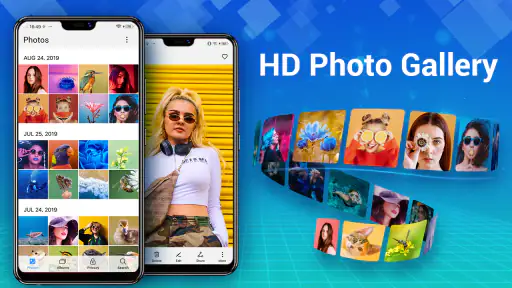
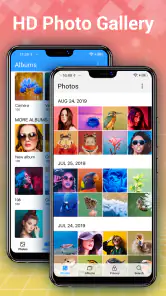
Ever tried scrolling through your endless gallery to find that one photo from last summer? Yeah, we’ve all been there. With Photo Gallery - Album, Vault, organizing your photos is as smooth as butter. The app offers an intuitive interface that lets you sort your photos into various albums effortlessly. Just drag and drop, and voila, your photos are neatly tucked away in respective folders.
That kind of sorting works best when I decide on a few useful albums instead of trying to classify every image. For example, a parent might keep school-event photos together, while someone planning a trip could gather screenshots, tickets, and camera shots in one place. A little restraint matters: too many narrowly named albums can turn organization into another chore. I’d start with broad groups, then split one only when I regularly struggle to find something.
One practical check before reorganizing is whether an album is simply a view inside the app or a change to the underlying files. Gallery apps can handle those ideas differently, and moving or deleting pictures may have consequences beyond tidying a screen. I’d test the workflow on a couple of unimportant images first, then use it on a larger collection once the result is clear. That small trial is especially worthwhile if other gallery or file-management apps also access the same photos.
More From Our News Desk

Weather by Xiaomi Review: Clear at a Glance, Less Clear Up Close

X Under Pressure: Can It Recover When Posting Goes Wrong?

Clash of Clans Is Won Between the Battles

Android Auto Makes the Case for Quieter Car Software

MobiOffice: Transforming Mobile Productivity with Seamless Integration

EA SPORTS FC™ Mobile Soccer: Redefining Mobile Sports Gaming
Private albums and sensible expectations
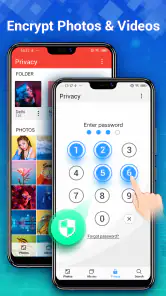
In today’s digital age, privacy is key. Nobody wants their private photos to end up in the wrong hands, right? This is where the app’s vault feature shines. You can lock away your sensitive photos using a PIN or fingerprint authentication, ensuring that only you have access to them. It’s like having a secret safe right on your phone!
I’d use a vault for casual privacy, such as keeping a personal image out of view when handing my phone to a friend to browse vacation pictures. It is not a substitute for careful device security or a guarantee against every way someone might access a phone. Before moving anything important, I’d also check how the app handles recovery and whether the chosen unlock method is available on my device. A private album is most helpful when it fits into a broader habit of locking the phone and sharing only what I intend.
Not to mention, the app also provides a cloud backup feature. So, even if you lose your phone, your memories are safely stored in the cloud, ready to be restored anytime. Trust me, this feature alone gives such peace of mind.
For irreplaceable pictures, I would still keep a second copy somewhere I control rather than relying on one gallery workflow alone. Before depending on any backup, I’d confirm that it is enabled, check which albums it covers, and make sure I understand how restoration works. That is a useful distinction: a gallery helps me browse and arrange, while a backup plan is about recovering files after a device problem. Those jobs overlap, but they are not interchangeable.
Viewing photos and videos your way
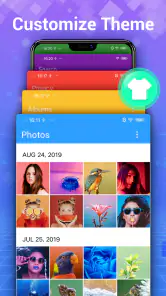
One of the coolest features of this app is the customization options available at your fingertips. Whether you’re a fan of dark mode or prefer a vibrant interface, the app lets you tweak the appearance to match your mood. Plus, the slideshow feature is perfect for those lazy evenings when you just want to relive your memories in style.
The slideshow is especially handy when I want to share a set of pictures without passing the phone around one image at a time. For a family visit, I could collect a small album beforehand and let it run while everyone watches. It also gives an old batch of photos a different feel, though it is less useful when I need to compare details or edit individual shots. For precise viewing or image adjustments, a dedicated photo editor is the better companion.
The app even supports a variety of image formats, so you’re not stuck with just JPEGs or PNGs. It’s like having a mini photo studio in your pocket!
That breadth is useful if pictures arrive from different sources, but format support should not be confused with editing capability. If I receive an unfamiliar image, I’d use the gallery to open and sort it, then turn to an editor if I need retouching, cropping, or color changes. Likewise, someone who mainly wants automatic search, deep editing tools, or a tightly integrated device ecosystem may be happier with the gallery already built into their phone or a specialist app.
What to expect from the app over time
The app was released on December 5, 2019, and its current version is 5.5.8. That gives me a concrete sense of its age and present build, but a version number alone does not show what changed between releases. I wouldn’t assume that a particular update introduced a specific feature or that every device behaves identically. The practical test is whether the current build works smoothly with your photo library and Android setup.
It supports Android 6.0 and later, so it may suit people keeping an older compatible phone in service as well as those using newer devices. The developer, Mobile_V5, offers a free app with optional purchases priced from $1.99 to $9.99 per item. I’d try the free experience against my own routine before paying for anything; the useful question is whether the features I actually use make browsing and privacy management easier, not whether every option is available.
What changes mean for an existing library
If I already use another gallery, I would not switch every habit over on the first day. I’d keep the existing app available while checking whether albums appear as expected, whether videos are easy to find, and whether images I’ve sorted remain accessible elsewhere. This is especially sensible when a phone has a built-in gallery that also handles sharing or connects with other services. The two apps can be compared side by side before I decide which one feels more natural.
For someone with years of photos, the main trade-off is convenience versus routine. A new gallery can make browsing feel less crowded, but changing where I look for pictures adds a small learning cost. I’d first use it for a fresh album—perhaps a weekend outing or a set of work references—rather than immediately reshuffling older folders. If the new workflow saves time on that small task, expanding its role makes sense; if not, there is little reason to force a migration.
A realistic day-to-day use
Imagine I’m meeting relatives and want to show a few photos from a recent gathering, while keeping personal screenshots and unrelated pictures out of the way. I could put the selected images in a dedicated album ahead of time, open that album during the visit, and use a slideshow when everyone is looking together. The useful part is not a dramatic new way to take photos; it is having a smaller, intentional collection ready instead of searching through the entire camera roll in front of people.
That preparation also reduces the chance of handing over the phone and having someone swipe into pictures I did not intend to share. I would still stay nearby and keep the device locked when it is not in use. For a presentation where images must appear in a particular order or fill a larger screen, a dedicated presentation or casting option may be more suitable. This gallery makes casual viewing easier, but it should not be mistaken for a specialized display tool.
Where it differs from familiar alternatives
Compared with a phone’s built-in gallery, this app is most appealing if I specifically want its combination of album organization, slideshow viewing, and a private area. The built-in option may remain the simpler choice for someone who values the phone maker’s existing design, integration, or automatic organization and has no problem finding pictures there. There is no universal winner: the right choice depends on whether the extra tools here address a regular annoyance or merely add another place to browse.
It also occupies a different role from cloud-photo services and editing apps. A cloud-focused service is the better fit when my priority is keeping a synchronized library available across devices; an editor is better when I need to alter images rather than arrange them. I see this app as a hands-on local browsing companion, with a vault and slideshow as useful extras. If those are the jobs I need, it is worth testing; if my central need is editing or dependable cross-device recovery, I would choose tools built around those tasks.
Who will appreciate it—and who may prefer another gallery
So, why should you download Photo Gallery - Album, Vault? Well, apart from its seamless interface and robust security features, it’s incredibly user-friendly. Even if you’re not tech-savvy, the app guides you through with ease. Plus, the frequent updates mean the developers are constantly adding new features and fixing bugs, which is always a plus in my book.
I’d recommend trying it if your main goal is to keep photos and videos browsable, create a few personal albums, and have a slideshow option close at hand. It is also a reasonable fit for someone who wants a simple private area for selected images. On the other hand, if you depend on advanced editing, powerful automated search, or a backup setup you can verify across multiple devices, compare it with your phone’s built-in gallery and dedicated tools before moving your whole library.
It may also be the wrong pick if you prefer not to grant a separate gallery app access to your photos, or if you want all management to happen through the tools already on your phone. Anyone considering the vault for sensitive material should test how locking and recovery feel before trusting it with anything important. I’d make that decision based on a small trial, not just on the word “vault”: privacy tools are most useful when their everyday behavior is clear to the person relying on them.
There are a few practical questions I would answer during that trial. Can I find a particular image quickly after creating an album? Does a slideshow show the collection I intended? Do the privacy controls fit the way I use my phone? And, if I use the backup option, do I understand what is covered and how I would restore it? Those checks turn a promising feature list into a decision based on my own device and priorities.
In conclusion, if you’re looking for an app that not only organizes your photos but also keeps them safe and sound, this might just be your perfect match. Give it a try, and you might find yourself wondering how you ever managed without it!
Photo Gallery - Album, Vault Frequently Asked Questions
Is Photo Gallery - Album, Vault free to download, and are there in-app purchases?
Photo Gallery - Album, Vault is free to download, so you can try its photo gallery features without paying upfront. The app also offers in-app purchases, with items priced from $1.99 to $9.99. Consider whether any optional purchase suits your needs before buying; the basic download and paid extras are separate.
What is Photo Gallery - Album, Vault and what does it offer?
Photo Gallery - Album, Vault is a comprehensive photo management application designed to organize, secure, and enhance your photo viewing experience on Android and iOS devices. It offers features such as customizable albums, secure vaults for private photos, and advanced photo editing tools, making it an ideal choice for users looking to manage their digital memories efficiently. Its gallery experience also supports viewing photos and videos and creating slideshows with a 3D effect.
How secure is my data in the Photo Gallery - Album, Vault app?
The Photo Gallery - Album, Vault app prioritizes your privacy by providing a secure vault feature that allows you to store sensitive photos and videos with robust encryption. Users can set up password protection or fingerprint authentication to ensure that only authorized individuals can access their private content, providing peace of mind for all users.
Can I edit my photos directly within the Photo Gallery app?
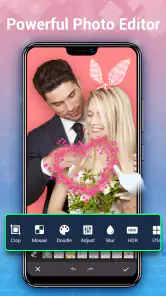
Yes, the Photo Gallery - Album, Vault app includes a range of photo editing tools that allow users to enhance their images directly within the app. You can adjust brightness, contrast, apply filters, and even remove blemishes with its intuitive editing interface, eliminating the need for third-party editing apps.
Does the app support cloud backup for my photos and videos?
While the Photo Gallery - Album, Vault app primarily focuses on device storage optimization, it does offer integration with popular cloud storage services. This allows users to back up their photos and videos to the cloud, ensuring that their digital memories are safe and accessible from any device, even if the phone is lost or damaged.
Pros
- Intuitive user interface.
- Supports multiple image formats.
- Easy album organization.
- Secure photo vault feature.
- Efficient search functionality.
Cons
- Limited cloud storage.
- Ads in free version.
- No video support.
- Occasional lags.
- Requires in-app purchases.
- Category
- Photography
- Version
- 5.5.8












