Music Player - Audio Player
- 37.07K
- 4.6
- Installs
- 100.00M
- Price
- Free

Screenshots

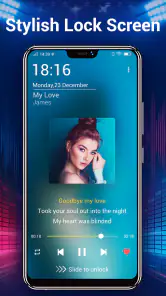
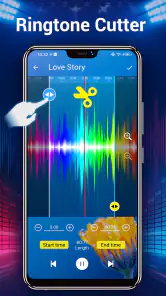
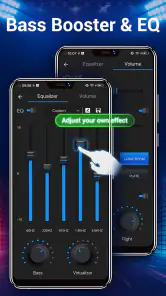
Analysis by Reviewed
I often use a music player on a shared household device, where one person’s listening shouldn’t dictate everyone else’s. Music Player - Audio Player is a practical fit when the goal is to play audio already on the device and adjust how it sounds, rather than manage a family’s separate streaming accounts. I’d treat playlists and library choices as personal organization, not as a substitute for separate profiles.
Sharing a device without mixing everything
For a realistic example, imagine a tablet in the kitchen that different people use for music while cooking or tidying up. A listener can put together a playlist for the task and tune the sound for the room or headphones. But if several people share the same library, they should agree on how to name and manage playlists; otherwise, someone else’s collections can make browsing less tidy. I would not choose this app expecting household profiles or controls that keep one person’s listening separate.
Set expectations before handing it around
The most useful boundary is deciding whose audio library the device represents. A shared player works smoothly when the music files and playlists are meant for everyone, while a personal phone is better for a library that should stay under one person’s control. Before letting another household member change sound settings or reorganize music, I’d show them the basic playback and playlist workflow. That small bit of coordination can prevent accidental changes without assuming the app offers special sharing safeguards.
For anyone comparing it with a streaming service, the key distinction is the job being done: this is a music player, not a replacement for a service built around online discovery and account-based libraries. I’d pick it for playing and shaping audio on the device; I’d use a streaming app when shared recommendations, cloud access, or distinct account histories matter more.
Age context is straightforward: it is rated for Everyone, which makes the stated content age rating broad, but that alone does not make a shared device automatically suitable for every child. I’d still consider what music is available on the device and who can change its playlists. There’s no need to treat a simple player as a family-management tool; adult supervision and clear household expectations remain the sensible approach.
One practical listening tip is to adjust the equalizer and bass boost with the actual headphones or speaker you plan to use, then listen to a familiar track before settling on a setting. A change that sounds fuller through headphones may become muddy on a room speaker. I’d also keep a few task-specific playlists rather than one enormous list: it makes a shared device easier to navigate and reduces the chance of another listener having to sort through unrelated music.
There are trade-offs. Sound controls are useful, but they invite tinkering, and a setting that suits one person may not suit the next. Playlist organization can also become a chore if several people make changes without a shared naming habit. If your priority is a polished multi-user library with separate tastes, or effortless access to music across devices, another kind of music service may be a better match.
That household distinction is why I see this as a capable personal or shared-room player, rather than a complete family listening system. It is most appealing when people want straightforward playback and are comfortable coordinating the library themselves.
A routine that makes shared listening easier
In practice, I’d keep the shared-device workflow deliberately simple. One person can create a short playlist for a recurring activity, such as quiet background music during dinner preparation, and give it an obvious name. Other listeners can choose that list without needing to reorganize the whole library. This is a small habit rather than a special app feature, but it helps avoid the common shared-device problem of having plenty of music and no clear way to find the right selection.
I’d also treat sound changes as temporary choices tied to the listening setup. If someone adjusts the equalizer for headphones, the next person using a speaker may hear a very different balance. A quick check of the current sound before pressing play is more useful than assuming the last setting still fits. When several people use the same device, agreeing that the listener who changes the sound should restore a neutral setting afterward can prevent confusion.
When a local player is the right tool
The app makes most sense for people who already have audio on their device and want a straightforward way to play it with more sound shaping than a bare-bones player offers. That could be someone listening to a personal collection during a commute, using saved audio while working offline, or playing familiar tracks at home without opening a streaming account. The equalizer and bass boost give those listeners practical controls, while playlist organization helps group music by activity or mood.
It is less compelling if the main pleasure of listening is discovering new artists through curated feeds, sharing recommendations, or keeping a synced library available across multiple devices. Those jobs are typically handled more naturally by streaming services. I would not install a local player expecting it to replace the social and cloud features of those alternatives; I’d choose it alongside them only if I have a separate collection that benefits from direct playback and sound adjustment.
Compared with a basic built-in player, the appeal here is the focus on audio controls and customization. Compared with a streaming app, the trade-off is that the experience revolves around the music available on the device rather than a service’s broader catalog and account features. Which option feels better depends less on the number of buttons and more on whether you want to manage a local collection or browse a connected music library.
What I would check before settling in
Before building playlists, I’d spend a few minutes looking through the library and testing playback with a track I know well. That gives me a useful reference for how the equalizer affects voices, bass, and instruments, rather than making adjustments based on a single unfamiliar song. I’d make changes gradually: a dramatic boost may sound exciting briefly but can make other tracks tiring or less clear. Switching between headphones and a room speaker is a good reminder that one setting is not automatically ideal everywhere.
I’d also decide whether playlists are meant to be private in practice or simply convenient labels for anyone using the device. On a shared tablet, playlist names that describe an activity are often easier for everyone to understand than names tied to one person’s mood or routine. On a personal phone, organizing by artist, occasion, or listening context may be more natural. The useful choice is the one that makes the next listening session easier, not the one that creates the most elaborate system.
One limitation of local-library listening is that the app’s usefulness depends on the audio collection being ready to play on the device. If a listener expects an endless catalog or effortless access to music stored elsewhere, this workflow can feel restrictive compared with a streaming service. On the other hand, for a collection someone already keeps close at hand, avoiding a discovery-heavy interface can be a welcome simplification.
Who should choose another option
I would steer away from this as the household’s main answer if different people need distinct accounts, recommendations, or listening histories. A shared library can work, but it asks people to coordinate rather than separating their experiences for them. The same applies if parents want dedicated child profiles or controls: an Everyone content rating does not supply those household tools, so families should use a platform designed for that kind of management when it is a priority.
It may also be unnecessary for someone who is already happy with a phone’s built-in player and has no interest in adjusting audio. The extra sound options are valuable only if the listener wants to use them; otherwise, another app can mean another place to browse without solving a real problem. I’d try it when playback controls, playlists, or sound tuning would improve an actual routine, not just because a feature list looks fuller.
From a casual tryout to a useful setup
Because it is free, I’d approach the first use as a low-commitment test: open a few familiar tracks, check that the library is convenient to browse, and compare the sound with and without adjustment. If I like the result, I’d make only a small number of useful playlists rather than migrating every listening habit at once. If I find myself returning to a streaming app for nearly everything, that is a sign this player may be best kept for a narrower purpose—or may not be needed.
For anyone wondering whether the app is aimed only at audio enthusiasts, I don’t think so. The sound controls can reward experimentation, but ordinary listeners can ignore them and use the player for familiar music. The more important question is whether the person wants to play audio already available on the device. If not, its central use will matter less than the advanced controls.
Ever since I stumbled upon Music Player - Audio Player, my musical journey has been nothing short of transformative. From its sleek design to its intuitive features, this app has become my go-to choice for all things audio. Let me take you through what makes this app a standout in its category.
Unleashing the Power of Sound
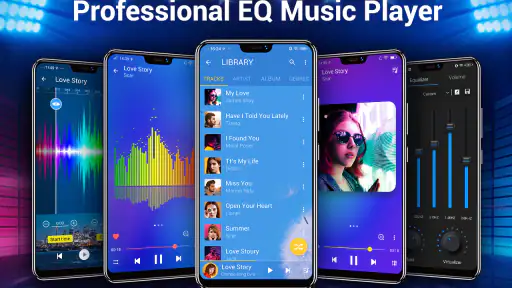
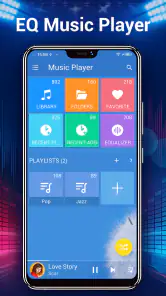
When you first open the Music Player - Audio Player, you're greeted with an interface that's as smooth as a jazz melody. The app’s design is not just about aesthetics; it's about making navigation effortless. Everything is where it should be, from the play button to the playlist management section. It’s like the app knows exactly what you want, and it delivers swiftly.
Feature-Rich Experience
What really sets this app apart are its robust features. Whether you're an audiophile or just someone who likes to jam out to tunes, you’ll appreciate the equalizer options that let you tailor the sound to your liking. The bass boost is especially remarkable, giving your tracks that extra oomph that makes listening through headphones a full-body experience.
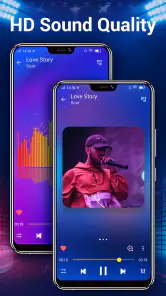
Another feature that deserves a mention is the app’s support for various audio formats. It doesn’t matter if you’ve got your music in MP3, WAV, or FLAC; this player handles them all like a pro. Plus, it supports high-quality audio playback, which means you’re always getting the best version of your music.
Personalization and Playlists
Creating playlists is a breeze with this app. I’ve always been someone who loves curating my own music for different moods and occasions, and this app makes it so easy. You can organize your music library with just a few taps, and the app even suggests songs based on your listening habits. It’s like having a personal DJ in your pocket.
The app also allows for customization of the interface. You can change themes to suit your mood or style, which is a nice touch for those who like a bit of personalization in their apps.
Final Thoughts
In a world full of music apps, the player stands out as a versatile choice that caters to both casual listeners and music enthusiasts. Its user-friendly interface, coupled with high-quality sound output and diverse features, makes it a compelling option for anyone who wants more control over their music.
If you’re on the lookout for a music player that doesn’t just play your tunes but elevates your entire listening experience, then this app is definitely worth a download. I’d recommend it most to people who keep audio on their device and enjoy adjusting playback to suit the moment. Trust me, once you try it, you may find it becomes a familiar part of your listening routine.
Who it suits, and what to expect
Developed by Mobile_V5, this free music and audio app has been available since August 1, 2013, and its current version is 8.0.0, with Android 6.0 as the minimum requirement. Its 4.6 average from around 1.6 million ratings and more than 100 million installs point to wide use, though popularity alone does not tell me whether its approach suits your habits. It has also received around 37,000 written reviews. I’d regard those figures as context, not a reason to expect every feature to work the same way on every device.
If your main question is whether it costs anything to try, it is free. For someone who already has music files and wants a player with sound adjustments, that makes testing it an easy decision. If you mainly listen through a streaming subscription, however, first consider whether you need another place to browse and organize audio. This app’s strengths are most relevant when you want a player for music you keep on your device, rather than another discovery feed.
My overall household verdict is that it works best when one person manages the library or everyone agrees on a simple playlist routine. I’d choose it for flexible local listening, familiar playback controls, and the ability to tailor sound; I’d skip it when separate family accounts, coordinated cloud libraries, or a dedicated child-focused experience are essential. Used with those expectations, it’s a convenient option rather than a one-size-fits-all answer.
Music Player - Audio Player Frequently Asked Questions
Is Music Player - Audio Player suitable for someone looking for a straightforward music app?
Music Player - Audio Player is a Music & Audio app focused on playing music and adjusting sound. Its short description is simply “Music Player,” while its feature summary highlights an equalizer, bass boost, and sound changer. That makes it worth considering if you want a player with sound controls alongside playback, rather than an app centered on a different kind of media.
Who develops Music Player - Audio Player, and what age group is it rated for?
Music Player - Audio Player is developed by Mobile_V5 and is rated for Everyone. That rating makes it suitable for a broad audience, including users looking for a general-purpose music app. Before installing, it is still sensible to review the app’s permissions and settings on your device so you understand what access it requests.
Is Music Player - Audio Player free to download?
Yes, Music Player - Audio Player is free to download. It is a music and audio app from Mobile_V5, intended for listening to music and adjusting sound. Its broad adoption is reflected in more than 100 million installs and an average rating of 4.6 from around 1.6 million ratings, giving prospective users a helpful sense of its reach.
What operating system does Music Player - Audio Player require?
Music Player - Audio Player requires Android 6.0 or later, so check your device’s operating system before downloading. The app is listed as version 8.0.0 and is rated for Everyone. If your device meets the minimum requirement, you can install it and explore its music playback and audio features; compatibility may still depend on your particular device.
What audio formats does Music Player - Audio Player support?
Music Player - Audio Player supports a wide range of audio formats, including MP3, WAV, AAC, FLAC, and more. This comprehensive compatibility ensures that users can play almost any audio file without the need for additional conversion tools, making it highly versatile for any music enthusiast.
Articles Related to Music Player - Audio Player
Clash of Clans Is Won Between the Battles
Its raids are quick; its community is a long-term project of coordination, teaching, rivalry, and shared responsibility—with all the friction that entails.
Android Auto Makes the Case for Quieter Car Software
The car interface is no longer judged by how much it can do, but by how quietly it helps. Android Auto shows what drivers now expect—and what still gets in the way.
MobiOffice: Transforming Mobile Productivity with Seamless Integration
MobiOffice: Word, Sheets, PDF is redefining mobile productivity with a surprising blend of functionality and innovation.
EA SPORTS FC™ Mobile Soccer: Redefining Mobile Sports Gaming
Dive into EA SPORTS FC™ Mobile Soccer, where immersive gameplay and strategic depth transform mobile sports gaming.
Pros
- User-friendly interface for easy navigation.
- Supports multiple audio formats.
- Customizable equalizer settings.
- Offline playback available.
- Seamless playlist management.
Cons
- Ads in the free version.
- Limited theme options.
- No lyrics support.
- In-app purchases for premium features.
- Occasional playback glitches.
- Category
- Music & Audio
- Version
- 8.0.0