DJ Mixer Studio - DJ Music Mix
- 399.00
- 4.3
- Installs
- 10.00M
- Price
- Free
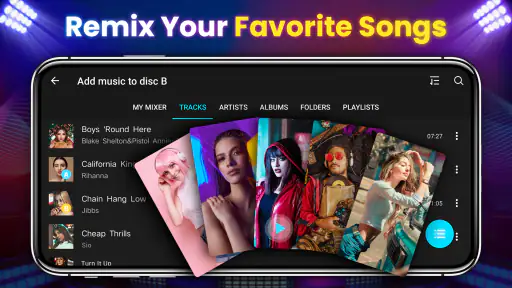
Screenshots
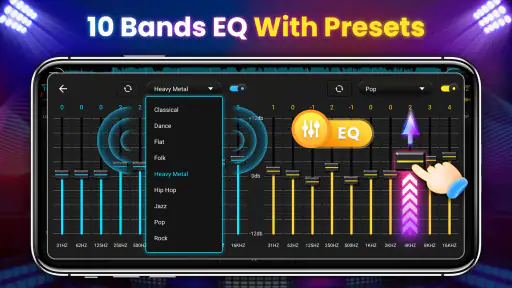
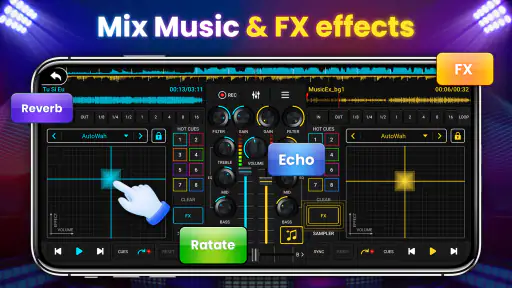
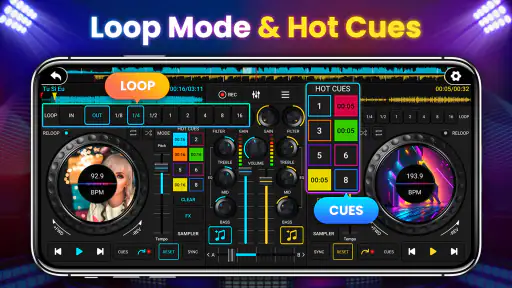
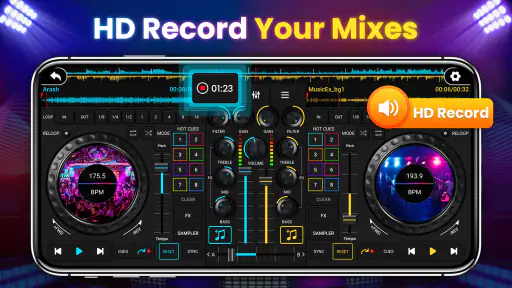
Analysis by Reviewed
I usually judge a music app by what happens after the first burst of curiosity: does it become useful enough to open again next week, or does it get forgotten? DJ Mixer Studio - DJ Music Mix makes a friendly first impression because it puts a two-track mixing idea within reach without asking me to begin with a physical controller. It is a free music and audio app from Mobile_V5, rated for Everyone, and its straightforward premise suits short experiments as much as casual practice.
The first week: quick experiments, not a lesson plan
The appeal is immediate if you have ever wondered how one song can lead into another without an awkward pause. I would start by choosing two tracks with a similar feel, then use the dual-deck layout to listen for a natural handoff. Tempo sync can take some of the guesswork out of aligning beats, which is handy while learning, but I would still listen closely: matching tempo does not automatically make two songs sound musically compatible.
That distinction is useful from the start. Pick songs with a clear, steady rhythm before trying tracks that change pace or have long quiet openings. A simple pair lets you notice what the controls are doing; a deliberately difficult pair can make the result feel messy even when the app is working as intended. For a first session, I would treat the automatic help as a starting point, not a substitute for choosing the right moment to transition.
Getting Started with DJ Mixer Studio
First things first, downloading and setting up DJ Mixer Studio - DJ Music Mix is a breeze. Whether you're on Android or iOS, the app is readily available and it’s free to start. The user interface is intuitive, which means you can jump right in without needing a degree in audio engineering. For those of us who might be a bit technologically challenged, this is a massive plus!
Features That Make It Stand Out
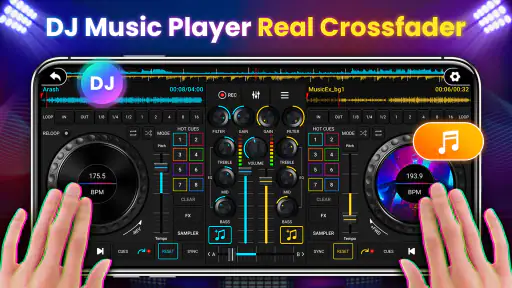
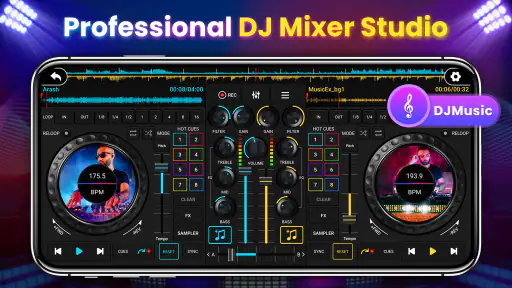
One of the standout features is the dual-deck interface. You can mix two tracks simultaneously, allowing for seamless transitions and creative mashups. There’s also a tempo sync feature that automatically aligns the beats of your tracks, ensuring your mixes sound polished and professional.
Another feature I absolutely love is the in-app recording. You can record your sessions and share them with friends or upload them to your favorite social media platforms. It’s a fantastic way to showcase your skills and get feedback from fellow music enthusiasts.
Practice that fits into ordinary routines
The recording option gives a short practice session a purpose beyond passing time. I would try a transition, record it, and listen back later rather than deciding in the moment that it sounded good. That replay can reveal a late handoff, a sudden volume change, or a section where the tracks compete. It is a more useful habit than piling on effects, because it helps you hear which choices actually improve the mix.
More From Our News Desk

Weather by Xiaomi Review: Clear at a Glance, Less Clear Up Close

X Under Pressure: Can It Recover When Posting Goes Wrong?

Clash of Clans Is Won Between the Battles

Android Auto Makes the Case for Quieter Car Software

MobiOffice: Transforming Mobile Productivity with Seamless Integration

EA SPORTS FC™ Mobile Soccer: Redefining Mobile Sports Gaming
It can also work for a low-pressure gathering at home: prepare a few familiar tracks, test the transitions before guests arrive, and keep the phone where you can reach it. I would not make it the sole plan for an important event, though. A phone interface is convenient for trying ideas, but a dedicated controller and a larger setup are easier to handle when reliable, continuous control matters. The app is better viewed as a portable practice space than a replacement for every DJ rig.
A realistic way to use it between busy days
For an everyday session, I would keep the goal small enough to finish before attention drifts. After work or while relaxing at home, choose a pair of songs you know well and focus on just one decision: where should the incoming track begin? Make a short recording, listen once, and decide whether the transition is clearer with an earlier or later entry. That repeatable loop makes the app useful even when I do not have time to build a full set.
The same approach helps when sharing music with friends. Rather than improvising a long sequence in the moment, I can test a few handoffs in advance and keep the combinations that feel natural. The trade-off is that preparation takes some attention: this is not simply pressing play on a playlist and forgetting about it. Its value is strongest when I want to shape the listening experience, not when I want background music with no involvement.
Perfect for All Skill Levels
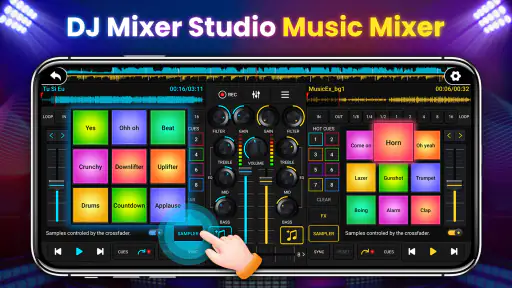
Whether you’re just starting out or you’re a mixing maestro, DJ Mixer Studio offers a range of tools to suit your skill level. Beginners can start with the auto-mixer feature, which helps create smooth transitions between songs without any manual input. For the more experienced, the app provides a wide range of effects, loops, and cues to experiment with.
The app also supports a variety of audio formats, so you’re not limited by the type of music you can mix. This flexibility is crucial for those who have extensive music libraries with different formats.
Choosing tracks and building a repeatable workflow
A useful detail when learning is to avoid changing too many things at once. I would first try a straightforward transition with no extra effects, then repeat it with one loop or cue to see whether that addition helps. If the second attempt sounds worse, I know the extra element was not earning its place. This simple comparison is more revealing than stacking controls until a mix feels busy.
For a small practice collection, I would choose tracks with different but compatible energy rather than selecting songs only because I like them individually. A slow, spacious opening followed by a dense, fast track may be an interesting challenge, but it is a poor first test of whether the handoff works. Familiarity matters too: knowing a song’s chorus or instrumental break gives me a better chance of choosing an entrance that sounds deliberate.
What keeps it useful from month to month
For recurring value, I would give myself small, specific challenges instead of opening the app and hoping inspiration arrives. Try making a clean transition between two tracks, then use a loop or cue to explore a different entrance. Once that feels comfortable, bring in an effect sparingly and compare the recording with the simpler version. This makes the available tools a way to learn timing and taste, rather than a checklist to work through.
It also helps to keep a short set of familiar tracks for practice. Knowing where a song’s beat settles and where its energy changes makes it easier to judge whether a transition works. When you want to try something new, swap in one unfamiliar track at a time; changing both songs makes it harder to tell what caused a rough handoff. These are small habits, but they make casual sessions more satisfying.
How it compares with players and full DJ setups
An ordinary music player is the better choice when I just want an album, playlist, or queue to run without active attention. This app asks for more participation: the appeal is experimenting with how tracks meet, recording an attempt, and deciding whether the result works. That makes it a different kind of listening tool, not a replacement for a dependable player during a commute or while doing chores.
Against a full DJ setup, the balance is reversed. A phone makes spontaneous practice convenient and lowers the barrier to trying a mix, while physical controls are easier to operate by feel and better suited to sustained, precise adjustments. If you are learning whether DJing interests you, the mobile format is an approachable first step. If you already know you need hands-on control for a performance, investing time in a controller-based workflow is the more sensible route.
Where the friction can build
A touchscreen is approachable, but it is not the same as having tactile knobs and faders. When I want precise, repeated adjustments, tapping and watching the screen can feel less direct than a controller. That matters more as a mix becomes complicated, so someone who already performs regularly or wants to develop hardware-based technique may be better served by dedicated DJ equipment and software designed around it.
There is also a learning trade-off in relying heavily on automatic mixing. It can help a beginner hear a smoother result sooner, but if every transition is left to automation, it is easy to miss the timing decisions that make a set feel intentional. I would use it to compare possibilities, then practice taking control of the handoff. Likewise, effects are most useful when they support a transition; using several just because they are available can make the mix tiring to listen to.
Maintenance without turning practice into a chore
The ongoing effort here is less about managing a complicated setup and more about keeping practice focused. I would return to a handful of tracks, note mentally which pairings worked, and avoid treating every session as a chance to discover a new tool. That cuts down on aimless tapping and makes it easier to hear progress. If I stop enjoying the process of listening back and making small adjustments, the app’s long-term value naturally falls.
It is also worth treating recordings as tests rather than finished products. A recording can help me judge timing and balance, but sharing every attempt can turn a relaxed experiment into a performance obligation. I would save sharing for mixes I genuinely want someone else to hear. That keeps the social side optional and lets the app remain useful as a private learning space.
Who should keep it installed?
This is a sensible fit for curious listeners, beginners who want a friendly way to experiment, and anyone who likes making short mixes from tracks they already enjoy. Its audience is reflected in its reach: it has more than 10 million installs and an average rating of 4.3 from around 42,000 ratings. Mobile_V5’s current version is 2.0.1, and the app supports Android 6.0 and later.
I would skip it if your main goal is to prepare polished, dependable sets for demanding live situations, or if you need the feel and precision of physical controls. It is also less compelling if you do not enjoy repeating a transition, listening back, and adjusting it; the lasting benefit comes from that practice, not simply from having a mixer-shaped interface on your phone. Compared with ordinary music players, it invites active experimentation. Compared with a dedicated DJ setup, it favors convenience over hands-on control.
Questions I would settle before making it a habit
Does it make sense for someone with no DJ experience? I think so, provided the goal is to explore rather than to master a professional workflow immediately. Starting with two familiar, steady tracks makes the controls easier to understand, and the automatic assistance can offer a useful comparison. The important next step is to listen critically and try the transition manually instead of assuming that a synchronized beat guarantees a convincing mix.
Is it suitable for playing music at a small get-together? It can be handy for casual use when I have already tried the track pairings and can keep the phone nearby. For an occasion where uninterrupted music and confident live control matter, I would choose a more dependable player or a dedicated DJ setup. And will it stay interesting? In my view, only if I enjoy setting small practice goals, revisiting tracks, and listening back; the novelty alone is unlikely to carry it for long.
My Personal Experience
When I first tried out DJ Mixer Studio - DJ Music Mix, I was blown away by how user-friendly it was. I’ve always wanted to try my hand at DJing but was intimidated by the complexity of traditional setups. This app made it so accessible and fun. In no time, I was mixing my favorite tracks and experimenting with different effects. The best part? It didn’t take long before I felt like a pro, crafting mixes that I was proud to share with my friends.
Over time, I would keep it around for quick creative sessions rather than expect it to become my only music tool. A useful routine is to record a short attempt, listen again when the novelty has worn off, and keep only the choices that still sound good. That gives the app a modest but genuine role: it can help turn idle listening into hands-on practice, provided I stay curious about the music and do not confuse automatic assistance with finished DJ skills.
Does it earn a lasting place?
For me, the strongest reason to keep this app is not the promise of becoming a DJ overnight; it is the convenience of testing musical ideas in a few spare minutes. Free access makes that low-commitment experimentation easier, and its Everyone age rating suits a broad audience. With an average rating of 4.3 and around 399 written reviews, it has attracted plenty of attention, but those figures matter less to my decision than whether I actually return to practice.
The app is free, and it was released on August 15, 2023. Those details are useful context, but the practical question is whether its two-deck mixing, recording, and learning tools fit the way I listen. The current version is 2.0.1. I would install it on a compatible device to explore casual mixing, while keeping expectations grounded: it is a convenient mobile starting point, not a substitute for developing technique on a physical controller.
In conclusion, if you’re looking to dip your toes into the world of DJing or even if you’re a seasoned pro looking for a portable mixing solution, DJ Mixer Studio - DJ Music Mix is definitely worth checking out. It's packed with features that cater to all skill levels, and its accessibility means you can start creating amazing mixes right away. So, why not give it a spin and see where your musical creativity takes you?
DJ Mixer Studio - DJ Music Mix Frequently Asked Questions
Can I use DJ Mixer Studio - DJ Music Mix to practice before using physical DJ equipment?
Yes, the app’s controller-style approach can give you a place to experiment with mixing on a mobile device before moving to physical equipment. You can explore its track-mixing controls and effects at your own pace. The experience is not identical to using dedicated hardware, so treat it as a convenient way to practise basic ideas rather than a complete substitute for hands-on equipment.
Who develops DJ Mixer Studio - DJ Music Mix, and what age group can use it?
DJ Mixer Studio - DJ Music Mix is developed by Mobile_V5 and is rated for Everyone. That makes it suitable for a broad audience interested in trying music mixing, including people who are new to the subject. As with any creative app, younger users may benefit from guidance when choosing audio to work with and when exploring the available tools.
Do I need an internet connection to use DJ Mixer Studio - DJ Music Mix?
An internet connection may be useful for downloading the app and obtaining music or updates, but DJ Mixer Studio - DJ Music Mix is centered on mixing tracks on your device. Before relying on it for a session away from Wi-Fi, check that the audio you want to use is available locally and that the app works as expected with your chosen tracks.
What is DJ Mixer Studio - DJ Music Mix?
DJ Mixer Studio - DJ Music Mix is an innovative music mixing application designed for both amateur and professional DJs. It offers a wide range of features that allow users to create and mix music tracks seamlessly. With its user-friendly interface, the app is perfect for those looking to experiment with music or perform at events. It is a Music & Audio app developed by Mobile_V5, and its store summary describes it as a professional tool that simulates real DJ controllers to mix songs.
Is DJ Mixer Studio - DJ Music Mix compatible with both Android and iOS devices?
Yes, DJ Mixer Studio - DJ Music Mix is available for both Android and iOS platforms. Users can easily download it from the Google Play Store or Apple App Store, making it accessible to a wide range of users regardless of their device preference. Ensure your device meets the app's specifications for optimal performance. On Android, it requires version 6.0 or later.
Pros
- Intuitive interface for beginners.
- Wide range of sound effects.
- Supports multiple audio formats.
- Real-time mixing capabilities.
- Frequent updates and improvements.
Cons
- Contains ads that can be intrusive.
- Limited free version features.
- Requires internet for full access.
- Occasional app crashes.
- High battery consumption.
- Category
- Music & Audio
- Version
- 2.0.1













