Opera News: breaking & local
- 8.66K
- 4.5
- Installs
- 100.00M
- Price
- Free

Screenshots

Analysis by Reviewed
My first week with Opera News: breaking & local made it easy to understand its appeal: I could open one app and skim a mix of international headlines and local stories instead of bouncing between several news sources. That convenience is useful when I have only a few minutes, though it also means I need to be deliberate about what I read rather than treating a busy feed as a complete picture of the news.
When the feed becomes a routine
On an ordinary morning, I might check the headlines while having breakfast, then save a longer article for a commute when reception is unreliable. This is where the app’s combination of a personalized feed and offline reading can earn a regular place on my phone. I would use the first glance to spot subjects worth following, then open the saved pieces later rather than trying to read everything as it appears.
That workflow is more useful than simply scrolling for longer. A feed shaped by reading habits can make familiar interests easier to find, but it can also narrow what catches my attention. I’d occasionally look beyond the stories recommended to me and check other topics, especially when an important event deserves more than one angle. Personalization is a convenience, not a substitute for choosing a range of sources.
The Latest on Opera News: breaking & local
Who will get the most from it?
I think this suits readers who want a quick, varied news check and are comfortable discovering stories through an aggregated feed. It is particularly handy if local coverage and broader headlines both matter to you, or if you often read in short bursts. The offline option has a practical role too: saving an article before a train ride is more dependable than assuming a connection will hold throughout the journey.
Someone who prefers to follow a small set of newspapers directly, control the order of every source, or spend time comparing coverage may be better served by those publishers’ own apps or a more deliberately curated reading setup. I would also avoid relying on any single feed for a complicated story. When the subject matters, opening several reports and checking their context is a better habit than taking a personalized selection as the whole account.
What Makes Opera News Stand Out?
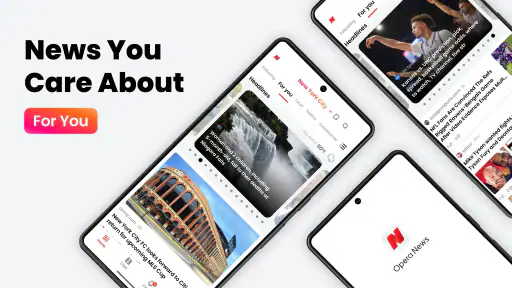
First off, Opera News boasts an impressive aggregation of news sources. You no longer need to hop between different apps to get your daily dose of info. Whether it’s international headlines or local gossip, this app has got you covered. The Home tab is sleek and easy to navigate, giving you a bird’s-eye view of trending topics across the globe.
Personalized News Feed
I was genuinely surprised by how well this app tailors news to your interests. It’s like it knows what you want before you do. Using AI technology, it curates articles that align with your reading habits. So, if you’re into tech news or obsessed with celebrity drama, Opera News ensures that’s what you’ll see the most.
More From Our News Desk

Android Auto Makes the Case for Quieter Car Software

MobiOffice: Transforming Mobile Productivity with Seamless Integration

EA SPORTS FC™ Mobile Soccer: Redefining Mobile Sports Gaming

How Microsoft OneDrive Became a Mobile Productivity Giant

How Google Translate Breaks Language Barriers Effortlessly

Why Google Sheets Is the Ultimate Mobile Productivity Tool
That personalization is a useful starting point, but I wouldn’t let it make every decision. If my feed keeps returning to one subject, I would deliberately seek out a different topic instead of assuming the most visible stories are the only ones worth my time. A small check like that helps keep a convenient feed from becoming a narrow one.
Offline Reading
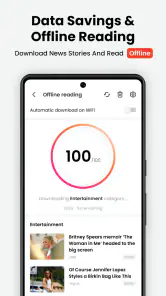
One of my favorite features? Offline reading. We all know the struggle of trying to read an article on a shaky subway ride with zero mobile data. Opera News lets you save articles to read offline, which is a lifesaver for those long commutes or when you’re traveling in areas with poor reception.
For the smoothest routine, I’d save a few pieces while connected and choose ones I genuinely expect to finish. That makes offline reading a planned part of the commute rather than a last-minute rescue after a connection drops. It also suits readers who prefer to set aside a short block of time for longer stories instead of opening them amid a busy day.
Interactive User Experience
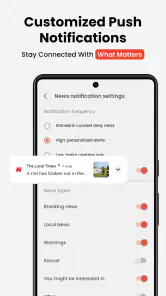
The app isn’t just about reading passively; it encourages interaction. You can comment on articles, share them with friends, or even engage in discussions. It’s a great way to dive deeper into a topic and see what others think. Plus, the app’s notification system ensures you never miss out on breaking news.
Interaction can add a human perspective, but comments are best treated as conversation rather than verification. I’d read the article itself before weighing in, and I’d be selective about notifications so that a stream of alerts doesn’t turn a quick check into constant interruptions. For readers who like to discuss current events, comments and sharing are a welcome extra; for anyone who wants quiet reading, they are easy to regard as optional parts of the experience.
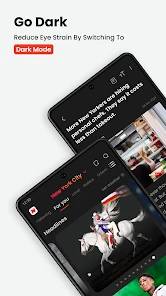
And let’s not forget the night mode feature, which is a blessing for those late-night reading sessions. Your eyes will thank you!
Living with it over time
Opera News is free, comes from Opera, and is rated Teen. Its broad reach—over 100 million installs—suggests it is familiar to many readers, while its average rating is 4.5 from around 687,000 ratings. It sits in the news and magazines space, where the usual alternatives range from direct newspaper apps to other aggregators. The trade-off is straightforward: an aggregator offers a quicker, mixed overview, while a publisher’s own app may be preferable when I want to stay close to one newsroom’s coverage and presentation.
For long-term use, I would keep the routine modest: check the feed when I have time, save only stories I plan to read, and review whether alerts are helping or just pulling me back into the app. The current version is 13.4.2254.80007, and the app supports Android 6.0 and newer. Those details make it accessible to a range of Android devices, but the lasting value still depends on whether its mix of discovery and convenience fits my habits.
Choosing a sustainable reading habit
The best way I can see to judge its staying power is to give the feed a clear job. I’d use it as a front page for discovery, not as an obligation to keep up with every alert or headline. A quick scan can surface a local development or a subject I hadn’t thought to search for; after that, I can decide whether to read, save, or move on. That simple choice keeps the app useful without letting the feed set the pace of my day.
For example, if I have a few minutes before work, I might scan the main stories, open one local report that affects my plans, and leave the rest for later. During a lunch break, I could return to a saved article rather than start another round of endless scrolling. The value is in separating discovery from reading: the feed helps me notice possibilities, while a saved item gives me a deliberate next step. If I never return to saved pieces, that is a sign to save fewer rather than accumulate a reading backlog.
That approach also helps answer whether the app is suitable for someone who wants a dependable daily briefing. It can be a convenient starting point, but I would still check that the stories I care about are represented and look beyond the feed for important or fast-changing subjects. Readers who need a highly controlled, source-by-source briefing may prefer a direct publisher app or a manually chosen set of outlets. Readers who want a broad sampler without maintaining several separate apps are more likely to appreciate the trade-off.
Where convenience has limits
An aggregated feed saves the effort of visiting multiple sources, but it also asks me to accept a layer of selection between me and the stories. That is not automatically a problem; it is simply a reason to pay attention to what keeps appearing and what does not. If a subject is important to my work, neighborhood, or family, I would search for additional reporting rather than assume a prominent card tells the whole story. I would also distinguish the article’s reporting from the reactions beneath it, since comments can show how readers respond without settling what happened.
There is a practical attention cost as well. A stream of fresh stories can make a short check feel productive even when I have only glanced at headlines. I’d set a small purpose before opening the app—check local developments, find one longer read, or catch up on a topic—and close it once that purpose is met. If I wanted a calmer experience with fewer choices, a single trusted newspaper app or a newsletter with a fixed edition could be a better fit than a constantly refreshed mix.
On the other hand, I would not expect a direct publisher app to do the same job as a broad aggregator. A publisher’s app is useful when I already know which newsroom I want to read, while this app makes more sense when I want to scan across subjects and discover what deserves a closer look. Keeping both approaches distinct can be sensible: use the feed to find a lead, then consult another report when accuracy, context, or a specific local detail matters.
Small choices that improve the experience
I’d make the first week a test of relevance rather than a contest to read the most. When a story genuinely interests me, I would follow that interest by opening the piece, and I would notice whether the next sessions continue to show a useful mix. If the recommendations become repetitive, I’d deliberately browse beyond my usual subjects. That gives the feed a chance to reflect broader interests without assuming that every recommendation is a reliable map of what matters.
Notifications are another choice worth revisiting. Breaking updates can be useful when I am following a major event, but constant prompts can turn news into a string of interruptions. I’d keep alerts only if they lead me to something I truly want to know promptly; otherwise, opening the app at a time I choose is a more comfortable routine. Similarly, I’d treat offline saves as a short queue for a commute or a planned reading break, not as a permanent archive. Those habits are more likely to make the feature useful month after month.
One question many readers have is whether a free news app can replace their regular sources. I would not use it that way. It can reduce the friction of checking a variety of stories, but a reader who depends on a particular newsroom’s depth, editorial voice, or consistent coverage should keep that source in the mix. Another reasonable question is whether the app is only worthwhile for breaking headlines. I think its value can also come from casual discovery and saved reading, provided those uses fit naturally into the day rather than creating another feed to manage.
The age guidance is Teen, so I would keep that in mind when deciding whether it is suitable for a younger reader, especially because news feeds can include stories about serious events. For my own use, the more important decision is whether the range and tone of what appears feel appropriate and useful. I’d review the experience after a few weeks: am I finding worthwhile local and broader coverage, or am I mostly scrolling past stories? That answer is a better guide to keeping it installed than the initial novelty.
Final Thoughts
All in all, Opera News: breaking & local is a must-have for anyone who wants to stay informed without feeling overwhelmed. It’s intuitive, comprehensive, and quite frankly, a game-changer in the world of news apps. Why waste time sifting through irrelevant content when you can have a tailored news experience right at your fingertips?
If you haven’t tried it yet, you’re missing out on a smarter way to consume news. Give it a go, and see how it transforms your daily news routine!
My lasting verdict is a little more measured: I’d keep it if its feed helps me discover useful stories and its saved articles fit naturally into my day. If I found myself opening it out of habit without reading attentively, or wanted tighter control over which outlets shape my coverage, I’d switch to a smaller set of direct sources. Its strongest case is recurring convenience, not a promise that one app can replace thoughtful news reading.
Opera News: breaking & local Frequently Asked Questions
What does Opera News offer, and is it suitable for someone who wants local coverage?
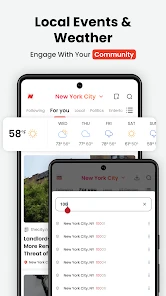
Opera News is a news app built to bring global and local stories together in one place. Its focus is reflected in its promise to deliver news as it happens, wherever you are, making it relevant if you want to follow both broader headlines and stories closer to home. The feed is personalized, so the topics you see can reflect your interests.
Who develops Opera News, and how established is the app?
Opera News is developed by Opera and is part of the News & Magazines category. It has been available since July 24, 2018, and has grown into a widely used news app, with over 100 million installs. If you are considering a familiar, established option for reading news, its broad reach may be reassuring, though the best fit still depends on the topics and reading experience you want.
Does Opera News require an account, and can I start reading right away?
Opera News is designed to provide a personalized news feed, so you can begin exploring stories and choose topics that interest you as you use the app. The app is free and is intended to bring global and local news together in one place. If you prefer, you can first review its Teen content rating and confirm that your device runs Android 6.0 or later before downloading.
What is Opera News and how does it work?
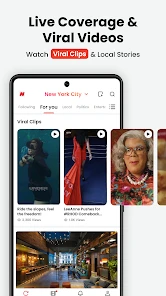
Opera News is a news aggregator app that provides users with personalized news feeds based on their preferences and browsing history. It sources news from a variety of international and local publishers, delivering articles, videos, and other media content. The app uses AI algorithms to curate and recommend stories that are most relevant to the user, ensuring they stay updated with the latest breaking and local news.
Is Opera News free to use and does it contain ads?
Yes, Opera News is a free-to-use application available on both Android and iOS platforms. However, like many free apps, it does contain ads, which help support the service. Users may encounter advertisements while browsing news articles or within the app interface. Currently, there is no ad-free subscription version available, so users should expect occasional ads during their usage.
Pros
- Highly customizable news feed.
- Offline reading mode available.
- Fast and lightweight app.
- Regular updates and improvements.
- Wide range of news categories.
Cons
- Ads can be intrusive.
- Limited offline news storage.
- Occasional notification glitches.
- Some news sources are biased.
- Requires stable internet for updates.
- Category
- News & Magazines
- Version
- 13.4.2254.80007