Police Scanner - Live Radio
- 17.30K
- 4.8
- Installs
- 10.00M
- Price
- Free
Screenshots
Analysis by Reviewed
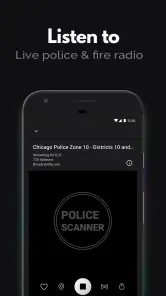
I treat Police Scanner - Live Radio as a live listening option, not as a dependable replacement for emergency alerts or verified local reporting. Its usefulness rises and falls with the connection: if the stream is reachable, I can listen in; if coverage drops, the audio may stop being a useful way to follow events. That distinction matters when I’m checking on something nearby or heading into an area with uncertain reception.
When the connection shapes the experience
Listening can feel immediate when a channel connects smoothly, but live audio is only useful if your network can keep the stream going. In a weak-signal spot, I’d expect the experience to be less dependable than a saved article or a text-based news feed. If you’re following something important, keep an established local news source or official alert channel handy rather than treating scanner audio as your only update.
There’s also a useful listening habit here: choose the channel before you need it, then give it a moment to connect while you still have time to switch. That reduces fumbling if you’re heading out or moving between areas. A scanner stream is best approached as a window into radio activity, not a promise that every relevant call will be available or easy to interpret.
Good fits for commutes, chores, and local curiosity
The app is most appealing to people who enjoy radio monitoring as a background activity: local-news followers, curious listeners, and anyone interested in how emergency services communicate. A realistic use is checking a nearby channel over breakfast, then leaving a familiar station on while doing household tasks. The value is less about staring at the phone and more about having audio available when you want a sense of what is unfolding nearby.
For a commute, background listening can make the trip more engaging, but I wouldn’t recommend handling channel searches while driving. Set things up before you leave, keep the volume at a sensible level, and let the audio remain secondary to the road. If you need precise directions, verified incident details, or a calm summary, a conventional news app is the better tool.
What to expect from coverage and interpretation
Police Scanner - Live Radio is a news-and-magazines app from Police Scanner, Scanner Live Radio App. It is free to install, with optional in-app purchases ranging from $1.49 to $64.99 per item, and it is rated Teen. The app has a 4.8 average from around 126,000 ratings, with more than 10 million installs. Those figures suggest a widely used listening option, though popularity can’t tell you whether the channel you care about will be available in your area.
The app’s version is 1.28.2-251125140, and it runs on Android 6.0 or later. I’d check that your device meets the requirement before installing, then explore the channel search to see whether it turns up useful local choices. Scanner audio can contain shorthand, fragmented exchanges, or details that make little sense without context; it is not the same as a reporter’s verified account. That’s a key trade-off compared with ordinary news apps, which are slower to provide a live sound but usually easier to understand.
More From Our News Desk

Weather by Xiaomi Review: Clear at a Glance, Less Clear Up Close

X Under Pressure: Can It Recover When Posting Goes Wrong?

Clash of Clans Is Won Between the Battles

Android Auto Makes the Case for Quieter Car Software

MobiOffice: Transforming Mobile Productivity with Seamless Integration

EA SPORTS FC™ Mobile Soccer: Redefining Mobile Sports Gaming
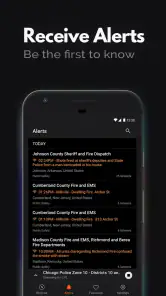
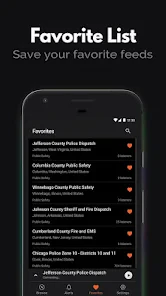
I’d also be selective about alerts and favorites. Marking only the channels you genuinely want to revisit makes the app easier to use than collecting every interesting result. A listener-count alert can point toward activity drawing attention, but it doesn’t establish what happened or whether the event affects you. Treat it as a prompt to check reliable sources, not as confirmation.
Connectivity and data are worth considering before making this part of a daily routine. Live audio can use mobile data, so if your plan is limited, listen over Wi-Fi when practical or keep an eye on your device’s data-usage settings. I would avoid assuming that a channel will continue through a tunnel, rural dead zone, or unstable connection. If uninterrupted access is essential, a radio or an official alert service may be a more dependable companion.
Listening with the right expectations
Ever had that curious itch to know what's happening in your neighborhood, or just wanted to dive into the adrenaline-pumping world of police chases and emergency responses? Well, the Police Scanner - Live Radio app might just be your new best friend. This nifty application turns your smartphone into a live police scanner, letting you tune into real-time broadcasts from law enforcement agencies, fire departments, and other emergency services. But does it really live up to the hype? Let's dive in!
Getting Started with Live Action
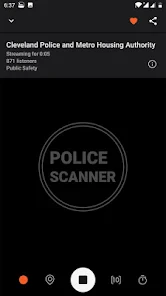
First things first, installing the Police Scanner - Live Radio app is a breeze. Available for both Android and iOS, the app is lightweight and doesn't demand much from your phone's resources. Once you've got it up and running, you're greeted with a simple interface that's easy to navigate even if you're not tech-savvy.
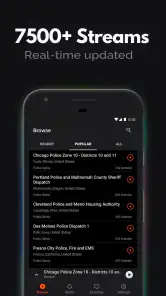
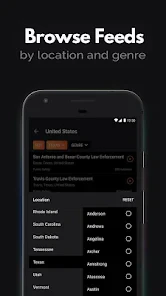
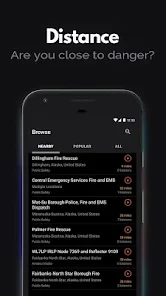
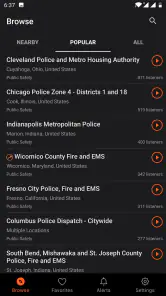
The app offers a plethora of channels to choose from, covering a wide range of frequencies across various states and cities. Whether you're tuning in from bustling New York or the serene landscapes of Montana, there's likely something for you. The streams are surprisingly clear, and I was impressed by how quickly they connected without any noticeable lag.
Diving into the Features
One of the standout features of this app is its ability to let you mark your favorite channels. This is particularly handy if you have specific areas or events you're keen on following. There's also an alert feature that notifies you when a channel reaches a high number of listeners, which usually indicates some major event or incident happening. Trust me, it's a game-changer for staying informed.
The app also supports background listening, so you can go about your day while keeping an ear out for any interesting broadcasts. This feature has made my commutes and daily chores way more interesting and informative. Plus, the app includes a search function that allows you to find specific channels or frequencies effortlessly.
Why It Stands Out
Now, I've tried a few similar apps, but what sets this one apart is its user-friendly design and the sheer number of available channels. The developers have clearly put a lot of thought into ensuring users have a seamless experience. The real-time aspect is a thrill, especially when you stumble upon live police chases or major fire department callouts. It's like having a front-row seat to the action, minus the danger.
Another cool aspect is the community feel. The app has a dedicated section where users can discuss ongoing events, share insights, or simply chat about their favorite channels. It adds a social element that I didn't expect but thoroughly enjoy.
A useful routine for a curious listener
I’d use the search function as a shortlisting tool rather than a reason to keep hopping between channels. Search for a place or frequency you recognize, listen briefly, and save only the channels that make sense for your regular area. That gives you a practical starting point the next time you open the app, instead of turning a quick check into a long hunt through unfamiliar feeds.
There is a second trade-off in deciding what to follow. A channel that sounds busy may be interesting, but activity alone does not mean it is relevant to your street, route, or plans. I’d keep one or two familiar local choices easy to reach and use broader searches only when I have time to explore. This keeps the app from becoming a noisy stream of fragments that are hard to place.
Where scanner audio is not the best answer
If I wanted a concise explanation of a developing event, I’d choose a local news report over raw radio traffic. A reporter can put separate details into context, while a scanner listener has to make sense of brief exchanges and may not hear the whole story. If I needed an urgent instruction, I’d turn to an official alert source rather than infer what to do from a broadcast. The app is strongest for listening and curiosity, not for making safety decisions.
It may also be a poor fit for anyone who finds tense or incomplete emergency audio stressful. Calls can sound serious without giving a clear outcome, and hearing fragments can leave more questions than answers. I’d avoid leaving it on around children who may misunderstand what they hear, despite the app’s Teen rating, and I would not use it as background sound when I need focused attention.
Making the connection work for your routine
For a realistic everyday check, I’d open the app at home while connected to Wi-Fi, search for a nearby channel, and confirm that the feed is understandable before relying on it as casual background listening. If I’m about to leave, I’d settle on a channel first rather than trying to browse while walking through a busy station or getting into a car. Once out, I’d keep a text news app available for moments when audio is inconvenient or the mobile connection weakens.
That approach also answers a common practical question: can I count on listening everywhere I go? I wouldn’t. The experience depends on both an available stream and a stable connection, so tunnels, patchy rural coverage, and crowded network conditions can interrupt the routine. If continuous access matters more than the live-radio experience, a conventional radio or an official alert service is a better backup.
For people watching mobile data, the sensible choice is to make listening deliberate. Audio streams can consume data while they run, so I’d use Wi-Fi for longer sessions when convenient and check the phone’s own data-usage controls if I listen often. I wouldn’t leave a stream running simply because it can play in the background; background convenience still means an active connection and ongoing data use.
The app is free to install, but optional purchases are available, with individual items priced from $1.49 to $64.99. I’d begin with the free experience and decide whether any paid option fits my actual listening habits before spending. Someone who only checks a local feed occasionally may not need to buy anything, while frequent listeners can weigh the available choices inside the app against how much value they get from regular use.
Conclusion: A Must-Try for the Curious
In a world where staying informed is more crucial than ever, the Police Scanner - Live Radio app offers a unique and engaging way to keep up with local happenings. Whether you're in it for the thrill or the information, this app delivers on both fronts. It's like having a personal window into the world of emergency services, right from the palm of your hand.
So, if you're someone who loves to stay in the loop or just enjoys the thrill of live radio, give this app a shot. It's a fascinating tool that brings the chaos and heroism of emergency response right to your ears. Who knew staying informed could be this exciting?
My connectivity verdict
For me, the best reason to try this app is the particular perspective live radio offers: brief, immediate audio that can make local activity feel more tangible than a headline. Its free starting point and searchable channels make it approachable for curious listeners, and favorites can help turn occasional browsing into a simple routine. But I’d keep the role narrow: it is an optional listening companion, not a reliable substitute for alerts, reporting, or a clear explanation of an incident.
Choose it if you’re comfortable with streams that depend on network access, enjoy interpreting radio traffic, and can listen without letting it distract you. Skip it if you need uninterrupted coverage, prefer concise written updates, or want confirmed answers rather than fragments. With a known channel saved, a text-based source ready, and sensible attention to mobile data, I think it can be an interesting addition to a local-news routine—as long as you know when to put the audio aside.
Police Scanner - Live Radio Frequently Asked Questions
What should I know before listening to emergency radio broadcasts?
Police Scanner - Live Radio is centered on live public-safety audio, so what you hear may include reports of emergencies and ongoing incidents. Treat broadcasts as information for general awareness rather than as official instructions or a substitute for emergency services. If you need help or face immediate danger, contact the appropriate local authorities directly.
Can I use Police Scanner - Live Radio while traveling?
The app is designed for listening to feeds from different locations, which may make it useful when you are away from home. Keep in mind that listening depends on an internet connection, and the broadcasts you can access may vary by area. When traveling, use the app responsibly and be mindful of local rules around scanner listening.
Is Police Scanner - Live Radio free to download, and does it include purchases?
Police Scanner - Live Radio is free to download, so you can try its live-radio listening experience without paying upfront. The app also offers in-app purchases, with items ranging from around $1.49 to around $64.99. Check the purchase options in the app before buying, and review any payment prompts carefully so you know what you are choosing.
What is Police Scanner - Live Radio, and how does it work?
Police Scanner - Live Radio is an app that allows users to listen to live audio feeds from police, fire, and emergency radios. By connecting to publicly available radio frequencies, the app streams real-time broadcasts from various law enforcement agencies. Users can select specific channels or frequencies to monitor activities in their local area or worldwide, making it a valuable tool for staying informed about public safety events.
Is the Police Scanner - Live Radio app legal to use?
Yes, using Police Scanner - Live Radio is legal in most regions, as it only accesses publicly available radio frequencies. However, users should be aware of their local laws, as certain jurisdictions may have restrictions on listening to police communications. It's important to use the app responsibly and not to interfere with law enforcement activities.
Pros
- Real-time police updates.
- Wide coverage of regions.
- User-friendly interface.
- Customizable alerts.
- Free to use.
Cons
- Ads can be intrusive.
- Limited offline access.
- Battery draining.
- Might breach privacy.
- Audio delay issues.
- Category
- News & Magazines
- Version
- 1.28.2-251125140











