CNN: Live & Breaking News
- 107.92K
- 4.4
- Installs
- 50.00M
- Price
- Free

Screenshots


Analysis by Reviewed
I often reach for a dedicated news app when I want to check what is happening without getting pulled into an endless social feed. CNN: Live & Breaking News is built for that quick check-in as well as longer reading sessions, and its strongest appeal is having a familiar newsroom’s coverage gathered in one place. I find it most useful when I want a broad overview, though it works best when I treat it as one source rather than my only route to understanding a complicated story.
Reading and finding a story
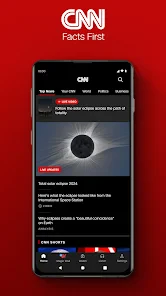
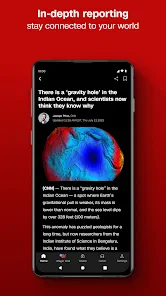
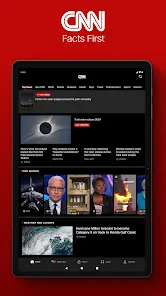
The app is from CNN, and its focus is news and magazines: headlines, developing stories, and coverage across subjects such as politics, business, sports, and entertainment. In practice, that range makes it easy to move from a major event to a lighter topic without switching apps. The interface is designed for browsing, so I can scan headlines first and open only the stories that matter to me. If I am following a specific issue, searching for it is a more deliberate route than repeatedly scrolling through the main feed.
That distinction matters because a constantly changing news feed can make it hard to tell what deserves attention. I use the top-level headlines for a quick sense of the day, then open a story when I need context. For a developing event, checking back later can reveal updates that were not available during the first visit. I would not treat an early headline as a complete account: the useful habit is to read beyond the title and return as the story develops.
Stay Updated Anytime, Anywhere
Picture this: You’re on a coffee break, and instead of mindlessly scrolling through social media, you could be catching up on the latest headlines from around the globe. The CNN: Breaking US & World News app ensures you’re always in the know, with real-time updates on breaking news, politics, business, sports, and entertainment. It’s like having a news channel right in your pocket.
All About That User Experience
Let’s talk about the user experience because, honestly, it's a big deal. The app’s interface is sleek and intuitive. You don’t have to be a tech guru to navigate through it. Whether you're searching for specific stories or just browsing the latest articles, everything’s just a few taps away. Plus, with customizable notifications, you can choose which topics you want to be alerted about. No more unnecessary buzzing at odd hours!
Notifications are most useful when I keep them selective. A phone alert can be a good nudge for a major development, but a busy news cycle can interrupt work, travel, or rest if every topic is allowed to compete for attention. I’d start with only the subjects I genuinely want to follow, then adjust after a few days. For a calmer routine, I can leave alerts aside and check the app at a chosen time instead; that keeps the news available without making every update feel urgent.
Multimedia Content That Engages
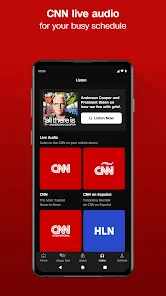
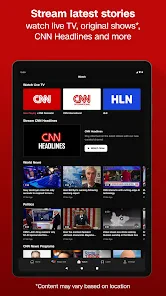
Reading’s great, but sometimes you want a little more. This app delivers with its rich multimedia content. From videos to podcasts, the app offers a dynamic way to consume news. There are times when watching a short clip or listening to a podcast fits better into your schedule, and this app has got you covered.
More From Our News Desk

Weather by Xiaomi Review: Clear at a Glance, Less Clear Up Close

X Under Pressure: Can It Recover When Posting Goes Wrong?

Clash of Clans Is Won Between the Battles

Android Auto Makes the Case for Quieter Car Software

MobiOffice: Transforming Mobile Productivity with Seamless Integration

EA SPORTS FC™ Mobile Soccer: Redefining Mobile Sports Gaming
Personalized News Feed
One of my favorite features? The personalized news feed. The app learns from your reading habits and curates content that matches your interests. It’s like having a personal assistant who knows exactly what you want to read. This feature makes catching up on news feel less like a chore and more like an engaging daily ritual.
Personalization is convenient, but I would not let it become my entire view of the news. A feed shaped by what I already read can make familiar subjects easier to find while leaving other important topics less visible. I sometimes use the broader headlines as a counterweight, especially when I want a quick scan beyond my usual interests. That small change helps keep a tailored feed useful without mistaking it for a complete picture.
Reliable Source of Information
In a world where misinformation spreads like wildfire, having a reliable news source is crucial. The app carries the trust and credibility of CNN, ensuring that the news you get is well-researched and factual. This aspect alone makes it a must-have for anyone who values authenticity and accuracy in their news consumption.
I still recommend comparing coverage when a story is contentious or especially consequential. A single outlet can offer useful reporting and context, but reading another reputable source may show which details are shared and where interpretations differ. That is not a reason to avoid CNN; it is a sensible way to use any outlet, particularly when a headline could influence a decision or shape a strong opinion.
Access in different situations
On an ordinary morning, I might scan headlines while waiting for a train, save deeper reading for a quieter moment, and use a video or podcast when my hands are occupied. That flexibility is helpful, but it does not make every format equally convenient everywhere. Video can be awkward in a quiet waiting room or when I have limited attention, while text is easier to skim discreetly. If I need to follow a story while moving, I wait until I can focus rather than trying to read on the go.
For readers who benefit from larger text, stronger contrast, screen readers, or other specific accessibility settings, I would check how the app behaves on their own device before relying on it as a primary source. Operating-system accessibility tools may help, but the actual experience can depend on the device and the content format. Multimedia also has trade-offs: a clip may clarify an event, while an article is often easier to revisit and scan for a detail.
Making a quick check more useful
One practical approach is to use the app in two passes. I first scan the main headlines without opening every alert or story; then I pick one item that matters and read it through, rather than jumping among several partial accounts. If an article raises a question, I can search for the specific subject instead of relying on the order in which stories appear. This turns a brief visit into a purposeful check-in and makes it easier to stop when I have the context I need.
That routine suits a real in-between moment: while waiting for a meeting to start, I can glance at the headlines, open a developing report only if it affects something I follow, and leave longer reading until I have time to concentrate. I would avoid reading while walking or driving; the convenience of having news on a phone does not make divided attention safe. For a short commute as a passenger, text may be more discreet than video, while listening can be a better fit if looking at a screen is inconvenient.
Who will get the most from it
I think this is a good fit for someone who wants a recognizable, general-purpose news source, follows breaking developments, and appreciates a mix of written and multimedia coverage. It also suits people who prefer a dedicated place to check headlines instead of opening a social network and sorting through unrelated posts. If you want a tightly focused specialist publication, a local-only service, or a feed assembled from many publishers, a different news app may suit you better. CNN’s own perspective and editorial choices are part of the experience, so I would not choose it expecting a neutral collection of every outlet’s reporting.
For everyday use, a practical routine is to scan the main headlines once, open only the stories that affect your interests, and return to a developing report when there is a meaningful reason. That is less tiring than treating every alert as a demand for attention. It also makes the app easier to use alongside other sources: CNN can be the first stop for a broad update, while another outlet can provide a useful comparison on a complex issue.
What to expect before installing
The app is free to download, has an Everyone 10+ age rating, and offers in-app purchases priced from $3.99 to $69.99 per item. I would check the purchase details in the app before committing, especially if I only want basic headline browsing. Its current version is 25.23.0, and it requires Android 8.1 or later. The app has a 4.4 average from around 587,000 ratings, with more than 50 million installs, which suggests it is widely used but does not guarantee that its layout or editorial mix will suit everyone.
One useful decision before installing is whether I want one newsroom’s full experience or a multi-source aggregator. CNN is the more direct choice if I already value its reporting and want its stories, clips, and alerts together. An aggregator is better when comparing publishers at a glance matters more than following one outlet’s presentation. Likewise, if I mainly need local notices or specialist analysis, I would look for a service built around that narrower need rather than expecting this app to cover it all.
As a news and magazines app, CNN has been available since April 18, 2011, and the long-running presence gives it an established place in the category. My main advice is to make the experience work for your attention: choose alerts carefully, use the broad headlines to avoid an overly narrow feed, and cross-check stories where the stakes are high. That is a more balanced way to get value from its speed and range without letting a personalized stream decide what counts as the whole story.
In conclusion, if staying informed is your thing, then this app is your new best friend. It’s user-friendly, packed with features, and most importantly, keeps you connected to the world. So, why not give it a try and see how it transforms your news-reading experience?
An inclusive fit, with sensible expectations
What I appreciate most is that the app offers several ways to engage with news, so a reader can choose between scanning, reading, watching, and listening according to the moment. That variety can make staying informed feel more manageable for people with different routines and preferences. At the same time, format choice is not the same as guaranteed accessibility: if comfortable text size, dependable spoken output, or low-stimulation browsing is essential, I would test those tasks on my own device before making CNN my daily news home.
Overall, I’d recommend it to readers who want CNN’s coverage close at hand and are willing to shape notifications and reading habits to suit themselves. I’d skip it if I wanted an outlet-neutral digest, a specialist source, or a reading experience whose accessibility needs I could not verify in advance. Used thoughtfully, it is a convenient way to keep up; used as the only lens on the world, it is less convincing.
CNN: Live & Breaking News Frequently Asked Questions
What kind of news can I expect to find in CNN: Live & Breaking News?
CNN: Live & Breaking News is a news app focused on keeping readers informed about breaking stories, live updates, and headlines. It brings together coverage of current events and articles, with video content also available in the app. If you want one place to follow developing news and browse reports from CNN, its format is designed for that kind of regular check-in.
Can I watch live news and video in the CNN app?
The app includes live video coverage and a video library with CNN shows and clips available on demand. That makes it useful if you prefer to watch some coverage rather than read every update. Video availability may depend on the content and access offered within the app, so check the relevant screen for any viewing requirements before relying on it for a particular program.
Will CNN: Live & Breaking News send notifications about breaking stories?
Yes, the app offers breaking news alerts, and users can customize notifications to receive updates on topics they choose. This can help you follow developing stories without repeatedly opening the app. If you prefer fewer interruptions, review the notification options and select the subjects that matter to you; you can tailor what arrives instead of treating every alert as equally important.
Is CNN: Live & Breaking News free to download, and are there in-app purchases?
CNN: Live & Breaking News is free to download, so you can try its news coverage without paying upfront. The app also offers in-app purchases, with listed items ranging from $3.99 to $69.99 each. Those purchases may relate to paid access or other app offerings, so check the details shown in the app before completing a transaction.
What age group is CNN: Live & Breaking News suitable for?
The app has an Everyone 10+ content rating, making it intended for a broad audience while recognizing that some news coverage may be better suited to older children. News can include serious or unsettling real-world events, so parents may want to review the app and its alerts with younger users and consider which topics they follow.
Pros
- Comprehensive news coverage
- User-friendly interface
- Customizable notifications
- Offline reading mode
- Exclusive video content
Cons
- Frequent ads
- High data consumption
- Limited offline content
- Subscription required for full access
- Occasional app crashes
- Category
- News & Magazines
- Version
- 25.23.0