Opera GX: Gaming Browser
- 7.11K
- 4.6
- Installs
- 10.00M
- Price
- Free

Screenshots






Analysis by Reviewed
When I think about a phone browser, I want it to get me to the page I need without turning every quick search into a project. Opera GX: Gaming Browser takes a different route: it gives gaming a visible place in the browsing experience, with related content and a more expressive look. That makes it interesting if gaming is part of your daily routine, though a themed interface alone is not a reason to switch.
What free access means in practice
Opera GX is a free communication app from Opera, so trying it does not require a purchase. That makes it easy to judge for yourself whether its look and gaming-oriented tools suit your routine. It is rated for Everyone, and its current version is 3.0.6; those details are useful context, but the real value comes down to whether you will use its features rather than simply enjoy the theme.
For me, “free” is useful because it lets you test the browser against your own habits before deciding whether it deserves a place on your home screen. There is no paid purchase to weigh against its features here. The more practical cost is attention: if gaming content, customization, or extra controls make browsing busier without helping you, the app may not offer much personal value even at no charge.
Where the value shows up
A browser earns its place by making ordinary tasks easier. If you check gaming news, keep several pages open, or want a browser that feels distinct from a plain utility, the added controls and customization can make everyday browsing more enjoyable. If you mainly open a browser to search once and leave, those extras may not change much.
A useful way to judge the value is to give it a real task rather than explore the interface indefinitely. For example, use it to look up a game update, compare a couple of related pages, and then return to your regular browsing. If the gaming material helps you discover something you would otherwise search for separately, that is a practical benefit. If you ignore it after the first few visits, the appeal may be mostly cosmetic.
Game-Changing Features
First off, the Opera GX browser is designed with gamers in mind. I found the GX Control panel particularly useful. It allows you to limit the CPU and RAM usage, which means you can keep your games running smoothly without sacrificing browsing speed. This feature alone is a game-changer, especially if you're like me and tend to have multiple tabs open while gaming.
On a phone, though, I would treat any resource-control feature as something to test in context rather than a promise that every game or page will behave better. Try it while doing the kind of multitasking you actually do, then compare how the phone feels with your usual setup. If you browse only on mobile and do not have a game running alongside it, the panel may matter less than the browser’s everyday comfort and speed.
More From Our News Desk

Weather by Xiaomi Review: Clear at a Glance, Less Clear Up Close

X Under Pressure: Can It Recover When Posting Goes Wrong?

Clash of Clans Is Won Between the Battles

Android Auto Makes the Case for Quieter Car Software

MobiOffice: Transforming Mobile Productivity with Seamless Integration

EA SPORTS FC™ Mobile Soccer: Redefining Mobile Sports Gaming
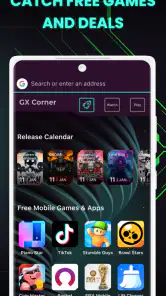
Another cool feature is the GX Corner. It's like having a gaming news hub directly in your browser. I love that I can quickly check out the latest gaming releases, deals, and news without having to scour the internet. It's all right there, neatly organized and updated regularly.
A small gaming-news routine
A realistic use for GX Corner is a quick check during a break: I can browse gaming news or look over releases and deals, then return to what I was doing without opening a separate search for every topic. That convenience is most useful when gaming is already a regular interest; it is less compelling if you prefer to follow a small number of sources directly.
I would use that hub as a starting point, not as a replacement for checking details before making a decision. If a release catches your eye, open the relevant page and verify the information that matters to you there. This keeps the convenience of a quick scan without treating a browser’s curated view as the final word on every game or offer.
Testing it on your own phone
On a phone, the best way to judge a browser is to try it with your actual routine: open the pages you visit most, see whether the interface feels comfortable, and decide whether the gaming material is a helpful shortcut or visual clutter. I would keep another browser available until those habits settle. Switching is worthwhile only if the specific features improve your day-to-day browsing, not just because the theme looks different.
It is also worth testing a few different situations rather than relying on a first impression. Use it for a quick search, for a longer article, and for moving between several pages. Notice whether you can find the controls you need without interrupting what you are reading. That simple check helps answer a practical question: does the gaming identity make this browser more pleasant to use, or does it get between you and the page?
Making the interface yours
Customization is key for any gamer, and Opera GX doesn't disappoint. The browser offers a plethora of themes, colors, and sound effects to choose from, allowing you to create a truly personalized experience. I had a blast experimenting with different themes and even settled on a neon green aesthetic that matches my gaming setup perfectly.
My advice is to customize for comfort before chasing a dramatic look. A high-contrast theme may feel fun at first, but the best choice is the one that remains easy to read during ordinary browsing. Sound effects are similarly optional in spirit: if they make the experience feel lively, keep them; if you browse in quiet places or prefer less feedback, dialing back the sensory extras makes more sense.
Additionally, the built-in ad blocker is a fantastic addition. It keeps my browsing experience clean and uninterrupted, saving me from those pesky ads that tend to pop up at the most inconvenient times.
When a page looks incomplete or a control does not work as expected, I would check whether blocking is involved before assuming the site itself is broken. Turning the blocker off for that situation can be a useful troubleshooting step. This is a trade-off worth knowing: reducing advertising clutter can make routine reading more comfortable, but some pages may depend on elements that a blocker affects.
How it compares with familiar browsers
Compared with a conventional mobile browser, GX gives more attention to gamer identity, presentation, and gaming-related browsing. That focus is its appeal, but it can also be unnecessary: someone who prioritizes a familiar, minimal interface may prefer a standard browser they already know. I would not choose a browser solely for its visual effects; I would first ask whether I want the gaming hub and customization in regular use.
Compared with a dedicated gaming news app, its advantage is that the content sits inside a browser, where you can move from a topic to related pages without treating news and web browsing as separate activities. The trade-off is that a specialist news service may suit someone who wants a tightly focused feed, while GX is still meant for browsing more broadly. Likewise, it can bring gaming-related browsing into one place, but it does not replace a game launcher or a chat service.
The ad blocker can make pages feel less cluttered, but I treat it as a convenience rather than a guarantee that every site will look or behave exactly as intended. If a page relies on advertising or embedded elements, disabling or adjusting blocking may be the sensible troubleshooting step. Likewise, sound effects and strong visual styling are personal preferences, not automatic improvements; I would turn down the distractions if I wanted a quieter browsing session.
What to expect from performance and integration
One of the highlights of using Opera GX is its seamless integration with various gaming platforms. Whether you're using Twitch, Discord, or any other service, the browser ensures everything runs smoothly. I appreciated how easy it was to connect my accounts and keep everything in one place.
Performance-wise, this browser is a beast. Despite its focus on gaming, it doesn't compromise on speed or efficiency. Pages load quickly, and I haven't encountered any crashes or lags, which is a big plus in my book.
For my own decision, I would separate the appeal of having gaming services nearby from the question of whether I need to connect accounts at all. If you only want to read coverage or visit a service’s web page, start there; connect accounts only when doing so genuinely makes your routine more convenient. That keeps the browser useful without adding steps you do not need.
Who gets the most value, and who should pass?
With an average rating of 4.6 from around 313,000 ratings and more than 10 million installs, Opera GX clearly has broad appeal. Its 7,100 reviews also give prospective users a substantial body of public feedback to consider. I see the best fit as someone who browses gaming coverage often, enjoys customizing an interface, and wants a browser that reflects that interest. Opera has been developing the app since its June 14, 2021 release, and it remains a free option.
I would especially consider it if gaming is already woven into small gaps in your day: checking a release while waiting for a friend, reading news during a break, or keeping browser research close to a gaming session. In those moments, a hub and a distinctive interface can make the browser feel purpose-built rather than merely decorated. The benefit depends on using those elements repeatedly, not just liking them during setup.
I would skip it if you want the simplest possible browser, dislike bold themes or sound effects, or have no interest in gaming news and releases. It is also not a substitute for a dedicated game launcher or chat app: its role is browsing and bringing related material together, not replacing the services themselves. If your priority is a familiar, understated browser, the usual alternative may be the better fit.
It may also be the wrong choice if you are trying to reduce visual stimulation or keep your browser interface as consistent as possible across devices. In that case, an established general-purpose browser is likely to feel more predictable. The best reason to choose GX is not that it is aimed at gamers, but that its particular mix of browsing, gaming material, and customization solves a small problem you actually have.
My verdict on whether to try it
In conclusion, Opera GX: Gaming Browser is more than just a browser; it's a comprehensive tool for gamers. Its unique features, customization options, and seamless integration make it a must-try for any gaming enthusiast. Whether you're a casual gamer or a hardcore one, this browser is designed to cater to your needs and enhance your gaming experience.
My more practical verdict is that it is worth trying if you want gaming interests to have a convenient place in your mobile browsing, and easy to leave aside if you do not. Give GX Corner, the interface, and the controls a fair test during normal use, not just a quick tour. If they save you effort or make browsing more enjoyable, the free access makes that value straightforward; if they add noise, there is little reason to force a switch.
So, if you're looking for a browser that can keep up with your gaming lifestyle, give Opera GX a try. Trust me, you won't be disappointed!
Opera GX: Gaming Browser Frequently Asked Questions
Does Opera GX work well for everyday browsing, or is it only for gamers?
Opera GX is presented as a browser created for gamers, but that focus does not prevent it from being used for ordinary web browsing. Its gaming-inspired appearance and tools may be most appealing to players, while the core browsing experience can suit everyday searches and websites too. If you prefer a more conventional-looking browser, its distinctive style may take some getting used to.
Who develops Opera GX, and what kind of app is it?
Opera GX is a communication app developed by Opera. Its central purpose is web browsing, with a gaming-focused identity reflected in its features and design. That combination makes it different from a dedicated game: you use it to browse the web, while its gamer-oriented tools and presentation are intended to make the experience feel more tailored to players.
Is Opera GX free to download, and is it suitable for all ages?
Opera GX is free to download and is rated Everyone, so its listed content rating makes it suitable for a broad audience. It is a communication app developed by Opera, built around a gaming-focused browsing experience. The gaming look and tools may appeal especially to players, while its browser features can also be useful for everyday web use.
What operating system does Opera GX require?
Before downloading, check that your device meets the app’s minimum operating-system requirement: version 10. Opera GX is available for Android and iOS, and its mobile version is intended to bring a gaming-focused browser experience to phones. Confirming your device’s software version first can help avoid installation problems and make it easier to decide whether the app is compatible with your device.
What makes Opera GX different from regular browsers?
Opera GX is designed specifically for gamers, offering unique features like CPU, RAM, and Network Bandwidth limiters that let users optimize their gaming and browsing experience. It includes a GX Control panel for managing resources, integrated Twitch and Discord, and a gaming-inspired design with customizable color themes, sound effects, and background music to enhance the gaming aesthetic.
Pros
- Sleek gaming-inspired design
- Integrated RAM and CPU limiters
- Twitch and Discord integration
- Free built-in VPN
- Ad blocker enhances browsing speed
Cons
- Limited extensions compared to competitors
- Occasional stability issues
- Resource-heavy on low-end devices
- Customization may confuse new users
- Gaming features might be unnecessary for non-gamers
- Category
- Communication
- Version
- 3.0.6