NewsBreak: Local News & Alerts
- 146.95K
- 4.6
- Installs
- 50.00M
- Price
- Free

Screenshots


Analysis by Reviewed
I judge a local news app by whether it helps me notice what is happening nearby without turning every spare minute into another scroll session. NewsBreak: Local News & Alerts is built around that local-first idea: a personalized news feed, alerts, and a place to follow community conversations. It is a free news and magazines app from Particle Media Inc., and its focus makes it most appealing when national headlines are not enough to tell you what is changing around your neighborhood.
When local discovery matters more than a single news source
I find this kind of app especially useful when my questions are practical: what is happening near a route I use, which neighborhood stories are drawing attention, or whether a local issue is developing beyond one brief headline. A general news aggregator can offer breadth, and a newspaper app can offer a steadier editorial voice. NewsBreak sits between those habits, putting local discovery and a mixed feed together. That is convenient, but it also means I treat it as a starting point, not a replacement for reporting I rely on.
For someone who has moved to a new town, follows family in another nearby community, or wants a quick sense of what residents are discussing, that local emphasis can be more useful than opening several sites one by one. The trade-off is that a broad feed can feel less coherent than following one publication. If I want a sustained investigation or a clearly defined newspaper perspective, I would go directly to that outlet; if I want leads and local context in one place, this app makes more sense.
Local coverage at the center of the experience
Its current position is easy to understand: rather than acting like a digital newspaper for one publication, NewsBreak gathers a personalized stream of news with a strong local angle. I would reach for it to scan what is happening close to home, then use a trusted publication directly when I want sustained reporting on a particular story. Those are different jobs, and the app is more useful when I treat it as a discovery tool than as my only source of news.
The app has been available since June 17, 2016, and its current version is 25.49.0. That release history gives the product room to mature, but a version number alone does not tell me which individual features changed or how the feed has evolved. What I can judge is the present experience: location and interests shape what appears, and local stories sit alongside the wider news mix. With a 4.6 average from around 607,000 ratings and over 50 million installs, it has reached a large audience, though popularity is not a substitute for checking whether its coverage suits your area.
Make the feed useful, not endless
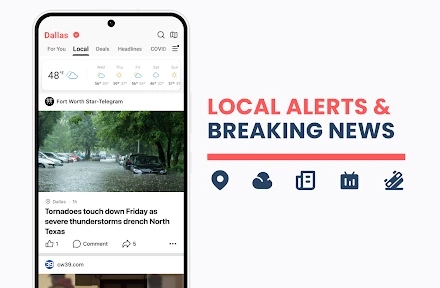
One of the coolest things about NewsBreak is how it curates news specifically for you. When I first installed the app, it asked me about my interests and location preferences. And voila! From then on, my feed was filled with news stories that actually mattered to me. No more scrolling through endless headlines that don't pique my interest. It's like having a news buddy who knows exactly what you want to hear.
That personalization is also a trade-off. A feed shaped by selected interests can save time, but it may keep serving familiar subjects if I never step outside those choices. I would periodically review what I follow and deliberately open stories beyond my usual interests, especially during a major local issue. That small habit can make the feed more useful without assuming that a personalized ranking is a complete picture of the news.
More From Our News Desk

Weather by Xiaomi Review: Clear at a Glance, Less Clear Up Close

X Under Pressure: Can It Recover When Posting Goes Wrong?

Clash of Clans Is Won Between the Battles

Android Auto Makes the Case for Quieter Car Software

MobiOffice: Transforming Mobile Productivity with Seamless Integration

EA SPORTS FC™ Mobile Soccer: Redefining Mobile Sports Gaming
Local alerts need a little judgment
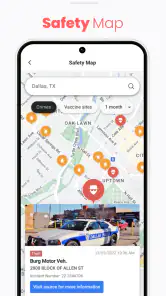
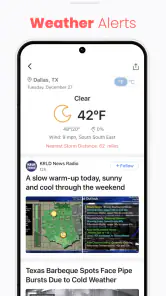
We've all been there, trying to find out what's happening in our local area, but all we get are international headlines. With NewsBreak, that problem is a thing of the past. Whether it's a new cafe opening around the corner, local weather alerts, or community events, this app has got you covered. It connects you to the heartbeat of your community like nothing else.
What really stands out is its alert feature. I remember getting a notification about a sudden road closure in my neighborhood. It saved me from a huge traffic jam, and honestly, I couldn't have been more grateful.
For everyday use, I would keep alerts focused on the kinds of updates that can change a plan, rather than allowing every headline to interrupt the day. A commuter might want to check local notifications before leaving, while someone planning a weekend could browse community coverage at a quiet moment instead. I would still verify urgent safety or travel information with an appropriate official source; a news alert is a useful prompt, not a guarantee that every detail is final.
Simple reading, with a social layer
Navigating through NewsBreak is a breeze. The interface is clean, intuitive, and clutter-free. Everything is where you expect it to be, making it super user-friendly even for those who aren't tech-savvy. Plus, the app loads quickly, which is a big plus for those of us who are always on the go.
Another feature worth mentioning is the option to save articles for later. Sometimes, I come across an interesting piece but don't have the time to read it immediately. With just a tap, I can save it and come back whenever I want. It's these little conveniences that make the app a joy to use.
That save-for-later habit works best as a deliberate reading queue: I can keep a developing local story to revisit, rather than reopening the feed and trying to find it again. If I am comparing coverage, I would save the relevant pieces and read them together, while remembering that different outlets may emphasize different facts. Readers who prefer a single publication's editorial voice may find a direct newspaper app more consistent; NewsBreak is better suited to discovering several local threads in one place.
Community comments are not the same as reporting
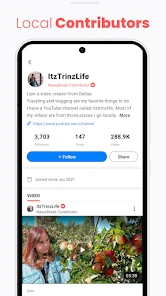
What's also great about NewsBreak is its emphasis on community engagement. Users can comment on articles, share their views, and even report local news themselves. It's like being part of a digital community where everyone's voice matters. I found myself engaging in discussions more often than I expected, and it's been quite enlightening.
That social element can add useful neighborhood context, but I would separate a reader's account from confirmed reporting, particularly when comments concern a person, emergency, or fast-moving event. If I contribute a tip, I would keep it specific and factual rather than treating the comment area as a substitute for a formal report. For someone who wants local conversation as well as headlines, that blend is a draw; for someone who wants a quiet, publication-only reading experience, it may feel like unnecessary noise.
A routine that avoids notification fatigue
A practical way to use the app is to give it a small, predictable place in the day instead of letting it set the pace. I might skim local headlines with breakfast, open a story only if it affects a decision, and save anything that deserves a longer read for later. That creates a useful separation between noticing news and reacting to every item. If the feed becomes a habit of checking without a purpose, the local focus can still turn into more screen time than the information is worth.
Notifications deserve the same intentional approach. I would ask whether an alert could change where I go, what I plan, or what I need to check before enabling that kind of interruption. A story that is interesting but not time-sensitive can wait in the feed. This is a small distinction, but it helps preserve the app's practical value: a road closure alert may matter before leaving, while a general community discussion is easier to read when I choose to open it.
Who will get the most from it
I think NewsBreak fits people who have recently moved, want to follow several nearby communities, or simply find that national news leaves practical local questions unanswered. A realistic routine might be checking the feed over breakfast, noticing a road closure alert before a commute, saving a longer neighborhood story for the evening, and then comparing it with a local outlet if the details matter. That uses the app as a convenient starting point without asking it to replace every other source.
It is less compelling for readers who already get all the local reporting they need from a trusted newspaper, or who dislike personalized feeds and notifications. Those readers may be better served by a publication's own app or by visiting a small set of sources directly. NewsBreak is free to download, though it offers in-app purchases ranging from ten cents to thirteen dollars per item; I would check what an item involves before buying rather than assuming the core reading experience requires payment. Its Teen content rating is another practical consideration for families deciding whether it suits a younger reader.
One question I would consider before relying on it is whether the places I care about appear regularly in the feed. Local coverage is only helpful when it matches the communities a reader actually follows, so I would spend a few sessions checking whether the nearby stories are relevant rather than judging from the first screen alone. If my area is quiet in the app or the stories feel repetitive, I would keep it as an occasional discovery tool and use direct local sources for the gaps instead of expecting one feed to cover everything.
What to keep in mind as it evolves
Particle Media Inc. continues to maintain a product that has grown well beyond a small local bulletin board: NewsBreak has around 147,000 written reviews, and its current release is the clearest concrete marker of its present state. I would not infer specific improvements from the version number by itself. For existing users, the sensible approach is to judge each update by whether the feed remains relevant, whether alerts feel worthwhile, and whether saved reading and community features still fit their routine.
The main gap I would keep in mind is one of judgment rather than navigation: a broad, personalized local feed can surface useful leads, but it cannot remove the need to assess a source or distinguish a discussion from verified reporting. I would also watch whether the stories appearing in my own area stay varied enough to justify keeping notifications on. If they become repetitive, adjusting interests and relying more on direct local sources may be a better balance than simply scrolling longer.
A useful companion, not the last word
Overall, NewsBreak: Local News & Alerts is worth trying if local discovery is what your usual news routine lacks. I like the combination of nearby stories, practical alerts, saved articles, and community participation, provided I use each for what it does well. I would keep a trusted outlet close for deeper reporting and turn alerts into a selective tool rather than a constant stream. Used that way, it can make local news easier to notice without asking it to be the final word on every story.
My recommendation is conditional rather than universal: try it if you want a convenient view across local topics and are willing to check important claims elsewhere. Skip it if you would rather follow a small number of editorially consistent sources, or if a personalized stream and community comments are distractions for you. The strongest setup, in my view, is to use NewsBreak to spot what deserves attention, save pieces worth revisiting, and then choose the right source for the depth or confirmation the story needs.
NewsBreak: Local News & Alerts Frequently Asked Questions
Is NewsBreak available for both Android and iOS?
NewsBreak is a news app for mobile devices, so check its page in the app store you normally use to confirm that it is available for your device. Before downloading, make sure your operating system meets the listed requirements. On Android, the stated minimum is version 8.0, which can help you determine compatibility before starting the installation.
Who develops NewsBreak, and how established is it?
NewsBreak is developed by Particle Media Inc. It has been available since June 17, 2016, and has reached over 50 million installs. Those details offer a sense of the app’s history and reach, though they do not tell you whether its editorial approach or local coverage will match your preferences. Exploring its feed can help you decide if it suits the way you follow news.
Does NewsBreak need my location to show local news?
NewsBreak is built around local coverage, so location helps it surface headlines relevant to your area. You can also choose interests and preferred news categories to shape your feed. If you are considering downloading it, think about whether location-based news is useful to you and review the app’s permission options on your device before deciding what access to allow.
Can I use NewsBreak to follow topics beyond my neighborhood?
Yes. Although NewsBreak emphasizes news from your immediate area, its customizable feed can include interests and preferred news categories beyond local headlines. That makes it useful if you want a mix of neighborhood updates and broader stories. You can adjust your preferences in the app settings as your interests change, rather than being limited to one kind of coverage.
What is NewsBreak: Local News & Alerts and how does it work?
NewsBreak: Local News & Alerts is a news aggregator app designed to keep users informed about local news and events. It allows users to customize their news feed based on their location and interests, providing a personalized experience. The app aggregates news from various sources, ensuring users have access to a diverse range of information and perspectives.
Pros
- Customizable news feed
- Local news coverage
- Real-time alerts
- Diverse content sources
- User-friendly interface
Cons
- Ads can be intrusive
- Limited international news
- Occasional notification glitches
- Some content behind paywalls
- Requires stable internet connection
- Category
- News & Magazines
- Version
- 25.49.0