Hindi News by Dainik Bhaskar
- 2.21K
- 4.0
- Installs
- 100.00M
- Price
- Free

Screenshots





Analysis by Reviewed
Ever found yourself in a situation where you want to keep up with the latest news from India but the language barrier or the lack of a reliable source keeps you from doing so? Enter Hindi News by Dainik Bhaskar, your go-to app for all things news in Hindi. It's like having a seasoned journalist in your pocket, ready to give you the scoop on what’s happening around the world, as well as back home in India.
Choosing a Hindi news app for everyday use
I’d look at this app first if Hindi is the language in which you prefer to follow the news, especially if you want local coverage alongside broader stories. It is a free news and magazines app from Dainik Bhaskar Group, and its audience is substantial: it has passed 100 million installs and holds a 4.0 average from around 667,000 ratings. Those figures suggest that it has broad reach, but they don’t tell me whether a particular report is complete or accurate. I still judge individual stories by their sourcing and by whether other credible outlets report the same facts.
Compared with a national newspaper app, a Hindi-focused service can be a more natural daily read for someone who wants to follow events in their own language and keep an eye on local developments. A general news aggregator may be better if you want to compare many publishers in one place, while a broadcaster’s app may suit someone who mainly wants scheduled video coverage. I’d choose based on the mix of Hindi reporting, local relevance, and formats I actually use—not on install totals alone.
The Latest on Hindi News by Dainik Bhaskar
All About the Features
Let me take you on a little tour of what Hindi News by Dainik Bhaskar has to offer. One of the standout features is its real-time updates. Whether it's politics, sports, entertainment, or business, the app ensures you're never out of the loop. You can also customize your news feed according to your interests. Fancy some Bollywood gossip or want to dive deep into economic reforms? Just tweak the settings, and voila, your personalized news feed is ready!
Easy Navigation and User Interface
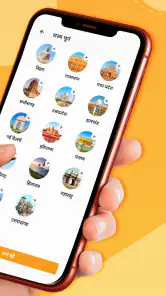
Now, I’ve used plenty of news apps, and trust me, nothing grinds my gears like a clunky interface. Thankfully, this app is as smooth as butter. The user interface is intuitive and easy to navigate, even for those who aren’t exactly tech-savvy. The home screen is neatly organized, with categories clearly laid out, making it easy to jump from one section to another without feeling lost.
Making a quick news check more useful
For a practical routine, I’d use the app in two passes rather than trying to read everything: first scan the headlines for stories that affect my city or region, then open only the reports I want to follow more closely. That keeps a quick check from turning into an endless scroll. If I’m deciding whether a developing story matters to me, I’d also look for the date and context in the report and compare important claims with another source before sharing them.
A realistic use is checking local headlines over breakfast, then returning to a specific report later when I have time to read it properly. That is different from relying on a news app for urgent alerts: I wouldn’t assume that opening a publication app guarantees immediate notification of every event. Anyone who needs instant emergency instructions should use official local channels as well, rather than treating a general news feed as an alert service.
More From Our News Desk

Clash of Clans Is Won Between the Battles

Android Auto Makes the Case for Quieter Car Software

MobiOffice: Transforming Mobile Productivity with Seamless Integration

EA SPORTS FC™ Mobile Soccer: Redefining Mobile Sports Gaming

How Microsoft OneDrive Became a Mobile Productivity Giant

How Google Translate Breaks Language Barriers Effortlessly
Stay Informed with Multimedia Content
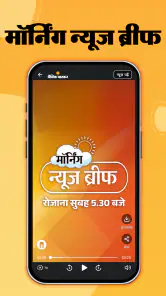
What’s more, the app doesn’t just stop at written articles. Dainik Bhaskar brings the news to life with videos and photo galleries, ensuring that you get a comprehensive view of the story. It's like watching the news on TV, but at your convenience. The videos are high-quality, and the audio is crystal clear, making it a great alternative for those who prefer to watch rather than read.
Video is useful when a visual explanation adds context, but it is not always the best choice in a quiet place, on a limited data connection, or when I need to find one detail quickly. In those moments, a written report is easier to skim and revisit. I’d also treat pictures and clips as part of a report, not as a substitute for checking what the story actually says.
Trust, privacy, and the choices that matter
When I use any news app, I pay attention to the choices it presents before granting access or sharing information. I can’t judge privacy practices from the fact that an app is popular, and I wouldn’t treat a rating as evidence about how personal data is handled. A sensible approach is to review the permissions Android requests, allow only access that makes sense for the feature I’m using, and revisit those choices in the phone’s settings if my needs change.
The same caution applies to account and personalization controls: I’d check the app’s own settings and the relevant Android settings rather than assume a control exists or works a particular way. If I prefer a minimal footprint, I can keep my use focused on reading and avoid granting optional access that isn’t needed for that task. Anyone uncomfortable with the permissions or choices actually presented should pause and decide whether a browser or another publisher’s app is a better fit.
Offline Reading - A Real Game Changer
One of my favorite features has to be the offline reading mode. If you’re anything like me, who loves to catch up on the news during a commute, this feature is a lifesaver. You can save articles to read later, without the need for an internet connection. Perfect for those moments when Wi-Fi is spotty, or you’re trying to save on data.
For commuters, the key practical question is whether the exact story they want is available without a connection when they need it. I’d test that with a non-urgent article before relying on it for a long trip, and keep in mind that a live update or video may not behave like saved text. If offline access is essential to your routine, that small check can prevent frustration; if not, the app can still be useful as a connected way to follow Hindi reporting.
Who will get the most from it
This is a sensible choice for readers who want Hindi news, value local coverage, and like having articles and multimedia in one place. It is less compelling for someone who needs an English-first experience, a single carefully curated briefing, or a dedicated tool for comparing publishers. In those cases, an English-language publication, an aggregator, or a broadcaster focused on video may fit better. The app is rated Everyone, and it runs on Android 6.0 or later; its current version is 14.4.1.
It has been available since January 7, 2014, and has accumulated around 2,200 written reviews. I see that history and reach as signs that many readers use it, not a reason to switch off my own judgment. For any news source, the useful habit is to distinguish a headline from the full report, check context when a claim is consequential, and avoid forwarding a striking clip before understanding what it shows.
In conclusion, if you’re looking for a reliable source for Hindi news, Dainik Bhaskar's app should be your top choice. It's user-friendly, packed with features, and keeps you informed with the latest happenings. So why wait? Dive into the world of news with this fantastic app and stay updated, no matter where you are!
My cautious verdict
I’d recommend giving it a try if Hindi is your preferred reading language and local news is part of your daily routine. I would not make it my only source for high-stakes claims, nor choose it solely because it is widely installed. Use the format that suits the moment, check the privacy and permission choices you see on your device, and cross-check important stories. That makes this app a practical part of a news routine without asking it to do more than a news app should.
Hindi News by Dainik Bhaskar Frequently Asked Questions
Is Hindi News by Dainik Bhaskar free to download?
Yes, Hindi News by Dainik Bhaskar is free to download. It is a news app from Dainik Bhaskar Group, designed for readers looking for Hindi-language coverage. As with other news apps, accessing fresh stories, videos, or ePaper content may use an internet connection, so your mobile data plan could affect the cost of using it away from Wi-Fi.
How popular is Hindi News by Dainik Bhaskar?
The app has a 4.0 average rating from around 667,000 ratings, and has been installed over 100 million times. Those figures suggest it has a large audience, though ratings reflect individual experiences and do not guarantee that every reader will enjoy the same features or coverage. The app is developed by Dainik Bhaskar Group.
Is Hindi News by Dainik Bhaskar suitable for readers who prefer local updates?
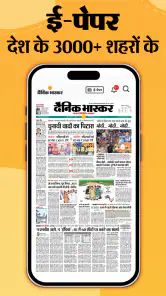
Yes. The app focuses on Hindi news and highlights local news for your city, alongside ePaper content and videos. That makes it a relevant choice if you want to follow news close to home as well as broader stories. Its short description is simply “Hindi News,” so the main appeal is clear: a Hindi-language news experience from Dainik Bhaskar.
What is Hindi News by Dainik Bhaskar?
Hindi News by Dainik Bhaskar is a mobile application that provides the latest news updates in Hindi. It covers a wide range of topics including politics, sports, entertainment, technology, and more. The app is designed to keep users informed with real-time news alerts and detailed articles, all presented in the Hindi language, catering specifically to Hindi-speaking audiences.
Is the Hindi News by Dainik Bhaskar app free to use?
Yes, the Hindi News by Dainik Bhaskar app is free to download and use. It provides users with access to a plethora of news articles and updates without any subscription fees. However, some features or sections within the app might require an internet connection to fetch the latest news updates, which could incur data charges as per your mobile plan.
Pros
- Comprehensive coverage of local news.
- User-friendly interface enhances browsing.
- Regular updates keep content fresh.
- Offline reading mode available.
- Customizable notifications for alerts.
Cons
- Contains ads that can be intrusive.
- Limited language options for non-Hindi speakers.
- Occasional app crashes reported by users.
- Some features require premium subscription.
- Video content may consume significant data.
- Category
- News & Magazines
- Version
- 14.4.1