Opera Mini: Fast Web Browser
- 33.55K
- 4.6
- Installs
- 500.00M
- Price
- Free

Screenshots

Analysis by Reviewed
On a phone, a browser’s value often becomes clearest when the connection is the least dependable. I’m interested in whether pages remain practical to use on a slow mobile network, and whether the app gives me a reason to choose it over the browser already on my device. Opera Mini is Opera’s free communication app, and its focus on compressed browsing makes it especially relevant when speed or data use matters more than having every page appear exactly as its designer intended.
When the network slows down
Opera Mini is built around a useful trade-off: reducing the amount of page content sent to your phone can make browsing feel more responsive, but a lighter version of a site may not look or behave exactly like its full desktop-style counterpart. That distinction matters for pages with complex layouts, interactive tools, or media. For reading articles, checking a basic page, or following a news link while travelling, the streamlined approach can be a sensible choice. For a web app that depends on detailed visuals or precise interactions, I would keep a regular browser available as a fallback.
A realistic example is checking a route update or looking up a shop while moving between places on a patchy connection. I would open the page, let the lighter browsing experience do its work, and avoid repeatedly refreshing while the signal fluctuates. When a page still stalls, switching to a stronger connection or trying the same site in another browser is more useful than assuming compression can overcome a complete network failure.
Speed and Efficiency
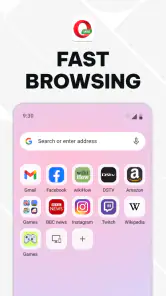
First things first, the speed. Opera Mini lives up to its name as a fast web browser. It uses advanced compression technology to speed up browsing, which means less waiting time for pages to load. Honestly, it's like the Usain Bolt of browsers. Whether you're on a slow network or just trying to conserve data, this browser has got you covered.
Data Savings
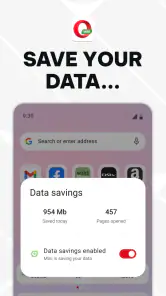
One of the standout features is the data-saving capability. The app compresses web pages, reducing data usage significantly. For someone like me who always seems to be running out of data, this feature is a lifesaver. I noticed my data consumption dropped by nearly 50%, which is pretty impressive.
Making a limited connection go further
Compression is most useful when I browse text-heavy pages or follow several links during a commute; it can help keep routine research from consuming as much mobile data. I’d treat that benefit as a reason to check the browser’s data-saving controls and compare my own usage over similar browsing sessions, rather than assuming every site will produce the same result. Media-heavy pages and embedded content can change the picture, so I would be selective about loading them when conserving data is the priority.
The app is free, rated for Everyone, and has been available since November 24, 2014. Opera Mini has a 4.6 average from around 9.8 million ratings, with over 500 million installs. Those figures suggest it is a familiar option for many mobile users, but they do not tell me whether its compressed presentation suits a particular site; that still comes down to what I need to do on the page.
More From Our News Desk

Weather by Xiaomi Review: Clear at a Glance, Less Clear Up Close

X Under Pressure: Can It Recover When Posting Goes Wrong?

Clash of Clans Is Won Between the Battles

Android Auto Makes the Case for Quieter Car Software

MobiOffice: Transforming Mobile Productivity with Seamless Integration

EA SPORTS FC™ Mobile Soccer: Redefining Mobile Sports Gaming
User Interface
Now, let's talk about the user interface. It's clean, intuitive, and easy to navigate. The homepage gives you quick access to your favorite sites, and the smart news feed keeps you updated without much effort. Plus, switching between tabs is smooth and hassle-free, unlike some other browsers that make you feel like you're navigating a maze!
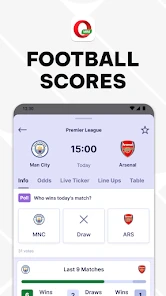
The news feed and football scores make sense if I want a quick glance at updates without opening several separate sites, though I’d keep them secondary if my main goal is focused research. One practical habit is to open only the pages I need and keep tabs organised as I go; that makes it easier to return to a useful article instead of restarting a search when a connection becomes unreliable. People who prefer a browser centred on a larger ecosystem of synced services may find their phone’s default browser more convenient, while Opera Mini’s appeal is its emphasis on lighter mobile browsing.
Choosing it for everyday mobile browsing
I find the clearest reason to install Opera Mini is not simply that a connection is slow, but that my usual tasks are forgiving: reading a short article, checking a score, or looking up opening information. If I’m planning a day out, for example, I might check a news update over mobile data, then open a map or a detailed booking page in my regular browser if the layout is difficult to use. That two-browser approach is more practical than expecting one app to be best for every site.
It is also worth thinking about how you browse rather than judging only by a first page load. A compressed page can be a good fit when I’m scanning for an answer, but less comfortable when I need to compare images, inspect a detailed product page, or fill out a form with several fields. In those cases, the richer presentation of a conventional browser can save frustration even if it uses more data.
Compared with the browser already installed on a phone, Opera Mini makes a more specific trade-off: it prioritises lighter browsing rather than making ecosystem integration the main reason to use it. If bookmarks, history, and other habits are already tied to a particular account or devices, switching completely may not be worthwhile. I’d try it as a companion first, especially for reading and quick checks on mobile data, and keep the default browser for tasks where its rendering or account continuity matters more.
Practical choices for different browsing habits
There is no need to move every saved site or change your routine on the first day. I’d make Opera Mini the browser I reach for when I’m away from Wi-Fi and want to read or check something quickly, while leaving the browser I already use in place for work, forms, and sites that depend on a particular sign-in. That division also makes it easier to judge the app fairly: a frustrating checkout is not a useful test of a browser intended to make ordinary mobile browsing lighter.
If you share a phone or often hand it to someone else, think about how you separate browsing sessions before deciding where to open sensitive pages. Private browsing can help avoid retaining activity in the normal browsing history on the device, but it does not replace careful handling of accounts or personal information. For a routine such as checking a public timetable, that distinction may not matter much; for account changes, I’d choose the browser and connection I trust for the task and confirm the result before closing the page.
Additional Features
Beyond the basics, Opera Mini packs in some nifty extras. The night mode feature is a blessing for late-night browsing, reducing eye strain with a darker theme. And if you're into offline reading, the browser lets you save pages to read later without an internet connection. It's like having your own mini library on the go!
For a practical reading workflow, I’d save an article while I have a stable connection, then check that it is available before relying on it during a journey. Saved pages are most helpful for material I already know I want to revisit, rather than as a substitute for live pages that may need fresh information. That small check avoids discovering at the wrong moment that a page was not ready for later reading.
Privacy and recovery when a page fails
Security-wise, the browser offers a private browsing mode, keeping your online activities under wraps. It's not just about speed and data savings; it's also about keeping your browsing experience secure and private.
Private browsing is useful when I don’t want a session retained in the usual way on the device, but I wouldn’t treat it as a promise of complete anonymity. If a page breaks, I’d first check whether the connection is active, then reload once or try a simpler version of the task; repeated refreshes on a weak signal can waste time and data. For logins, payments, or forms that must work exactly as intended, a full-featured alternative may be the safer practical choice if the compressed page behaves oddly.
What to try when loading goes wrong
When a page appears stuck, I’d avoid opening several copies of it in quick succession. First, I’d give the current request a moment, then check whether other basic pages load. If they do, the issue may be specific to that site or its interactive elements; if they do not, the connection itself is the more likely obstacle. Trying the same task in a regular browser can help distinguish those cases without turning every failed load into a series of data-consuming retries.
For a page that is mostly text, I’d also consider whether I need the whole experience or just the information. A simpler page view can be enough for an address or a headline, while a checkout, account change, or form deserves a closer check before I submit anything. My rule is to verify that a sensitive action completed rather than assuming a quick response means it did.
When another browser is the better fit
I would not choose Opera Mini as my only browser if most of my day involved web-based work tools, detailed online shopping, or pages where images and scripts are central to the task. A standard browser may show those sites as intended and may fit better if I rely on its account sync across devices. Likewise, if I already have reliable Wi-Fi and generous mobile data, the lighter presentation may offer less of a practical advantage, so convenience and compatibility can matter more than compression.
On the other hand, someone who checks headlines between errands, follows football scores, or looks up basic information on a limited mobile connection has a clearer reason to give it a try. I’d test a few sites I actually use, not just the homepage: one article, one page with interactive controls, and one page that tends to be media-heavy. The difference between those examples quickly shows where the browser saves effort and where a fuller browser is preferable.
Who will get the most from it
I’d recommend Opera Mini to someone who often browses on mobile data, wants a lighter option for everyday reading, or appreciates having news and football updates within the browser. It is less compelling for someone whose browsing mostly involves demanding web apps, media-rich pages, or close integration with another browser’s account and device ecosystem. With Opera as its developer and tens of thousands of written reviews, it has a broad audience, but the best test is whether its lighter approach works on the specific sites you visit.
If you’re deciding whether it belongs on your phone, I’d start with a few ordinary tasks you repeat: reading a news article, checking a score, and opening a site you know can be awkward on mobile. Notice whether the pages are usable, whether you miss features from your usual browser, and whether the data-saving approach feels worthwhile for your own habits. That small trial is more informative than switching everything at once.
Final Thoughts
All in all, Opera Mini is a solid choice for anyone looking for a fast web browser that doesn't skimp on features. Whether you're trying to save data, speed up your browsing, or just want a smooth user experience, this app ticks all the boxes. So, if you're tired of sluggish browsers and constant buffering, give Opera Mini a try. You might just find it's the perfect fit for your browsing needs!
My connectivity verdict is straightforward: it’s a useful everyday alternative when a mobile connection is limited and the task is mostly reading, checking updates, or opening straightforward pages. I would not make it my only browser if I regularly depend on complex sites or need every page to render in its full form. Try it alongside your usual browser for the kinds of pages you actually visit, and keep the one that handles your routine most reliably.
Opera Mini: Fast Web Browser Frequently Asked Questions
What is Opera Mini, and what can I use it for?
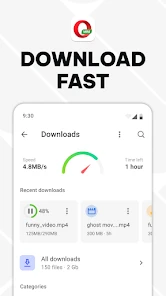
Opera Mini is a mobile web browser developed by Opera. It lets you open websites and also brings together data-saving tools, news, football scores, and downloads. It may suit people who want a browser with a few extra features in one app, whether they are reading web pages, checking updates, or managing downloaded files.
Is Opera Mini available for Android and iOS?
Opera Mini is designed for mobile browsing and is available for Android and iOS devices. Before downloading, check its app-store page on your device to make sure it is compatible with your operating system. The app is developed by Opera and brings browsing together with data-saving tools, news, football scores, and downloads.
Does Opera Mini work as a regular web browser?
Yes. Opera Mini lets you browse websites, while also offering features such as data saving, news, football scores, and downloads. It can suit everyday activities like searching for information and reading web pages, as well as checking updates within the app. Your experience will naturally depend on the websites you visit and the internet connection available.
Can I use Opera Mini without an internet connection?
Opera Mini is a web browser, so an internet connection is needed to load websites and current online content. Its download tools can help you access files you have already downloaded, but that is different from browsing the live web offline. If you expect to be without a connection, consider saving the material you need in advance where the app and content allow it.
Does Opera Mini include a built-in ad blocker?
Opera Mini’s published feature set includes a built-in ad blocker, which can make pages less cluttered while browsing. The effect may vary from site to site, since websites display content in different ways. The browser also focuses on data saving and fast browsing, with news, football scores, and downloads available alongside its web tools.
Pros
- Fast browsing experience
- Data-saving features
- User-friendly interface
- Privacy protection
- Ad blocker included
Cons
- Limited extension support
- Occasional page rendering issues
- Not all sites optimized
- Basic customization options
- Some features require login
- Category
- Communication
- Version
- Varies with device













