Norton Family Parental Control
- 2.47K
- 3.3
- Installs
- 1.00M
- Price
- Free

Screenshots



Analysis by Reviewed
When I judge a parental-control app, I look beyond the promise of setting limits. The real test is whether a parent can understand what is happening, explain the rules to a child, and use the controls without turning ordinary phone use into a constant negotiation. Norton Family Parental Control is a free parenting app from NortonMobile focused on managing children’s time online. I see its value in making supervision more deliberate, provided the family treats it as a tool for conversation rather than a silent way to keep watch.
Readability and navigation for the parent
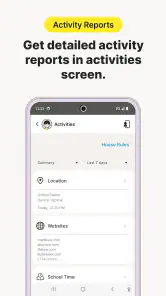
The app is designed around a parent’s need to review activity and adjust supervision without hunting through unrelated tools. In my experience, a central dashboard is helpful when you are checking in between other tasks: you can look over online activity and revisit screen-time settings in one place. That convenience matters more than a long list of controls if you only have a minute before dinner or bedtime.
For a parent who finds dense menus tiring, I would keep the first setup focused: establish the basic household rules, then explore other controls only when a real need comes up. This avoids trying to interpret every option at once. It also makes it easier to explain each setting in plain language to a child, rather than presenting a collection of unexplained restrictions.
A practical tip is to decide on a small number of household rules before changing settings. For example, agree on when device use should stop, then use time supervision to support that conversation. This makes the controls easier to explain and less likely to feel like a surprise punishment. The app’s menus and prompts still require a parent to make those decisions; they do not replace a family agreement about what fair use looks like.
Online oversight in everyday use
Ever found yourself in a situation where you’re constantly worrying about what your kids are up to online? Trust me, I’ve been there, and that’s when Norton Family Parental Control became my knight in shining armor.
How supervision fits into family life
Let’s be real, the internet is both a boon and a bane. While it offers a wealth of knowledge, it also poses risks that are way beyond our imagination. With Norton Family Parental Control, you can finally breathe a sigh of relief. It’s like having a virtual nanny that watches over your child’s internet activities when you’re not around. The app allows you to monitor your child’s online habits, set time limits, and even block unsuitable websites. Seriously, it’s like the Swiss Army knife of parental controls!
Web, time, and location supervision
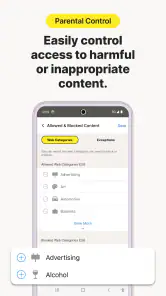
Alright, let’s dive into what makes this app so snazzy. First off, the web supervision feature lets you see the websites your kids are visiting. This is invaluable because it gives you a window into their world. Not to mention, it allows you to block sites you deem inappropriate.
More From Our News Desk

Weather by Xiaomi Review: Clear at a Glance, Less Clear Up Close

X Under Pressure: Can It Recover When Posting Goes Wrong?

Clash of Clans Is Won Between the Battles

Android Auto Makes the Case for Quieter Car Software

MobiOffice: Transforming Mobile Productivity with Seamless Integration

EA SPORTS FC™ Mobile Soccer: Redefining Mobile Sports Gaming
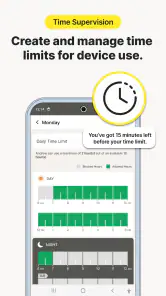
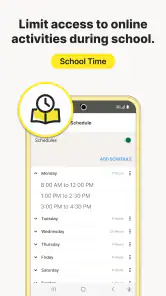
Then there’s the time supervision feature. Ever had a hard time getting your kid to put down their device? With Norton, you can set time limits for each device, ensuring that they don’t turn into little tech zombies.
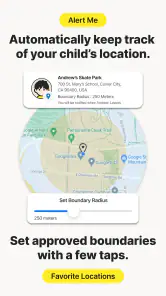
And let’s not forget about the location supervision. If your child has a smartphone, you can track their whereabouts in real-time. This is particularly useful when they’re out and about, and you want that extra peace of mind.
These controls answer different questions, so I would not treat them as interchangeable. Website activity can help you decide what to discuss; time limits support a routine; location supervision is most relevant when a child is away from home. A useful habit is to review only the information connected to a specific concern. Checking everything simply because it is available can make supervision feel intrusive and leave a parent with more detail than they can use constructively.
Setup and a less stressful first week
Now, I’m not tech-savvy at all, but setting up Norton Family Parental Control was a breeze. The app walks you through the installation process with step-by-step instructions, and before you know it, you’re up and running. The interface is user-friendly, so you won’t find yourself confused or frustrated.
I also love the fact that you can manage everything from a single dashboard. Whether it’s checking your child’s online activity or adjusting their screen time, all it takes is a few clicks.
Even with a straightforward setup, I would avoid changing several rules on the same day. Start with the main stopping time or a clear website concern, then see how that works during a normal school week. If a limit disrupts a predictable activity, you will know which setting caused the problem and can discuss a focused adjustment. Changing everything at once makes it harder to tell whether the plan is fair or simply too strict.
Choosing the right fit
Compared with relying only on a device’s built-in screen-time controls, Norton Family brings web supervision and location supervision into the same parental-control experience. That combination can suit a household managing several kinds of concern at once. A built-in tool may be the better choice if you want a simpler setup or only need basic limits, while families who want a broader view may prefer a dedicated app.
The choice also depends on how your family prefers to manage rules. Built-in controls can be convenient when the goal is one basic device boundary and a parent wants fewer moving parts. A dedicated parental-control app makes more sense when website review and location supervision matter alongside time management. The trade-off is that broader oversight asks the parent to spend time interpreting what they see and explaining the decisions that follow.
For an everyday example, imagine a child using a phone after school for both homework and entertainment. A parent can review web activity later, then use the time settings to support a planned stopping point. The useful trade-off is that supervision creates information, not context: a site visit may be schoolwork, curiosity, or something worth discussing, so I would treat the activity view as a prompt for conversation rather than proof of intent.
That distinction is especially useful when a child searches for a topic that looks surprising at first glance. Rather than blocking first and asking later, I would check whether the visit fits an assignment or a genuine question, then decide whether a boundary is needed. This approach makes web supervision more educational and reduces the risk of treating every unfamiliar page as a problem.
Motor and sensory considerations
For families considering access needs, the important question is not simply whether a parent can open the app, but whether the whole routine is manageable for everyone involved. A parent may need to check settings quickly while distracted, while a child may have difficulty with interruptions or sudden changes. I would keep the rules predictable and use short, direct explanations so the child knows what to expect when a limit applies.
If a child relies on a particular device-level accessibility setting or a specialized way of interacting with a phone, check how the supervision routine works alongside that setup before making it a daily requirement. A parental-control app does not automatically solve motor, reading, or sensory barriers. The practical test is whether the family can review activity and respond to limits without making the device harder for the child to use for school, communication, or other essential tasks.
Access across different situations
Location supervision has a different role from website and time controls: it is about a child being away from home, not about judging how they spend every minute online. I would agree in advance on when location checks are appropriate, such as during an independent trip, rather than checking continuously out of habit. Clear expectations can make this feature feel like a safety arrangement instead of a hidden test of trust.
Households with more than one caregiver should also agree on who reviews activity and who changes rules. If one adult sets a boundary and another quietly changes it, the child may experience the app as arbitrary. A shared plan—what the rule is, why it exists, and when it can be reconsidered—makes supervision more consistent even when daily schedules differ.
Boundaries, friction, and remaining barriers
The app may be easier for a parent who is comfortable managing settings from a phone or dashboard than for someone who prefers a completely hands-off approach. Families should also consider how supervision feels to the child. Explaining what is being monitored, why limits exist, and when they can be revisited can help preserve trust. That is especially important for older children, for whom a highly watchful approach may create friction rather than cooperation.
On the child’s side, time limits and website blocking can make boundaries clearer, but they can also feel abrupt if they interrupt homework or an agreed activity. I would check settings together and make room for exceptions through a parent-led conversation, rather than expecting the app to understand every situation. If your main need is accessibility support for a specific sensory, motor, or reading requirement, I would first assess the actual screens and controls on the devices your family uses; parental supervision tools are not automatically a fit for every access need.
Another limitation is the temptation to use activity records as a complete picture of a child’s online life. They are better treated as clues than as a full account of motivation, tone, or what happened outside the screen. A parent who expects the app to make judgment calls, resolve disagreements, or guarantee safe behavior will be disappointed. Its usefulness depends on adult attention and a willingness to have sometimes awkward conversations.
There is also a real choice between reassurance and privacy. Younger children may benefit from clear, close boundaries, while older children often need a growing say in how those boundaries work. I would revisit the arrangement as circumstances change instead of leaving settings untouched indefinitely. If a child’s needs call for highly individualized access controls, or if monitoring itself is likely to damage trust, a simpler device-level limit—or no added monitoring—may be the kinder and more practical option.
Who is likely to benefit
Norton Family is a sensible option for parents who want website oversight, time limits, and location supervision together, and who are willing to review the information and talk through decisions. It may be less suitable if your family values minimal monitoring, if a child’s needs call for highly customized accessibility controls, or if you only want one simple device-level limit. The app is free, rated for Everyone, and has an average rating of 3.3 from around 26,000 ratings, with over 1 million installs. It was released on February 1, 2012, and version 7.9.6.16 requires Android 8.0 or later.
It is most useful for a parent who wants a shared place to manage several kinds of supervision and is prepared to explain the choices. It is less compelling for a family that already has a straightforward routine and only needs a basic stopping time. Before relying on it, I would make sure the parent’s phone and the child’s device meet the Android requirement, then decide which single concern the app should help with first. That keeps the setup tied to a real family need rather than adding monitoring just because it is available.
An inclusive verdict
In this digital age, keeping an eye on your child’s online activities is more important than ever. Norton Family Parental Control offers a comprehensive solution that’s easy to set up and use. It lets you be the cool parent who’s in the loop without being overly intrusive. So, if peace of mind is what you’re after, this app is definitely worth checking out!
My recommendation is more specific: consider it if you want web, time, and location supervision in one parenting app and can use those tools with clear, agreed boundaries. The strongest results come from choosing a small number of rules, reviewing information with context, and adjusting the plan when a child’s routine or needs change. Families looking for highly tailored accessibility support or minimal oversight should compare simpler options first. For everyone else, the app can be a practical aid to family discussions, as long as the conversation—not the dashboard—remains in charge.
Norton Family Parental Control Frequently Asked Questions
What devices and operating systems can I use with Norton Family Parental Control?
Norton Family Parental Control is available for Android and iOS, and its minimum operating-system requirement is version 8.0. Check that your device meets this requirement before downloading. If your family uses different kinds of devices, make sure the app is available on each one you plan to supervise so your setup matches how your children go online.
Who develops Norton Family Parental Control?
NortonMobile develops Norton Family Parental Control, a parenting app focused on helping parents manage the time their kids spend online. If you are comparing parental-control options, consider how its purpose fits your family’s approach to supervision and digital habits. The app is rated for Everyone, while parents should still decide what guidance is appropriate for their own children.
Is Norton Family Parental Control free to download?
Norton Family Parental Control is free to download, so you can try its parental-control tools without an upfront app price. The app is designed to help parents manage the time their kids spend online. Before installing it, consider whether its approach to supervision fits your family’s needs and discuss online safety expectations with your child.
What is Norton Family Parental Control, and who is it for?
Norton Family Parental Control is a parenting app for adults who want to guide and supervise how their children use connected devices. It brings online supervision and screen-time management together, giving parents tools to support safer digital habits. It is intended for family use, so setting clear expectations with children can help make supervision feel constructive rather than simply restrictive.
What platforms does Norton Family Parental Control support?
Norton Family Parental Control is available for both Android and iOS devices, making it accessible to a wide range of users. Additionally, it can be used on Windows PCs, providing comprehensive coverage for families using multiple types of devices. It’s essential to ensure that your device meets the app’s compatibility requirements before downloading.
Pros
- Comprehensive web filtering options.
- Customizable time management tools.
- Location tracking for children.
- Easy to use interface.
- Detailed activity reports.
Cons
- Limited features on iOS.
- Some reports lack detail.
- No social media monitoring.
- Requires constant internet connection.
- Occasional false alerts.
- Category
- Parenting
- Version
- 7.9.6.16