Norton360 Antivirus & Security
- 195.97K
- 4.6
- Installs
- 50.00M
- Price
- Free

Screenshots
Analysis by Reviewed
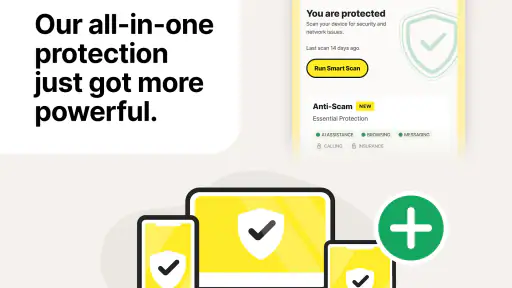
I approach Norton360 Antivirus & Security as a mobile security toolkit rather than a magic fix for every online risk. Its appeal is having protection and privacy tools gathered in one place, but the first hurdle is knowing what the app can do on your particular device and what requires a paid plan. That distinction matters if you want a simple scanner, not a broader security subscription.
Before installing, check what you need
NortonMobile’s app sits in the Tools category and is free to install, though in-app purchases range from $0.99 to $264.99 per item. That wide range is a reason to read the plan and purchase details shown in the app before committing; the free download should not be mistaken for every protection feature being free. It is rated for Everyone, and its current version is 5.127.0.251117986, with Android 10 as the minimum OS requirement.
The app has been available since June 8, 2010, and its scale is substantial: it has over 50 million installs, around 1.9 million ratings, and an average rating of 4.6. Those figures suggest plenty of people use it, but they cannot tell you whether a particular feature is included in the option you choose or whether its approach suits your habits. I would decide first whether I want device-focused protection, safer browsing, or a VPN, then check the current in-app terms for each.
Where setup can feel less simple
The initial screens are approachable, but a security app can still prompt questions when it asks to enable protections or adjust settings. I take those prompts one at a time and read what each setting does instead of tapping through just to reach the dashboard. If a feature does not work as expected, checking that it is enabled and that the app has the access it asks for is a sensible first step; avoid granting unrelated access simply because an app is security-focused.
On iOS and Android, security tools do not necessarily work in identical ways, so I would not assume that a feature behaves the same across both platforms. If you switch phones or reinstall, revisit the setup screens rather than relying on remembered settings. Keeping the app current is also a practical check when something seems out of date; on Android, the listed minimum operating-system requirement is Android 10.
Setting Up Your Digital Shield
Getting started with Norton360 Antivirus & Security is as straightforward as pie. Once you download the app from the Play Store or App Store, the installation process is quick. You’ll be greeted with a user-friendly interface that doesn't bombard you with complex jargon, making it easy even for the not-so-tech-savvy among us. The app offers a free trial, which is a great way to test the waters before diving into a subscription.
Features That Stand Out
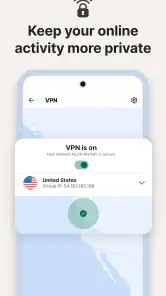
One of the standout features of Norton360 is its real-time threat protection. This nifty tool scans your device continuously, ensuring that malware and viruses are kept at bay. It’s like having a vigilant guard dog that never sleeps. Additionally, the app boasts a VPN service, which is a godsend for those who value privacy. This feature encrypts your data, making sure that your online activities remain your business only.
More From Our News Desk

Weather by Xiaomi Review: Clear at a Glance, Less Clear Up Close

X Under Pressure: Can It Recover When Posting Goes Wrong?

Clash of Clans Is Won Between the Battles

Android Auto Makes the Case for Quieter Car Software

MobiOffice: Transforming Mobile Productivity with Seamless Integration

EA SPORTS FC™ Mobile Soccer: Redefining Mobile Sports Gaming
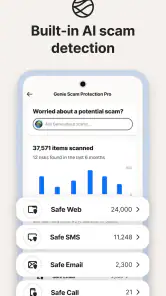
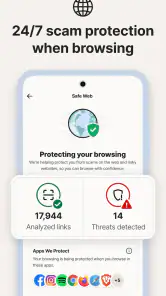
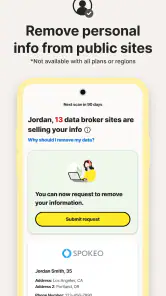
Another feather in Norton360's cap is the Safe Web feature. It acts as a protective shield when you’re browsing, alerting you about malicious websites before you stumble onto them. Plus, the Identity Theft Protection is a thoughtful addition for those concerned about personal data breaches. It’s like having a personal detective monitoring your info round the clock.
Performance and Usability
I was pleasantly surprised to find that the app runs smoothly without causing any noticeable lag on my device. The battery consumption is minimal, which is a huge relief considering how some security apps can drain your battery faster than you can say "malware." The interface is intuitive, with clearly labeled options, making navigation a breeze.
One thing I particularly appreciate is the customizable notifications. You can tweak the settings to only alert you about what you find important, cutting down on unnecessary noise. It's these little details that make the app a joy to use daily.
Using the protections in everyday routines
The useful habit is to treat alerts as prompts to investigate, not as a reason to panic. If Safe Web warns you about a page, pause before entering a password or payment details and check that you opened the intended site. A warning can help interrupt a risky click, but it does not replace careful browsing or guarantee that every harmful page will be caught.
A realistic use case is checking messages during a commute, then opening a link that appears to come from a delivery service. I would let the browsing protection assess the destination, avoid entering personal details if the address or request looks odd, and use the VPN when I specifically want an encrypted connection on a network I do not control. The VPN is a privacy layer, not a promise of anonymity, and it cannot make a fraudulent site trustworthy.
Recovering when a scan or alert seems stuck
If a scan does not appear to finish, I would first return to the app and check its status rather than starting repeated scans immediately. Then I would make sure the app is up to date, close and reopen it, and retry when the phone has a stable connection if the task depends on online checks. If an alert persists, read its wording and follow the in-app guidance; deleting something or changing a setting without understanding the warning can create more confusion than it solves.
For a notification that feels too frequent, the customization already mentioned is worth using selectively. I would keep alerts that help me make a decision, while quieting lower-value notices if the app offers that choice. The trade-off is straightforward: fewer interruptions can make the phone calmer, but turning off too much can also make useful warnings easier to miss.
When another tool may fit better
Compared with relying only on the security tools built into a phone, Norton360 offers a bundled approach that brings malware protection, browsing safeguards, and VPN access together. That convenience is valuable if you want one place to check several protections. Someone who only wants a basic device scan, or who already uses a trusted VPN and separate security tools, may find the extra layers unnecessary and prefer to keep their setup lean.
It is also not the right answer to every phone problem. A slow device, a failed connection, or an app that crashes can have causes unrelated to malware, so I would test the affected app or network separately before assuming Norton is responsible. If turning a security feature off is the only way to make something work, treat that as a temporary troubleshooting clue, not proof that leaving protection disabled is the best long-term fix.
Choosing a sensible first test
Before relying on the app day to day, I would test the parts that matter to my routine rather than trying to explore every screen at once. For example, someone who mainly worries about suspicious links can begin by checking how Safe Web responds during ordinary browsing, while a frequent public-network user can look at the VPN option and understand when they would actually switch it on. This makes it easier to judge whether the app solves a real problem or merely adds another dashboard to check.
I would also keep a note of the setting I changed if I am troubleshooting. If an app or site behaves differently after enabling a protection, changing one setting at a time makes it easier to identify a possible conflict and restore the previous setup. Avoid disabling several protections together: that may temporarily alter the behavior, but it leaves you without a clear explanation of what helped.
What to expect from a bundled security app
The main trade-off here is breadth versus simplicity. Compared with installing a single-purpose VPN or relying on a phone’s built-in safeguards, Norton360 gathers multiple protections in one place, which can reduce the number of separate tools you manage. The flip side is that you may encounter plan choices and options you never use. If you want a narrowly defined tool, a dedicated alternative can be easier to understand; if you value a combined toolkit, the bundle makes more sense.
One practical question is whether the free install is enough for your needs. I would treat the download as a chance to inspect the app and its available options, not as a guarantee that every feature is included at no cost. Before starting a purchase, check the feature and plan details displayed in the app, especially if you are choosing it for a specific protection. This small pause is more useful than assuming the broadest package is necessary.
When another tool may fit better
Compared with relying only on the security tools built into a phone, Norton360 offers a bundled approach that brings malware protection, browsing safeguards, and VPN access together. That convenience is valuable if you want one place to check several protections. Someone who only wants a basic device scan, or who already uses a trusted VPN and separate security tools, may find the extra layers unnecessary and prefer to keep their setup lean.
It is also not the right answer to every phone problem. A slow device, a failed connection, or an app that crashes can have causes unrelated to malware, so I would test the affected app or network separately before assuming Norton is responsible. If turning a security feature off is the only way to make something work, treat that as a temporary troubleshooting clue, not proof that leaving protection disabled is the best long-term fix.
Final Thoughts
In a world where cyber threats are as common as coffee shops, having a reliable security app is not just a luxury, it's a necessity. Norton360 Antivirus & Security delivers on its promise of robust protection without sacrificing performance or usability. Whether you’re a casual user or someone who spends a significant amount of time online, this app provides the peace of mind you deserve.
So, if you're on the lookout for an app that offers comprehensive security features wrapped in an easy-to-use package, Norton360 might just be your perfect match. Don't just take my word for it; give it a spin and see how it fits into your digital lifestyle.
Who I would recommend it to
I see the strongest fit for someone who wants a familiar security brand and prefers a single app for several kinds of protection rather than piecing together separate tools. It can also suit a family member who benefits from clear prompts and a central place to review security settings, provided someone helps them understand plan choices before they subscribe. If all you need is occasional reassurance and you rarely install apps or follow unfamiliar links, a larger toolkit may feel like more than you need.
My practical verdict is to start by identifying the one risk you most want to address, then try the relevant protection and notice whether its alerts and workflow suit you. Keep expectations grounded: no mobile security app can remove the need to check suspicious messages, safeguard every account, or solve unrelated network problems. Norton360 is most worthwhile when you will actually use its combination of safeguards; if you only want a standalone VPN or the lightest possible setup, a focused alternative may be easier to manage.
Norton360 Antivirus & Security Frequently Asked Questions
Can Norton360 Antivirus & Security help protect my privacy when I use public Wi-Fi?
Norton360’s store summary highlights a fast VPN, which is intended to support more private browsing by routing your internet connection through a VPN service. This may be useful when you connect to public Wi-Fi, but a VPN does not make every online activity risk-free. Review the VPN settings and the terms of any subscription before relying on it for your privacy needs.
Does Norton360 Antivirus & Security scan for malware and viruses?
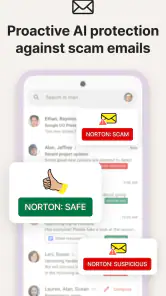
Yes. Norton360’s store summary describes AI-powered malware protection and a virus scanner, so scanning and protection from malicious software are central to the app’s purpose. If you are choosing a security app, consider whether these tools fit the way you use your device, and review the app’s permissions and settings during setup so you understand how its protection features operate.
Can I use Norton360 Antivirus & Security on an iPhone or iPad?
Norton360 is offered for mobile devices, and the app is intended for Android and iOS users. The available features and installation requirements can differ between platforms, so check the app’s compatibility and details in the relevant app store before downloading. This is especially useful if you plan to use Norton360 across several kinds of devices or expect the same tools on each one.
Is Norton360 Antivirus & Security free to download, and are there in-app purchases?
Norton360 Antivirus & Security is free to download, so you can install the app and explore its interface before deciding whether to buy anything. The app also offers in-app purchases, with prices ranging from $0.99 to $264.99 per item. Check the purchase details shown in the app before confirming a transaction, since available options and costs can vary.
What is Norton360 Antivirus & Security, and who develops it?
Norton360 Antivirus & Security is a security and privacy tools app developed by NortonMobile. Its store summary highlights AI-powered malware protection, a virus scanner, and a fast VPN. It is rated for Everyone, making its content suitable for a general audience. If you are looking for an app that brings security tools together in one place, Norton360 is designed for that purpose.
Pros
- Comprehensive threat protection.
- Includes VPN for secure browsing.
- Dark web monitoring feature.
- Parental control options.
- Easy-to-use interface.
Cons
- Can slow down device performance.
- VPN has limited locations.
- Premium price tag.
- Occasional false positives.
- Limited features on iOS.
- Category
- Tools
- Version
- 5.127.0.251117986









