myTuner FM Radio App
- 16.43K
- 4.6
- Installs
- 10.00M
- Price
- Free

Screenshots
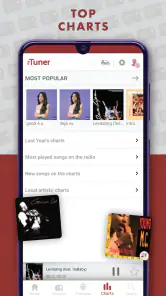
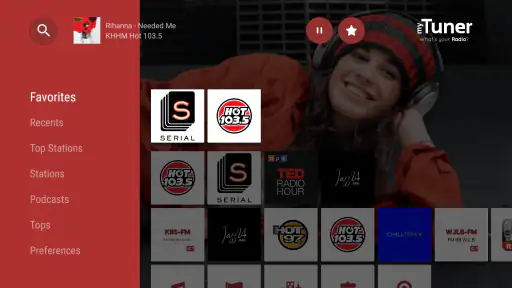
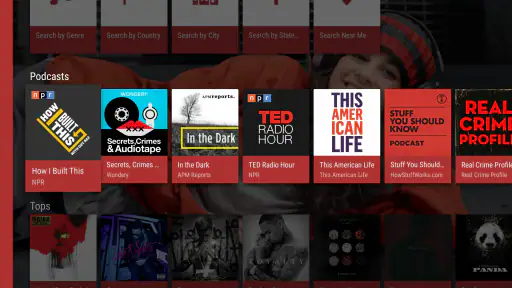
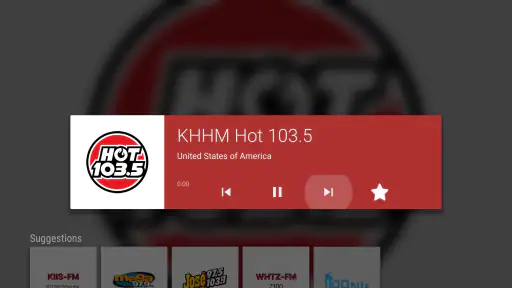
Analysis by Reviewed
I reach for a radio app when I want someone else to choose the next song, a local voice to break up a quiet room, or a station from somewhere I have never visited. myTuner FM Radio App is built around that kind of listening: it brings live radio together with podcasts, so I can browse beyond my usual music library without committing to a playlist. It is a free music and audio app from Appgeneration - Radio, Podcasts, Games, and its long-running presence makes it an appealing option for anyone who still enjoys the unpredictability of radio.
The listening habit it serves today
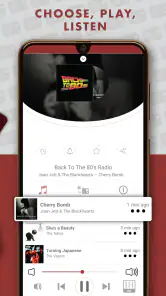
What I value most here is that the app starts from a different question than a typical music service. Instead of asking what exact song or album I want, it invites me to choose a station and let its presenters, music, and schedule shape the session. That suits moments when I want sound in the background but do not want to keep making choices. It is less satisfying when I have a very specific track in mind.
The live-radio focus also gives the app a useful role alongside services built around personal libraries. I can use it for a burst of local programming, a genre-led station while cooking, or a quick look at what a station in another place is playing. Podcasts offer a second path when I want spoken content, though I still think of radio as the app’s defining strength.
How it fits into everyday listening
The app has been around since January 21, 2014, and its current audience is substantial: it has passed 10 million installs and holds a 4.6 average from around 328,000 ratings. Those numbers suggest it has become a familiar choice, though popularity alone cannot tell you whether its listening style suits you. I see its main appeal in the simple switch between browsing stations and choosing a podcast, rather than in trying to replace every audio app on your phone.
Radio browsing works best when you have a destination
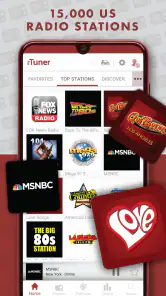
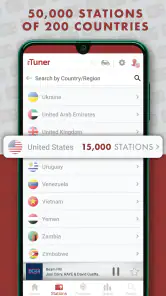
When I first stumbled upon the myTuner FM Radio App, I was instantly intrigued by its promise of a global music experience. With over 50,000 radio stations from more than 200 countries, it’s like having the world’s music at your fingertips. Whether you're in the mood for some smooth jazz from New Orleans or want to catch up on the latest K-pop hits straight from Seoul, this app has you covered. The variety is simply astounding!
That breadth is most useful when I search with a small clue in mind: a country, city, or genre can turn an overwhelming catalogue into a manageable hunt. If I only want a familiar station, saving it for later avoids repeating that search. If I am in the mood to explore, browsing by place makes the app feel less like a shuffled playlist and more like tuning a dial across different communities. The trade-off is that a large choice of stations can take patience; I would not open it expecting every search to reveal an instant, perfect match.
Finding a station without getting lost in choice
A useful way to explore is to begin with a destination or mood rather than scrolling without a plan. If I want a station from a particular city, I search by place first; if I want a certain sound, I narrow by genre. Then I save only the stations I would genuinely return to. That keeps the favorites area useful instead of turning it into another long catalogue I have to sift through.
More From Our News Desk

Weather by Xiaomi Review: Clear at a Glance, Less Clear Up Close

X Under Pressure: Can It Recover When Posting Goes Wrong?

Clash of Clans Is Won Between the Battles

Android Auto Makes the Case for Quieter Car Software

MobiOffice: Transforming Mobile Productivity with Seamless Integration

EA SPORTS FC™ Mobile Soccer: Redefining Mobile Sports Gaming
There is also a small discovery trade-off: a station name may be familiar, but the experience depends on the station’s own programming and stream. I treat browsing as a way to find candidates, not a guarantee that every result will match the exact sound I imagined. When a station is right, saving it makes the next session much quicker; when it is not, moving on is easier than trying to force it into a carefully controlled playlist routine.
A practical companion, with a few listening trade-offs
One of the first things I noticed was how user-friendly the app is. The interface is super intuitive, making it easy even for the least tech-savvy among us to navigate. You can search for stations by country, genre, or even by the city, which is such a handy feature. Plus, the app loads stations quickly, so there’s no awkward buffering time. I also love that it works smoothly on both Android and iOS, meaning you get a consistent experience no matter what device you’re using.
A realistic use for me is putting on a station while making breakfast, then saving it if I enjoy the presenters or music. On a commute, live radio can add local news and the feeling of company that an on-demand album does not, while a podcast is better when I want to follow a subject at my own pace. I would keep an eye on mobile data if listening away from Wi-Fi, since live audio is a stream rather than a downloaded music file. For a low-signal journey or a carefully curated offline library, a music service with downloads is the more dependable choice.
When radio beats a playlist—and when it does not
In a familiar routine, I might start a station while getting ready, let it run through breakfast, and save it if its mix and presenter suit the mood. That requires less attention than building a queue, which is exactly the point. On a longer trip, though, I would think about connection quality and data before relying on live streaming for the whole journey. If I need audio to keep playing in a place with unreliable service, downloaded tracks or episodes are a safer plan.
This is where myTuner differs from the usual alternatives. A music-streaming service gives me tighter control over individual songs and often makes more sense when I want an album or a specific sequence. A dedicated podcast app is a stronger choice if I organize many shows and care about a detailed listening queue. myTuner is appealing when I want live programming, station discovery, and a quick route between radio and podcasts without opening several apps.
Personalized Features Just for You
Now, I’m a sucker for apps that allow personalization, and myTuner FM doesn’t disappoint. You can save your favorite stations for quick access, and there’s even an alarm feature where you can wake up to your favorite station. How cool is that? It’s like having a personal DJ wake you up each morning.
The alarm is especially handy if you already know which station you trust in the morning: choosing it ahead of time turns a broad radio catalogue into a small, dependable routine. I would still keep a backup alarm if waking up on time matters, because a station-based wake-up depends on the app and the connection behaving as expected. Favorites also make a useful short list for different moments—one station for background listening at home, another for a particular city or genre—without having to search from scratch each time.
Making favorites and the alarm work for you
I would use favorites as a practical set of shortcuts, not as a complete record of every station I have sampled. A short list is easier to scan when I have only a minute before leaving home, and it can reflect different listening situations: a lively option for chores, a calmer one for winding down, and a station I want to check from another place. This is a simple habit, but it helps keep the app’s broad selection from feeling unwieldy.
For the wake-up feature, I would test the routine at a low-stakes time before depending on it for an important morning. That is not a criticism unique to radio; it is a sensible precaution whenever an alarm relies on an app and a live station. If a consistent wake-up is essential, keep the phone’s usual alarm as a fallback. The radio alarm is most appealing when the station itself is part of a pleasant morning, rather than when absolute redundancy is the priority.
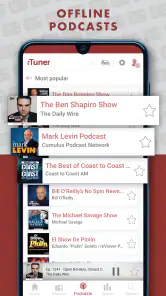
Another feature worth mentioning is the podcast section. Yes, you heard it right! Apart from radio stations, myTuner FM also lets you dive into the world of podcasts. Whether you’re into true crime, comedy, or educational content, there’s something for everyone. This dual feature of radio and podcasts makes it a one-stop shop for all things audio.
For me, that combination is convenient rather than a reason to uninstall every other audio app. Radio suits casual listening, discovery, and live programming; podcasts are more appealing when I want a specific episode or a subject-led listen. If you already organize a large podcast library elsewhere, you may prefer to keep that workflow there. But if you mainly want a quick change from live stations to spoken audio, having both in one place reduces app-hopping.
Choosing between the radio and podcast sides
A useful way to decide whether the podcast section fits your routine is to ask how you usually listen. If I want to choose a show, manage a queue, and keep track of a long-running set of episodes, a dedicated podcast tool may remain more comfortable. If I mostly switch between radio and occasional spoken listening, having both in one app is convenient. It avoids a separate search when I just want to move from music and presenters to a podcast for a change of pace.
I would also keep the two listening modes mentally distinct. A live station is something I can turn on and let unfold; a podcast is usually something I select with a topic or episode in mind. The app brings them together, but it does not make their habits identical. That distinction helps me avoid expecting radio to behave like an on-demand library or expecting a casual podcast browse to replace a carefully organized show collection.
Who should choose it—and who may prefer something else
I would recommend trying it if you like tuning into stations from different places, want radio and podcasts in one app, or enjoy discovering music through presenters and programming rather than selecting every track yourself. It is also a sensible fit for someone who wants a straightforward way to save a few favorite stations and return to them. The app is free to start, with in-app purchases listed at $20.99 to $22.99 per item, so I would check the purchase details in the app before paying for anything. Its content rating is Teen.
On the other hand, it may not be the right fit if you mostly want albums on demand, precise control over what plays next, or a listening library that works offline. A conventional music-streaming service is usually better for those needs; a dedicated podcast app may be preferable if episode queues and a deep podcast routine matter most. myTuner’s strength is the live-radio habit, not replacing those more focused tools.
What to consider before making it your main audio app
If you are deciding whether to install it, I would start with the stations you actually care about rather than judging the app by the size of its catalogue. Search for a local favorite, a station from a place you know, or a genre you listen to often. If those searches lead to useful choices, the app has a clear role in your routine. If you mainly want a familiar music library with offline access and exact track selection, you will probably be happier using a different kind of service as your primary player.
The price structure is another practical point. It is free to begin, while in-app purchases are listed between $20.99 and $22.99 per item. I would treat any purchase as a separate decision and read its details before confirming, rather than assuming the free experience or a paid option includes a particular feature. That approach keeps expectations clear and makes it easier to judge the app on the radio and podcast listening you can already explore.
What its history tells me—and what I would watch
Its release in 2014 and continued reach point to a product that has had time to establish itself, but I would not treat that history as proof that every station or listening routine will be equally reliable. The current picture is clear enough for a practical choice: the app is a mature radio-and-podcast option with a large audience, while individual station availability and the usefulness of its catalogue are best judged by trying the searches that matter to you. There is no reason to assume a future change will improve or disrupt your preferred stations; I would simply keep favorites organized and notice whether the app continues to fit my daily habits.
What matters as the app continues to evolve
For existing users, the most important measure of change is often practical rather than dramatic: do the stations they rely on remain easy to find, and does the radio-and-podcast mix still suit the way they listen? The app’s release history shows it has been available for years, but that alone does not establish which features have changed over time. I would separate that confirmed history from any expectation about what might come next.
What I would watch is whether the parts that make the app worthwhile remain dependable for my own use: saved stations should continue to make returning simple, and the station searches I care about should lead to options I want to hear. If I use the alarm, I would keep a fallback regardless of future changes. For a new listener, the same approach is useful: try a few personally relevant searches and see whether the app earns a place in the daily routine before treating it as an all-purpose audio replacement.
Final Thoughts
In conclusion, the myTuner FM Radio App is a must-have for anyone who loves music and audio content. It’s not just an app; it’s a gateway to discovering new sounds and cultures. With its plethora of stations, user-friendly interface, and personalized features, it’s clear why it stands out in the crowded world of radio apps.
So, if you haven’t already, give myTuner FM a try. You might just find yourself exploring a whole new world of music and podcasts, and who knows? You might even discover a new favorite station or two. Happy listening!
myTuner FM Radio App Frequently Asked Questions
Can I listen to myTuner FM Radio App through headphones or a speaker?
Yes. You can listen through headphones or a speaker connected to your phone, making the app suitable for private listening or playing a station aloud. Audio is streamed live, so you will need an internet connection while listening. Your experience may depend on your device and the way you connect your audio equipment.
Can I use myTuner FM Radio App while traveling?
The app is designed to stream live stations from different places, so it can be useful when you want to explore radio beyond what is available locally. Since it relies on an internet connection, you will need Wi-Fi or mobile data while traveling. Keep in mind that mobile data use may matter when you are away from Wi-Fi.
Does myTuner FM Radio App let me listen to live radio from other places?
Yes. myTuner FM Radio App is built around live AM and FM radio streams, so you can explore stations beyond the ones you usually hear locally. Its selection covers different countries, locations, and types of programming, making it useful for discovering music, news, sports, and talk radio from around the world.
Is myTuner FM Radio App suitable for teenagers?
The app has a Teen content rating, and its programming includes a broad mix of music, news, sports, and talk shows from live radio stations. Because stations choose their own broadcasts, the listening experience can vary. Families may want to consider the content of the stations selected and whether they are appropriate for each listener.
What is myTuner FM Radio App?
myTuner FM Radio App is a mobile application that allows users to listen to over 50,000 radio stations from more than 200 countries and territories. It offers a wide variety of genres and programming, providing users with access to their favorite music, news, sports, and talk shows, all in one place.
Pros
- Wide variety of global radio stations.
- User-friendly interface.
- Offline listening feature.
- Supports podcasts and music playlists.
- Customizable station favorites.
Cons
- Contains ads in free version.
- Limited offline stations.
- No recording feature.
- Occasional streaming delays.
- Premium version is pricey.
- Category
- Music & Audio
- Version
- Varies with device













