Mahjong for Seniors
- 4.53K
- 4.6
- Installs
- 5.00M
- Price
- Free
Screenshots
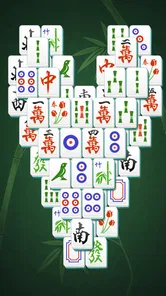
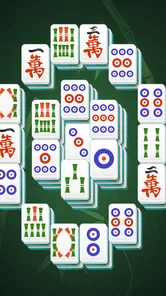
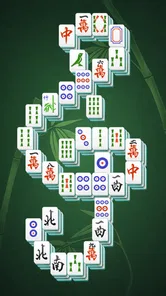
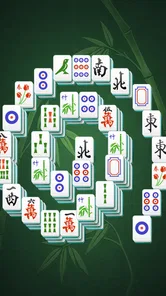
Analysis by Reviewed
I find Mahjong for Seniors easiest to enjoy when I treat it as a quiet puzzle rather than a race. It is a board game built around clearing matching tiles, so the appeal is in spotting available pairs and thinking a move ahead. If you want a calm activity for a short break, it has a clear purpose; if you want a fast, social game with lots of different modes, this is a narrower choice.
A Steady Pace That Suits Short Breaks
The first thing I would consider is how you like a game to feel moment by moment. There is no need to react quickly here: the challenge comes from looking over the board, choosing a pair, and noticing what that choice reveals. That makes the pace easy to control. I can imagine opening a puzzle while waiting for an appointment, taking a few moves, and putting the phone down without feeling that I have abandoned a timed contest.
That relaxed rhythm does not mean every board is effortless. When a useful tile is covered, a move that looks good at first may not help much, and I may need to scan the layout again. I find that pause part of the appeal, but players who want a constant stream of surprises may find the basic matching loop too measured. The game is best approached as a small problem to work through, not a way to chase high-speed excitement.
When a Board Takes Longer Than Expected
A puzzle can take more attention than the calm presentation suggests, especially if I start removing pairs without thinking about what they uncover. My practical habit would be to look for matches that open up blocked areas before clearing obvious pairs elsewhere. It is a simple way to make each move feel purposeful, and it can reduce the frustration of discovering that the remaining tiles offer few useful choices.
If I reach a point where the board stops making sense, the hint system gives me a way to get moving again. I would use it after a genuine scan rather than at the first moment of uncertainty. That preserves some of the satisfaction of solving the layout myself while keeping a tricky pause from turning into a reason to quit. The trade-off is straightforward: frequent hints may make progress easier, but they can also take away the pattern-spotting that makes the puzzle rewarding.
Keeping a Session Comfortable
For a longer session, I would pay attention to the screen as well as the game. Larger tiles can help make choices clearer, but comfort still depends on the phone or tablet, the display brightness, and how far away I hold it. If I have to lean in or strain to distinguish tiles, I would adjust the device or take a break instead of expecting the game’s design to solve every visibility issue.
It also helps to give a session a natural stopping point. I might finish a board before returning to other tasks, rather than opening the game in the middle of something that needs frequent attention. The puzzle does not demand quick reactions, but keeping track of a partly considered layout is easier when I can give it a little uninterrupted time. A short pause between boards is useful too, particularly if I have been staring at the same tile patterns for a while.
More From Our News Desk

 Gmail
GmailGmail in a Busy Inbox: Who Benefits Most?
From first account to crowded workday, Gmail earns its place through dependable search and flexible sorting—but its best fit depends on how much inbox maintenance you can tolerate.

 Prime Video
Switching to Prime Video: What Changes in Your Viewing Routine
Prime Video can make a compelling second home for streaming, but switching means learning a different catalog, rental layer, and route from browsing to playback.

 Universal TV Remote Control
Universal TV Remote Control Works Best as a Reliable Backup
A phone remote earns its place through quick setup and reliable habits. Here is how to get more from Universal TV Remote Control—and where its limits show.

 Weather - By Xiaomi
Weather by Xiaomi Review: Clear at a Glance, Less Clear Up Close
Xiaomi’s weather app makes everyday forecasts quick to scan, but its calm surface can leave useful details and recovery paths harder to find than they should be.

 X
XX Under Pressure: Can It Recover When Posting Goes Wrong?
A resilience-focused review of X, examining setup, mistaken posts, interruptions, weak connections, and the gaps that matter when recovery needs to be dependable.

 Clash of Clans
Clash of Clans Is Won Between the Battles
Its raids are quick; its community is a long-term project of coordination, teaching, rivalry, and shared responsibility—with all the friction that entails.
Latest News



What the Game Asks of a Device
Because play centers on a board and individual tile choices, I would expect its ordinary demands to feel lighter than those of a fast, effects-heavy game. That is a cautious expectation, not a promise that it will run identically on every device. The experience can still depend on the screen and the phone’s general responsiveness, and an older or less capable device may feel different from a newer one.
If a selection seems to miss, I would stop for a moment and tap the tile once, rather than quickly tapping several times. That makes it easier to see whether the game registered the first input and avoids confusing a slow response with a change in selection. I would also close out of a session normally when I am done, so I can return later with a fresh board rather than leave the game open in the background unnecessarily.
Why You Should Give It a Try
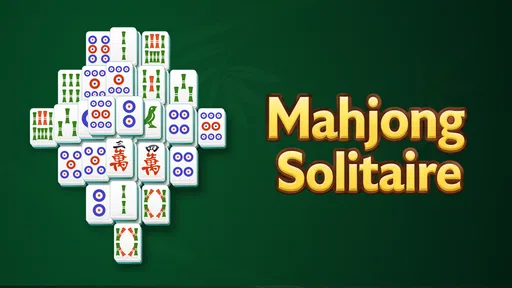
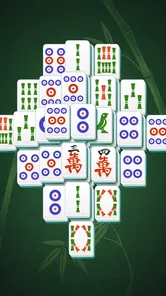
Mahjong is one of those timeless games that never seems to go out of style. With the Mahjong for Seniors app, the developers have taken this classic puzzle game and tailored it perfectly for an older audience. What immediately stood out to me is how user-friendly the interface is. No more squinting at tiny tiles! The tiles are larger, making them easy to see and tap, which is a huge plus for anyone who might not have 20/20 vision.
Design and Usability
First off, let’s talk about the design. It’s simple, clean, and not cluttered with unnecessary frills. The backgrounds are soothing, which adds to the overall relaxing vibe of the game. It’s like they’ve created an oasis of calm in the palm of your hand. Navigating through the app is a breeze; everything is laid out intuitively, so you won’t find yourself getting lost in a maze of options.
One of my favorite features has to be the hint system. It’s like having a little helper by your side, gently nudging you in the right direction whenever you get stuck. This is especially handy if you’re just learning how to play or if you’ve hit a particularly tricky spot.
Features That Stand Out
Now, let’s chat about what makes this app particularly appealing. The Mahjong for Seniors app includes different levels of difficulty, which means you can challenge yourself as much or as little as you like. Whether you’re a beginner or a seasoned Mahjong pro, there’s something here for everyone. Plus, they’ve included daily challenges to keep things fresh. It’s like having a new puzzle to look forward to every day!
Another highlight is the option for customization. You can change the tile sets and backgrounds to suit your mood. Feeling a little adventurous? Switch up the themes and enjoy a new visual experience!
Making a Puzzle Fit Your Day
For me, the most practical way to use a tile puzzle like this is to start one when I have a few unhurried minutes, rather than opening it while juggling other tasks. A short session can make a coffee break feel more engaging, while a longer one suits a quiet evening when I want something absorbing but not demanding. The gradual difficulty choice is useful here: I would begin at a comfortable level, then move up only when the pattern recognition feels familiar, rather than turning a relaxing habit into a test.
The hint is best treated as a nudge, not an automatic answer to every pause. I’d first scan the board for pairs that uncover useful tiles, then ask for help if I genuinely cannot see a move. That small pause keeps the puzzle involving and makes the hint more valuable when it arrives. A practical trade-off is that visual comfort depends on the screen itself as well as the tile design; if the display is small or dim, adjusting the device’s brightness and holding it at a comfortable distance can matter as much as choosing a theme.
Speed, Stability, and Longer Sessions
This is a turn-based puzzle, so I would not choose it for action-game speed or split-second reactions. Its pace is naturally set by how quickly I can inspect the layout and decide which pair to remove. That makes it a good fit for players who prefer thinking time, and a poor fit for anyone who finds tile matching repetitive or wants constant new mechanics. I also would not assume that a calm visual style means every board will feel easy: a layout can still take patience when promising matches are buried beneath other tiles.
For ordinary play, the straightforward screens described here suggest a game whose demands are modest compared with visually busy, real-time titles, though actual responsiveness can vary with the device. If a tap seems not to register, I would pause and tap the center of a tile rather than rapidly repeating the input; repeated taps can make it harder to tell whether the selection changed. On a longer session, taking a brief eye break is sensible even with larger tiles. The game’s measured pace is forgiving, but it does not remove the need to rest your eyes.
Who Will Enjoy It—and Who May Prefer Something Else
I can see this being especially suitable for someone who already likes solitaire-style solo puzzles, wants a simple way to practise spotting patterns, or appreciates larger tiles and a less busy presentation. It can also work as a low-pressure shared activity: one person can suggest a pair while another taps, turning a solitary board into a relaxed conversation. The daily challenge can give regular players a reason to return, while the different difficulty options make it easier to keep the puzzle within reach as confidence changes.
By contrast, I would steer players seeking multiplayer competition, a story, or a wide variety of board-game genres toward a broader game collection. Compared with many casual puzzle alternatives, the strength here is its focus: matching tiles is the point, not one feature among a crowded set of activities. That focus is also its limitation. If you tire of the same basic objective, changing the tile set or background can refresh the look, but it does not change the underlying style of play.
What to Know Before Installing
The game is free to download, with optional in-app purchases priced from under a dollar to around fifteen dollars per item. I would start with the free experience and decide whether any purchase matters to my own routine instead of treating customization as essential. It is rated for everyone, and the current version is 4.01; the minimum operating system requirement is version 9. Appgeneration - Radio, Podcasts, Games is the developer. The game has a 4.7 average from around 72,000 ratings, and has passed five million installs, which gives a useful sense of its reach without telling me whether it will suit my personal taste.
If you are wondering whether you need to be an expert before starting, I would say no: the hint option and adjustable difficulty make it approachable. If you are wondering whether it can provide a quick daily routine, the daily challenges make that an easy use case. And if you need a game that keeps changing its rules or offers competition with other people, this is probably not the right match. I would also keep expectations grounded: a hint can help with a stuck moment, but it cannot make every board instantly satisfying, and a visual theme changes presentation rather than the puzzle’s core.
Choosing It Over Other Casual Games
Compared with a general collection of phone games, this one asks for less switching between modes and less learning of unrelated rules. That focus is useful when I know I want a tile puzzle and would rather spend my time solving than browsing a large menu. A traditional physical Mahjong set is a different experience, especially when the appeal is playing with other people around a table. This app is better suited to a solo pause when setting up a group game is not practical.
It is also worth separating this kind of tile-matching puzzle from competitive or social versions of Mahjong. I would choose this game for a quiet individual session, not as a substitute for learning table play with other people. The distinction matters if you are searching for conversation, opponents, or the full social ritual of a group game. Here, the satisfaction comes from working through a board at your own speed.
A Routine That Makes the Most of It
A realistic routine could be to open a daily challenge after breakfast, play only while I have time to focus, and leave the game there if the day gets busy. If I return later, I can approach another puzzle when I am ready instead of feeling obliged to protect a streak or keep up with a competitive group. That low-pressure pattern is one of the better reasons to choose a solo board game, particularly for someone who wants a repeatable pastime without a complicated commitment.
For a shared moment, I would hand the phone to a family member only if the screen is comfortable for both of us to see. One person can point out possible matches while the other makes the taps, but I would keep the conversation relaxed rather than turning it into a lesson or a race. The game’s simple objective makes that sort of casual participation easy to imagine, although it remains a single-player-style puzzle rather than a dedicated multiplayer experience.
Someone deciding whether the free download is enough can start without planning to buy anything. The optional purchases may appeal if a particular extra matters, but I would first see whether the basic puzzle routine itself holds my interest. A new background or tile appearance can make the board feel fresher to look at; it will not make the underlying matching task into a different game. That is a useful distinction when deciding what, if anything, is worth paying for.
Final Thoughts
In a world where apps can often feel overwhelming, this tile-matching game is a breath of fresh air. It’s thoughtfully designed to cater to seniors, but honestly, it’s a joy for anyone who enjoys a good puzzle. The game strikes a satisfying balance between being challenging and relaxing. Whether you’re looking to pass the time or keep your mind engaged, this app is definitely worth checking out.
So, if you’re ready to try a puzzle that is easy on the eyes and gives you room to think, I’d give it a go. I’d recommend it most to people who want a calm, solo tile game they can approach at their own pace, and less to anyone looking for fast action or a deep range of game types. Its strongest appeal is that simple, focused routine: open a board, look for a match, and decide whether you want another.
Mahjong for Seniors Frequently Asked Questions
Is Mahjong for Seniors easy to see and control on a phone screen?
Mahjong for Seniors is a tile-matching board game, and a larger display may make the tiles easier to view than a compact phone screen. Before downloading, consider the device’s screen size and whether the player is comfortable tapping individual tiles. The game’s senior-focused name may appeal to older adults, but the available details do not establish specific display or control settings.
Does Mahjong for Seniors have a relaxing pace, or is it mainly challenging?
The game is described as both relaxing and challenging, with the goal of matching tiles to solve a Mahjong puzzle. That combination makes it a possible fit for someone who enjoys thinking through a board without seeking a fast-action game. The experience centers on finding matches, so the challenge comes from working through the puzzle rather than competing in a described action-based format.
Is Mahjong for Seniors suitable for someone who has never played Mahjong before?
Mahjong for Seniors is a board game built around matching tiles, so newcomers can approach it as a relaxed puzzle rather than needing experience with traditional Mahjong. Its focus is on matching available tiles to solve each puzzle. Players who prefer a slower, thoughtful pace may find this style approachable, while the challenge comes from choosing matches carefully.
How much does Mahjong for Seniors cost, and are purchases required?
Mahjong for Seniors is free to download, and optional in-app purchases are available, ranging from $0.99 to $14.99 per item. You can try the game without paying upfront; purchases are not described as a requirement for starting. As with any game offering optional items, it is sensible to check purchase settings before handing a device to someone who might tap them unintentionally.
What is Mahjong for Seniors, and how is it different from traditional Mahjong?
Mahjong for Seniors is a digital adaptation of the classic Mahjong game, specifically designed to cater to older adults. It features larger tiles and simplified controls to accommodate users with visual or motor impairments. The game maintains the strategic tile-matching objective of traditional Mahjong, but with an interface that prioritizes ease of use and accessibility.
Pros
- Easy-to-read tiles enhance accessibility.
- Large interface designed for seniors.
- Relaxing background music adds enjoyment.
- Helps improve memory and cognitive skills.
- Includes various difficulty levels.
Cons
- Limited customization options.
- Ad interruptions can be distracting.
- No multiplayer mode available.
- Requires internet for updates.
- Some levels may be too challenging.