Microsoft To Do: Lists & Tasks
- 13.24K
- 4.6
- Installs
- 10.00M
- Price
- Free

Screenshots



Analysis by Reviewed
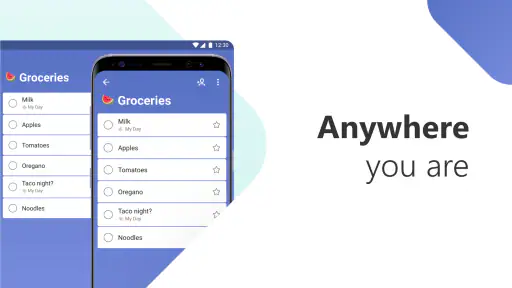
In a busy household, a shared list can be more useful than another conversation about who was supposed to pick up the groceries. I like the idea of keeping errands, chores, and plans somewhere everyone involved can check, rather than relying on messages that quickly disappear in a chat. Microsoft To Do: Lists & Tasks is a free productivity app from Microsoft Corporation, and its lists make it a practical option for coordinating everyday jobs as well as individual plans.
One list, several people, clearer handoffs
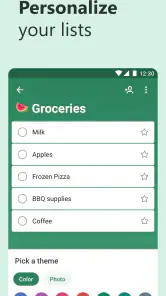
A household could keep separate lists for groceries, weekend jobs, and an upcoming trip instead of mixing everything into one long stream. That division is more than cosmetic: it helps someone opening the app for one purpose avoid scanning unrelated reminders. Shared lists can also make handoffs clearer. If one person adds a task and another takes responsibility for it, the list gives the group a common place to check what still needs attention.
I would still agree on a simple routine before relying on a shared list. For example, one person can add items as they notice them, while whoever is heading to the shop checks the list before leaving. This works best when tasks are written as clear actions—“buy dish soap” is easier to act on than “kitchen.” The app can support coordination, but it cannot decide who owns a chore or settle disagreements about priorities; people still need to communicate those parts themselves.
Keep accounts and devices in their proper lanes
Shared use does not mean everyone should use the same account. I’d keep each person’s sign-in separate and share only the lists that genuinely need to be shared. That creates a useful boundary between personal reminders and household tasks, and avoids turning a common shopping list into a window onto someone else’s private plans. Before adding another person, it is worth checking that the list is meant for collaboration and that everyone understands what they can see and change.
This setup also suits shared-device situations, such as a tablet kept in a common room, but I would be careful about leaving a personal account open on a device other people use. A family list is convenient; an unlocked personal account is a different matter. If the device is shared, choose a setup that keeps individual accounts and private tasks from being treated as communal by default.
Age, trust, and the limits of a task list
The app is rated for Everyone, which makes it suitable for a broad audience, but that rating is not a substitute for household judgment. I would show younger users what a shared list contains and explain that tasks may be visible to other participants. It can help a child remember a packing list or a small agreed chore, yet it should not be treated as a supervision tool or a way to verify that work was actually done. Trust and a quick check-in still matter.
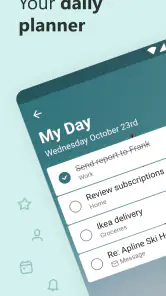
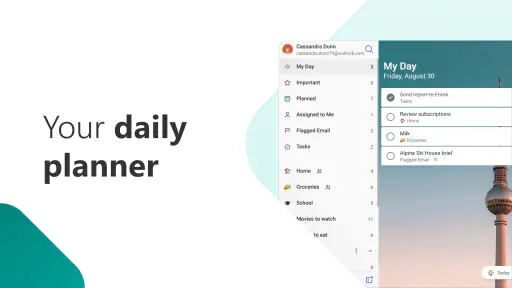
For individual planning, the My Day view is useful when a large backlog starts to feel discouraging: I can choose a manageable handful of tasks for today rather than treating every unfinished item as equally urgent. A practical habit is to review the list in the evening, move only the tasks that still matter, and leave less urgent ideas in their own list. That keeps daily planning from becoming a second job.
You May Like

Clash of Clans Is Won Between the Battles

Android Auto Makes the Case for Quieter Car Software

MobiOffice: Transforming Mobile Productivity with Seamless Integration

EA SPORTS FC™ Mobile Soccer: Redefining Mobile Sports Gaming

How Microsoft OneDrive Became a Mobile Productivity Giant

How Google Translate Breaks Language Barriers Effortlessly
Making the app work in a real household
A realistic weekday example shows where this kind of setup earns its keep. I might add milk and dish soap to a shared shopping list while making breakfast, then a partner can check it on the way home. Separately, I can keep a personal reminder to call the dentist without putting that task in front of everyone. The useful distinction is not simply “shared versus private”; it is choosing the right place for each task before the list gets crowded.
For a household with different schedules, I’d treat the list as a handoff board rather than a live conversation. Add a short, actionable task when it comes to mind, and use a message or a direct conversation for anything that needs explanation or a quick decision. A note such as “pick up the parcel” is easy to understand; a vague entry like “parcel issue” invites follow-up. This habit keeps the list useful without asking it to replace communication.
Set up collaboration without blurring boundaries
Before sharing a list, I would decide who actually needs access and what the list is for. A grocery list may be appropriate for several people; a personal work list usually is not. Keeping those purposes separate makes it easier to share confidently and reduces accidental clutter. If someone uses a family tablet, I’d also think carefully about whether the person’s account should remain signed in there, rather than assuming that a shared device should display everyone’s plans.
For a child or a less experienced user, I’d begin with a small list and explain the difference between an item being written down and someone having agreed to do it. The app can help everyone see the same information, but it cannot establish permission, responsibility, or a household rule. Those expectations have to come from the people using it. That distinction matters especially when a list includes tasks that are optional, time-sensitive, or intended for one person alone.
There is also a practical access question: can every participant comfortably use the same list from their own device? The app’s cross-device synchronization is a convenience when people use it on more than one device, but shared access still depends on a sensible account setup and everyone knowing which list to open. If a person rarely checks the app, a shared list will not magically make them more available. I’d agree on a simple check-in habit before relying on it for important errands.
Use My Day without turning planning into a chore
My Day works best for me as a daily selection, not as another permanent list to maintain. I can look across what needs attention, choose a few realistic tasks, and focus on those instead of carrying the entire backlog in my head. If I try to move every unfinished item forward each evening, the daily view becomes a repeated dump of old intentions. I’d rather ask whether each task still matters, then leave it in its appropriate list if it does not belong today.
This approach is especially helpful when household jobs compete with work and personal errands. A short plan can make the day feel manageable, while the broader lists preserve things that do not need attention immediately. The trade-off is that the app depends on the user making those choices. It can organize what I enter, but it will not know that an errand has become irrelevant or that I have taken on too much.
Where it fits—and where it doesn’t
Against a paper checklist, the app’s advantage is that a shared list can be updated without rewriting it, and reminders can help keep time-sensitive errands visible. Compared with a fuller project-management tool, it is easier to approach for basic household coordination, but less suited to work that depends on complex planning, detailed progress tracking, or extensive discussion. I would choose it for groceries, school supplies, and recurring home tasks; I would look elsewhere if a project needs dependencies, formal assignments, or a detailed team overview.
It also occupies a useful middle ground between a notebook and a group chat. Paper can be satisfying for one person and works without asking the household to adopt an app, but it is less convenient when several people need to update the same running list. Chat is good for clarifying a change or agreeing on a plan, but shopping items and chores can disappear among unrelated messages. This app is better for keeping simple actions in view; it is not a replacement for either a conversation or a detailed project workspace.
One useful trade-off is that organization depends on how thoughtfully lists are named and maintained. Too many lists can make a simple task harder to find, while one catch-all list becomes noisy as family members add unrelated items. I’d start with just a few clear categories, then split a list only when it becomes genuinely difficult to scan. That small discipline matters more than building an elaborate system on day one.
Another way to keep lists readable is to write tasks in the form someone can act on, and to include only the context needed to complete them. “Buy the ingredients for Friday dinner” gives a clearer purpose than a broad label, but a long explanation in every entry turns a checklist into a poor substitute for a message thread. For unusual requests, I’d discuss the details elsewhere and keep the list entry brief. The app is at its best when each item is easy to recognize at a glance.
Who will appreciate it, and who may not
I think it suits people who want a low-friction place for personal tasks and straightforward shared lists, especially if they already use Microsoft services. It can work well for a couple coordinating errands, roommates dividing basic household supplies, or a parent helping a child remember a short packing list. The common thread is that the tasks are concrete and the people involved are willing to check the list.
I would skip it as the main household system if the group needs detailed conversations attached to every task, complex responsibility tracking, or a central view of a large project. I would also avoid treating it as a family-monitoring tool: a completed checkbox is not proof that a job was done well, and a reminder cannot replace an agreement. If someone needs paper, dislikes maintaining digital lists, or will not check a shared device, a simpler routine may be more dependable.
Microsoft To Do is free, has a 4.6 average from around 454,000 ratings, and has passed 10 million installs. It is rated Everyone and works on devices running Android 8.0 or later. Those details make it easy to consider, but the right fit depends on how you plan to use it: it is strongest when you want straightforward lists and reminders, especially if Microsoft 365 is already part of your routine. If you need a shared household hub with richer conversations or advanced oversight, a different kind of app may serve you better.
Getting Started with Ease
From the moment you install Microsoft To Do, you’ll notice its clean and intuitive interface. The setup process is as smooth as butter, and you’ll be adding tasks in no time. Whether you’re a seasoned task manager or just getting started, this app caters to all levels of organizational prowess. The seamless synchronization across devices ensures you’re always on top of your game, no matter where you are.
Features That Stand Out
One of my favorite features has to be the My Day function, which encourages you to focus on tasks that need immediate attention. It’s like having a personal assistant gently remind you of what’s important. Plus, the ability to create multiple lists means you can categorize tasks to your heart’s content. Planning a vacation? There’s a list for that. Organizing a work project? Yep, there’s a list for that too.
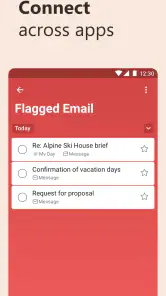
Another gem is the integration with Microsoft 365. If you’re already in the Microsoft ecosystem, this feature is a godsend. Sharing tasks and lists with colleagues or family is as simple as pie. You can even attach files directly from OneDrive, making it a breeze to keep everything in one place. The app feels like it’s holding your hand through the chaos of daily life, and honestly, who doesn’t need a little hand-holding every now and then?
User Experience
The app’s design is minimalist, yet it packs a punch with its functionality. Navigating through the app feels intuitive, and you’re unlikely to find yourself lost in a sea of icons and menus. Notifications are timely and subtle, striking the right balance between being informative and not overly intrusive. It’s like the app knows exactly when to give you a nudge, without being a nagging presence.
Final Thoughts
Is Microsoft To Do: Lists & Tasks the app you need to regain control of your life? I’d say it’s pretty darn close. With its user-friendly design, robust feature set, and seamless integration into the Microsoft ecosystem, it’s a tool that’s hard to overlook. Whether you’re managing personal errands or professional projects, this app is equipped to handle it all with grace. So, if you’re ready to tame the chaos and bring a little order to your world, give Microsoft To Do a whirl. You might just find it’s the missing piece in your productivity puzzle.
Microsoft To Do: Lists & Tasks Frequently Asked Questions
Can I add reminders and due dates to tasks in Microsoft To Do?
Yes. Microsoft To Do is designed to help you create daily to-do lists, add reminders, and organize tasks. You can set due dates and reminders to make important items easier to track, then group tasks into lists that fit your plans. This makes it useful for everything from remembering a small errand to keeping a larger set of responsibilities in view.
Can I share lists or notes with other people?
Microsoft To Do’s store summary highlights sharing notes, and the app is intended to help you keep plans organized in lists. Sharing can be useful when coordinating tasks with family, friends, or colleagues, since everyone involved can refer to a common set of information. If collaboration is a key reason for downloading, consider whether its list and note tools suit the way your group likes to plan.
Can Microsoft To Do help me build a daily planning routine?
Yes. Microsoft To Do is aimed at everyday productivity, and its daily to-do lists give you a straightforward place to collect tasks and reminders. You can separate responsibilities into lists, add due dates, and use reminders to keep items from slipping through the cracks. It is a practical option if you want a dedicated task app to support a simple, repeatable planning habit.
Is Microsoft To Do appropriate for children and families?
Microsoft To Do has an Everyone content rating, so its content is suitable for a broad audience. Families may find it useful for keeping everyday plans, reminders, and shared notes organized. Its core purpose is productivity rather than entertainment, and the list-based approach is easy to understand. Each person’s ability to use shared information will depend on the account and sharing setup they choose.
Can I use Microsoft To Do without a Microsoft account?
Microsoft To Do is designed to keep your lists and tasks available across devices, so signing in with a Microsoft account is important for using its syncing and Microsoft service integrations. If you already use Microsoft products, the same account can help bring your tasks into that workflow. You can still consider whether you want an account-based app before downloading.
Pros
- Seamless integration with Microsoft 365
- User-friendly interface
- Cross-platform synchronization
- Customizable task lists
- Supports subtasks and reminders
Cons
- Limited features in free version
- No offline mode
- Occasional sync issues
- Lacks advanced project management
- Limited third-party integrations

- Category
- Productivity
- Version
- Varies with device













