Magic: The Gathering Companion
- 843.00
- 4.6
- Installs
- 1.00M
- Price
- Free

Screenshots




Analysis by Reviewed
My first impression of Magic: The Gathering Companion is that it makes the practical side of playing Magic feel less scattered. Instead of treating an event as a separate chore, it brings event participation and basic table tools into one mobile place. That is a useful first-week discovery if you already play at stores or with a regular group; it is less compelling if you only want a general-purpose app for browsing cards or building decks.
Where it earns its place in the first week
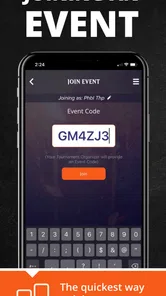
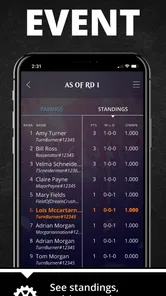
The quickest way to judge it is to use it during a real event, not just tap around at home. When I arrive for a tournament, having event details, pairings, and standings on my phone can be more convenient than keeping track of updates through scraps of paper or asking someone to repeat information. It is especially handy when the room is busy and I want to check what is happening without interrupting a match.
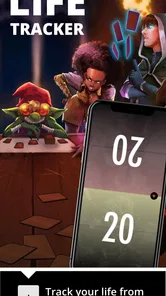
For a casual evening, the life counter is a different kind of convenience. I can keep it nearby rather than searching for spare dice, and a shared screen can make life totals easy for both players to see. Still, phones can be distracting at the table, so I would agree with the group first about whether using one is welcome. A physical counter remains a better fit for players who prefer to keep devices away from the game.
Your Pocket Magic Assistant
Imagine having a personal assistant that keeps track of all your Magic: The Gathering needs. That's precisely what this app does. It's like having a little magical helper in your pocket, ready to assist you anytime, anywhere. Whether you're a seasoned player or just starting, the app is designed to enhance your gameplay experience.
Features That Enchant
First off, let's talk about the features. The app allows you to easily join and participate in events. No more fumbling around with paper and pen; the app seamlessly integrates with Wizards' official event system. You can check event schedules, register for tournaments, and even get pairings and standings straight on your phone. It's like having a front-row ticket to all the action.
Another magical feature is the life counter. Forget those clunky dice or counters; the app provides a sleek and easy-to-use life counter for both you and your opponent. It's customizable, so you can tweak it to fit your preferred playstyle. Plus, it supports multiplayer games, which is perfect for those epic Commander nights.
From regular events to quieter months
The app is most likely to keep its place on my phone when I play in recurring events. A sensible habit is to check event information before leaving home, then open the app again when I need standings or pairings. That small routine makes it more useful than a one-time novelty. If I only attend an occasional event, though, I might use it for that day and forget about it until the next one; its value follows my Magic schedule rather than creating a reason to play.
More From Our News Desk

Weather by Xiaomi Review: Clear at a Glance, Less Clear Up Close

X Under Pressure: Can It Recover When Posting Goes Wrong?

Clash of Clans Is Won Between the Battles

Android Auto Makes the Case for Quieter Car Software

MobiOffice: Transforming Mobile Productivity with Seamless Integration

EA SPORTS FC™ Mobile Soccer: Redefining Mobile Sports Gaming
Compared with the usual alternatives, Companion is aimed at official event participation, while a paper note, dice, or a general life-counter app can be quicker for an informal kitchen-table game. Those alternatives may also suit a group that does not want phones out. The trade-off is that paper does not put event information and a life counter in the same digital routine. I would choose based on the evening: event tools for organized play, simple physical counters when convenience and fewer screens matter more.
Maintenance, fatigue, and fit
There is little reason to make this a daily habit if I am not playing. Its upkeep is mostly practical: keep the app available, make sure my phone has enough charge for an event, and check that I can access the event workflow before relying on it at the venue. I would not make it my only plan for tracking a casual game; a pair of dice is a sensible backup if the phone is inconvenient or the group would rather stay off screens.
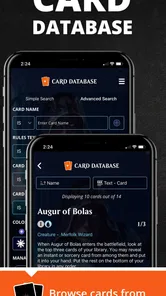
There is also a boundary worth keeping in mind: a companion for events and table use is not automatically the best tool for every Magic task. If I mainly want to explore cards, organize a collection, or work on deck ideas, I would look for an app built around that particular job rather than expect this one to replace it. The same applies to players who rarely attend events; they may get more regular value from a dedicated game aid they use every session.
Stay Connected with the Community
One thing I absolutely love is how the app keeps me connected with the MTG community. You can follow your favorite events, players, and even get notifications about upcoming matches. It's a vibrant hub of activity where you can engage with fellow players and stay up-to-date with the latest happenings in the Magic world.
And let's not forget the deck builder feature. Crafting the perfect deck is an art, and the app makes it so much easier. You can experiment with different card combinations, save your decks, and even share them with friends. It's like having a magical workshop right at your fingertips.
One realistic way I would use it is to check the event details before heading to a local tournament, then keep the phone handy for the information I need between rounds. At home, I would treat the life counter as a backup option for multiplayer games rather than assume every player wants to share a screen. That separation helps me get the practical benefits without letting an app take over the social part of playing.
Using it without slowing down the table
A small but useful habit is to decide before a match who will handle the phone. If each player tries to tap through a shared counter or check event information at the same time, the device can become one more thing to coordinate. I would keep it with the player who is already comfortable using it, then put it aside once the relevant check is done. That keeps the tool in its supporting role and avoids turning between-round downtime into a phone session.
For an event, I would also make a quick check while I still have time and a stable connection, rather than waiting until I am rushing to find a pairing. This is less about advanced setup than about reducing avoidable stress: know where the event information appears, keep the phone charged, and have a paper or dice fallback for life totals. If the app is unfamiliar, a quiet test at home is more comfortable than learning it with other players waiting.
The Verdict
All in all, the Magic: The Gathering Companion app is a game-changer for anyone who loves MTG. It's intuitive, feature-rich, and genuinely enhances the way you play and engage with the game. Whether you're battling in a tournament or just having a casual game with friends, this app is a trusty companion that keeps everything running smoothly.
So, if you haven't already, I highly recommend giving it a try. It's available for both Android and iOS, and trust me, once you start using it, you'll wonder how you ever played without it. Until next time, may your draws be ever in your favor!
It is free, rated for Everyone, and made by Wizards of the Coast LLC. Its average rating is 4.2 from around thirteen thousand ratings, with roughly eight hundred written reviews and over a million installs. It first appeared in July 2020, and version 1.10.6 is listed for devices running iOS 8.1 or later. Those details make it easy to try without a purchase, though I would still judge it by whether its event tools fit the way I actually play.
Who should keep it installed?
I would keep it installed if I regularly join organized Magic events, want event information close at hand, or appreciate having a digital life counter for games with friends. Newer players may also find it useful as a practical introduction to event routines, especially when checking what to do before and during a tournament. A useful tip is to explore the event flow before arriving, rather than trying to learn it while everyone is waiting to begin.
On the other hand, someone who plays only at home and already has a preferred way to track life totals may not open it often enough to justify a permanent spot. The app is free, but attention is still a cost: notifications and phone use can pull focus from the table. I would keep only the parts that help my own play routine, and skip it if my group strongly prefers paper, dice, or a phone-free game.
A lasting role, not a daily destination
My long-term verdict is that Companion earns space through recurring usefulness, not constant novelty. It is a focused tool for the moments around events and games, so its value rises when Magic is already part of my regular calendar and naturally dips during quieter stretches. If that matches your habits, it can be an easy, sensible companion; if you want a card database or a deck-building workspace first, another specialized app will serve you better.
What to expect from its event focus
One question I would ask before installing it is whether it can replace every other Magic app I use. I would not expect that. Its strongest role is around organized play and at-table convenience; a dedicated card reference or deck workspace is a better choice when searching, sorting, or refining a list is the main task. Thinking of it as a focused event companion, rather than an all-in-one Magic hub, makes its strengths and limits easier to judge.
It is also worth separating access to event information from the experience of playing. The app can make logistics easier to check, but it does not remove the need to listen for announcements, follow the event’s instructions, or confirm that you are ready for the next round. I treat the screen as a convenient reference, not as a substitute for paying attention to the people running the event.
A practical routine for recurring play
If I attend a weekly or monthly gathering, I would build a simple routine around the app rather than open it out of habit every day. Before leaving, I would check the event details; on site, I would use it for the information that helps me move between rounds; after the event, I would close it and get back to ordinary phone use. That limited rhythm matches what the tool is for and keeps notifications or browsing from becoming another obligation.
For a newer player, the less obvious benefit is not just having event details on a screen. It is being able to approach a tournament with a clearer sense of the practical sequence: check in through the event flow, look for the information needed during play, and check standings or pairings when appropriate. I would still ask the organizer if I am unsure how that particular event is being run, but having a familiar place to start can make a first visit feel less intimidating.
Where the trade-offs become noticeable
Phone-based life tracking has a particular downside in multiplayer games: everyone may need to see the total, but not everyone wants to lean over one device or wait for a turn to adjust it. A screen can also be harder to read from across a table than a large physical counter. I would test the arrangement with the group before making it the default, especially if the game involves frequent changes or players seated far apart.
There is a related trade-off at events. Combining event information and table utilities is convenient, but it concentrates more of the routine on a phone. If the battery is low, the device is unavailable, or I simply want fewer screens in my day, the old-fashioned alternatives remain perfectly reasonable. I do not see that as a failure of the app; it is a reminder to use digital convenience where it genuinely helps and keep a simple backup for the rest.
Who may prefer a different tool
I would be more cautious about recommending it to someone whose Magic time is almost entirely casual and offline. If that player already uses dice, a paper pad, or a small group’s preferred counter, adding an app may create extra handling without solving a real problem. Likewise, a player focused on collecting or building decks should choose a tool organized around those interests. Companion makes most sense when the event connection is part of the reason to install it.
For regular event-goers, by contrast, even occasional use can justify keeping it around because the value is concentrated in moments when reliable access to pairings, standings, or event details matters. That is a different kind of usefulness from an app opened every day. I find that distinction helpful: it prevents me from judging the app by screen time alone and instead asks whether it removes friction from the specific occasions when I need it.
Keeping the habit light
The best long-term setup is probably the smallest one that works. I would use the event functions when playing organized Magic, keep the life counter available for groups that welcome it, and ignore anything that does not fit my routine. That keeps the app from becoming a maintenance project. When play becomes less frequent, there is no need to force daily engagement; it can simply wait until the next event or game where its tools are useful.
Magic: The Gathering Companion Frequently Asked Questions
Does Magic: The Gathering Companion work without an account or sign-in?
If you are deciding whether to install it, consider how you plan to use its event and game-management tools. The app is an official mobile companion for Magic: The Gathering, but some activities may involve event participation or account-related steps. It is best suited to players who want mobile support alongside tabletop play, rather than someone looking for a complete, self-contained card game on a phone.
Can I use Magic: The Gathering Companion to organize a local game or event?
The app is designed to support Magic: The Gathering games and events, making it relevant for players who want digital help while gathering with others. Its tools can assist with managing a session, especially when a group is playing tabletop Magic. If you are planning a local event, the app can be a useful companion, though it is not itself a venue, community, or replacement for arranging the gathering.
Is Magic: The Gathering Companion available in my language?
Language preference can matter when using an app during a game, especially if players need to read event or game-management information quickly. Magic: The Gathering Companion is an official mobile companion for the tabletop game, and its usefulness will depend partly on whether its interface is comfortable for you to navigate. Check the app’s displayed language on your device before relying on it for an event or group session.
Do I need to know how to play Magic: The Gathering before using Companion?
The app is an official mobile companion for Magic: The Gathering, so it is most useful when you already take part in the tabletop game or are learning it with other players. Its event and game-management tools can support a session, but they do not replace learning the rules or provide a standalone card-playing experience. New players can use it alongside a game as they get familiar with the hobby.
Is Magic: The Gathering Companion suitable for children and families?
Magic: The Gathering Companion has an Everyone age rating, and its role is to support the card game with mobile tools rather than provide a separate game to play on the phone. Families can use it to help manage a tabletop session or event. Whether the wider Magic: The Gathering experience is a good fit will depend on the cards, rules, and style of play chosen by the people playing.
Pros
- User-friendly interface for easy navigation.
- Real-time updates for new card releases.
- Comprehensive deck-building tools.
- Supports multiplayer game tracking.
- Official app with reliable rules reference.
Cons
- Requires internet for most features.
- Limited offline functionality.
- Occasional sync issues reported.
- High battery consumption.
- No landscape mode for tablets.













