Logo Maker And Logo Creator 3D
- 189.00
- 4.8
- Installs
- 5.00M
- Price
- Free
Screenshots
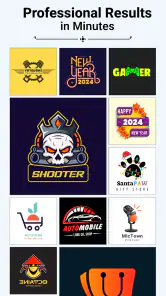
Analysis by Reviewed
I’d choose a logo-making app by asking one practical question first: do I need a quick visual starting point, or do I need a distinctive identity that will hold up across a whole business? Logo Maker And Logo Creator 3D is aimed at the first job. It’s a free art and design app from Firehawk, and its focus on ready-made visual elements makes it worth considering when I want to explore ideas without starting with a blank canvas.
That distinction matters before I spend time choosing a design. A logo used for a one-off event, a new social profile, or an early project can be a useful experiment; a logo expected to represent a growing business for years has to do more. I’d decide where the mark will appear, how often it will need changing, and whether I’m comfortable adapting a template before I open the editor.
Start with the job the logo must do
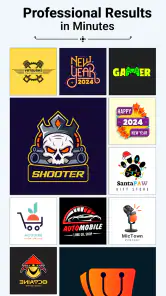
The scale of its library is a useful clue to its appeal: the app brings together more than 5,000 logos, backgrounds, icons, and other graphics. That gives a new shop owner, club organizer, or creator plenty to browse, but a large selection can also make choosing slower. I get better results by deciding on a mood and a small palette before opening the template choices, rather than scrolling until something merely looks attractive.
It also helps to write down the name and any short wording before designing. Long business names can be awkward in a compact badge, while abbreviations may be unclear to people who have never seen them. I’d check the chosen wording at the actual size it will appear, not just in a large preview, and leave enough visual breathing room for the name to remain easy to read.
What the template-first approach does well
For a first draft, a template can help me move from a vague idea to something I can actually judge. The 3D option is a particular reason to try this app: dimensional styling can give a badge or name treatment more presence on a profile image or promotional graphic. It is a visual choice, though, not automatically a better logo. If the mark needs to work as a tiny one-color stamp, a simpler flat design may be easier to use.
A useful workflow is to make two versions of the same concept: one with depth and one kept plain. Then I can compare them at the size where people will really see them, such as a small social avatar, instead of choosing based on the editor’s larger preview. I’d also avoid putting every appealing icon and effect into one design. A strong mark is often easier to recognize when its central shape and name are doing most of the work.
For a practical comparison, I’d put both versions beside the name of the project and view them briefly from a distance. If the 3D treatment draws attention but makes the wording harder to identify, the extra depth is working against the logo’s main job. I’d keep a decorative treatment for a poster or cover image if it suits the mood, and use the simpler mark where recognition matters more than visual flourish.
You May Like

Clash of Clans Is Won Between the Battles

Android Auto Makes the Case for Quieter Car Software

MobiOffice: Transforming Mobile Productivity with Seamless Integration

EA SPORTS FC™ Mobile Soccer: Redefining Mobile Sports Gaming

How Microsoft OneDrive Became a Mobile Productivity Giant

How Google Translate Breaks Language Barriers Effortlessly
Getting Started
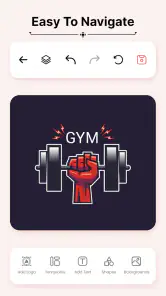
First off, downloading and installing the Logo Maker And Logo Creator 3D is a breeze. Available on both Android and iOS platforms, it’s just a quick download away from Google Play Store or the Apple App Store. Once you’ve got it installed, the interface greets you with a clean and intuitive design that’s immediately welcoming, even for those who might not be tech-savvy. No need for a tutorial here; the app is very user-friendly.
Before committing to a design, I’d treat the first session as a short selection exercise rather than trying to finish the perfect logo immediately. Pick a few directions that match the project, then compare them against practical needs: Does the name fit? Is the central symbol understandable? Would I still recognize it without its background? This keeps browsing purposeful and makes it easier to notice when a template looks appealing but doesn’t fit the actual use.
Features That Shine
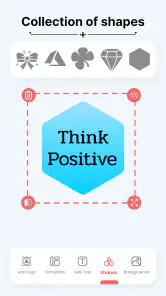
What really sets this app apart is its robust set of features. You’re not just limited to 2D designs; as the name suggests, you can also dive into 3D logo creation, which is perfect for those looking to add a bit of depth and dimension to their brand. The app offers an extensive library of templates, ensuring you’ll find something that suits your style or business vibe. Whether you’re running a tech startup or a cozy coffee shop, there’s a template for you.
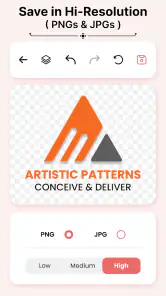
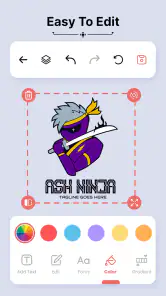
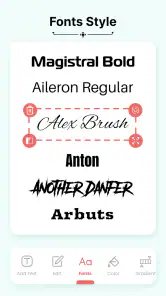
Customization is king here. You can tweak colors, fonts, and even layer elements to create something truly unique. Plus, the app supports high-resolution exports, so your logo will look crisp whether it’s on a business card or a billboard.
One non-obvious advantage of a ready-made starting point is that it lets me test a visual direction before I spend time building a full identity. I can compare a bold symbol with a more understated treatment and see which better fits the project’s tone. The trade-off is that changing colors and wording may not be enough to make a template feel distinctive; I’d remove any ornament that doesn’t contribute to recognition rather than treating every available element as something I should use.
Usability and Experience
Now, let’s talk about usability. One of the things I loved about this app is how it caters to both beginners and seasoned designers. If you’re just starting out, the drag-and-drop functionality makes it easy to put together a logo in minutes. For those who want more control, the advanced editing tools offer a lot of flexibility. The app runs smoothly without any noticeable lag, which is a huge plus when you’re knee-deep in design mode.
A realistic use is preparing a temporary logo for a weekend market stall: I could pick a fitting visual, adjust the wording and colors, and use the result on a simple sign or social post while testing whether the name and look feel right. I would treat that as a practical draft, not proof that the design is ready for every use. Before settling on it, I’d check that the text remains legible at small sizes and that the design still makes sense without decorative depth.
For that market-stall scenario, I’d make one version for the sign and another preview sized like a small social profile image. The same artwork can feel balanced on a large sheet yet crowded in a circle or square crop, so checking both contexts early can prevent a last-minute redesign. I’d also save the chosen wording and color decisions somewhere outside the editing session, which makes it easier to keep later promotional materials visually consistent.
Choosing between this and other design tools
Compared with a general drawing or layout app, this is the more direct route when I want a logo-shaped starting point and don’t want to build every graphic from scratch. A blank-canvas editor is a better fit if I need precise control over custom shapes or a visual system for packaging, web pages, and print materials. Hiring a designer is the stronger choice when originality, brand strategy, and consistent files for many formats matter more than speed or cost.
The trade-off with templates is that another person may arrive at a similar visual direction. I’d make the design more personal by changing the wording, choosing a restrained color combination, and removing elements that don’t help communicate what the organization does. I’d also keep a note of the colors and type choices I settle on, so later posts or signs don’t drift into a different look.
The alternative I’d choose depends on what happens after the first draft. A template-based app makes sense when speed and exploration are the priorities. A general-purpose design editor is a better fit for someone who wants to draw a distinctive symbol from scratch or develop a coordinated set of materials. If the identity will appear across many business touchpoints, a designer can help create consistency that a single logo-making session may not provide.
There is also a useful middle ground: use this app to clarify the direction, then take the strongest idea into a more flexible workflow if the project grows. That avoids demanding a finished brand system from a quick logo tool, while still making the initial experiment productive. I’d keep the design simple enough to reproduce and avoid relying on effects that may not translate well to every format.
Practical limits, cost, and fit
The app is free to install, while optional in-app purchases range from $0.99 to $99.99 per item. I’d start by testing the free experience and only consider a purchase if a specific item or option is clearly useful to my project. That matters for someone making a one-off logo: paying for extras before deciding whether the template approach suits you can turn a quick experiment into an unnecessary expense.
It’s rated for Everyone, has a 4.8 average from around 50,000 ratings, and has passed 5 million installs. It was released on November 3, 2023; version 2.1.2 supports Android 7.0 and later. Those details make it easy to judge basic compatibility and broad reception, but they don’t replace checking the result carefully for your own needs.
I’d recommend it to beginners, side projects, and small organizations that need a fast visual draft and are comfortable adapting a template. I’d skip it if I needed a highly original identity, exact brand specifications, or a complete set of production-ready assets for a larger business. For that kind of work, a more capable design workflow or a professional designer is the better investment.
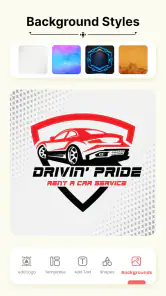
One question I’d ask before settling on any logo is whether it will still work when the background changes. I’d inspect the mark against a light and a dark surface, and check that its most important parts remain clear without relying on a particular backdrop. This is especially useful when the design is intended for social posts, signage, or other places where the surrounding color may vary.
Another practical decision is whether the design is a temporary placeholder or something I plan to keep. For a short-lived project, a fast template can be entirely reasonable. If it becomes the face of a business, I’d be more cautious: similar template choices can appear elsewhere, and a logo that needs many refinements may be a sign that a blank-canvas workflow or professional help is a better next step. The app is most useful when I set that expectation before starting, rather than after becoming attached to the first attractive result.
Who should use it, and who should move on
If you’re looking for an app that combines ease of use with powerful design tools, Logo Maker And Logo Creator 3D is definitely worth checking out. It’s perfect for anyone who needs a professional-looking logo without spending a fortune. The app’s ability to create both 2D and 3D logos is a game-changer, providing versatility that’s hard to find elsewhere.
I see the clearest fit for someone who needs a first visual quickly: a small community group preparing a notice, a creator testing a channel identity, or a new seller trying out a name and look before investing in a wider brand. In those cases, the ability to explore a logo-shaped design without beginning on a blank page is a genuine time-saver. I’d still make a deliberate choice about where the design will be used and check that it reads at that size.
I’d steer away from it if the main requirement is a unique symbol with carefully controlled geometry, a complete identity system, or artwork prepared to exact specifications for many different outputs. That doesn’t make the app a poor choice; it means the job has outgrown what I want from a quick template-led tool. A more flexible editor or a designer is likely to serve that project better, even if it takes more time to reach a finished result.
In conclusion, whether you’re an entrepreneur launching a new brand or just someone who loves dabbling in design, this app is a fantastic tool to have in your arsenal. It’s affordable, versatile, and incredibly easy to use. So why not give it a shot and see what amazing logos you can create?
My recommendation is to try it when the goal is a quick, editable starting point, and to judge the result by how clearly it communicates rather than how many effects it uses. Keep the design simple, compare the 3D and flat treatments at real viewing sizes, and wait to spend on extras until you know they solve a specific need. For an early-stage idea or a modest project, that makes this a practical option; for a lasting, highly distinctive brand, I’d move to a more controlled design process.
Logo Maker And Logo Creator 3D Frequently Asked Questions
Is Logo Maker And Logo Creator 3D free to download, and are there optional purchases?
Logo Maker And Logo Creator 3D is free to download, so you can try its logo-design tools without paying upfront. Optional in-app purchases are available, with individual items ranging from $0.99 to $99.99. Check the details of any item before confirming a purchase so you understand its cost and what it offers.
Who develops Logo Maker And Logo Creator 3D, and what kind of app is it?
Logo Maker And Logo Creator 3D is an Art & Design app from Firehawk, aimed at people who want to create logos using a collection of design resources. Its short store description is “Logo Maker 3D,” while the full summary highlights logos, backgrounds, icons, and other graphics. It may suit personal projects as well as straightforward branding work.
What is the age rating for Logo Maker And Logo Creator 3D?
The app has an Everyone content rating, so it is marked as suitable for a broad audience. That rating describes the app’s content classification; it does not guarantee that every design tool will be equally useful for every age or skill level. Anyone planning to make a logo can explore the available tools and decide whether they fit their needs.
Can I use Logo Maker And Logo Creator 3D on my device?
Logo Maker And Logo Creator 3D is an Art & Design app developed by Firehawk. It runs on Android 7.0 and later, so check your device’s operating system before downloading. The app is free to install, and its age rating is Everyone, making it suitable for a broad audience interested in creating logos.
What features does Logo Maker And Logo Creator 3D offer?
Logo Maker And Logo Creator 3D offers a comprehensive suite of tools for creating professional logos with ease. It includes a vast library of templates, customizable fonts, colors, and icons, and 3D text options. Users can also import their own images and utilize advanced editing features to fine-tune their logos, making it perfect for beginners and professionals alike.
Pros
- User-friendly interface for beginners.
- Extensive library of templates.
- High customization options.
- Supports 3D logo creation.
- No watermarks on final logos.
Cons
- Limited free features.
- Occasional in-app ads.
- Requires internet for some features.
- Some design tools are premium.
- Lacks advanced editing tools.

- Category
- Art & Design
- Version
- 2.1.2













