Local Weather: Live Forecast
- 3.40K
- 4.6
- Installs
- 10.00M
- Price
- Free
Screenshots
Analysis by Reviewed
I judge a weather app by whether it helps me make a better decision quickly, not by how many numbers it can put on screen. Local Weather: Live Forecast is aimed at that everyday need: checking conditions before a commute, deciding whether to take a walk, or working out if outdoor plans need a backup. It’s a free weather app from WINDWAVE LIMITED, and its straightforward focus makes it approachable if you want a useful forecast without turning weather-checking into a hobby.
What I would check before choosing it
My first question with any local forecast is practical: can I get from a quick glance to a sensible plan without digging through screens? This app brings current conditions, hourly and weekly outlooks, radar, alerts, and air quality into one weather-focused experience. That range matters most when the answer is not simply “hot” or “cold,” but whether rain might interrupt a walk or whether air conditions should affect time outside.
I’d also consider how I usually use weather information. If I check once in the morning and rarely change plans, a phone’s built-in weather view may be enough. If I revisit the forecast through the day, or want radar and tailored notifications close at hand, a dedicated app like this has a clearer purpose. The best choice is the one that gives me useful context without making routine decisions feel complicated.
One small but important habit is to separate a forecast from certainty. An hourly view can help me choose a window for an errand, while radar can provide a visual sense of nearby precipitation. I would still leave room for conditions to shift, especially if I’m planning around a narrow gap in the weather. Used together, those views are more helpful than treating one forecast symbol as a guarantee.
First Impressions
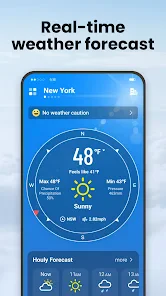
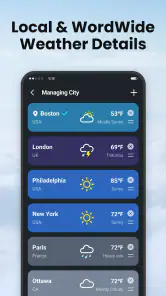
When I first launched Local Weather: Live Forecast, I was greeted with a sleek and intuitive interface. The app doesn’t bombard you with ads or unnecessary information, which is a huge plus. It’s all about the live weather updates and making sure you’re prepared for whatever Mother Nature throws your way. The main screen gives a quick overview of the current weather, including temperature, humidity, and wind speed. It’s straightforward and easy to navigate, which is perfect for those of us who don’t want to spend ages figuring out an app.
Main Features
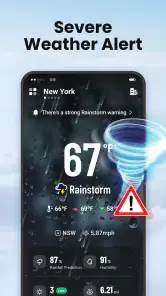
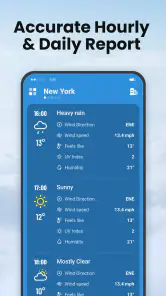
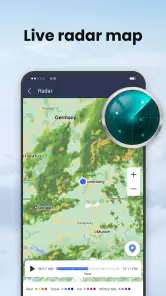
Alright, let’s talk about what really matters—the features. This app offers hourly and weekly forecasts that are surprisingly accurate. I found myself checking it every morning to plan my day. The live radar is a standout feature, allowing you to see weather patterns in real-time. If you’re planning a road trip or outdoor event, this is incredibly handy. It also includes weather alerts for severe conditions, which I appreciate because safety first, right?
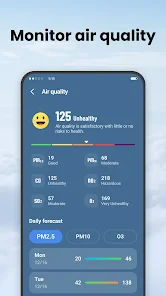
For those of us who love a bit of customization, the app lets you personalize notifications. You can set it to alert you about specific conditions like rain or snow. There’s even an air quality index, which is a nice touch for those living in areas where pollution is a concern.
Making the features work for ordinary plans
The combination of forecast views, radar, and alerts is most useful when each has a separate job. I’d use the weekly outlook to notice days that may need flexible plans, then check the hourly view before choosing a departure time. Radar is better as a short-term visual check than as a long-range planner. This simple sequence keeps me from overreacting to a distant forecast while still giving me a chance to adjust before heading out.
For example, imagine I have errands on foot and a short outdoor appointment later in the day. I would check the forecast in the morning to see whether the day looks unsettled, then revisit the hourly view shortly before leaving. If rain appears relevant, I’d look at radar as another clue and carry a light layer or move the appointment if that is practical. The app supports that kind of decision-making; it cannot remove the uncertainty inherent in local weather.
Air quality is useful in a different way from rain alerts. If I’m planning exercise outdoors, I can make a more informed choice by checking it rather than relying only on temperature and cloud cover. I’d treat it as one part of the decision, alongside how I feel and any local guidance that applies to me. That makes the feature more than a decorative extra, particularly for people who are sensitive to air conditions.
Turning a forecast into a plan
The useful trick is to check the hourly view at the point when you have to make a decision, rather than treating the weekly outlook as a promise. If I’m choosing when to walk the dog or cycle to an appointment, I’d use the near-term forecast and radar together: the forecast gives a quick plan, while radar can help me judge whether rain is moving toward my area. Neither should be treated as a guarantee, especially when conditions change quickly.
For a family outing, I’d also set only the alerts that matter to the plan. A rain notification can be helpful before a picnic, but too many alerts can become easy to ignore. The option to personalize notifications is most valuable when it keeps the app quiet on ordinary days and draws attention to a condition that could actually change what I do.
There’s a useful trade-off here: alerts can save repeated checking, but they work best when I choose them deliberately. Before a week with outdoor commitments, I’d enable only the conditions that could realistically alter those plans. If I’m not relying on a particular notification, I’d rather leave it off than train myself to dismiss every prompt. A weather app should reduce mental clutter, not add another stream of noise.
Who is likely to get the most from it
I can see this app fitting people whose plans move between indoors and outdoors: commuters deciding whether to walk or take another route, parents coordinating activities, dog owners choosing a comfortable time outside, and anyone who wants air quality alongside a regular forecast. The value is not that it makes decisions for them, but that several useful kinds of weather context are available in one place.
It may be less compelling for someone who only needs the temperature and a broad sense of the day. A built-in phone forecast can be a quicker, simpler habit if it already answers that person’s questions. Likewise, someone who follows weather closely for work or plans trips in exposed areas may prefer specialist tools and authoritative local information. I would not make a safety-critical call from a single consumer app, whatever its feature set.
For a household with different routines, the practical question is whether alerts and location-based checks will help more than a shared glance at a general forecast. I’d start with the person who actually makes the outdoor plans and see whether the extra views change a decision. If nobody uses radar, air quality, or tailored alerts, the simpler option may be the better fit.
Where it fits among weather apps
Compared with a phone’s built-in weather screen, this app brings together radar, alerts, air quality, and forecast views in one place. That makes it a stronger choice for someone who wants to check more than the current temperature without jumping between tools. On the other hand, people who only glance at the weather once a day may find their built-in app perfectly adequate.
It is also not a replacement for specialist planning. If I were organizing a long hike, working outdoors in exposed terrain, or making a safety-critical travel decision, I would cross-check conditions with an authoritative local source rather than rely on one consumer forecast. Radar and alerts are useful context, not a promise that a storm will arrive at a precise time or that every local hazard will be covered.
That gives me a useful way to compare the usual alternatives. A basic built-in screen prioritizes convenience and may be all a casual checker needs. A dedicated weather app is more attractive when I want several views and alerts together. A specialist or official source is the more responsible choice when the consequences of getting conditions wrong are serious. I would choose based on the decision at hand, rather than assuming one app has to serve every situation.
Switching without adding friction
Changing weather apps can be a small task, but the habit is what determines whether the switch sticks. I’d begin by checking the current conditions and a day’s outlook at the times I normally reach for my phone. Then I’d test the hourly forecast and radar when a real plan depends on them, rather than exploring every screen in one sitting. That makes it easier to tell whether the extra detail is genuinely useful or simply new.
I’d also keep notification choices restrained at first. If an alert proves helpful for a specific routine, I can keep it; if it interrupts without changing what I do, I can adjust the settings. This is a better test than enabling every option immediately, because it shows whether the app fits my day instead of asking me to reorganize my day around it.
For travel, I would check the forecast before leaving and note that offline information is only the last information loaded. That distinction matters when I’m outside reliable coverage: a saved screen can still be a reference, but it cannot account for weather that developed after the refresh. I would treat the app as a convenient companion, not as a substitute for planning around changing conditions.
User Experience
Now, onto the user experience. The app runs smoothly without any annoying lags or crashes. It’s available on both Android and iOS, which means no one is left out. I enjoyed how quickly it loaded data even on a slower internet connection, ensuring that you’re never left hanging when you need weather info fast.
One thing that’s worth mentioning is the app’s ability to work offline. It stores data for your location, so even if you lose service, you can still check the last updated weather conditions. This is particularly useful if you’re traveling to remote areas with spotty reception.
For a normal commute, that offline fallback is unlikely to be the main reason I’d choose a weather app. It becomes more relevant when I know I may lose reception and want to glance at information already loaded. My practical tip is to refresh before leaving, then check how recently the displayed conditions were updated. That keeps a convenient stored forecast from being mistaken for a live one.
Compatibility is another straightforward consideration: the app is suitable for Everyone and its minimum operating-system requirement is 7.0. I would check that my device meets that requirement before planning a switch. For a family member using an older phone, this is a more useful first check than comparing a long list of features they may never open.
Practical trade-offs before you switch
Offline access is best understood as a fallback, not a substitute for a connection: stored conditions can become stale, so I would check when the information was last refreshed before using it to make a time-sensitive choice. A practical routine is to load the forecast before leaving home, then treat it as background information if reception disappears. For a remote drive, I’d also plan around the possibility that the weather could change while the app cannot refresh.
The app is free to download, though it includes in-app purchases ranging from $0.99 to $39.99 per item. I’d start with the free experience and decide whether any optional purchase solves a real need before spending money. It is rated for Everyone, has a 4.6 average from around 56,000 ratings, and has passed 10 million installs. Those figures suggest broad interest, but they do not tell me whether a forecast will suit every neighborhood or personal routine. WINDWAVE LIMITED has continued to maintain it, with version 1.8.13 currently available; the listed minimum operating-system requirement is 7.0.
For the cost decision, I’d separate downloading from committing to a purchase. The free starting point lets me see whether the layout and forecast routine suit me before paying for anything. Since optional items span a broad price range, I would check the specific purchase and its value in the app rather than assume every user needs one. If the features I actually use are already serving my routine, there is no reason to buy something simply because it is offered.
Version 1.8.13 is the current version, and the app was released on April 7, 2024. It has around 3,400 written reviews as well as its substantial audience, which can offer a general sense of how widely it is used. I still wouldn’t treat popularity as proof that its local forecast matches my needs. A week of checking it against the conditions I experience is a more personal and practical test.
My recommendation
Overall, Local Weather: Live Forecast is a solid app for anyone looking to stay ahead of the weather. It’s packed with features but remains user-friendly, making it suitable for all ages. Whether you’re a casual user or a weather enthusiast, this app covers all bases. The real-time updates and customizable alerts are just the cherry on top.
I’d recommend it to people who regularly adjust errands, commutes, or outdoor plans around changing conditions and want radar and alerts alongside a quick forecast. I’d skip it if a basic built-in forecast already answers your needs, or choose a dedicated source when precision and official warnings matter most. It was released on April 7, 2024, and has about 3,400 written reviews, but my deciding test would still be simple: use it for a week of ordinary plans and see whether its updates help you act, rather than just check.
So, if you’re tired of getting caught in the rain or missing a sunny day, give this app a try. It’s like having a personal meteorologist right in your pocket!
Local Weather: Live Forecast Frequently Asked Questions
How much storage space does Local Weather: Live Forecast need?
The app is a weather tool for checking local conditions, so it may be worth considering how much room you have before installing it, especially if your device is already low on storage. App size can vary with updates and the device you use. You can check the download size shown on your device’s app store before proceeding.
Does Local Weather: Live Forecast require location access?
Local Weather: Live Forecast is designed to provide local weather information, so location access can make it easier to see conditions for where you are. If you prefer not to grant location permission, review the app’s available location settings and your device’s privacy controls. You can also consider whether manually choosing a location suits the way you plan to use the app.
Who develops Local Weather: Live Forecast, and is it suitable for everyone?
Local Weather: Live Forecast is a weather app developed by WINDWAVE LIMITED. It is rated for Everyone, so its stated age rating is suitable for a broad audience. Whether it fits your needs depends on the kind of forecasts and alerts you want; the app is intended to provide local weather information and help users keep track of changing conditions.
What devices and operating systems can run Local Weather: Live Forecast?
The app is available for devices running Android 7.0 or later, which covers a wide range of Android phones and tablets. Before downloading, check your device’s Android version in its settings to make sure it meets that requirement. Local Weather: Live Forecast is an Android app, so this compatibility information applies to Android devices.
What features does the Local Weather: Live Forecast app offer?
Local Weather: Live Forecast provides real-time weather updates, including temperature, humidity, wind speed, and precipitation forecasts. The app offers hourly and weekly forecasts, interactive radar maps, severe weather alerts, and customizable notifications to keep you informed about any weather changes in your area.
Articles Related to Local Weather: Live Forecast
Clash of Clans Is Won Between the Battles
Its raids are quick; its community is a long-term project of coordination, teaching, rivalry, and shared responsibility—with all the friction that entails.
Android Auto Makes the Case for Quieter Car Software
The car interface is no longer judged by how much it can do, but by how quietly it helps. Android Auto shows what drivers now expect—and what still gets in the way.
MobiOffice: Transforming Mobile Productivity with Seamless Integration
MobiOffice: Word, Sheets, PDF is redefining mobile productivity with a surprising blend of functionality and innovation.
EA SPORTS FC™ Mobile Soccer: Redefining Mobile Sports Gaming
Dive into EA SPORTS FC™ Mobile Soccer, where immersive gameplay and strategic depth transform mobile sports gaming.
Pros
- Accurate weather predictions daily.
- User-friendly interface and design.
- Real-time storm and rain alerts.
- Customizable weather widgets.
- Includes air quality index.
Cons
- Contains ads in free version.
- Limited features without subscription.
- Occasional app crashes reported.
- Slow updates in remote areas.
- High battery usage when active.
- Category
- Weather
- Version
- 1.8.13