Leonardo.Ai - Image Generator
- 1.39K
- 4.6
- Installs
- 10.00M
- Price
- Free
Screenshots
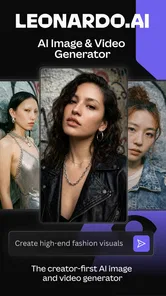
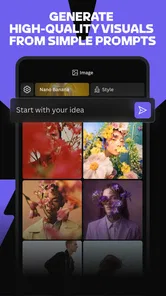
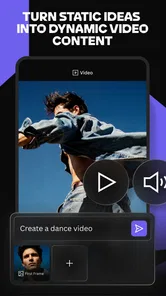
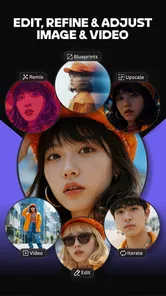
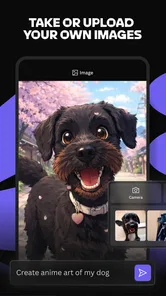
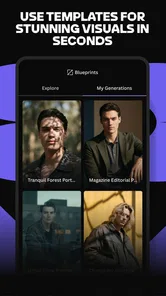
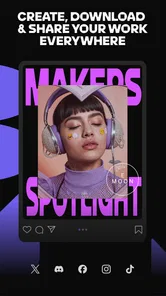
Analysis by Reviewed
When an AI image app feels confusing, the problem is often not the idea but the gap between what you pictured and what a prompt actually describes. I find that Leonardo.Ai works best when I treat each result as a draft to judge and refine, rather than expecting the first image to match a fully formed concept. That mindset makes the creative process more useful and takes some pressure off getting the wording exactly right.
Start with a small, clear idea
For a first attempt, I’d choose one subject and a few visual details instead of piling every possible style and mood into a single prompt. For example, if I wanted a poster concept for a neighborhood book swap, I’d begin with the books, the welcoming feel, and a simple setting. Once I had a direction I liked, I’d decide what to change next. This makes it easier to tell whether a new result improved the part I cared about or simply changed the whole image.
That approach is useful for everyday tasks as well as personal art: mood-board ideas, a character sketch, or a visual starting point for a presentation. I would still check any generated image carefully before using it publicly. AI-generated details can look convincing at a glance but may not fit the practical needs of a design, so I see the app as a source of drafts rather than a replacement for final review.
Make each attempt easier to judge
A useful habit is to decide what success means before generating. If I need a calm background for a slide, I care more about open space and an appropriate mood than tiny decorative details. If I am exploring a character, silhouette and broad color direction may matter more. Naming the priority keeps me from mistaking a visually impressive result for one that actually suits the job.
I also avoid changing the subject, style, setting, and mood all at once when revising. Keeping most of the prompt stable makes the next result easier to compare with the last. This is especially helpful when a prompt produces one promising image among several weaker directions: I can preserve the useful idea and adjust the part that is not working, rather than starting from zero.
Have you ever dreamed of creating stunning visuals without having any artistic skills? Well, let me introduce you to Leonardo.Ai - Image Generator, a nifty app that’s taking the digital art world by storm. I’ve spent some time playing around with it, and let me tell you, it’s a game-changer for anyone wanting to dive into the realm of digital imagery.
Unleashing Creativity with Ease
First off, let’s talk about the app’s user-friendly interface. Leonardo.Ai - Image Generator has been designed with simplicity in mind, making it super easy for users of all levels to navigate. Whether you’re a seasoned designer or someone who just wants to dabble in art, you’ll find this app incredibly intuitive. You get this sense of empowerment as you tinker around, which is truly fantastic.
More From Our News Desk

 Remini - AI Photo Enhancer
Remini Is Our App of the Week for Bringing Old Photos Back to Life
A quick AI restoration tool earns its place by making faded portraits and soft, older photos feel vivid again—provided you know where its polish ends.

 PayPal - Pay, Send, Save
PayPal Reviewed: Who Benefits from Its Reach, and Who Should Skip It
PayPal is most useful when its reach and familiar checkout solve a real payment problem. These reader-by-reader recommendations show where it earns a place—and where friction wins.

 Millionaire 2026 Quiz & Trivia
 Makes Every Answer Count
A familiar quiz-show format succeeds or falters on tiny design decisions: how clearly the game guides a first answer, handles hesitation, and invites one more round.

 Decor Life - Home Design Game
Decor Life Turns Short Breaks Into Bite-Sized Decorating Jobs
A room-by-room decorating game built for quick sessions gains from modern phone habits, but its gentle pace still depends on patience, repetition, and a steady stream of design jobs.

 Sniper 3D:Gun Shooting Games
Sniper 3D’s Quick-Shot Appeal Faces the Upgrade Treadmill
The appeal is immediate: line up a target, steady your aim, and fire. The harder question is whether Sniper 3D can keep players returning after the first rush.

 Blockudoku®: Block Puzzle Game
Blockudoku vs. the Puzzle Pack: A Quick Puzzle With a Repetitive Edge
Blockudoku turns a clean grid into a quiet test of foresight. Against match-three polish and head-to-head simplicity, its lasting appeal is also its biggest limitation.
Latest News



Features That Stand Out
The app comes packed with a plethora of features that cater to your creative needs. One of my favorites is the AI-driven image creation tool. You simply input your preferences or themes, and voila! The app conjures up a masterpiece almost instantly. It’s like having a professional artist at your fingertips, no exaggeration.
Another cool feature is the variety of filters and effects available. Whether you want a vintage look or something more modern, Leonardo.Ai has got you covered. The ability to tweak these effects in real-time is a nice touch, allowing you to see your adjustments come to life as you make them.
Performance and Reliability
Now, I know what you might be thinking: does it actually perform well? In my experience, the app runs smoothly without any noticeable hiccups. It's optimized to handle complex image processing tasks efficiently, which is a huge plus. Plus, the developers seem to be on the ball with regular updates, constantly improving the app’s performance and introducing new features.
One aspect that really impressed me is the app’s ability to save high-resolution images. This means you can create stunning visuals without worrying about losing quality. It’s perfect for anyone looking to print their creations or use them in professional projects.
Keep an eye on the final details
Even when the broad composition feels right, I’d inspect faces, hands, small objects, and any text-like marks before treating an image as finished. These are the kinds of details that can look plausible when viewed quickly but become distracting when someone studies the image or sees it at a larger size. For a personal mood board, that may be a minor flaw; for a poster or client-facing graphic, it can change whether the image is usable at all.
I’d also think about the image’s job before leaning on the high-resolution result. A concept image can be valuable even if I later rebuild parts of it in another tool. By contrast, a design that must contain exact wording, a precise logo, or carefully aligned elements needs hands-on editing. The practical win is often the idea I can carry forward, not a promise that every generated detail is ready to publish unchanged.
Is It Worth It?
So, is Leonardo.Ai - Image Generator worth the download? Absolutely! Whether you’re an aspiring artist, a professional, or just someone who enjoys creating for fun, this app offers a unique blend of simplicity and functionality. It makes the process of generating images not only accessible but genuinely enjoyable.
In a world where digital content is king, having a tool like Leonardo.Ai in your arsenal can really set you apart. You don’t just get an app; you get a creative partner that sparks inspiration every time you use it. Give it a try and let your imagination run wild!
Where I’d pause before choosing it
Leonardo.Ai is an art and design app from Leonardo.Ai, and its appeal is clear for anyone who wants image-making to begin with an idea rather than a blank canvas. It’s free to install, has an average rating of 4.8 from around 48,000 ratings, and has passed 5 million installs. The Teen age rating is also worth keeping in mind if you’re choosing an app for a younger user. I’d be more cautious if you need precise lettering, a consistent branded character, or an exact layout: those jobs usually call for a conventional design editor where you can position and edit every element yourself.
There’s a meaningful difference between trying an app for free and assuming every use will remain free. Leonardo.Ai offers in-app purchases, with items priced from $9.49 to $459.99, so I’d check the purchase details and any usage terms shown in the app before committing to a regular workflow. The range is broad enough that casual users should be comfortable exploring without treating a paid option as necessary, while people planning frequent or professional use should understand what they would be paying for first.
Think through the workflow before relying on it
For a quick creative task, I’d start by deciding whether I need a finished asset or merely a direction. Someone planning a social post for a small community group might use the app to explore a few possible visual moods, then place the selected image into a separate editor to add the event name and date. That split is more dependable than asking one image-generation step to solve both the artwork and the exact information design.
It is also worth considering how often the work will need to change. A one-off illustration for inspiration is a natural fit; a recurring campaign that must keep the same character, layout, and visual identity across many pieces is more demanding. I would test that consistency before building a whole project around it. If every version needs exact manual adjustments, a conventional graphics editor may save time despite requiring more hands-on work at the beginning.
Simple checks when a result disappoints
If a generated image misses the mark, I wouldn’t immediately assume the app has failed. I’d first make the prompt more specific about the main subject and remove details that compete with it. Then I’d try one change at a time, so I could see which wording or effect helped. That small discipline is more informative than rewriting everything between attempts, and it makes the process feel less like guessing.
If the app seems slow or an image does not appear as expected, I’d check the basics before restarting a project: confirm the device has a steady connection, make sure the app is current, and reopen it if it has become unresponsive. The current version is 1.1.4, and the listed minimum operating-system version is 7.0. Those checks won’t solve every issue, but they’re sensible first steps and can help distinguish a temporary problem from a prompt that simply needs another pass.
When the issue may be elsewhere
Not every frustrating result points to a technical fault. A vague request can leave too many possible interpretations, while a prompt that asks for several conflicting styles may produce an image that feels muddled. I’d simplify the brief and try again before spending time troubleshooting. If the same task works with a clearer description, the main obstacle was probably the instruction rather than the app.
For a generation that appears stuck, I’d avoid repeatedly tapping controls or starting many near-identical attempts in a hurry. First I’d wait briefly, check the connection, and reopen the app only if it remains unresponsive. I’d keep the prompt somewhere outside the app if it took time to write, so an interruption does not mean reconstructing the whole idea from memory. These are simple habits, but they make experimentation less fragile.
How it fits alongside other creative tools
Compared with drawing by hand or using a traditional graphics editor, this app is most useful at the idea-generation stage: it can give you visual directions to react to without requiring you to build every element yourself. A drawing app is the better choice when you want direct control over every stroke; a layout editor is better when alignment, typography, and exact revisions matter. I’d use Leonardo.Ai to explore concepts, then move to a more hands-on tool if the result needs careful finishing.
For a realistic routine, imagine preparing a few visual directions for a club event after work. I’d make a straightforward prompt, compare the images, and save the one whose overall mood works best. I’d then check its details at full size and decide whether it is only a reference or suitable for the finished material. That last distinction matters: the app can make exploration quicker, but it doesn’t remove the need to review the image or adapt it to the final purpose.
Who will get the most from it
I think the strongest fit is someone who enjoys visual experimentation but does not want drawing skill to be the entry ticket. It can help a hobbyist find a direction, give a writer a visual reference for a character, or let a designer quickly compare moods before committing to a more deliberate composition. It is also useful when the goal is to get unstuck: seeing an imperfect image can make it easier to describe what the idea should become.
I’d hesitate if I needed predictable, repeatable production or precise control over every part of the image. People who prefer to make each stroke themselves may find a drawing app more satisfying, while anyone creating information-heavy layouts will likely be happier in a design editor. The key question is whether I want possibilities to react to or exact elements to place. Leonardo.Ai is better at the first job.
My practical verdict
I’d recommend trying Leonardo.Ai if you enjoy experimenting, need visual inspiration, or want to turn a rough idea into an image without starting from drawing skills. I would skip it as my main tool for exact production work, or if I preferred complete manual control over how an image is built. Its most satisfying use is collaborative in a simple sense: I bring the idea, the app offers possibilities, and I decide what is worth keeping.
Leonardo.Ai - Image Generator Frequently Asked Questions
What devices and operating systems should I check before downloading Leonardo.Ai?
Leonardo.Ai is an art and design app for Android, with Android 7.0 as the listed minimum operating-system requirement. It is also available for iOS, so check that your device can install the version offered for its platform. Since the app generates images with AI, having a reliable internet connection and enough available storage can make it easier to use.
Who develops Leonardo.Ai, and what is the app mainly for?
Leonardo.Ai is developed by Leonardo.Ai and belongs to the Art & Design category. Its purpose is to help users create artwork with AI, turning written descriptions into visual results. The app’s focus makes it worth considering if you enjoy experimenting with image ideas or want a tool for creative projects. Its store summary describes the experience simply: create stunning art with AI.
Is Leonardo.Ai free to download?
Leonardo.Ai is free to download, so you can try the app without paying upfront. It also offers in-app purchases, with options priced from $9.49 to $459.99 per item. Before choosing a purchase, consider how often you expect to use the app and check the details shown in the app so you understand what each option provides.
Does Leonardo.Ai work on my phone?
Leonardo.Ai is an art and design app for Android, and the listed minimum operating-system requirement is Android 7.0. Check your phone’s software version before downloading, and make sure you have enough storage and a reliable internet connection for using an AI image generator. The app is also available on iOS, so users can choose the version that matches their device.
What is Leonardo.Ai and how does it work?
Leonardo.Ai is an advanced image generator that uses artificial intelligence to create stunning visuals from user inputs. By leveraging machine learning algorithms, it transforms text prompts into high-quality images. Users simply input a description of the desired image, and the app generates a visual representation that matches the description as closely as possible.
Pros
- Intuitive interface for easy navigation
- High-quality image generation
- Wide variety of styles and templates
- Fast processing of images
- Free version available with essential features
Cons
- Limited free version features
- Occasional bugs in image rendering
- Requires internet connection
- Subscription needed for premium features
- May consume significant device storage