KLM - Book a flight
- 662.00
- 4.6
- Installs
- 5.00M
- Price
- Free

Screenshots


Analysis by Reviewed
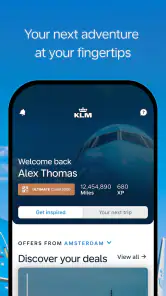
When I book a flight, I want to know where I need to look if plans change, not just get through the payment screen. The KLM app is built around that airline-specific journey, from booking to arrival, which can make it a practical companion if you are flying with KLM. It is a free travel app from KLM Koninklijke Luchtvaart Maatschappij N.V.; its 4.6 average from around 118,000 ratings and over 5 million installs suggest many travelers find it useful, though popularity alone is not a guarantee that every trip will go smoothly.
Trust starts with knowing what you are choosing
I would treat this app as a focused tool for handling a KLM trip rather than a neutral place to compare every airline. That distinction matters: an airline’s own app may be convenient once you have chosen that carrier, while a flight-search service is usually the better starting point when your main goal is comparing options across providers. The app is rated for Everyone and is free, so there is no purchase price to weigh before trying it.
Use the app where it has a clear role
For a straightforward KLM itinerary, keeping booking details and travel tasks together can reduce the need to move between a confirmation email, a browser, and separate travel tools. I would still keep the booking confirmation somewhere I can find it independently, especially before leaving home. That is a simple backup habit, not a claim about how the app stores or protects information.
The developer is KLM Koninklijke Luchtvaart Maatschappij N.V., so the app’s purpose is closely tied to the airline’s own services. That can be a strength when you want to manage a KLM booking in one place, but it is also the key trade-off: if you have not settled on KLM, compare routes and conditions using an option that covers the airlines you are considering before committing.
A Seamless Booking Experience
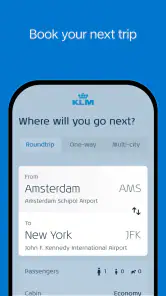
First things first, let’s talk about the booking experience. The KLM - Book a flight app is like having a personal travel agent in your pocket. From the moment I fired it up, the interface was clean, intuitive, and super easy to navigate. It's like the app just gets you, you know? You pop in your travel details, and voila, you’ve got a list of options that suit your schedule and budget. No more endless scrolling through websites!
All Your Travel Needs in One Place
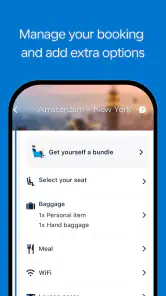
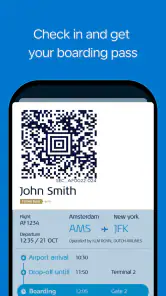
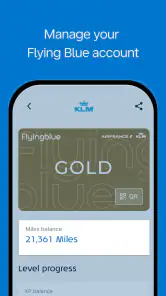
This app isn’t just about booking flights. Oh no, it goes way beyond that. You can check in, choose your seats, and even download your boarding pass straight to your phone. It’s like magic! I also loved how you can manage your bookings effortlessly and make changes if your plans go haywire. Plus, if you're anything like me and need to keep an eye on your frequent flyer points, the app has got you covered there too.
Useful habits for a travel day
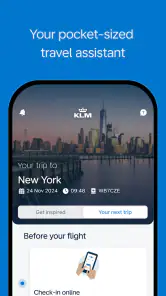
A practical way to use those tools is to check the booking details before setting off, then look at the flight status again closer to departure. For example, if I am packing the night before an early flight, I can make sure the itinerary and boarding pass are easy to find rather than searching through messages at the airport. I would also avoid relying on a single phone screen as my only record: keeping the confirmation accessible outside the app gives me a fallback if my battery runs low or I cannot get online.
More From Our News Desk

Weather by Xiaomi Review: Clear at a Glance, Less Clear Up Close

X Under Pressure: Can It Recover When Posting Goes Wrong?

Clash of Clans Is Won Between the Battles

Android Auto Makes the Case for Quieter Car Software

MobiOffice: Transforming Mobile Productivity with Seamless Integration

EA SPORTS FC™ Mobile Soccer: Redefining Mobile Sports Gaming
Seat choice and check-in are helpful when they are available for the itinerary, but they do not remove every travel decision. I would still check the details shown for my particular booking and allow time for airport procedures. The app can organize airline tasks; it cannot make a late arrival at the airport less stressful.
User-Friendly Features
Another cool thing? The notifications. I mean, who doesn’t like being reminded about upcoming flights or when it’s time to check in? The app sends timely alerts so you can stay on top of everything without breaking a sweat. And let’s not forget the live updates on flight status. Talk about peace of mind!
Oh, and if you ever need help, the app provides easy access to customer support. It’s like having a travel buddy who’s always got your back, 24/7.
Choices, attention, and limits
Notifications are most useful when they stay focused on travel changes and reminders, so I would review the phone’s notification controls and keep only the alerts I actually want. Those are device-level choices, not a promise about the app’s data practices. If you are cautious about account access or personal details, take a moment to review the choices presented during setup and sign-in rather than assuming every airline app handles information in the same way.
The app is currently version 16.3.0 and supports Android 8.0 or later. That makes compatibility worth checking before a trip, particularly if you use an older phone. I would install it and make sure I can sign in and reach my itinerary while I still have time to troubleshoot, rather than waiting until I am already on the way to the airport.
Planning around a changing itinerary
The strongest reason to keep an airline app ready is not the routine flight where everything happens exactly as planned; it is the moment you need to check your own booking without reconstructing the trip from scattered messages. Suppose I am heading to the airport after work and a colleague asks whether my flight is still on schedule. I can open the KLM app and check the status there, then keep the itinerary and boarding pass available for the next step. That is more useful than searching a general travel site for a flight number, because I am looking at the airline’s own trip tools rather than only trying to identify a departure.
For a multi-leg journey, I would make a habit of checking each segment rather than assuming one status update tells the whole story. A delay on one part of a trip can affect what I need to do next, while the app’s airline focus means it is most directly useful for the KLM portion of the itinerary. If another carrier is involved, I would also keep that carrier’s information accessible. This small bit of preparation prevents an airline-specific app from becoming an accidental single source for details it may not cover.
Choosing between an airline app and a travel service
Compared with a broad booking or travel-search service, KLM’s app has a narrower job. A general service is often better when I am still deciding which airline, route, or schedule works for me, because its value is comparing alternatives in one place. Once I have picked KLM, the dedicated app makes more sense as a place for the airline-related tasks described here, such as checking in, choosing a seat, viewing a boarding pass, managing a booking, and following flight updates.
I would not expect the two kinds of tools to replace each other. A comparison service helps me make the purchase decision; the KLM app is the more relevant companion after my trip is tied to KLM. Travelers who book through another service can still consider the airline app for trip management, but should check that their booking is available and that the account or booking details they have are sufficient to access it. I would avoid assuming that every reservation can be handled in exactly the same way.
Small checks that prevent airport friction
One useful habit is to open the app before travel day and confirm that I can reach the booking, rather than treating installation as the same thing as readiness. If I have just changed phones, signed out, or not used the app in a while, checking early gives me time to resolve a sign-in snag without a queue forming behind me. I would also make sure the phone itself is charged and that I know where the boarding pass is displayed. A digital pass is convenient, but it does not help if I cannot unlock the phone or find the right screen when asked.
Another practical trade-off is notifications. I like them for time-sensitive travel reminders, but I do not want every alert on my phone to compete for attention. I would enable the notices that help me act, then use the app directly when I want to check something on my own schedule. That separates urgent prompts from routine curiosity and makes it less likely that I will overlook a message that matters. It is a personal device-setting choice, not evidence of how the app handles personal information.
What to consider before relying on it
Before using the app as my main way to manage a trip, I would ask myself a few ordinary questions: Is this a KLM booking? Can I sign in or retrieve the itinerary now? Do I have another way to find my confirmation if my phone is unavailable? Those checks matter more than assuming that every feature will apply identically to every booking. The app’s trip tools are useful, but airport requirements and the details of an individual itinerary still deserve attention.
If privacy and account access are priorities for you, pay attention to the choices shown during setup and sign-in, and review the controls on your phone. I would not infer a particular permission or data policy from the fact that it is an airline app. Instead, I would decide what information I am comfortable entering, use the available account controls carefully, and avoid leaving a logged-in device unattended. That is a sensible way to approach any travel account containing booking details.
There is also a real case for skipping it. If you rarely fly KLM, prefer to keep all travel arrangements in a single independent service, or are still comparing carriers, installing an airline-specific app may add another account and another place to check without much benefit. In that situation, I would use the broader tool that already suits my planning and install the KLM app only when its trip-management role becomes worthwhile.
Final Thoughts
In a world where convenience is king, the KLM - Book a flight app really stands out. It doesn’t just streamline the booking process; it makes the entire travel experience smoother and more enjoyable. Whether you’re a frequent flyer or an occasional traveler, this app is a total game-changer. So next time wanderlust strikes, you know where to turn!
Who will get the most from it
I would recommend it most to someone who has chosen KLM and wants a single airline-focused place to handle the trip, especially if they value having check-in, a boarding pass, booking management, and flight updates close at hand. A traveler who mainly wants to compare carriers, or who prefers managing every booking through a general travel service, may be better served by that broader option and can use the KLM app only if it fits the final itinerary.
My cautious verdict is that it can make the KLM part of travel easier, but it should be one useful tool rather than the whole travel plan. Keep a backup of essential booking information, check the app’s prompts and device controls for choices that matter to you, and confirm the details for your own flight. For those boundaries, I find its airline-specific focus more helpful than a generic travel app; for broad shopping across airlines, I would start elsewhere.
KLM - Book a flight Frequently Asked Questions
What is the KLM app designed to help travelers do?
KLM’s app is designed to guide you through the journey from booking a flight to landing at your destination. It brings flight booking and trip-related tasks together in a mobile travel companion, which can be useful if you prefer to manage your plans from your phone. The app is listed in the Travel & Local category and is developed by KLM Koninklijke Luchtvaart Maatschappij N.V.
Is the KLM app free to download, and what devices can run it?
The KLM app is free to download and is available for Android and iOS devices. On Android, it requires version 8.0 or later. Its Everyone age rating makes it suitable for a broad audience. If you plan to install it on an older phone, check your device’s operating-system version first so you can see whether it meets the requirement.
What features does the KLM app offer for booking flights?
The KLM app provides a comprehensive range of features to streamline your flight booking experience. Users can search for flights, compare prices, and book tickets directly through the app. Additionally, it offers functionalities such as seat selection, meal preferences, and the ability to manage bookings. The app also provides real-time updates on flight status and travel alerts, ensuring passengers are well-informed and prepared for their journey.
Is the KLM app available for both Android and iOS devices?
Yes, the KLM app is available for download on both Android and iOS devices. Users can find it on the Google Play Store for Android and the Apple App Store for iOS. The app is designed to provide a seamless experience across both platforms, ensuring users have access to all features and services regardless of their device.
How user-friendly is the KLM app for first-time users?
The KLM app is designed with user-friendliness in mind, making it accessible for first-time users. The interface is intuitive and easy to navigate, with clear instructions and guidance provided at every step. Whether you are booking a flight, checking in, or managing your itinerary, the app simplifies the process with straightforward menus and user support features, including FAQs and customer service chat options.
Pros
- User-friendly booking interface
- Multiple payment options available
- Easy flight status tracking
- Access to exclusive travel deals
- 24/7 customer support
Cons
- Limited in-app language options
- Occasional app crashes
- Requires internet connection
- No offline boarding pass access
- Frequent update notifications
- Category
- Travel & Local
- Version
- 16.3.0