Job Hai - Search Job, Vacancy
- 33.00
- 4.2
- Installs
- 10.00M
- Price
- Free

Screenshots


Analysis by Reviewed
When a job search stalls, I find the hardest part is often not spotting an opening but figuring out whether it suits my location, experience, and day-to-day needs. Job Hai is aimed at making that first pass feel more manageable, particularly for people exploring local vacancies, fresher roles, or work-from-home possibilities. I’d treat it as one useful place to look rather than a promise that every listing will be a match.
Where a job search can get stuck
On any job app, a broad search can return possibilities that look relevant at first but differ in practical details. I’d narrow the search by role and area before spending time applying, then read each listing carefully instead of relying on its title alone. A familiar job title can cover very different duties, schedules, and expectations, so checking the description is worth the extra minute.
The app is free and is made by infoedge.com. Its Everyone age rating makes it accessible to a broad audience, while its business focus is clear: helping people find and pursue work. The current version is 4.7.38, and it supports Android 7.0 and later. That gives an older Android phone a chance of running it, though the experience still depends on the device and connection.
Setup checks that save time
Before searching in earnest, I’d make sure the profile details I enter are accurate and consistent with the roles I want. A useful search starts with a realistic location and job preference; otherwise, even a busy results feed can be a poor fit. If you are a fresher, be clear about that rather than presenting experience you do not have. A straightforward profile is easier to stand behind if an employer follows up.
It also helps to decide how much time you can give the search and check new listings in a regular window rather than reacting to every notification. Notifications can make fresh opportunities easier to notice, but they do not replace checking the listing details or deciding whether the job works for you. If results seem off, adjust one search choice at a time—such as location or role—so you can tell which change made the difference.
Choosing a useful search routine
I would start with one clearly defined goal instead of trying to search every kind of work at once. For example, someone looking for a nearby retail or service role can first focus on the area they can realistically commute to, then compare the responsibilities and schedule across a small set of openings. A fresher looking for a first job may have a different priority: finding roles that do not quietly assume experience they have not yet gained. The more clearly you set those boundaries, the easier it is to decide whether a result deserves your attention.
A practical routine is to keep a short note outside the app with the role, location, date you applied, and any question you want to ask if you hear back. That is especially useful when several listings have similar titles. It keeps the search organized without requiring you to trust memory or repeatedly reopen every vacancy. I would also save time for checking the details rather than measuring progress only by how many applications I send.
More From Our News Desk

Weather by Xiaomi Review: Clear at a Glance, Less Clear Up Close

X Under Pressure: Can It Recover When Posting Goes Wrong?

Clash of Clans Is Won Between the Battles

Android Auto Makes the Case for Quieter Car Software

MobiOffice: Transforming Mobile Productivity with Seamless Integration

EA SPORTS FC™ Mobile Soccer: Redefining Mobile Sports Gaming
Your Job Search Companion
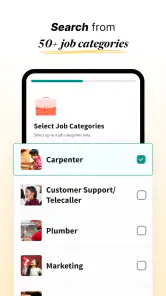
The first thing that struck me about Job Hai is how darn easy it is to navigate. Right from the get-go, the app greets you with a clean, intuitive interface that just screams "simplicity." No more getting lost in a jungle of tabs and options. Instead, you get straight to the point. You can search for jobs based on location, industry, and job role, which is a massive time-saver. Plus, it covers a wide range of sectors, from IT to marketing, hospitality, and more. It's like having a buffet of job opportunities at your fingertips.
Stay Ahead of the Game
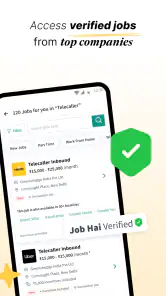
One of the standout features of the app is its real-time updates. You know how some apps seem to have job listings from the Stone Age? Yeah, none of that here. Job Hai keeps you updated with the latest job postings, ensuring you don't miss out on any fresh opportunities. Plus, you can set up notifications for new job listings that match your criteria. It's like having a little job scout working for you 24/7.
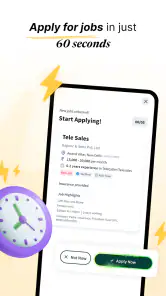
Applying for jobs has never been easier. With just a few taps, you can send your application directly through the app. No need to jump through hoops or navigate to external sites. It's all about making your life easier and more efficient.
Making Connections
Networking is a crucial part of any job search, and Job Hai understands that. The app offers features that let you connect with potential employers directly. You can chat with them, ask questions, and get a feel for the company culture before even setting foot in an interview. It's like having LinkedIn and a job portal rolled into one handy app.
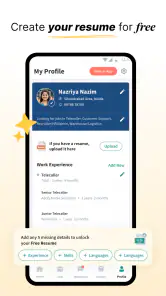
And let's not forget the resume builder. If you're anything like me, the thought of updating your resume can be downright daunting. But fear not, because Job Hai provides a straightforward resume-building tool that guides you through the process. It's all about making sure you put your best foot forward.
Making each application count
I would use the resume tool as a starting point, then review every detail before sending an application. A general resume may be convenient, but adjusting the way you describe relevant experience for each role can make your application more focused. Keep a simple note of the jobs you have applied to and any replies; when several applications are in progress, that small habit helps avoid confusion about which employer or vacancy a message refers to.
For example, someone with a morning commute and a free hour in the evening could use that time to check nearby openings, shortlist roles that fit their schedule, and send a few considered applications. If an employer responds through the app, having the listing and application fresh in mind makes it easier to ask useful questions about responsibilities and the next step. I would still confirm important details directly with the employer before making plans or sharing sensitive information.
Who benefits most from a mobile-first search
I see the strongest fit for people who want to scan local work opportunities in short sessions, including freshers and applicants open to different kinds of roles. The app’s focus on vacancies across many cities makes it potentially useful when location is central to the decision, while its work-from-home and fresher positioning may help people who are not following a single conventional career path. It can also suit someone balancing applications with shifts, classes, or family responsibilities, because a phone-based search is easy to pick up when there is a spare moment.
That convenience is not the same as a complete job-search strategy. If you are pursuing a senior, licensed, or highly specialized position, a focused industry board, professional network, or the employer’s own careers page may give you better context. The same applies if researching a company’s track record is a major part of your decision. I would use this app to discover possibilities, then widen the search when the role calls for deeper research.
When another route may work better
Job Hai has a practical advantage over manually checking separate company career pages: it brings job discovery and parts of the application process into one mobile workflow. Compared with broad professional networking services, its appeal is more immediate when you want to find vacancies by role and place rather than spend time building a public professional presence. Those alternatives can still be better for senior specialist roles, researching an employer in depth, or building industry contacts.
The trade-off is that a convenient feed can encourage quick applications before you have checked whether a job is genuinely suitable. I would not rely on any one app as the whole search, especially if your target role is highly specialized or you need detailed employer research. Use it to discover leads, then compare promising opportunities with other trusted sources and assess the actual duties, location, and terms before proceeding.
Questions worth settling before you apply
A common concern is whether a mobile application means the role is secure or that an employer will respond quickly. I would not assume either. Treat each listing as an opportunity to investigate, and read the employer’s instructions carefully; hiring timelines and follow-up depend on the employer, not simply on where you found the vacancy. If a role matters to you, keep applying to other suitable openings rather than putting the rest of your search on hold.
Another useful question is whether a short title tells you enough to decide. It rarely does. Before applying, check the actual duties, location, schedule, and any stated expectations, then prepare questions for details that remain unclear. If you are unsure whether an opening matches your experience, compare the listed requirements with what you can honestly demonstrate instead of stretching your profile to fit. That approach may mean fewer applications, but it makes each one easier to explain in a conversation.
Recovering when the workflow falters
If a search or application does not go as expected, I’d first check the basics: confirm the selected location and role, review the listing again, and make sure the profile information is complete and current. If the app feels slow or results do not refresh, a stable connection and reopening the app are sensible first steps. If an application appears incomplete, return to the vacancy and check its current instructions before sending it again, so you do not accidentally submit duplicates.
Sometimes the issue is not the app at all. A role may close, an employer may take time to respond, or the vacancy may not match what its short title suggested. No job-search service can guarantee a reply or remove the uncertainty of hiring. I’d use the app to organize the search, keep expectations realistic, and continue looking elsewhere while waiting on an application.
Making Connections
Networking is a crucial part of any job search, and Job Hai understands that. The app offers features that let you connect with potential employers directly. You can chat with them, ask questions, and get a feel for the company culture before even setting foot in an interview. It's like having LinkedIn and a job portal rolled into one handy app.
And let's not forget the resume builder. If you're anything like me, the thought of updating your resume can be downright daunting. But fear not, because Job Hai provides a straightforward resume-building tool that guides you through the process. It's all about making sure you put your best foot forward.
When the problem may be outside the app
If you have checked your search choices and the results still do not feel useful, it may help to reconsider the goal rather than keep changing settings at random. A commute that is too long, an unrealistic schedule, or a mismatch between your experience and the stated requirements can narrow the practical options. I would separate those questions from technical troubleshooting: first decide what work is actually viable, then refine the search around it.
Likewise, silence after applying is not necessarily a sign that the application failed. Check whether you received any confirmation or whether the vacancy has changed, and avoid sending repeated applications just to prompt a response. If you need an answer about a job’s terms, ask the employer through the available contact route and wait for a clear response before making commitments. Staying cautious is more useful than treating every delay as an app error.
Final Thoughts
All in all, if you're on the hunt for a job, Job Hai is definitely worth checking out. It combines the best of job searching with the ease of modern technology, making the whole process smoother and less stressful. Whether you're a fresh graduate or someone looking to switch careers, this app is designed to cater to everyone.
Its reach is reflected in an average rating of 4.2 from around 143,000 ratings, with over 10 million installs. I see that as a sign that many people have tried it, not as a guarantee that every listing or interaction will suit every applicant. It is best for people who want a mobile-first way to browse a range of openings and keep applications moving; if you need a highly specialized search or prefer to evaluate employers through several sources, pair it with those tools.
So, if you're tired of the same old job search routine, give Job Hai a shot. Who knows? Your dream job might just be a tap away.
Job Hai - Search Job, Vacancy Frequently Asked Questions
Does Job Hai support searches for fresher and work-from-home roles?
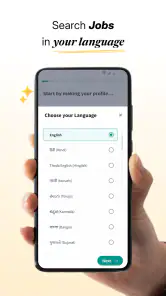
Yes. Job Hai’s summary highlights fresher and online work-from-home jobs, making it relevant if you are starting your career or looking for remote opportunities. You can explore vacancies across more than 420 cities, although the roles available to you will depend on employer listings and the preferences you use when searching. Check each vacancy for its specific requirements and work arrangement.
What is Job Hai, and who develops it?
Job Hai is a business app for searching job vacancies, with a focus on helping people find openings through a mobile job-search experience. It is developed by infoedge.com and is described simply as “Job Hai.” If you are deciding whether it suits your needs, consider the types of roles and locations you want to explore, along with the app’s focus on fresher and work-from-home searches.
What kinds of jobs can I search for with Job Hai?
Job Hai is aimed at people looking for vacancies across a range of roles and locations, including fresher and work-from-home opportunities. Its summary highlights searches across more than 420 cities, so you can explore openings beyond a single local area. As with any job-search app, the opportunities you see depend on what employers have posted and the preferences you use while searching.
Is Job Hai free to download, and what devices can run it?
Job Hai is free to download and is intended for users of all ages. On Android, it requires version 7.0 or later. The app is listed as a business app and is developed by infoedge.com. These basics can help you check compatibility and decide whether to install it before setting up your job search.
What is Job Hai and how can it help me find a job?
Job Hai is a job search application designed to streamline the process of finding job vacancies that match your skills and preferences. It offers a user-friendly interface where users can search for jobs across various industries and locations. With features like personalized job recommendations and alerts, it aims to make your job hunting experience efficient and effective. The app’s focus on fresher and work-from-home searches may also be useful if you are exploring those kinds of roles.
Pros
- User-friendly interface for easy navigation.
- Extensive job listings across various fields.
- Real-time job alerts to stay updated.
- Customizable search filters for precision.
- Free access without subscription fees.
Cons
- Limited international job listings available.
- Occasional duplicate job postings.
- Requires stable internet for functionality.
- Some features need improvement for iOS.
- No in-app resume builder option.
- Category
- Business
- Version
- 4.7.38












