Instabridge: WiFi Hotspot Map
- 39.67K
- 4.2
- Installs
- 100.00M
- Price
- Free

Screenshots




Analysis by Reviewed
When I’m deciding whether a WiFi-finder app will help me, I care about more than the number of hotspots on a map. I want to know whether I can read it quickly, use it when my connection is already unreliable, and make sensible choices without rushing. Instabridge is a free productivity app from Degoo Backup AB - Cloud, built around finding shared WiFi access. Its mix of map-based discovery and offline use can be handy, though it works best as a guide rather than a promise that every listed network will be available.
Readable directions, with a little preparation
Instabridge is organized around a practical question: where might I get online nearby? Its map-oriented approach makes that purpose easier to grasp than a general search through settings or a list of network names. In a new area, I’d use it to identify possible places to connect before I reach the point of needing to send a message or check directions.
The offline-map option is especially useful if I prepare while I still have a dependable connection. Downloading a map for a destination before leaving gives me a way to consult hotspot information later, when mobile data is weak or unavailable. I would treat that map as a planning aid, not a live guarantee: locations and shared access details can change, so a saved result may not match what I find on arrival.
That distinction matters for readability as much as reliability. A map can show possibilities, but I still need to judge which ones are close enough to be practical and whether the route makes sense. Before a trip, I’d look at the area at a comfortable pace, rather than trying to interpret several markers while walking or standing in a crowded station. Saving a mental shortlist of a couple of nearby options is more useful than assuming the first marker will work.
Discovering the Need for Connectivity
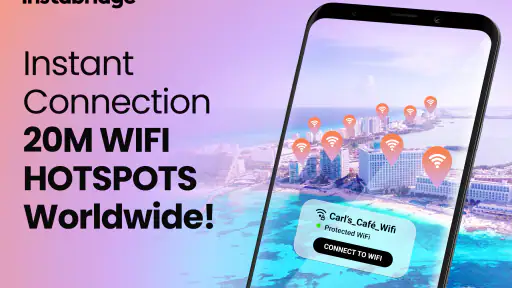
Picture this: You're in a new city, your data plan is running low, and you need a quick internet fix. Enter Instabridge, the app that feels like a community-driven treasure map for WiFi hotspots. With a database that covers millions of WiFi networks, this app turns the daunting quest for free internet into a seamless adventure.
How Does Instabridge Work?
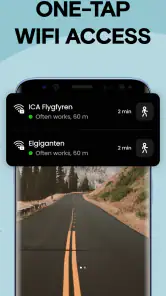
It's pretty simple! Once you install the app, it grants you access to a plethora of WiFi passwords shared by users around the world. It's a collaborative effort where users contribute by adding new hotspots and updating existing ones. The interface is user-friendly, guiding you to the nearest WiFi connection with a few taps. The real charm lies in its offline functionality, allowing you to download city maps and access them without internet—perfect for when you're on the move.
Security is a top concern, and Instabridge understands that. The app ensures that any WiFi network you connect to is safe, providing peace of mind for those wary of public networks. The app also highlights which connections are faster, saving you the hassle of trial and error.
More From Our News Desk

Weather by Xiaomi Review: Clear at a Glance, Less Clear Up Close

X Under Pressure: Can It Recover When Posting Goes Wrong?

Clash of Clans Is Won Between the Battles

Android Auto Makes the Case for Quieter Car Software

MobiOffice: Transforming Mobile Productivity with Seamless Integration

EA SPORTS FC™ Mobile Soccer: Redefining Mobile Sports Gaming
Using it comfortably in different situations
On a typical travel day, I might download the destination map at home, check likely hotspots while planning my route, and keep the map available for the walk between a station and my lodging. That workflow reduces the need to search from scratch in a busy place. I’d still keep an offline copy of essential directions or booking details: a hotspot finder can help me look for internet, but it cannot replace information I need before I get connected.
For someone who finds small text, crowded screens, or repeated tapping tiring, the useful approach is to do the setup calmly rather than while standing outdoors in a hurry. Review the map before departure, zoom in on the area you care about, and avoid relying on a single hotspot as your only plan. These are practical habits, not accessibility features I would assume the app provides. If navigating a map is difficult for you, a familiar place with staff or a trusted companion may be a more comfortable fallback.
There’s also a situational trade-off between looking for access and getting where you need to go. If I’m carrying bags, helping a child, or moving through an unfamiliar area after dark, stopping to inspect a map may be more trouble than it’s worth. I’d plan the connection point in advance and use the app when I can pause somewhere safe. For someone with limited hand mobility or who relies on assistive settings, the best test is a short, low-pressure trial at home or in a familiar neighborhood, not an urgent search on the street.
Why Choose Instabridge?
The answer is simple—convenience and community. Instabridge creates a sense of belonging among its users, fostering a global community that thrives on sharing and caring. The app is ideal for travelers who want to stay connected without burning through their mobile data.
What truly sets Instabridge apart is its unique offline capability. Whether you're backpacking through Europe or exploring the hidden gems of your hometown, the app ensures you're always connected.
For me, the community model is most useful when I treat the map as a set of leads rather than a directory that must be perfectly current. A listing can save time by pointing me toward an option I might not have found by scanning my phone’s WiFi settings, but local conditions still decide whether it helps. If one place is busy, closed, or simply out of reach, having another possibility nearby makes the search less frustrating.
Where it fits—and where it doesn’t
Compared with opening your phone’s WiFi settings and checking networks one by one, Instabridge can help you discover places to try before you arrive. Compared with relying only on mobile data, it may offer another route to connectivity when your allowance is low. Those advantages depend on useful, current community information and a hotspot being reachable; I wouldn’t plan an urgent call or work deadline around an untested listing.
The app is a stronger fit for travelers, students moving around town, or anyone who often needs occasional internet access away from home. It’s less suitable if you need guaranteed connectivity, prefer not to use public WiFi, or want a tool focused only on managing a private home network. Public access also calls for ordinary care: I avoid sensitive tasks on networks I don’t trust and use mobile data or another trusted connection when privacy matters more than saving data.
A realistic use is arriving at a station with enough data left to check one message but not enough to browse freely. I could consult a map saved earlier, head toward a likely hotspot, and use the connection for a quick, non-sensitive task. I’d avoid making that the moment to upload private documents or handle anything time-critical. If I need dependable access for remote work, video calls, or a medical appointment, a known connection or mobile plan is the better choice; a community hotspot map is not a substitute for guaranteed service.
Instabridge is free to download, with in-app purchases listed from $0.99 to $94.99 per item. It is rated for Teen users, and the current version is 22.2025.12.01.1521, with Android 6.0 as its minimum OS requirement. Its 4.2 average comes from around 3.9 million ratings, and it has passed 100 million installs. Those figures show broad adoption, but they don’t tell me whether a particular hotspot near my destination is current or suitable for my needs.
That breadth may appeal if you travel between places and want one tool for scouting access, but it may feel like more than you need if your only goal is to connect to your own router. The alternatives are straightforward: phone settings are direct when I already know a network, mobile data is usually simpler when reliability matters, and asking staff can be more practical in a place I’m already visiting. Instabridge occupies the middle ground: it helps me find potential shared access before I arrive, while leaving the final choice and fallback plan to me.
A Few Tips for New Users
When you first open Instabridge, take a moment to explore its features. Download the offline maps of the areas you frequent the most; it’s a lifesaver. Also, contribute to the community by adding any WiFi hotspots you discover. It's all about give and take here!
I’d add one more practical step: check the likely area before you leave, then keep a backup plan such as saved directions or a small amount of mobile data for essential tasks. If a listing doesn’t work, move on rather than repeatedly trying the same connection. That approach makes the app useful without asking it to solve every connectivity problem.
One small planning habit can make the offline option work better: download the map while connected, then open it before setting out so you know you can find the area you need. I’d also keep the destination name or address written somewhere accessible outside the app. That gives me a fallback if I’m tired, the map is hard to interpret, or I have to switch plans quickly. Contributing accurate updates can help other people too, but I’d only add information I can personally check rather than guessing about access details.
My inclusive verdict
In conclusion, Instabridge is more than just an app; it's a community-driven platform that connects people through the power of shared resources. So, the next time you find yourself in need of WiFi, remember that with Instabridge, the world is your hotspot.
I’d recommend it to someone who is comfortable exploring a map and wants a practical way to scout shared WiFi, especially when preparing for a trip or navigating a familiar neighborhood. I would not make it my only option for urgent access or private work. Its offline maps can help bridge the gap when service drops, while the community-based nature of its listings means a little flexibility is still needed. Used with that expectation, it’s a handy companion rather than a guarantee.
My inclusive verdict is therefore positive but qualified. The app’s purpose is easy to understand, and preparing offline maps can reduce the pressure of searching when a connection is already poor. Still, map-based exploration and repeated decisions may not suit everyone or every setting. I’d choose it for flexible, low-stakes connectivity scouting, and skip relying on it when I need certainty, privacy, or a very simple experience. The most comfortable approach is to prepare ahead, keep essential information offline, and use a trusted connection whenever the task deserves one.
Instabridge: WiFi Hotspot Map Frequently Asked Questions
What should I check before installing Instabridge?
Instabridge is a free app in the productivity category, intended for people looking for WiFi and related phone tools. It is rated for Teen audiences, so it may not be suitable for every user. Check that your device meets the app’s operating-system requirement before downloading, and review any permissions or purchase prompts during setup so they match what you want from the app.
Does Instabridge require a recent Android version?
On Android, Instabridge requires version 6.0 or later. Checking your phone’s software version before downloading can save time if your device is older. The app is also available for iOS, but compatibility depends on the requirements shown for your device in its app store. Keep in mind that the app’s features and availability can vary by device and location.
Can I use Instabridge while traveling?
Instabridge can be useful when traveling because its hotspot map is designed to help users look for WiFi connections beyond their usual area. Before leaving, you can explore the app and prepare for places where mobile data may be limited. Treat each hotspot as a connection option rather than a guarantee, and use sensible precautions when accessing public networks.
What else does Instabridge include besides a WiFi hotspot map?
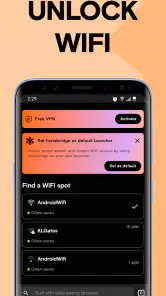
Instabridge is broader than a hotspot map: its app summary also describes an offline WiFi hotspot finder, eSIM, Caller ID, dialer, home screen launcher, and VPN. That range may appeal to users who want several connectivity and phone tools in one app, though the core reason many people consider it is finding WiFi. The app is listed in the productivity category.
What is Instabridge and how does it work?
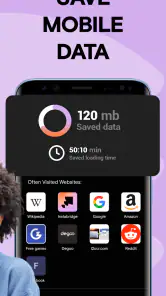
Instabridge is a mobile application designed to help users find and connect to free WiFi hotspots around the world. The app provides a map of nearby WiFi networks that have been shared by other Instabridge users. By connecting to these shared networks, users can save on mobile data usage and stay connected while on the go. The app continuously updates its database with new hotspots, ensuring users have access to the latest connections.
Pros
- Extensive global WiFi network
- User-friendly interface
- Offline maps available
- No registration needed
- Fast connection speeds
Cons
- Contains ads
- Limited features in free version
- Occasional connection drops
- Requires location access
- Consumes battery quickly
- Category
- Productivity
- Version
- 22.2025.12.01.1521