Holy Bible, KJV Bible + Audio
- 1.12K
- 4.8
- Installs
- 5.00M
- Price
- Free

Screenshots





Analysis by Reviewed
I often think of a Bible app as a small tool for fitting scripture into an ordinary day, rather than a replacement for a printed Bible or a study group. Holy Bible, KJV Bible + Audio is built around the King James Version, with reading and listening at its center. It is a free Books & Reference app from WOOMBIT, and its focus makes the most sense for someone who already wants the KJV close at hand.
Choosing a starting point
The first useful decision is whether you want to read a passage, listen, or simply open the app for a short daily pause. The KJV’s familiar phrasing is a benefit if you know it or prefer its traditional style, but it can feel demanding if you are new to biblical English. I would treat the daily verse as a prompt to explore a passage, not as a substitute for reading the surrounding chapter when context matters.
There is also a practical question before making it a regular habit: the app is free to download, but it includes optional in-app purchases, ranging from $0.49 to $29.99 per item. Its Everyone age rating makes it suitable for a broad audience, though parents may still want to guide younger readers through religious material as they would with a print Bible.
First Impressions
Right off the bat, the interface of the Holy Bible, KJV Bible + Audio is impressively user-friendly. As soon as you open it, you're greeted by a clean layout that doesn’t clutter your screen with unnecessary options. It’s straightforward, making it easy for anyone to navigate, whether you’re tech-savvy or not. The app offers both the Old and New Testaments in the King James Version, which is a classic choice for many believers.
Features That Stand Out
One of the standout features is the audio option. Sometimes, reading isn’t feasible, especially when you’re on the go. So, being able to listen to the scriptures is a huge plus. The audio quality is clear, and the narration is done in a soothing voice that makes it easy to follow along. It’s perfect for those long commutes or when you’re relaxing at home.
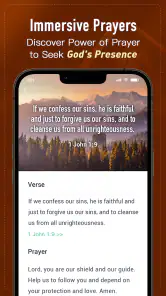
Another cool feature is the verse of the day. Each day, you get a new verse to meditate on, which can be a great way to start or end your day. It’s like having a little daily dose of inspiration at your fingertips.
Making a session useful
For a realistic routine, I’d use the daily verse as the entry point: read it, search for the chapter around it, then bookmark a passage worth returning to. That small sequence gives the verse more context and turns a quick glance into a deliberate reading session. Bookmarks are especially handy if you are following a personal reading plan outside the app; you can mark where you stopped without needing to remember a chapter number later.
More From Our News Desk

Weather by Xiaomi Review: Clear at a Glance, Less Clear Up Close

X Under Pressure: Can It Recover When Posting Goes Wrong?

Clash of Clans Is Won Between the Battles

Android Auto Makes the Case for Quieter Car Software

MobiOffice: Transforming Mobile Productivity with Seamless Integration

EA SPORTS FC™ Mobile Soccer: Redefining Mobile Sports Gaming
Audio works best when treated as a different kind of session, not simply a hands-free version of reading. On a walk or during a quiet household task, listening can keep a passage in your attention without asking you to look at a screen. If you want to check a particular phrase, switch back to text and use search. That handoff between listening and looking is useful, although the reported occasional glitches when changing modes can interrupt the flow, so I would not rely on a seamless switch in the middle of an important moment.
Customizability and Navigation
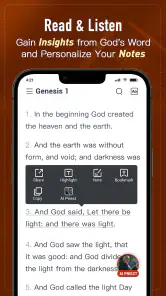
The app offers a decent level of customizability. You can adjust the font size to suit your reading comfort, which is a thoughtful touch for those who might struggle with smaller text. Bookmarking your favorite verses or passages is seamless, and you can even share them directly from the app, which is great for those who like to spread the good word on social media.
Navigation is a breeze. There’s a search function that lets you easily find specific verses or chapters, which is super handy. Whether you're looking for something specific or just browsing, it's all pretty intuitive.
Where it fits—and where it doesn’t
The app has a strong everyday use case for someone who wants scripture available during small gaps: a few minutes before work, a lunch break, or a quiet moment before bed. I would use search for a passage I already know by wording or reference, then bookmark it for a later return. Sharing is a separate handoff: it can help when a friend asks for a verse, but a short excerpt on social media may lose the context that made the passage meaningful, so I prefer to include a chapter reference and explain why I’m sending it.
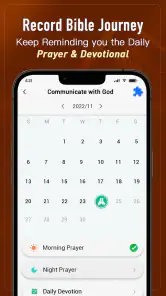
Compared with a printed KJV, this app is easier to carry, search, and listen to, while a physical Bible avoids phone notifications and makes longer, screen-free reading more comfortable. Compared with Bible apps centered on multiple translations or detailed study resources, this one is a more focused choice: its KJV emphasis suits readers who value that translation, but it is less useful for someone who wants to compare wording across versions. The app’s store summary also points to an AI Priest, Bible Quiz, prayers, and plans; those extras may appeal to readers looking for more guided activities, though I would choose a dedicated study resource if detailed comparative research is my main goal.
A routine that travels well
One practical way to make the app part of a day is to give each tool a clear job. I might begin with a short reading at breakfast, use a bookmark to keep my place, and return to the same passage later by listening while doing a familiar chore. In the evening, I can revisit the text rather than relying on memory of what I heard. This is a modest routine, but it avoids turning a daily verse into a quick scroll with no follow-through.
For a new reader, the search box can also be a bridge between curiosity and a longer session. If a verse comes up in conversation or a sermon, search for the words or reference, then read beyond the single result before sharing it. That extra step matters because a search result is convenient, not an explanation of the passage. If the wording feels unfamiliar, I would note the question and consult a plain-language translation or a trusted study resource rather than assuming the KJV phrase is immediately clear.
Who will get the most from it
I would recommend this app most readily to someone who already likes the King James Version and wants a portable way to read or hear it without carrying a book. It also suits people who prefer a simple entry point: a verse, a passage search, or audio when their hands and eyes are occupied. A reader who is building consistency can use bookmarks to create a lightweight trail through the text, even if their broader plan comes from a church, reading group, or paper notebook.
It is less likely to satisfy someone whose main goal is comparing translations, researching historical context, or keeping a phone entirely out of a devotional routine. Those readers may be better served by a reference work with stronger comparative tools, or by a printed Bible and a separate study guide. I would also be cautious about recommending it as a child’s only resource: the age rating is Everyone, but an adult can still help a young reader interpret older language and discuss the religious content in a suitable way.
Small trade-offs in daily use
Audio is a genuine convenience, but listening changes how actively you engage. It can be useful for revisiting familiar material, yet it is easier to miss a phrase or lose your place than when reading closely. My practical compromise would be to listen for continuity and switch to the text when I want to study a sentence, compare it with a note, or save a specific passage. The occasional mode-switching glitch makes that deliberate approach more dependable than expecting every transition to feel instant.
Sharing also needs a little care. A verse sent to a friend can be thoughtful, but a cropped quote may sound different outside its chapter. I would share a reference alongside the excerpt and, when appropriate, add a short personal note. That keeps the app’s convenience from flattening a passage into a slogan and makes the handoff more useful for the person receiving it.
Room for Improvement?
While the app is generally fantastic, there are a couple of areas where it could improve. For instance, a few users have mentioned that the app occasionally glitches when switching between audio and text mode. It’s not a deal-breaker, but something to be aware of.
Adding more translations could also be a bonus for those who want to compare versions or for non-native English speakers. But hey, if you’re a fan of the KJV, you’re set with this one!
It has an average rating of 4.8 from around 25,000 ratings, with more than 5 million installs and roughly 1,100 written reviews. Those figures suggest it has found a broad audience, but they cannot tell you whether the KJV’s language or the app’s particular mix of tools suits your routine. Version 1.23 supports Android 5.0 and later, which leaves it accessible to many older devices. I would still decide based on your reading preference: if you want the KJV, audio, and quick verse lookup in one place, the fit is clear; if you need several translations or a distraction-free study setting, another resource may serve you better.
Making the choice before settling in
If you are wondering whether you need to pay to try it, the app is free to download, with optional purchases available in the app. I would begin with the reading and listening habits I actually expect to use, then decide whether any additional paid content is worthwhile for me. The presence of purchases does not make the core choice more complicated: first ask whether the KJV and this focused mix of tools fit your needs.
For a commute, I would prepare by opening the passage before setting off rather than searching while moving. For a quiet reading break, I would keep the phone’s other distractions in mind and use the app for one specific task instead of bouncing between features. These small choices make the experience more intentional and reduce the chance that convenience turns into another screen habit.
All in all, the Holy Bible, KJV Bible + Audio app offers a comprehensive and convenient way to carry the Bible with you wherever you go. It combines traditional scripture with modern technology, making it accessible and engaging for today’s user. Whether you’re a devoted believer or just curious, it’s definitely worth checking out!
Holy Bible, KJV Bible + Audio Frequently Asked Questions
Can I listen to the Bible instead of reading it?
Yes. Audio is part of the app’s focus, so you can listen to the King James Version as well as read it. That can suit a commute, a quiet break, or a time when reading on screen is inconvenient. The app also highlights offline Bible access, which is useful when you want to spend time with scripture away from an internet connection.
Does the app include prayers, plans, or a Bible quiz?
Yes. Alongside the KJV Bible, the app’s features include an AI Priest, Bible Quiz, guiding prayers, and plans. These options offer ways to engage with scripture beyond opening a passage to read, whether you want a structured plan or a quiz. The exact mix that suits you will depend on how you prefer to study and reflect.
Is the app suitable for children and families?
The app is rated for Everyone, so its stated age classification makes it suitable for a broad audience. Families can use it to read the King James Version together, listen to audio, or explore the included Bible quiz, prayers, and plans. As with any reading app, parents may want to review the content and features with younger users.
Which Bible translation does the app focus on?
The app focuses on the King James Version (KJV), making it a clear choice for readers who want to read or listen to that translation. Its store summary highlights offline Bible reading, alongside features such as an AI Priest, Bible Quiz, guiding prayers, and plans. If you prefer a different translation, check that the KJV meets your needs before downloading.
What features does the Holy Bible, KJV Bible + Audio app offer?
The Holy Bible, KJV Bible + Audio app provides users with a comprehensive digital version of the King James Version Bible. It includes features such as offline access, audio narration, daily verses, bookmarks, and a search function to easily find specific passages. The app is designed to enhance your Bible study experience with user-friendly navigation and customization options.
Pros
- Offline access available
- User-friendly interface
- Audio feature for ease
- Comprehensive search tool
- Regular updates
Cons
- Ads can be intrusive
- Audio requires internet
- Limited translation options
- Requires regular updates
- In-app purchases present
- Category
- Books & Reference
- Version
- 1.23