Agoda: Cheap Flights & Hotels
- 12.65K
- 4.6
- Installs
- 100.00M
- Price
- Free

Screenshots







Analysis by Reviewed
When I’m planning a trip, I like being able to compare a place to stay and a flight without beginning again on separate sites. Agoda: Cheap Flights & Hotels is a free travel app from agoda.com that brings those searches together, which I find handy for everything from a quick city break to a longer trip with several lodging options to weigh. The key is to treat it as a comparison tool, not assume that the first attractive result is automatically the best fit.
Starting with a clear search
Ever had that moment where you’re itching to travel but the prices just seem to laugh at your budget? Well, let me introduce you to Agoda: Cheap Flights & Hotels! This app is like having a savvy travel agent in your pocket, ready to find those hidden gems that won’t break the bank.
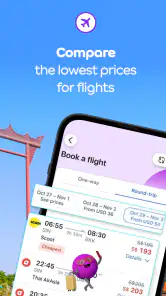
First up, the user interface. Navigating through the app is as smooth as butter. Whether you’re a tech newbie or a seasoned app user, you’ll find it a breeze to search for flights and hotels. The search function is particularly intuitive. You just punch in your destination, dates, and voila, a list of options tailored to your needs pops up.
Agoda has been around since 2011, and its travel focus is clear: the app brings together accommodation searches across millions of properties worldwide and flight deals. That breadth is useful when your destination is flexible, but it can also make a results page feel busy. I’d narrow your search with practical priorities—such as location and travel dates—before comparing individual offers, rather than scrolling through a long list with no clear idea of what matters most.
Making comparisons work for your trip
I find comparisons most useful when I decide in advance what would make a trip workable, rather than letting a tempting result set the agenda. For a group or a traveler with specific needs, I’d also agree on the essentials before searching so the shortlist reflects everyone’s priorities. That gives the next section a more practical focus: how to turn a broad set of choices into a decision that fits the actual trip.
Readable results and careful comparison
On a small phone screen, quick scanning matters as much as the number of options. I would use the results to build a shortlist, then open the details for the few places that look promising. Pay attention to the full booking conditions, not just the headline amount: cancellation terms, room details, and what is included can change which option is genuinely convenient. Reviews are helpful context, but I’d look for comments relevant to my own needs rather than treating a single glowing or critical review as decisive.
A practical way to keep the comparison manageable is to decide on a small set of non-negotiables before searching. I might need a particular area, a room suitable for the people travelling with me, or a flight time that works with my arrival plans. I can then use the app to compare options against those needs instead of letting a prominent deal reset my priorities. This matters especially when a low headline price is tempting: a different location, room arrangement, or set of conditions can make the cheapest-looking choice a poor match.
More From Our News Desk

Weather by Xiaomi Review: Clear at a Glance, Less Clear Up Close

X Under Pressure: Can It Recover When Posting Goes Wrong?

Clash of Clans Is Won Between the Battles

Android Auto Makes the Case for Quieter Car Software

MobiOffice: Transforming Mobile Productivity with Seamless Integration

EA SPORTS FC™ Mobile Soccer: Redefining Mobile Sports Gaming
Deals, timing, and trade-offs
Now, let’s talk about the deals. This app doesn’t play around when it comes to saving you money. You’ll find exclusive mobile-only prices that make traveling more accessible for those of us watching our wallets. Plus, the app keeps you in the loop with notifications about price drops and flash deals, meaning you can snag a bargain without constantly checking back.
Furthermore, there’s a nifty feature that shows you the price trends over time for flights and hotels. This helps in deciding whether to book now or hold off for a better deal. It’s like having a crystal ball for travel prices!
I’d treat a trend as one clue, not a promise that waiting will lower the fare. If your dates are fixed or the trip is soon, the value of securing an option you can live with may matter more than chasing a possible dip. If you have flexibility, compare a few date combinations and keep the total journey in mind; a low fare is less compelling if its schedule does not suit your plans. This is a useful distinction from searching airline and hotel sites one at a time: Agoda can make broad comparison quicker, while checking a provider directly may be preferable when you already know exactly where you want to book or need to examine its terms closely.
For someone arranging a trip around work or family commitments, the best workflow is often to check accommodation and flights as separate decisions, even though they are available in the same app. For example, I might first identify a few places in a suitable area, then see which flight choices fit the arrival and departure times. That order helps me avoid letting a flight deal dictate a stay that is inconvenient, or choosing a property before I know whether the journey works. When plans are firm, I’d also read the final booking details before confirming rather than relying on what I remember from the results page.
Reviews and booking confidence
Another great thing about Agoda is the transparency. User reviews are prominently displayed, allowing you to read honest feedback from fellow travelers. It’s reassuring to see what others have experienced before making a booking decision. And if you’re someone who likes to plan down to the last detail, the app provides comprehensive information about hotel amenities and flight inclusions.
For a realistic example, imagine planning a weekend away after work, with only a rough idea of the neighborhood and a firm arrival day. I’d first compare accommodation around the areas I’m willing to stay in, then check amenities and recent guest comments for practical details that affect the trip. After that, I’d look at flight choices and their inclusions before deciding. Keeping those steps separate helps avoid choosing a hotel because of a low price and only later noticing that its location or conditions do not match the plan.
Reviews are most useful when I read them with a specific question in mind. If a late arrival matters, I’d look for comments that speak to arrival arrangements; if a quiet room is important, I’d focus on feedback about noise rather than the overall tone of a review. This does not make guest comments a guarantee, but it turns them into a more useful second opinion. I would still check the property details and booking conditions directly in the listing before committing, particularly when a trip depends on a specific amenity.
Using the app in different situations
Agoda’s large selection is especially useful for travelers who are open to comparing several properties, as well as people arranging trips in unfamiliar places. The app is less suited to someone who wants a very simple, single-provider booking flow or who prefers to make every decision on a larger screen. If you find dense lists tiring, pause between searches and review a short shortlist rather than trying to assess every result at once.
For a traveller who already has a preferred hotel or airline, starting with that provider’s own site may be more direct. Agoda makes more sense when I want to survey alternatives, compare different properties, or keep flight and accommodation searches close together. That is a genuine trade-off: a broad marketplace is useful at the discovery stage, but the number of options can add work if I have already made up my mind. I’d use it to explore and compare, then make the final choice based on the exact terms and details shown for the option I want.
Motor and sensory needs also affect how comfortable a booking app feels. I’d take time to read the accommodation details for features that matter to the traveler, and not infer suitability from photos or a general description alone. On the phone, notifications can be useful for deal updates, but frequent alerts may be distracting; keeping them only if they help your planning is a sensible way to reduce noise. Anyone who has difficulty using small touch controls may find it easier to compare options on a larger device before returning to the app to book.
Travel planning can happen in less-than-ideal conditions: on a crowded commute, during a short break, or while coordinating with another person. In those moments, I find it safer to browse first and postpone a booking decision until I can read the important details calmly. A short list of candidates is easier to share or discuss than a stream of open results, and it reduces the chance of confusing one property’s conditions with another’s. If you rely on someone else to help assess a booking, reviewing the same shortlist together can make the decision clearer than passing a phone back and forth through multiple search screens.
Agoda is rated 4.6 on average from around 2.2 million ratings, and it has more than 100 million installs. Those figures suggest that it is widely used, but they do not replace checking whether a particular property and booking arrangement suit you. The app is rated for everyone, runs on iOS version 8.1 or later, and its current version is 13.45.0. I’d still make sure the device and app are up to date before a trip, especially if I plan to rely on my phone while traveling.
It is also worth thinking about how much planning you want to do on a phone. A quick search or a last-minute comparison can suit a mobile screen well, while weighing many room details or coordinating a group may feel easier on a larger display. I would not treat that as a reason to avoid the app altogether; instead, I’d use it for the parts of planning that benefit from quick access and switch to a more comfortable setting when careful reading matters. The important point is to give yourself time to check the details, rather than making a rushed choice because the app makes searching convenient.
And let’s not forget the Agoda VIP program, which rewards frequent users with even better discounts and perks. It’s a sweet deal for anyone who finds themselves bitten by the travel bug often.
That makes the app a more natural fit for people who compare trips regularly than for someone who books one occasional stay and wants the fewest possible steps. I’d consider any membership-related benefit as a bonus rather than the reason to choose a property. The stay still needs to suit the trip on location, room details, and booking conditions; a perk does not make an unsuitable option right for you.
Who benefits most, and where the friction remains
I’d recommend Agoda most readily to travellers who are still deciding where to stay, want to compare a range of possibilities, or appreciate having flight searches alongside accommodation planning. It can also help when a destination is unfamiliar and the first challenge is understanding what kinds of stays are available. A person who has exact requirements, dislikes scanning lists, or prefers to book directly with one chosen provider may find a direct site or another focused option simpler.
The main friction is the judgement the app asks of you. A long set of choices can be useful, but it does not remove the need to compare the fine print, assess reviews carefully, and decide which trade-offs are acceptable. That is why I would not use a low price alone as my decision rule. If you are booking for someone with particular mobility, sensory, or room needs, check the relevant property details closely and contact the provider if you need a clear answer before booking. Photos and broad descriptions are not a substitute for confirming the practical detail that matters to that traveller.
A balanced choice for trip planning
In the end, Agoda: Cheap Flights & Hotels is a powerhouse app for budget-savvy travelers. It’s all about making travel accessible, affordable, and enjoyable. With its user-friendly interface, fantastic deals, and reliable reviews, it’s an app that deserves a spot on your home screen. Whether you’re planning a quick weekend getaway or an extended vacation, Agoda has your back.
My more measured recommendation is to use it as a strong starting point for comparison, especially when you have some flexibility and want to see alternatives side by side. It is not a substitute for checking the specific terms of a booking, and it may not be the most comfortable choice for people who need a highly guided, minimal-flow experience. For travellers willing to shortlist, verify, and choose at their own pace, the combination of accommodation and flight searching is genuinely convenient.
So, next time wanderlust strikes, remember there’s an app that’s got your back, helping you chase those travel dreams without the financial nightmare. Bon voyage!
Agoda: Cheap Flights & Hotels Frequently Asked Questions
Does Agoda require an account, and can I save trip details?
Agoda is built around searching and booking travel, so having an account can be useful for keeping reservations and trip details together. Before booking, check which sign-in options and account features are available in the app. You can still use the app to explore travel options, but account access may be needed for certain booking or management tasks.
Can I browse Agoda before choosing a destination or travel date?
Yes. Agoda is useful while you are still shaping a trip, since you can explore accommodation and flight options as part of your planning. Searches become more specific when you enter a destination and dates, but browsing can help you compare possibilities before settling on a plan. Review the details of any option carefully before making a booking.
Is Agoda free to download, and what devices can run it?
Agoda is free to download and is available for Android and iOS, so travelers can use it across a range of mobile devices. On Android, it requires version 8.1 or later. The app is rated for Everyone, and its focus is on browsing and booking travel options from a phone or tablet.
Can I use Agoda to book both accommodation and flights?
Yes. Agoda brings accommodation and flight searches together in one travel app. Its overview highlights rooms at 4.2 million properties worldwide and flight deals every day, making it useful for comparing parts of a trip in one place. You can use it to look for a stay, explore flight options, and manage travel planning from your device.
What is Agoda: Cheap Flights & Hotels?
Agoda: Cheap Flights & Hotels is a travel app that offers users the ability to book flights and accommodations at competitive prices. With a focus on affordability, the app provides a wide range of options for hotels and flights globally, making it a popular choice for travelers seeking cost-effective travel solutions. Agoda is developed by agoda.com and has been available since July 6, 2011.
Pros
- Wide range of hotels worldwide.
- Competitive flight deals.
- User-friendly interface.
- 24/7 customer support.
- Exclusive app-only discounts.
Cons
- Occasional app crashes.
- Limited payment options.
- Slow loading times.
- Inaccurate booking info.
- Infrequent updates.
- Category
- Travel & Local
- Version
- 13.45.0