Etsy Seller: Manage Your Shop
- 2.84K
- 4.7
- Installs
- 1.00M
- Price
- Free

Screenshots


Analysis by Reviewed
I see the Etsy Seller app as a useful part of a shop routine, not a replacement for having one. Before opening it, I’d decide what deserves attention today: an unanswered customer question, an order that needs preparing, or a listing that needs a quick correction. That small bit of prioritizing helps keep phone checks purposeful instead of turning every notification into a new task.
A practical workflow for busy shop days
For example, if I’m packing orders at home and need to step out, I can use a quiet moment to check whether a buyer has sent a question, then return to packing without sitting down at a computer. The value is in keeping customer communication and shop upkeep close to the day-to-day work. I’d still leave tasks that need careful writing or a longer review for a time when I can concentrate.
Make quick checks lead to clear next steps
A simple habit makes mobile shop management more sustainable: check messages and orders at planned points in the day, then act on what needs attention rather than repeatedly reopening the app. I’d also keep a brief note outside the app for work that needs follow-through, such as revising a product description later. That way, a quick phone session can surface a task without becoming the place where every task must be finished.
Keep shop decisions separate from shop alerts
One useful distinction is between something that needs a fast response and something that needs a considered decision. A customer question may be time-sensitive, while a change to pricing or a product description can wait until I have checked the details. I’d use the app to notice what is happening, then give larger decisions their own focused block rather than making them in a hurry between errands.
If you’re an artisan, a craft enthusiast, or someone who's turned your passion into a business, then you’re probably already familiar with Etsy. But what about managing your shop on the go? Enter the Etsy Seller: Manage Your Shop app, your pocket-sized partner in the bustling world of online selling. This app is like having your shop manager right in your pocket, ready to help you handle your business anywhere, anytime.
Effortless Shop Management
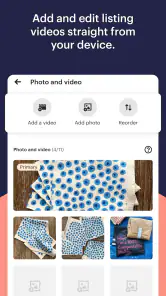
One of the standout features of the Etsy Seller: Manage Your Shop app is how it simplifies shop management. Whether you’re lounging at a café or stuck in a queue, you can easily manage your listings. Updating product details, adjusting prices, or even uploading new photos becomes a breeze. The app's user-friendly interface ensures that even if you're not tech-savvy, you can navigate your shop’s backend with ease.
Use listing edits with a little care
Quick edits are most useful when I already know what needs changing. If I spot a typo or notice that a photo should be replaced, handling that small correction on my phone can save a later trip to the computer. For a more consequential edit, I’d prepare the wording and check the item details first. That extra pause matters for handmade goods, where a measurement, material, or variation can change what a buyer expects.
More From Our News Desk

Weather by Xiaomi Review: Clear at a Glance, Less Clear Up Close

X Under Pressure: Can It Recover When Posting Goes Wrong?

Clash of Clans Is Won Between the Battles

Android Auto Makes the Case for Quieter Car Software

MobiOffice: Transforming Mobile Productivity with Seamless Integration

EA SPORTS FC™ Mobile Soccer: Redefining Mobile Sports Gaming
Build a simple capture habit
When an idea for a new listing or a better description comes to me while I’m away from my workspace, I wouldn’t rely on memory alone. I’d jot down the idea separately, along with the specific item it relates to, then use a calmer session to make the actual change. This keeps a passing thought from turning into an incomplete edit and helps preserve the details that make each product distinct.
Real-Time Notifications
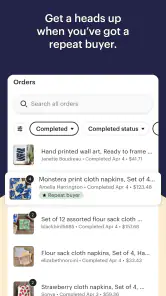
Imagine this: you're out for a walk, and a notification buzzes on your phone – you've just made a sale! With this app, you receive real-time notifications about new orders, messages from customers, or even shop updates. It keeps you in the loop, ensuring you never miss a beat, whether it’s a customer query or an order to fulfill.
Let notifications support, not run, the day
Notifications are most helpful when they point me toward something I can act on. If I’m in the middle of making a product or spending time with family, every alert does not have to become an immediate interruption. I’d choose a routine that suits the shop’s actual workload: check for urgent buyer messages at sensible intervals, then handle packing and listing work when I can give those tasks proper attention.
A realistic day might start with a planned check before I begin making orders. I can see whether a buyer needs clarification, note which orders need preparation, and then put the phone aside while I work. Later, a short check can catch a new message or a sale. The benefit is not doing the whole business from a phone; it is keeping small Etsy-specific decisions close enough to the work that they do not pile up unnoticed.
Customer Interaction Simplified
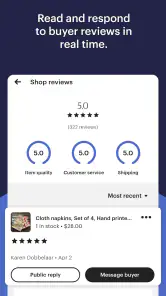
Responding to customer messages swiftly can significantly enhance your customer service game. The app allows you to reply to messages on the go, ensuring that your clients feel valued and heard. This quick communication can make a huge difference in building customer loyalty, and the app’s layout makes it easy to keep track of all your interactions.
Reply clearly without rushing
For a message about a product’s size, materials, or timing, I’d rather give a complete and accurate answer than send a fast guess. If I need to check a measurement or confirm what I can make, I can note the question and reply once I have the right information. A short, useful response is better than an immediate one that creates confusion or an expectation I cannot meet.
Messages can also reveal patterns worth acting on later. If buyers repeatedly ask for the same clarification, I’d treat that as a cue to review the relevant listing when I have time, rather than typing the same explanation from scratch each time. The app makes it convenient to handle the conversation; the more durable improvement may be updating the product information so the next buyer can find the answer themselves.
Analytics at Your Fingertips
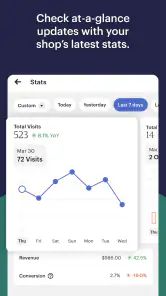
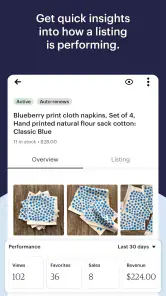
Understanding your shop’s performance is crucial for growth, and the app delivers on this front too. It provides insights into your sales, view counts, and even traffic sources. This data can be instrumental in tweaking your strategies and optimizing your listings for better visibility and sales. Having analytics at your fingertips empowers you to make informed decisions without being tied to a desktop.
Turn shop activity into a measured experiment
I’d use those performance insights to form a question, not to make a sweeping change after one quiet day. For example, if I’m reviewing a listing, I can note what I changed and later check whether the shop’s activity gives me a reason to keep testing or reconsider it. Looking at views alongside sales and traffic sources can help frame what to investigate, but it does not by itself explain why a buyer did or did not purchase.
A practical trade-off is that mobile analytics are convenient for a quick pulse check, while comparisons and planning may be easier with a larger screen and a written record. I’d avoid changing several listings at once if I want to understand which adjustment mattered. Keeping a simple log of the item, the change, and when I made it can make later reviews more useful without turning shop management into a complicated data project.
Where mobile management has limits
I wouldn’t treat a phone as the best place to overhaul a whole catalogue. Editing one listing while waiting somewhere is handy; comparing several descriptions, checking details carefully, or planning a consistent batch of changes is easier when I can focus on a larger screen. Mobile convenience can also encourage too many small interruptions, so I’d keep notifications useful and set boundaries around when I respond, especially if making and shipping products already fills the day.
Another limitation is the natural division between Etsy-specific work and the rest of running a business. A seller still has to think about materials, production time, packaging, expenses, and the promises made to buyers. The app can keep shop activity accessible, but it should not become the only record of a production plan or business decision. I’d keep important operational notes somewhere dependable and use the mobile app for the shop tasks it is suited to.
How it fits beside other tools
Compared with a general notes app, spreadsheet, or bookkeeping tool, Etsy Seller is focused on the Etsy shop itself: it brings listing work, customer conversations, orders, and shop performance into a seller-oriented place. That focus is its advantage when I need to handle Etsy-specific work quickly. It is not a substitute for broader business planning, inventory records, or bookkeeping, so I’d pair it with whatever system already keeps those responsibilities organized rather than expecting one app to do everything.
For someone who sells only through Etsy, this focused approach can be simpler than trying to recreate shop tasks in a generic organizer. A notes app is better for loose ideas and personal checklists; a spreadsheet can be more flexible for a carefully structured stock or cost record; bookkeeping software is intended for financial tracking. Those tools answer different questions. I’d use Etsy Seller to stay close to shop activity, then choose the right companion for any responsibility that needs more structure than a quick mobile check.
Keep a handoff between phone and desk
A small handoff routine prevents mobile work from becoming scattered. Before closing the app, I’d record any task that needs a longer session: a listing to review, a buyer question that needs checking, or a change to consider across several products. When I return to the work later, I can start from that short list instead of trying to remember why I opened the app. This is especially helpful when shop tasks are interleaved with making, caregiving, or another job.
Who will get the most from it
The app is a strong fit for independent makers and small shop owners who already sell on Etsy and want to keep an eye on activity while away from a desk. It is less compelling if you are only browsing the marketplace, do not run an Etsy shop, or prefer to handle every business task on a computer. Etsy, Inc developed this free business app; it is rated for Everyone, has a 4.7 average from around 42,000 ratings, and has been installed over a million times. The current version is 1.109.0, and it supports Android 8.0 or later.
It is also a sensible choice for a seller whose day is split between production and customer-facing work: a maker can check a question between tasks, confirm what needs attention, and return to the workbench without needing a full desktop session. I’d be more cautious about adopting it as the center of a business that spans several sales channels, has complex stock coordination, or depends on detailed financial records. In those cases, it can still help with the Etsy portion, but broader tools should carry the cross-business workload.
If you are deciding whether to install it, the key question is not whether you can do every task on your phone. It is whether quick access to your Etsy shop would remove enough friction from your actual day to justify another source of alerts. The app is free and its age rating is Everyone, so the practical decision is mainly about fit: do you want to handle shop messages, listing upkeep, and activity checks while away from a computer, or would a planned desktop routine be calmer?
A measured recommendation
My recommendation is to use Etsy Seller: Manage Your Shop as a mobile companion, not as permission to stay on call all day. It can make a useful difference when a timely reply or a quick listing adjustment matters, while a planned desktop session remains better for detailed work. If that balance suits the way you run your shop, it’s a practical free option to try; if you need one place for every part of a business, a broader set of tools will serve you better.
For me, the strongest case for the app is a seller who wants to keep Etsy work moving without letting it take over every pause in the day. A planned check, a clear note for follow-up, and a separate place for the broader business records make it easier to get that benefit without mistaking constant availability for good service. With that boundary in place, it can be a useful everyday companion; without it, a phone can turn a manageable shop routine into a stream of interruptions.
Etsy Seller: Manage Your Shop Frequently Asked Questions
What is Etsy Seller, and who is it designed for?
Etsy Seller is a business app for managing an Etsy shop from a mobile device. It is aimed at people who already sell on Etsy and want to take care of shop tasks while away from a computer. Its focus is seller operations rather than shopping, so customers looking to browse or buy products will want the regular Etsy shopping experience instead.
Can I use Etsy Seller on both Android and iOS?
Etsy Seller is available as a mobile app, but make sure you choose the version intended for your device when you visit its app store. The Android release requires operating-system version 8.0 or later. Checking your device’s compatibility before downloading is a sensible first step, especially if you use an older phone or tablet.
Is Etsy Seller free to download, and what devices can run it?
Etsy Seller is a free business app from Etsy, Inc, designed for people who want to manage their shops on a mobile device. It is suitable for general audiences, and its listed minimum operating-system requirement is version 8.0. Before downloading, check that your device meets that requirement and has enough space for the app.
Do I need to be an Etsy seller to use Etsy Seller?
Yes, the app is intended for managing an Etsy shop rather than browsing and buying products as a customer. Its tools focus on shop operations, such as handling listings, orders, and customer conversations. If you are not running a shop, the seller-focused features are unlikely to be useful for your needs.
What features does the Etsy Seller app offer for shop management?
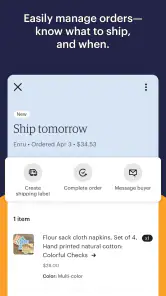
The Etsy Seller app provides a comprehensive suite of tools designed to help sellers manage their online shops effectively. Key features include inventory management, order tracking, sales analytics, and customer messaging. Additionally, the app allows users to update listings, manage shop policies, and receive notifications about sales and customer inquiries, all from a mobile device.
Pros
- User-friendly interface simplifies shop management.
- Real-time notifications keep you updated instantly.
- Customizable settings for personalized shop experience.
- Integrated analytics for tracking sales and growth.
- Mobile access allows management anytime
- anywhere.
Cons
- Limited features compared to desktop version.
- Occasional app crashes affect usability.
- Some users report delayed notifications.
- In-app purchases can be costly.
- Requires stable internet for optimal performance.
- Category
- Business
- Version
- 1.109.0












