Esports Logo Maker
- 3.03K
- 4.8
- Installs
- 10.00M
- Price
- Free

Screenshots
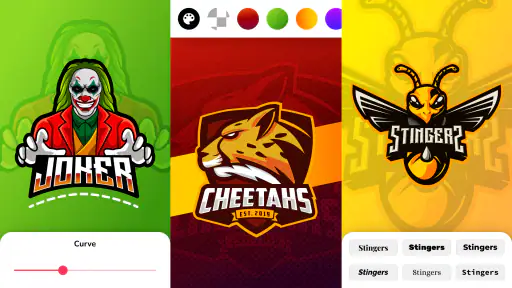
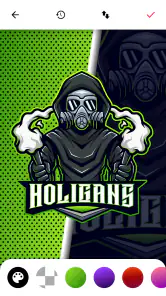
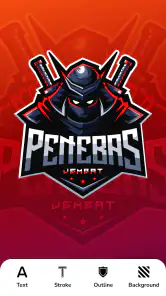
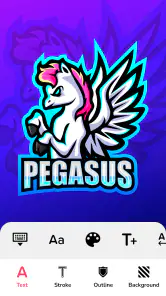
Analysis by Reviewed
When I first opened Esports Logo Maker, I wanted to see whether I could make a recognizable team emblem without already knowing design software. It is an Art & Design app from ZipoApps, aimed at turning a gaming-clan idea into a logo through a guided, template-based process. My first impression was that it feels approachable rather than technical: I could start exploring designs before worrying about learning a complicated tool.
What to expect from the first session
I’d approach this app as a focused way to create a mascot-style gaming emblem, not as a complete branding studio. Its template-led workflow is useful when you have a rough idea—an animal, a mood, or a team name—but no finished sketch. You can begin with a visual direction and refine it, rather than facing an empty canvas and having to invent every shape yourself.
That difference matters if you are new to design. A blank-canvas editor can offer more freedom, but it can also make the first decision surprisingly hard: where should the symbol go, how large should the lettering be, and what belongs in the background? Here, the template gives those decisions a starting structure. I found that especially helpful for getting from “we need a logo” to something the group can react to.
The app is free to install, and its Everyone age rating makes it accessible to a broad audience. It has a 4.8 average from around 320,000 ratings, with more than 10 million installs. Those figures indicate plenty of interest, but I would treat them as context rather than proof that every style or workflow will suit you. The key question is whether a mascot-and-template approach matches what you want to make.
Getting oriented before you customize
Once it is open, I recommend deciding what the logo needs to do before picking details. Is it mainly for a small team avatar, a chat group, or a larger graphic? A compact emblem needs a clear silhouette and lettering that stays readable at a glance. A larger image can carry more texture and finer decoration. Having that use in mind makes it easier to choose between options without endlessly changing things just because you can.
I’d also settle on a short visual brief with the team before editing: one mascot idea, a couple of colors, and the name as it should appear. That simple preparation prevents a common group-design problem, where everyone suggests another effect or color and the logo loses a clear center. The app can help explore variations, but it cannot decide what your team wants to represent.
If you are working alone, a quick note on your phone is enough: “bold, aggressive, easy to read” or “playful, bright, friendly.” I use a phrase like that as a filter. When a font or effect looks attractive but does not fit the brief, I move on instead of rebuilding the whole concept around it.
More From Our News Desk

Weather by Xiaomi Review: Clear at a Glance, Less Clear Up Close

X Under Pressure: Can It Recover When Posting Goes Wrong?

Clash of Clans Is Won Between the Battles

Android Auto Makes the Case for Quieter Car Software

MobiOffice: Transforming Mobile Productivity with Seamless Integration

EA SPORTS FC™ Mobile Soccer: Redefining Mobile Sports Gaming
Easy Peasy Design Process
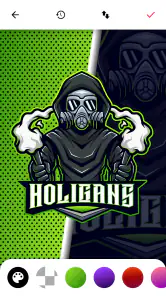
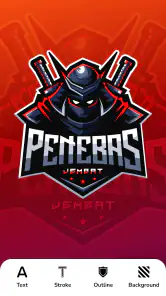
Alright, so first things first, the user interface is sleek and pretty intuitive. You don’t have to be a graphic design genius to figure things out. The app guides you through the process step-by-step. You start by picking a template. And boy, they have a ton of templates! Whether you're into dragons, skulls, or something more abstract, there's something here for everyone.
For a first session, I’d keep the goal simple: choose a motif that fits your group, then make one clear change at a time. That is more useful than cycling through every option at once. A small set of colors and a readable name will usually make a better starting point than a crowded design, especially if the emblem will appear as a tiny profile image.
Once you've got your template, it's all about customization. The app lets you tweak colors, fonts, and even the tiniest details to get that perfect logo. I spent way too much time playing with different color schemes, but hey, it's all part of the fun, right?
The Customization Galore
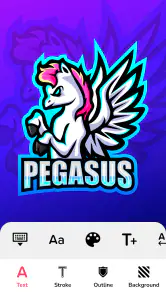
This is where Esports Logo Maker really shines. The level of customization available is impressive. You can adjust everything from the shadow effects to the overall color palette. And if you're like me and love those small details, you'll appreciate the ability to add textures and gradients to your designs.
A practical tip is to judge each version at the size where you expect people to see it, rather than only zoomed in while editing. Fine texture and layered effects can look exciting up close but become visual noise in a small avatar. I’d save a bold, simpler version for team icons and reserve more elaborate detail for a larger display.
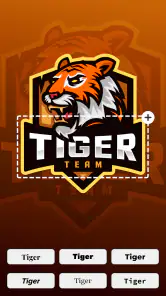
The app also offers a range of fonts to choose from, which is great because the right font can really make your logo pop. I spent a good chunk of time mixing and matching fonts until I found the perfect one.
Making the First Draft Work
For a realistic first-use scenario, imagine your friends decide on a team name shortly before an online match and need an emblem for a group profile. I’d pick a mascot that still reads clearly without its small details, use a strong contrast between the lettering and background, and avoid adding effects just because they are available. Then I’d pause and ask someone who has not watched me edit to identify the name and image at a glance. If they cannot, the next useful step is simplifying, not adding more decoration.
This is also where the app’s template-first approach has a trade-off. It gets a new user to a visual starting point quickly, but a template can make several teams’ designs feel related if everyone keeps the original layout. Changing the palette, type choice, and a few defining details can help establish a distinct identity. If you need complete control over custom vector shapes or a carefully constructed brand system, a dedicated design program is likely the better fit.
Making group feedback useful
When a few friends are involved, I would avoid sending every half-finished variation for a vote. Too many choices make feedback vague, and people often choose whichever version has the flashiest effects. I’d instead make two or three genuinely different drafts, each with a clear reason behind it—for example, one that prioritizes the mascot, another that puts the team name first, and a third with a different color mood.
Ask reviewers a specific question, such as whether they can read the name quickly or recognize the mascot at small size. That gives you practical feedback rather than a string of personal color preferences. It also helps keep the design process moving when the group has different tastes.
For a club or informal team, this is often enough: a recognizable mark that everyone is happy to use. If the logo will represent an organization publicly or appear on products, I’d be more cautious. A template-based starting point can be convenient, but you should make sure the result is distinct enough for its intended use and that the group agrees on who will maintain the final version.
Exporting and Sharing
After creating your masterpiece, you might be wondering, "Okay, how do I show this off?" The app makes it super easy to export your logo in high-resolution formats. Whether you need it for social media, merchandise, or just to boast to your friends, sharing is just a tap away.
Before sharing, I’d check where the logo will be used and whether its shape and lettering remain legible there. A design meant for a square team avatar may need different spacing from one displayed on a wider banner. The export step makes it convenient to pass along a finished image, but it does not replace checking how that image looks in its actual destination.
Plus, there are options to save your projects within the app, so you can always revisit and tweak them whenever you get a new burst of inspiration. I found this particularly useful for those last-minute changes before my team’s next big match!
Choosing the right alternative for the job
Compared with a general-purpose graphics editor, this app is more direct for a mascot-led logo and less suited to building an identity from scratch with precise, original shapes. That is a useful trade-off, not a flaw in every situation. If you mainly want a quick emblem that looks finished enough for a team profile, starting from a template can save you from learning a larger tool before you even know what design you want.
A drawing app is the better choice when the central idea depends on an illustration that does not fit the available template direction, or when you want to draw the mascot yourself. A broader layout or branding tool is more suitable if you need matching graphics for several formats and want tight control over spacing and typography. I would not switch tools just because this app is template-based; I would switch when the template is actively limiting the specific idea or output I need.
There is also a practical middle ground: use the app to explore a few concepts, then take the strongest direction into a more flexible editor if the project grows. That makes sense for a team that is still choosing its identity. It is less worthwhile if all you need is a simple icon for a private group, where spending extra time on a full design workflow may not improve the result in a meaningful way.
Who It Suits, and Where It Can Frustrate
I’d recommend it most to casual players, small gaming groups, and first-time creators who want a mascot-led logo without starting from a blank canvas. It is also handy when you need to test several visual directions before settling on a team identity. If your priority is producing a quick, shareable concept rather than building a full professional brand package, the template-based workflow makes sense.
On the other hand, I would skip it if your brief requires precise original illustration, extensive control over every shape, or a consistent identity system for many different materials. A general-purpose graphics editor gives more freedom for that kind of work, though it also asks for more time and design know-how. There is a learning curve even here: the controls are approachable, but choosing a coherent combination of mascot, colors, effects, and lettering still takes judgement.
The app is free to install, with in-app purchases ranging from $0.99 to $149.99 per item, so I’d explore the basic workflow before deciding whether any paid option is worthwhile for my needs. It is rated for Everyone, and its Android minimum requirement is version 5.0. The current release is 1.4.5. Its 4.8 average from around 320,000 ratings and over 10 million installs suggest that many people have tried it, though those figures alone cannot tell you whether its style suits your project.
Questions to settle before you commit
Can a complete beginner make something usable? I think so, especially if “usable” means a clear concept for a gaming group rather than a polished commercial identity. Starting with a suitable motif, limiting the palette, and checking the lettering at small size gives you a sensible route to a first draft. The app lowers the barrier to beginning; it does not remove the need to make choices.
Will it work for a team avatar as well as a larger graphic? It can be used for either, but I would not assume one version will look equally good everywhere. A detailed design may suit a larger display, while a profile image benefits from fewer competing elements. Save the project and revisit it if the first export looks crowded in its intended setting.
Do you need to pay to try the creative process? The app is free to install, while optional in-app purchases are available. I would first see whether the template and editing workflow suit your needs, then consider any purchase only after you know what it adds to your own project. That keeps the decision tied to a real use rather than the temptation to unlock something before you have a clear design.
Is it the right choice for a serious esports brand? For a quick team emblem or early concept, it can be a useful starting point. For an identity that needs original artwork, exact production control, or a coordinated set of assets, I would choose a more flexible design workflow. The difference is not simply skill level: it is whether your brief needs the convenience of a guided logo maker or the control of a broader design tool.
Final Thoughts
In conclusion, the logo maker is a fantastic tool for anyone looking to create professional-looking logos without the hefty price tag. It's user-friendly, packed with features, and offers a great deal of flexibility. Whether you’re a seasoned designer or a newbie just diving into the world of esports branding, this app has something to offer you.
So, if you're ready to unleash your inner designer and create logos that truly represent your gaming persona, give this app a shot. Who knows, you might just design the next iconic esports logo!
Esports Logo Maker Frequently Asked Questions
What kind of app is Esports Logo Maker, and who is it for?
Esports Logo Maker is an Art & Design app from ZipoApps for creating logos with a gaming or esports identity. It may appeal to individual players, teams, and anyone looking to develop a visual mark for a gaming brand. Its focus is on logo creation, so it is most relevant if you want to explore designs built around esports-style mascots and avatars.
Who develops Esports Logo Maker?
Esports Logo Maker is developed by ZipoApps. Knowing the developer can help you identify the app when browsing Android downloads and distinguish it from other logo-design tools with similar names. The app is focused on creating esports and gaming logos, making it a specialized choice for people who want to work on a gaming-related design rather than a general-purpose illustration project.
Is Esports Logo Maker compatible with my Android device?
Esports Logo Maker is an Art & Design app from ZipoApps, and its listed minimum Android requirement is version 5.0. If your device runs Android 5.0 or later, it meets that stated requirement. Checking your Android version before downloading is a simple way to avoid compatibility surprises and decide whether the app is suitable for your phone or tablet.
What features does Esports Logo Maker offer?
Esports Logo Maker offers a wide range of features designed to help users create professional-looking logos effortlessly. It includes customizable templates, a vast library of icons and fonts, and advanced editing tools. Users can easily adjust colors, shapes, and text to suit their needs. Whether you're a novice or an experienced designer, the app provides everything you need to create a unique logo for your esports team or gaming brand.
Is Esports Logo Maker free to use?
Esports Logo Maker is free to download, with in-app purchases ranging from $0.99 to $149.99 per item. You can start using the app without paying upfront, but purchases may apply to some content or features. It is worth reviewing any purchase options shown in the app before confirming them, particularly if you plan to use it regularly or want access to additional design resources.
Pros
- User-friendly interface for easy navigation.
- Wide range of templates to choose from.
- High-quality output suitable for professional use.
- Customizable options for unique logos.
- Fast processing and download speeds.
Cons
- Limited free features without subscription.
- Occasional ads may interrupt workflow.
- Some advanced features require in-app purchases.
- Limited font options for text customization.
- Requires internet connection for optimal use.
- Category
- Art & Design
- Version
- 1.4.5













