EngLearn Speak: AI Tutor
- 0.00
- 0.0
- Installs
- 100.00K
- Price
- Free

Screenshots
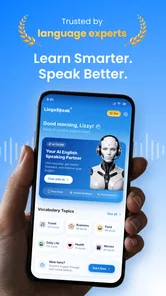
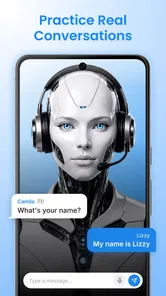
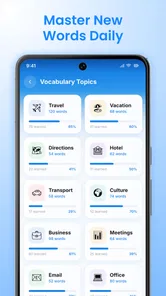
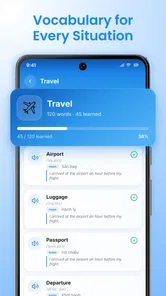
Analysis by Reviewed
Learning a language can feel easiest right up until you have to say something out loud. EngLearn Speak: AI Tutor is aimed at that awkward gap: it is an English-learning app from DQL TechLab that puts speaking practice, chat and vocabulary work at the center. I’d consider it if I wanted a low-pressure way to practise forming sentences, rather than another course that mainly asks me to read and tap through exercises.
It is free to install, with optional in-app purchases priced from $6.99 to $89.99 per item. That makes it straightforward to try, but I would check the purchase details in the app before committing to anything. The app is rated for Everyone, has reached over 100,000 installs, and its current version is 1.6.0. It is an education app, not a general chatbot or a replacement for a structured class.
What to expect from an AI-focused English lesson
The appeal is the chance to practise language actively. A conversation gives you a reason to retrieve words and build a response, while vocabulary work can support the gaps you notice along the way. That combination can be more useful than memorising isolated terms if your main hurdle is turning what you know into something you can actually say.
I would approach the AI element as a practice partner, not as a guaranteed teacher who knows exactly what you need. AI conversation can help make repetition less intimidating, especially when you are studying alone. It still takes your own judgement to decide whether a suggested phrase fits the situation, sounds natural, or matches the level of formality you want.
The app’s short description is “EngLearn Speak,” and that emphasis is a useful clue to its best role: building confidence through use. It may suit a learner who already knows some English but freezes when trying to speak, as well as someone who wants regular conversational exposure. If you need a full course with a carefully sequenced syllabus, grammar explanations and teacher feedback, I would compare it with a course designed specifically for those needs.
Set a small goal before your first session
Before opening a conversation, choose one practical situation you care about: introducing yourself, asking for directions, or explaining what you need at an appointment. A narrow goal makes it easier to tell whether practice is helping. It also keeps a chat from drifting into phrases you may never use.
For a first-time learner, I would not try to sound fluent immediately. Aim to produce a clear sentence, then try a second version with one improvement. For example, if you are practising how to ask for help, focus first on getting the request across. Only after that would I work on making it more polite or adding detail. This gives the session a useful finish line without turning it into a test.
More From Our News Desk

Weather by Xiaomi Review: Clear at a Glance, Less Clear Up Close

X Under Pressure: Can It Recover When Posting Goes Wrong?

Clash of Clans Is Won Between the Battles

Android Auto Makes the Case for Quieter Car Software

MobiOffice: Transforming Mobile Productivity with Seamless Integration

EA SPORTS FC™ Mobile Soccer: Redefining Mobile Sports Gaming
Getting started without overthinking setup
EngLearn Speak requires Android 8.0 or later. Once installed, I would keep the first visit simple: find the speaking or chat activity, choose a familiar topic, and begin with a sentence you could imagine saying in real life. There is no need to plan a long study schedule before finding out whether the practice style suits you.
If the app asks you to make choices during setup, pick the answers that reflect what you can do now rather than the level you hope to reach. That helps keep early practice manageable. I would also take a moment to notice which activities are available without a purchase and which ones lead to an in-app purchase screen. The app is free, but optional items range from $6.99 to $89.99, so it is sensible to understand the cost before buying.
One useful first-session habit is to keep a small personal note outside the app with two or three phrases you struggled to produce. This is not a claim about a built-in notebook feature; it is simply a practical way to make a conversation lead to later practice. At the end of a session, write down the phrase you wanted, the wording you managed, and one expression you want to try next time.
Your first meaningful success: finish one real exchange
A good first win is not completing a long lesson. It is carrying a short exchange from opening line to response without switching back to translation for every word. Try a simple scenario such as ordering a drink: greet the other person, make a request, and respond to one follow-up. If you get stuck, use a simpler sentence rather than abandoning the conversation.
This workflow makes the app’s mix of chat and vocabulary practice more purposeful. After the exchange, identify one missing word that genuinely blocked you. Practise that word in a new sentence, then return to the scenario and try again. The key is to retrieve the word in context, not merely recognise it on a screen. That small loop—attempt, notice a gap, practise, repeat—is more likely to build usable language than collecting a long list of unfamiliar vocabulary.
Another helpful approach is to say your answer aloud before entering or submitting it, where the activity allows. Speaking first exposes a different problem from typing: a sentence may look familiar but be difficult to produce at natural speed. Keep the first attempt short. If you can express the idea in plain English, you have accomplished something worth building on, even if the wording is not elegant.
Common points of confusion and how I’d handle them
AI feedback can feel authoritative, but I would not treat every correction as the only acceptable answer. English often has several natural ways to say the same thing, and a conversational tool may focus on one version. When an alternative sounds unfamiliar, compare the meaning and tone rather than assuming your original sentence was useless. For high-stakes writing or formal work, check a reliable reference or ask a qualified teacher.
It is also easy to mistake a lively chat for a complete learning plan. Conversation builds comfort and recall, but it may not systematically cover grammar, pronunciation, listening comprehension or exam skills. If one of those is your priority, use EngLearn Speak as a supplement or choose a resource that targets that skill directly. A textbook or structured course can be better for understanding why a grammar pattern works; a human tutor can respond to your individual habits and context.
Vocabulary practice can become busywork if you save every new term. I would keep only words that connect to a current goal, such as work introductions or travel questions. Use each one in a personal sentence, and revisit it in a later conversation. This makes the app more useful for a real need and reduces the chance that your study session turns into an unmanageable pile of words.
Finally, do not judge progress by how long you spend chatting. A short exchange that you can repeat confidently may be more valuable than a much longer session where you rely on familiar prompts. If a topic is too difficult, move to a simpler one and return to it later. That is not failing; it is adjusting the practice to match what you can use today.
Where it fits among English-learning options
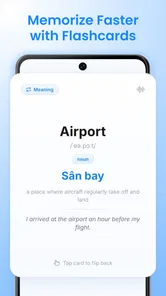
Compared with flashcard-focused apps, EngLearn Speak is more appealing when you want to turn vocabulary into spoken responses. Compared with a conventional language course, it appears better suited to practising conversational output than following a complete, carefully staged curriculum. And compared with a human conversation partner, an AI-based practice option may feel easier to approach when you are embarrassed about mistakes, though it cannot replace the nuance of a real person who knows your goals.
That distinction matters when choosing how to spend study time. If you already use a grammar book or attend lessons, a short speaking session can help you apply what you learned. If you have no other learning structure, you may need to add reading, listening and explicit grammar study yourself. I would not rely on a speaking-oriented app alone to prepare for an exam or to master every part of English.
The best everyday use case is a small pocket of time with a clear purpose. Imagine having a few minutes before a meeting where you need to introduce yourself in English. Practise a concise introduction, then try answering a likely follow-up question. Or, before a trip, rehearse how to ask for a particular item and clarify if you do not understand the reply. These are modest sessions, but they connect practice to language you may need soon.
Who should try it, and who may prefer something else
I would recommend giving it a try if you want a less intimidating way to practise English conversation, especially if you understand more than you feel comfortable saying. Its education focus and AI-led approach make it a plausible companion for independent learners who want to practise between classes or build a speaking habit at home.
I would look elsewhere if you need a teacher to explain errors in depth, a guaranteed progression through grammar topics, or detailed preparation for a specific test. It may also be a poor fit if you prefer lessons built around a fixed textbook sequence, or if you do not want to consider optional purchases at all. The free entry point is useful, but it is still worth checking the in-app purchase terms before you use paid content.
For younger learners, the Everyone age rating is reassuring as a broad content classification, but it does not tell a parent how a child learns best. I would still sit with a younger student at first, help them choose sensible topics, and see whether the conversation style holds their attention. Adults who are shy about speaking may find it easier to begin privately, then take the phrases they have practised into real conversations.
A sensible next step after the first session
After your first exchange, repeat the same scenario once with a small change: a different request, a new detail, or a more polite opening. Then choose a second scenario related to your daily life. This checks whether you can transfer a phrase instead of simply memorising one response. If the app’s activities are helping, keep the routine short and regular rather than trying to compensate with one oversized session.
EngLearn Speak is developed by DQL TechLab, and its current release is version 1.6.0. I would judge it by whether it helps me say something I previously struggled to say, not by how many screens I complete. That is a practical standard for any speaking tool, and it is especially appropriate here.
My overall view is that EngLearn Speak: AI Tutor is worth trying when your immediate goal is to become more comfortable making English sentences in conversation. Start with one realistic situation, notice the words that slow you down, and practise those in context. Keep expectations grounded: it can support a useful speaking habit, but it is not a substitute for every kind of English instruction. If that balance matches what you need, the first successful exchange can be a genuinely encouraging place to begin.
EngLearn Speak: AI Tutor Frequently Asked Questions
What is EngLearn Speak: AI Tutor?
EngLearn Speak: AI Tutor is an English-learning app designed to help users practise speaking with AI-powered conversation activities. Depending on the features available in your version, it may offer guided dialogues, pronunciation practice, vocabulary exercises, or feedback on spoken responses. It is intended as a flexible study aid rather than a replacement for a qualified teacher, structured course, or real-world conversation practice.
How does the AI speaking practice work?
The app generally lets you respond to prompts or take part in simulated conversations using your device’s microphone, then uses AI to assess or respond to what you say. The exact topics, feedback, and available practice modes can vary by app version and subscription. For the best experience, use a quiet space, speak clearly, and check that microphone permission is enabled in your device settings.
Is EngLearn Speak: AI Tutor suitable for beginners?
It may be useful for learners at different levels, especially those who want low-pressure speaking practice, but suitability depends on the lesson options and feedback provided in the current version. Beginners may benefit from short, simple prompts and repeating phrases, while more experienced learners can use open-ended conversations. If you are new to English, check whether the app explains corrections clearly and supports your preferred learning level.
Is EngLearn Speak: AI Tutor free to use?
The app may be available to download without an upfront charge, but some lessons, AI conversations, or other features could require a subscription or in-app purchase. Before starting a trial or subscribing, review the price, billing period, renewal terms, and cancellation instructions shown in the app store and within the app. Availability and pricing can differ by country, platform, and app version.
What permissions and privacy considerations should I know about?
Speaking practice may require microphone access, and the app may process audio or conversation text to generate responses and feedback. Before using it, review the developer’s privacy policy and the app-store privacy details to understand what information is collected, how it is used, and whether it is shared or retained. Avoid including sensitive personal information in practice conversations, and revoke microphone access in your device settings if you no longer need it.
Pros
- AI-guided speaking practice lets learners rehearse at their own pace.
- Pronunciation feedback can help highlight sounds that need more practice.
- Conversational exercises offer a practical alternative to drills alone.
- Short sessions are easy to fit into a daily study routine.
- A private practice space may feel less intimidating than speaking in a group.
Cons
- AI feedback may miss context or misjudge pronunciation and grammar.
- Speech recognition can struggle with accents
- background noise
- or quiet speech.
- Automated conversations may feel less natural than talking with a person.
- Useful features or lessons may require a paid subscription.
- Speaking practice requires microphone access and a quiet environment.













