Emergency: Severe Weather App
- 1.31K
- 4.5
- Installs
- 500.00K
- Price
- Free

Screenshots
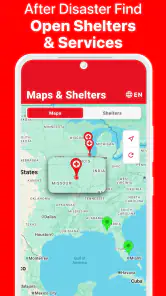
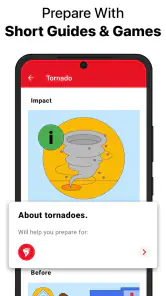
Analysis by Reviewed
When severe weather is possible, the hardest part is often not finding information; it is turning scattered warnings into a sensible plan. That is where Emergency: Severe Weather App makes its case. Developed by the American Red Cross, this free weather app focuses on preparation for tornadoes, hurricanes, and earthquakes, while also delivering local weather alerts. I see it as a practical safety companion rather than a replacement for a full daily forecast service.
My first impression is that its purpose is unusually clear. It is not trying to be a general weather dashboard filled with hourly temperatures, pollen levels, radar layers, and lifestyle suggestions. Instead, it is built around the moment when ordinary weather information becomes a personal safety concern. That narrower focus gives it value, especially for someone who wants guidance before an emergency rather than only a forecast after opening a weather app.
From an uneasy forecast to a usable emergency plan
Starting with the situation at hand
A realistic use case begins with a familiar situation: I notice a storm system developing, hear that conditions may worsen, or live in an area where hurricanes, tornadoes, or earthquakes are part of the seasonal risk. My usual weather app may show a warning, but it often leaves me to decide what that warning means for my household. This app is designed to take the next step by placing preparation at the center of the experience.
That distinction matters. A forecast tells me what the atmosphere may do; an emergency-focused app helps me think about what I should do before, during, and after a dangerous event. The American Red Cross is a natural developer for that kind of material, and the app feels more useful when treated as a planning tool than as a screen I open only once an alert arrives.
The app covers tornadoes, hurricanes, and earthquakes, so its usefulness depends partly on the risks around me. For a person living in a region where those hazards are realistic, the combination is meaningful. It encourages preparation across different types of emergencies instead of making me search separately for advice each time a threat changes.
It is also free and rated for Everyone, which removes two common barriers. A family can consider it without adding another subscription to the household budget, and its intended audience is broad enough to include younger users who are learning what to do in an emergency. The app has reached over 500 thousand installs, and its average rating is 4.5, with around 2.9 thousand ratings, suggesting that its focused approach has found a receptive audience.
Moving from warning to preparation
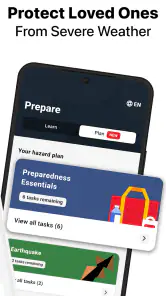
The useful workflow starts before panic sets in. I would open the app during a calm moment, review the material for the hazards most relevant to my location, and turn that information into a short household conversation. Who checks the local alert? Where does everyone meet? Which information should be shared with a relative who is not at home? These are small decisions, but they are easier to make before a warning becomes urgent.
More From Our News Desk

Clash of Clans Is Won Between the Battles

Android Auto Makes the Case for Quieter Car Software

MobiOffice: Transforming Mobile Productivity with Seamless Integration

EA SPORTS FC™ Mobile Soccer: Redefining Mobile Sports Gaming

How Microsoft OneDrive Became a Mobile Productivity Giant

How Google Translate Breaks Language Barriers Effortlessly
One of the app's less obvious strengths is that it can serve as a rehearsal aid. Reading emergency advice once is not the same as using it under pressure. I would revisit the relevant guidance at the beginning of a storm-prone season, then ask another household member to explain the plan back to me. That handoff exposes gaps that a quick solo read can hide, such as assuming everyone knows where to go or who is responsible for checking on a neighbor.
For a hurricane, the planning conversation may involve a longer lead time than for a tornado. That makes the app useful in two different ways: as a source of preparation guidance when there is time to organize, and as a reminder of the decisions that should already have been made. For an earthquake, the preparation mindset is different again because the event may offer little warning. Having reviewed the relevant advice in advance is therefore more valuable than trying to learn everything during the emergency itself.
I would not treat the app as something to browse casually while a dangerous event is already unfolding. The better workflow is to use it ahead of time, identify the sections that apply to my household, and keep the resulting actions simple enough to remember. That is a more realistic use of any emergency guide than expecting it to replace judgment in a fast-moving situation.
How local alerts fit into the process
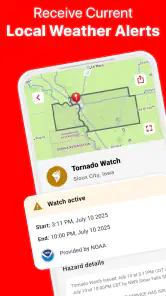
The app also provides local weather alerts, which adds an important connection between general preparation and a specific situation. A local warning can change the urgency of the plan: a calm review becomes a reason to move indoors, contact family, or monitor official instructions more closely. The alert is valuable not because it answers every question, but because it can prompt the next decision.
This is where I would be careful about the handoff. An alert on a phone is only one part of an emergency information chain. I still need to read the warning, understand which area it affects, and compare it with instructions from local authorities. I would not forward a vague message to relatives without checking the source and context. The app can start the conversation, but people remain responsible for interpreting the situation and passing along accurate information.
A practical household routine could look like this: one person notices the local alert, another checks the app's preparation guidance, and a third confirms that everyone knows where to go or how to stay in contact. This division of responsibility is a concrete advantage of using the app as a shared tool. It turns a notification into a sequence of actions instead of leaving one person to absorb every detail alone.
There is also a useful distinction between an alert and a plan. An alert is time-sensitive and easy to miss; a plan is reusable. I would use the app to build the second and rely on the local alert function to trigger it when appropriate. That separation keeps the app from being judged only by how quickly a notification appears and gives it a more durable role in everyday preparedness.
What the handoffs look like in real life
Imagine that I am at work when a severe weather alert affects the area where my family lives. The first handoff is from the app to me: I receive or notice the local warning. The second is from me to the household: I send a clear message stating what we are doing, rather than simply forwarding an alarming headline. The third is from the household to a trusted contact: someone confirms that children, older relatives, or anyone needing assistance has been reached.
This is where the app's design goal becomes practical. Its preparation content can help me decide what information is worth sharing before I contact others. Instead of writing, “Something bad may happen,” I can communicate a specific action based on the hazard: stay in the chosen safe area, follow local instructions, or be ready to leave if authorities direct an evacuation.
For a hurricane, the handoff may happen over hours or days and involve checking plans more than once. For a tornado, the same process may need to happen quickly, with less time for discussion. For an earthquake, the critical handoff may occur after the shaking, when people need to account for one another and respond to changing conditions. The app's hazard coverage is helpful because it encourages different planning conversations rather than treating every emergency as identical.
Parents may also find the app useful as a teaching aid. I would not hand a child a phone and assume the problem is solved, but I could use the app's subject matter to explain why certain actions matter. The Everyone rating makes it easier to include the whole household in that conversation, while adult supervision and local judgment still matter when turning general advice into a family plan.
What I get at the end of the workflow
The best outcome is not simply having another weather app installed. It is leaving with a clearer response routine. I know which hazards deserve attention, understand that local alerts may require immediate action, and have a basis for discussing responsibilities with the people around me. That is a more meaningful result than collecting forecast screens without deciding what to do with them.
In my view, the app is strongest for people who want a guided starting point. Someone moving to a new region, a parent organizing household preparedness, or a person who tends to ignore emergency planning can use it to make the subject less abstract. The free price helps here: there is little financial friction in trying it, and the app can remain available as a reference between emergencies.
The current version is 5.4.0, and the app requires iOS 10 or later. That requirement is modest enough for people using older compatible devices, although anyone with a much older phone should still check compatibility before relying on it. The app was released on April 14, 2015, so it has had a long presence compared with many short-lived safety tools. I take that history as a reason to view it as an established utility, while still remembering that emergency information should be checked against current local guidance.
Compared with a typical weather app, this one gives up breadth in exchange for emergency context. A standard forecast service is usually better for planning a commute, choosing clothing, comparing hourly conditions, or watching a storm on a map. Compared with a general emergency-alert service, this app's advantage is its emphasis on preparedness for specific hazards. I would happily keep both types of app: one for routine weather decisions and this one for building a response plan.
Where the flow breaks down
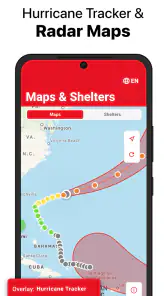
The focused design can also feel limited. If I want detailed radar, long-range forecasting, minute-by-minute precipitation, or a broad picture of everyday conditions, this is not the app I would choose first. Its value comes from emergency preparation and local alerts, not from replacing a complete meteorological toolkit.
Another limitation is that no app can guarantee that a notification will be noticed at the perfect moment or that a general warning will match every household's circumstances. Phone settings, connectivity, location context, and attention all affect the usefulness of an alert. I would keep system notifications configured appropriately, but I would not make the app my only safety channel. Official local communications and direct instructions from emergency authorities remain important.
The app can also expose an uncomfortable human limitation: information is not the same as readiness. I might read guidance and still fail to decide where the family should gather, who needs help, or what happens if phone service is disrupted. That is not a flaw unique to this app, but it is a reason to use it actively. A short practice discussion is more valuable than repeatedly opening the app without turning its advice into decisions.
People who only want a simple daily forecast should probably skip it. The same is true for users seeking advanced weather maps or a single platform that handles every type of alert, travel forecast, and smart-home automation. A conventional weather app will likely be more convenient for those jobs. This app is a better choice when the question is, “How should I prepare for a serious hazard?” rather than, “Will I need an umbrella this afternoon?”
I would also avoid treating its presence on my phone as proof that my plan is complete. The most useful approach is to review the relevant guidance, write down or discuss the actions that apply to my household, and make sure another person knows the same plan. That extra step is where the app's information becomes dependable behavior.
My recommendation after using it as a safety tool
I recommend Emergency: Severe Weather App to anyone who wants a straightforward way to begin preparing for tornadoes, hurricanes, or earthquakes. Its free access, broad age rating, local weather alerts, and guidance from the American Red Cross make it easy to include in a household safety routine. I especially like it for people who already use a normal weather app but recognize that forecasts alone do not explain how to respond.
I would describe it as a companion, not a complete emergency command center. Keep a regular forecast app for everyday weather, follow local authorities during an active event, and use this app before trouble arrives to shape a realistic household response. That division of labor avoids expecting one tool to do everything.
The app's real payoff comes when it changes what I do away from the screen. After reviewing the relevant hazard guidance, I should be able to contact the right people, move toward the agreed safe option, and make decisions with less confusion. Its strongest feature is the workflow it encourages: notice the risk, prepare before pressure builds, pass clear information to others, and act on a plan.
With a 4.5 average from around 2.9 thousand ratings and over 500 thousand installs, it has earned a solid place among safety-focused weather tools. My final opinion is positive, with one clear condition: use it proactively. If I install it only to wait for a dramatic notification, I miss most of its value. If I use it to turn general emergency advice into a shared plan, it becomes a practical and reassuring addition to my phone.
Emergency: Severe Weather App Frequently Asked Questions
Is Emergency: Severe Weather free to download, and what devices can run it?
Emergency: Severe Weather is a free weather app from the American Red Cross, intended for people who want information and guidance for preparing for severe weather and other emergencies. It is rated for Everyone and requires a device running OS version 10 or later. Check your device’s app store for compatibility before downloading, since the available installation options depend on the operating system you use.
What is the Emergency: Severe Weather app used for?
Emergency: Severe Weather is designed to help users stay informed about dangerous weather conditions, including severe storms, tornadoes, hurricanes, floods, and other emergency situations. After reviewing the app, its main value is the combination of weather alerts, safety information, and practical guidance that can help users understand a developing threat and decide when to seek shelter or take other precautions. Its focus is emergency readiness, so it may be especially useful to people who want to plan ahead rather than wait until severe weather is already approaching.
Does Emergency: Severe Weather provide real-time weather alerts?
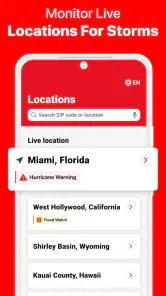
The app is intended to deliver timely notifications about severe weather affecting selected locations. Users should enable notifications and allow location access, when available, to receive the most relevant warnings. However, alert speed and coverage may depend on regional authorities, weather-data providers, internet connectivity, and device settings. It should support official emergency services rather than replace local warnings or instructions.
Does the app work without an internet connection?
Some previously loaded safety instructions or stored information may remain accessible when the connection is unavailable, but live weather updates and newly issued alerts generally require mobile data or Wi-Fi. During a major storm, networks can become congested or fail, so users should not rely on the app as their only source of emergency information. Keeping a battery-powered radio and following local authorities is also recommended.
What permissions does Emergency: Severe Weather require?
Depending on the device and the features enabled, the app may request permission to send notifications, use location services, and access network connectivity. Location access can help provide alerts for the user’s current area, while notifications are important for receiving warnings promptly. Before installing, review the permissions and privacy information in the relevant app store, and disable access that is not necessary for your intended use.
Pros
- Provides timely alerts for dangerous weather conditions.
- Covers multiple severe weather threats in one app.
- Useful safety information helps users prepare and respond.
- Location-based notifications can keep local users informed.
- Clean layout makes important warnings easy to find.
Cons
- Some features may require an active internet connection.
- Alert accuracy depends on available local weather data.
- Frequent notifications may feel overwhelming during storm events.
- Coverage and warning speed can vary by region.
- Battery usage may increase when location services stay enabled.
- Category
- Weather
- Version
- 5.4.0












