Blood Donor
- 6.85K
- 4.8
- Installs
- 1.00M
- Price
- Free
Screenshots
Analysis by Reviewed
I judge a donation app by whether it helps turn good intentions into a plan I can actually keep. The American Red Cross’s Blood Donor is a medical app built around that practical job: helping people organize blood and platelet donations. Its focus is useful for someone who wants a clear next step, not a general health tracker or a place to browse medical news.
The app is free, rated for Everyone, and developed by the American Red Cross. It has an average rating of 4.8 from around 27,000 ratings, with more than a million installs. Those figures suggest that it has reached a substantial donor audience, though popularity alone cannot tell you whether a nearby donation option or a particular appointment will suit your schedule.
A Useful Routine for First-Time and Returning Donors
For someone deciding whether to install it, I would start with a simple question: do you expect to use an app to plan donations, or do you only need an occasional answer from a donation center? Blood Donor is strongest in the first case. It brings donor-focused tasks together, which is more convenient than keeping a reminder in one place, searching for local options elsewhere, and trying to remember personal donation details from memory.
That organization can be especially helpful when donation is a good intention you keep postponing. A person with a busy workweek, changing errands, or family commitments can use the app to make the next step concrete: review information, look for a suitable location, and fit a visit into an actual calendar. It does not remove the time involved in donating, but it can reduce the mental effort of getting started.
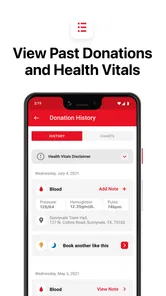
It is also a reasonable choice for someone who has donated before and wants a personal record nearby. That record can help you look back at your own history when planning, rather than relying on a vague memory of when you last went. I would still treat it as a convenience, not as the final word on whether you can donate on a particular day; personal circumstances and center guidance matter.
Connecting Donors and Patients: The Core of Blood Donor
The Blood Donor app is essentially a bridge connecting those who are willing to donate blood with the people who desperately need it. It’s like a social network for blood donation, but with the life-saving twist. The app’s interface is surprisingly straightforward, making it a breeze for anyone to navigate, even if you’re not exactly tech-savvy.
Features that Matter
One of the standout features is the nearby donation center locator. The app uses your location to suggest the nearest centers where you can donate. No more wasting time searching on the web or making calls. And if you’re someone who tends to forget appointments, the app’s got your back with its handy reminder notifications for your scheduled donation. How cool is that?
More From Our News Desk

 Block Blast!
 Makes Every Clear Feel Like One More Turn
A clean little block puzzle becomes a study in space, risk, and self-control. Its best moments come from one satisfying clear; its toughest test is knowing when to stop.

 Super Stylist Fashion Makeover
Super Stylist Turns Dress-Up into a Runway Career
Its makeover-to-client loop turns quick outfit decisions into shareable style theater. The question is whether the closet keeps giving players a reason to return.

 Block Craft 3D:Building Game
Block Craft 3D Under Pressure: How Well Does It Recover When Building Goes Wrong?
A failure-focused look at Block Craft 3D’s forgiving building loop, its uncertain recovery edges, and the moments that demand more than a cheerful village.

 Woodturning
 Trades Creative Freedom for a Satisfying Carving Loop
If your usual creative game is about building, decorating, or styling, Woodturning trades open-ended projects for a tactile, tightly guided carving loop. Here is what that switch really costs.

 PUBG MOBILE
 Shows What Battle Royale Must Get Right
PUBG MOBILE shows how battle royale has matured: bigger systems matter less than meaningful choices, readable fights, and a reason to return after every loss.

 Braindom: Brain Games Test
Braindom’s Social Life Happens Between Puzzles
Braindom turns quick logic traps into a personal ritual, but its community value is more about comparing answers than building together.
Latest News



Another feature worth mentioning is the information hub. The app provides a wealth of knowledge about the importance of blood donation, the process involved, and eligibility criteria. It’s a mini-library in your pocket, making sure you’re well-informed before you roll up your sleeve.
Making the App Work Around Real Life
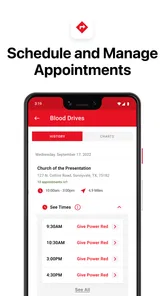
The most useful way I’d use the locator is before committing to a visit: check which suggested center fits a commute or an errand, then confirm the practical details through the app’s scheduling flow. A nearby result is a starting point, not a guarantee that the timing works for you, so I would avoid setting out based on location alone. This small check can save a wasted trip when a donation needs to fit around work, school pickup, or a busy day.
Reminders are most valuable when I treat them as prompts to prepare rather than as a substitute for planning. I’d set the appointment only after checking my calendar, then use the notification to remember the commitment. If plans change, the sensible move is to revisit the app and adjust the appointment rather than assume a reminder means the original time is still convenient. That workflow is especially helpful for occasional donors who may not have a regular routine.
A practical scenario is a donor who has a free afternoon between work and another commitment. I would check the suggested location and appointment details before leaving home, rather than assuming the closest result automatically suits that window. If the timing does not fit, I would compare another day or use the center’s own contact route to clarify what is possible. The app can help organize that decision, but it cannot make a tight schedule flexible.
The information hub also makes the app more useful before a first visit. I’d read the eligibility guidance ahead of time and use it to identify questions to raise with donation staff. It can help a hesitant beginner feel less uncertain, but it should not be treated as a personal medical assessment or as a substitute for the center’s instructions. If your circumstances are unusual or you are unsure whether you can donate, getting guidance from the appropriate staff is a better next step than guessing from a general article.
Who Benefits—and When Another Route Makes Sense
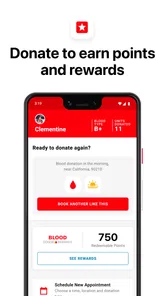
This is a strong fit for people who have already decided they want to donate and need help finding a center, arranging a visit, or keeping track of their own history. It can also suit someone trying to make donation a recurring habit: the profile offers a personal record to look back on, while appointment reminders support the practical routine. For a first-time donor, the educational material can make the process feel less opaque before arriving.
It is less suitable if you only want broad health information, need urgent medical advice, or expect an app to determine your eligibility with certainty. It is also not a replacement for contacting a center when you need an answer about a particular appointment or personal situation. Compared with searching the web, its advantage is having donation-related information and planning in one place; a center’s own channels may still be the better choice for a time-sensitive or highly specific question. I would use both in their proper roles rather than expect one app to cover every detail.
Compared with a paper calendar or a basic phone reminder, Blood Donor’s appeal is that the reminder sits alongside donation-specific planning and information. A general calendar may be quicker for someone who already knows exactly where and when to go, and it can be enough for a donor who prefers not to keep another app. A center’s own channels are more suitable when you need a precise answer about its arrangements. I see the app as a useful organizer between those alternatives, not as a reason to stop using them.
One small but useful habit is to check appointment details again when plans change, even if a reminder is already set. A notification helps you remember the plan you made; it does not resolve a new conflict or confirm that your circumstances are unchanged. Similarly, before relying on a location suggestion, consider whether it actually fits the route you will take that day. Thinking through those steps makes the app more useful than simply installing it and expecting it to manage every decision for you.
My Personal Experience
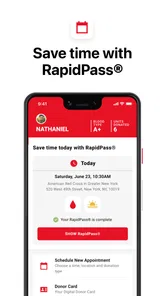
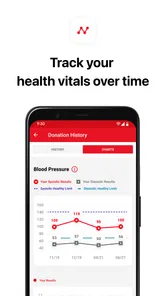
When I first logged in, I was greeted with a clean and intuitive dashboard. Signing up was a piece of cake, and within minutes, I was browsing through the app’s features. I particularly loved the personal profile section where you can track your donation history. It’s not just a stat, but a badge of honor, reminding you of the lives you’ve touched.
I decided to test the waters by scheduling a donation. The process was seamless, and I even received a cheerful reminder on the day of my appointment. It felt good to know that my small act could make a big difference.
What the Current Version Means for Donors
The current version is 2.22.0, and the app has been available since September 5, 2014. That long-running presence gives returning donors a familiar place to manage donation-related tasks, while the current version number identifies the build they can look for on a compatible device. The minimum operating system is 10, so it is worth checking device compatibility before planning to rely on the app.
For existing users, the practical question is whether their usual routine still feels simple: finding a center, reviewing guidance, scheduling, and checking a history. I would not assume that a version number by itself signals a particular redesign or new feature. What matters more is whether the current app works smoothly on your device and supports the steps you use. If something appears different after an update, take a moment to review the appointment details rather than relying on an old habit.
The version information is useful in a modest, practical way: it helps you identify the current build and check whether your device meets the operating-system requirement. It does not tell me what has changed from earlier releases, so I would not base a decision to reinstall or switch routines on assumptions about new capabilities. If you already use the app, the best test is still whether the parts you depend on—your profile, planning, and reminders—work as expected on your device.
Small Frictions and What to Keep in Mind
A locator is only as helpful as the options it presents for your plans, and a reminder cannot solve a calendar conflict. Donors should leave enough time to verify the visit details and should not treat general eligibility information as a final decision about their own case. Those limits do not undermine the app’s purpose; they define where the app helps and where direct communication or professional guidance matters more.
I’d also recommend keeping the app’s role modest: it can make donation logistics easier, but it cannot make the donation itself effortless or guarantee that every location and time will fit. For someone who wants to donate but prefers not to enable location features, manually checking options through another route may feel more comfortable. The best choice depends on whether the convenience of nearby suggestions outweighs that preference.
There is a broader trade-off between convenience and relying on a single planning tool. The app can keep donation tasks together, but you should still make sure you know how to contact the relevant center if an appointment needs clarification. If you do not want to use location-based suggestions, you can choose a more manual approach instead of treating that feature as essential. And if your main need is medical advice, a donation-planning app is simply the wrong tool for that question.
Final Thoughts
In a nutshell, the Blood Donor app is a game-changer in the realm of social good. It’s well-designed, easy to use, and most importantly, it serves a noble purpose. Whether you’re a regular donor or someone contemplating your first donation, this app is a must-have on your phone. It’s more than just an app; it’s a community, a movement towards saving lives. So, why not give it a try? You might just find it to be one of the most fulfilling apps you’ve ever downloaded.
My recommendation comes with one practical qualification: use it as a planning companion, then rely on the donation center for case-specific instructions and confirmation. If you want a straightforward way to keep donation logistics and your personal record close at hand, it earns a place on your phone. If you need urgent medical answers or a guaranteed solution for every appointment question, contact the relevant professionals directly. For donors whose needs match its focused purpose, that balance makes the app genuinely worthwhile.
Blood Donor Frequently Asked Questions
Is Blood Donor only for people who already donate blood?
No. Blood Donor is intended for people interested in donating blood or platelets, whether they are exploring the process for the first time or keeping up with donation activities. Its tools and educational resources can help users learn about ways to take part. The app does not replace medical advice, so check your personal eligibility with an appropriate professional or the American Red Cross.
What can I learn about blood donation before making an appointment?
Blood Donor includes educational resources about blood donation, including information on its benefits and tips for donors. These materials can help you become more familiar with the process before arranging a visit. For questions about your personal health or whether you can donate, rely on guidance from the American Red Cross or a qualified health professional rather than treating general app content as a medical assessment.
Who develops the Blood Donor app, and what is it intended for?
Blood Donor is a medical app from the American Red Cross, designed to make donating blood and platelets easier. It brings donation-related tools and information together in one place, so people can explore ways to take part and keep track of donation activities. It is intended for a general audience, though anyone considering donating should follow appropriate medical guidance about their own eligibility.
What features does the Blood Donor app offer?
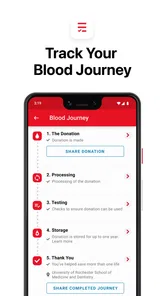
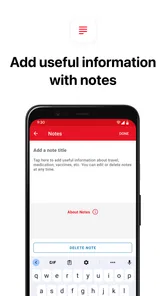
The Blood Donor app provides users with a platform to easily find nearby blood donation centers and blood drives. It allows users to schedule appointments, track their donation history, and receive notifications for upcoming donation events. Additionally, the app offers educational resources to inform users about blood donation benefits and tips.
Is the Blood Donor app free to use?
Yes, the Blood Donor app is completely free to download and use. There are no hidden fees or in-app purchases. The app is designed to encourage more people to donate blood by providing them with a convenient and accessible platform at no cost.
Pros
- Easy-to-use interface for all users
- Quick location of nearby donation centers
- Real-time tracking of blood donation history
- Helpful reminders for upcoming donation dates
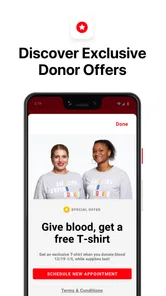
- Access to exclusive donor rewards and benefits
Cons
- Requires internet connection for full functionality
- Limited to certain geographic regions
- Occasional app crashes reported by users
- User data privacy concerns
- Lack of multilingual support