DoorDash - Dasher
- 129.75K
- 4.3
- Installs
- 10.00M
- Price
- Free
Screenshots


Analysis by Reviewed
Hey there! So, I've been diving into the world of food delivery apps lately, and I recently got my hands on the DoorDash - Dasher app. If you're not familiar with it, this is the app for those who want to become a delivery driver for DoorDash. Let me take you through my experience with it.
Getting Started: Smooth and Easy
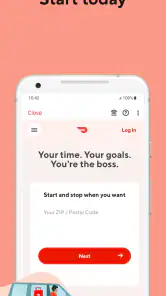
First things first, downloading and setting up the DoorDash - Dasher app is a breeze. You can find it on both Android and iOS, and it’s free to download. Once you open the app, you're greeted with a user-friendly interface that guides you through the sign-up process. I was impressed with how intuitive it was; even a complete newbie wouldn’t feel lost.
The Onboarding Process
After signing up, the app takes you through an onboarding process. This includes verifying your identity, setting up payment methods, and a quick tutorial on how the app works. The tutorial is detailed yet straightforward, ensuring you know exactly what's expected. I appreciate that they don’t just throw you into the deep end without any guidance.
Features that Stand Out
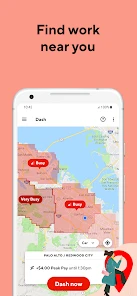
One of the standout features for me was the real-time map and navigation system. It's super accurate and helps you find the best routes, saving both time and gas money. Plus, there's a handy feature that shows you hot spots in your area where orders are more frequent. It’s like having a little insider tip right in your pocket!
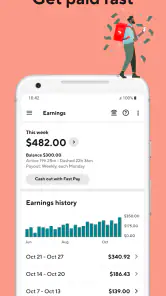
Another feature worth mentioning is the earnings tracker. You can see exactly how much you’re earning per delivery, and it updates in real-time. This transparency is a big plus because you can plan your day better and see which times are more profitable to be out and about.
Flexibility and Freedom
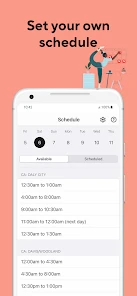
One of the things I love about using the app is the flexibility it offers. You can decide when you want to work; there’s no boss breathing down your neck. If you want to dash for a couple of hours in the morning and then again in the evening, you can! It’s perfect for anyone looking to make some extra cash without committing to a rigid schedule.
Plus, the app sends you notifications about new delivery opportunities, so you’re always in the loop. It’s like having a little personal assistant keeping you updated.
More From Our News Desk

Weather by Xiaomi Review: Clear at a Glance, Less Clear Up Close

X Under Pressure: Can It Recover When Posting Goes Wrong?

Clash of Clans Is Won Between the Battles

Android Auto Makes the Case for Quieter Car Software

MobiOffice: Transforming Mobile Productivity with Seamless Integration

EA SPORTS FC™ Mobile Soccer: Redefining Mobile Sports Gaming
Making a Shift Work in Real Life
A practical way I’d use the app is to plan a short delivery window around an existing routine rather than treating every open hour as work time. For example, someone with a free stretch after classes could check the map, choose a familiar area, and decide whether the likely activity makes the trip worthwhile. The earnings tracker can help review how that session went, but I wouldn’t confuse a busy-looking period with guaranteed take-home income: travel, waiting, and vehicle costs all affect the result.
That is also why I’d keep a simple personal record of time on the road and expenses. The app’s per-delivery view is useful for seeing what came in, while a separate note can show whether a particular shift actually made sense after costs. This small habit is more useful than chasing every notification, especially when an order would pull you far from the area where you planned to work.
Where New Dashers Can Get Stuck
Even a clear onboarding flow can involve pauses while you complete the requested steps. I’d work through the screens carefully, use accurate account details, and avoid starting a shift until the app shows that setup is complete. If a screen seems stuck, closing and reopening the app or checking the connection is a sensible first move; repeatedly tapping buttons can make it harder to tell whether an action went through.
Before heading out, I’d also check that the phone has enough battery, mobile data is working, and location access is available to the app. These are ordinary phone checks, not special tricks, but they matter when the map and delivery updates are part of the work. Keeping a charging option in the car or bag is practical for a longer session, while a driver should always handle the phone only when safely parked.
Recovering from a Slow or Confusing Moment
The original friction I noticed—lag when trying to accept an order—matters most when you’re rushed. If the screen stops responding, pause rather than tapping several times, check whether the phone still has a connection, and reopen the app if needed. Once it loads, confirm what the screen shows before continuing. That gives you a clearer recovery path than assuming an action failed or succeeded.
New users may also find the amount of information on screen distracting. I’d focus on the immediate decision in front of me, then take a moment between deliveries to review earnings or the map. Treating every alert as urgent can add stress without improving a shift. The app is a work tool, but it still takes judgment to decide when to act and when to stop safely.
When the Problem May Be Outside the App
Navigation trouble does not always mean the app is at fault. A weak mobile connection, a phone running low on power, or an unclear pickup location can all interrupt an otherwise straightforward trip. I’d compare the displayed route with road signs and use common sense rather than following a map blindly. If the destination or pickup instructions seem inconsistent, taking a safe moment to reassess is better than making a risky turn.
There is a trade-off in relying on one phone for directions, order updates, and work information: a device problem can affect the whole shift. Keeping the phone charged and checking the route before moving helps reduce that risk. If the issue continues after basic connection and restart checks, it may be a broader account or service problem rather than something you can solve by repeatedly changing settings.
How It Fits Alongside Other Work Options
Compared with a conventional shift-based job, this app is appealing because it lets you choose when to try working, but that freedom also means you have to judge whether a session is worthwhile. Compared with other delivery-driver apps, the useful distinction for a new user is less about a universal winner and more about which service has opportunities that fit their area, schedule, and preferred routes. I’d compare actual experiences over a few sessions instead of assuming one busy map or one good evening tells the whole story.
This is best suited to someone who is comfortable driving or cycling in their area, can manage a phone while parked, and wants flexible delivery work rather than a predictable fixed routine. It is a weaker fit if you need guaranteed hours, dislike navigating unfamiliar streets, or cannot absorb vehicle and travel costs. In those cases, a scheduled job or another local option with clearer hours may suit you better.
Room for Improvement
No app is perfect, and the experience is no exception. While the app generally runs smoothly, there are occasional glitches and lag times, especially during peak hours. It’s not a deal-breaker, but it can be annoying when you’re trying to accept an order, and the app is slow to respond.
Also, while the app provides a lot of information, sometimes it can feel a bit overwhelming, particularly for new users. A more streamlined interface or an option to simplify the view could be helpful.
Who Should Give It a Try
DoorDash, the developer behind the app, has built a business tool for people considering delivery work, not a general food-ordering app for customers. It’s free, rated for Everyone, and its version is 8.57.6 on Android devices running version 9 or later. It has a 4.3 average from around 562,000 ratings, with over 10 million installs; that reach suggests plenty of people have tried it, though it cannot tell you what demand or earnings will look like in your neighborhood.
The app was released on December 10, 2013, and has around 130,000 written reviews. I’d treat those broad figures as context rather than a promise about my own experience. Local conditions, how comfortable you are with delivery work, and whether the schedule suits you matter more than popularity alone. If you want to test a flexible side option and are prepared to track your time and costs, it is reasonable to explore. If your priority is a steady paycheck or a fixed workload, I’d look elsewhere first.
In conclusion, if you're looking to earn some extra money and enjoy the freedom of working on your own schedule, the app is definitely worth checking out. It’s easy to use, offers useful tools, and despite a few minor hiccups, provides a solid platform for delivery drivers. I’d go in with realistic expectations, keep an eye on costs, and use the map and earnings information to make thoughtful choices about when and where to work.
DoorDash - Dasher Frequently Asked Questions
Can I use DoorDash - Dasher on both Android and iOS?
DoorDash - Dasher is presented here as an Android app, so check that your phone runs Android 9 or later before downloading. The app is built around delivery work, with delivery opportunities managed from a smartphone. If you use an iPhone, look for the app in the iOS App Store and confirm that the version available there is the Dasher app before proceeding.
What should I consider before signing up to deliver with DoorDash?
Before downloading, think about whether delivery work fits your schedule and whether you have a suitable way to make deliveries. The app is intended to help Dashers find and manage delivery opportunities, but installing it does not mean you can start immediately: you must complete signup and be approved. Review the requirements and local options during the signup process.
Do I need a reliable phone connection and navigation while dashing?
A compatible smartphone is important because DoorDash - Dasher is used to receive delivery opportunities and manage delivery work on the road. Navigation can help you travel between the restaurant and customer while completing an order. Make sure your phone can run the app and that you are comfortable using it during deliveries, while always paying attention to safe driving.
Can I use DoorDash - Dasher if I only want occasional delivery work?
The app is intended for people interested in making money as delivery drivers and offers the option to work when they want. That can make it worth considering if you are looking for occasional work rather than a fixed schedule. You still need to sign up and be approved before accepting deliveries, and available opportunities may depend on your location and the times you choose to work.
Is DoorDash - Dasher free to download?
Yes, DoorDash - Dasher is free to download. It is a business app for people interested in making money through delivery work, and its main purpose is to help Dashers manage delivery opportunities. Before installing, keep in mind that downloading the app is only one step: you will need to complete the signup and approval process before you can start accepting deliveries.
Pros
- Flexible work hours for easy scheduling
- Instant pay option after each delivery
- User-friendly app interface
- Various delivery opportunities available
- Efficient GPS tracking system
Cons
- Occasional app glitches during peak times
- High competition in busy areas
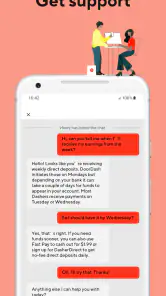
- Limited support for technical issues
- Potential for low earnings in off-peak hours
- Fuel and vehicle maintenance costs
- Category
- Business
- Version
- 8.57.6












