DICE Access
- 4.00
- 1.0
- Installs
- 10.00K
- Price
- Free

Screenshots
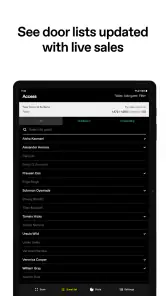
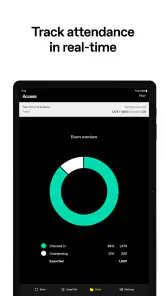
Analysis by Reviewed
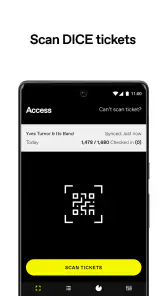
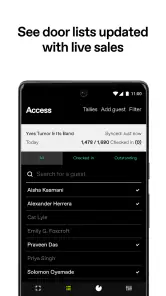
I approached DICE Access as a venue tool rather than a normal event-discovery app. That distinction matters immediately: its job is to help staff scan DICE tickets at the door, not to help attendees browse concerts, manage a personal calendar, or replace a venue’s wider box-office system. In my view, the app makes sense only when it is used inside that specific admission workflow.
That narrow purpose is also the best starting point for judging trust. A ticket-scanning application handles a sensitive moment: a person arrives, presents proof of entry, and expects a quick, fair decision. I therefore paid more attention to the clarity of the scanning task, the amount of control left with venue staff, and the points where a user should pause before relying on it during a busy event. The result is a focused tool with a practical role, but not one I would recommend casually to everyone.
What the app is really for at the venue door
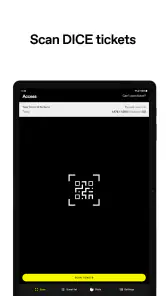
The developer is DICE FM, and the app belongs in the events category. Its store summary is brief because the function is brief: venues use it to scan DICE tickets. That simplicity is useful. A door worker does not need a second entertainment feed competing for attention; they need to open the tool, present the phone at the ticket, and determine whether admission can proceed.
A realistic example would be a small club preparing for an evening show. One staff member stands at the entrance with an Android phone, while guests bring their tickets on their own phones. Instead of checking names manually or searching through messages, the worker uses the venue scanner for each arrival. The value is not flashy automation. It is reducing the number of decisions that have to be made from memory while a queue forms.
I would still treat it as one part of the door operation, not the entire operation. Staff need a clear fallback for a cracked screen, a weak connection, a ticket that cannot be displayed, or a guest whose situation needs human review. A scanning app can speed up routine entries, but it should not encourage a venue to remove all manual judgement from the entrance.
The app is free, and its content rating is Everyone. That makes installation less complicated from a basic access perspective, especially when a venue uses temporary or shared staff devices. However, “free” does not mean that every operational cost disappears. Someone still has to prepare the device, train the team, keep the phone charged, and decide who is allowed to use it during an event.
A focused tool rather than an attendee replacement
This is where DICE Access differs from the usual alternatives. A general event app is built around discovery, ticket purchasing, reminders, maps, and attendee communication. A generic QR scanner may read a code, but it does not automatically represent the venue’s admission process. DICE Access sits between those two ideas: it is more purpose-built than a basic scanner, yet much narrower than the consumer-facing event apps people use before they arrive.
More From Our News Desk

Weather by Xiaomi Review: Clear at a Glance, Less Clear Up Close

X Under Pressure: Can It Recover When Posting Goes Wrong?

Clash of Clans Is Won Between the Battles

Android Auto Makes the Case for Quieter Car Software

MobiOffice: Transforming Mobile Productivity with Seamless Integration

EA SPORTS FC™ Mobile Soccer: Redefining Mobile Sports Gaming
That focus is a strength when the tickets being presented belong to the DICE ecosystem. It is a weakness if a venue wants one universal scanner for tickets from several providers. I would not choose this app as a general-purpose entrance system without first confirming that it matches the ticket source and the venue’s actual workflow.
The current version is 8.7, and the minimum operating system is Android 5.0. Those details make it accessible to older Android hardware, which can be helpful when a venue keeps dedicated phones for events instead of buying new devices for every season. Even so, an older compatible phone is not automatically a good event phone. Battery condition, screen brightness, camera performance, and network reliability can matter more at the door than the age of the operating system.
Where it can save time, and where it cannot
The most useful advantage is consistency. If every staff member follows the same scanning routine, fewer guests are forced to explain their ticket situation from scratch. That can make the entrance feel calmer, particularly during the first rush before a performance. The app’s value is therefore operational: it can turn repeated ticket checks into a repeatable process.
There is also a less obvious benefit in assigning the tool to a dedicated role. If one person scans while another handles questions, accessibility needs, guest-list issues, and payment or merchandise requests, the scanner remains focused on its main task. I would avoid asking one worker to scan tickets while also searching for names or answering every question in the queue. That is a staffing problem, not something the app itself can solve.
Another practical tip is to test the complete entrance routine before doors open, not merely launch the app and assume everything is ready. The test should include the phone’s camera position, the brightness of the display being scanned, the staff member’s grip, and the handoff when a ticket needs human attention. A short rehearsal can reveal awkward angles or unclear responsibilities before guests are waiting.
Trust, controls, and the moments that deserve care
Because this is a venue-side application, trust should be judged through visible choices rather than assumptions. I would look at what the app asks for during setup, what the device displays during a scan, and whether staff can understand the result without guessing. Those are the controls a worker can actually evaluate. I would not treat the app’s narrow description as proof that it collects only the minimum possible information, nor would I assume that a scan is harmless simply because it takes a moment.
For a venue, the first control is account and device ownership. Before an event, the manager should know which account is being used, which phone is running the app, and who is responsible for that phone. A shared device can be convenient, but it also makes accountability less obvious. A dedicated work device with a clear handoff is easier to supervise than a personal phone passed among several people.
The second control is the decision at the entrance. A scan should support staff judgement, not replace it. If a result is unclear, the right response is to pause and follow the venue’s escalation process rather than repeatedly scanning at random or turning the guest away without explanation. This is especially important when a person’s screen is damaged, their battery is low, or the ticket cannot be shown in the expected way.
Data-sensitive moments are easy to overlook because the interaction is so short. A staff member may see a ticket on a guest’s screen, handle a device during troubleshooting, or discuss an admission result within earshot of a queue. I recommend keeping conversations discreet and avoiding unnecessary screenshots or handwritten copies of ticket details. Those habits are not advanced settings, but they are meaningful forms of data care at the door.
Permissions and information discipline
I would review the permissions presented during installation and use, granting only what is clearly needed for the scanning task. The camera is an obvious example of a permission that may be central to scanning, but I would still read the system prompt rather than approving every request automatically. If the app presents a permission that does not make sense for the venue’s workflow, that is a reason to stop and investigate before putting it into service.
The same cautious approach applies to notifications, account access, and device storage. A venue should know which choices are being made on a shared phone and whether staff can distinguish operational messages from personal ones. I would also avoid signing into a venue scanner with an employee’s private account unless the organization has deliberately chosen that arrangement and understands the consequences when that employee leaves.
One useful practice is to create a short written checklist for staff: use the assigned device, keep the screen visible only as needed, do not photograph tickets, escalate uncertain results, and report a lost phone immediately. This does not add a new feature to the app, but it gives the app a safer operating boundary. In my experience, clear human procedures are often more dependable than expecting software to anticipate every entrance problem.
Account control and staff handoffs
Anyone considering the app for a venue will reasonably want to know how much account control they have. The practical answer is to inspect the sign-in and sign-out options on the actual device before event day, then decide who can perform those actions. I would not leave account changes to a busy door worker who has never used the app before. The person responsible for the venue’s ticketing setup should own that process.
Staff turnover is another important scenario. If a temporary worker uses the scanner for one night, the venue should have a clear handoff and should not assume that deleting the app is the same as ending account access. Account credentials, device access, and any visible ticket information should be treated as separate responsibilities. This is a small operational distinction, but it prevents confusion when several people share equipment.
Users also need to know what to do if they no longer want the app on a device. I would remove the account through the app’s visible controls where available, sign out when appropriate, and then follow the phone’s normal uninstall process. If the venue cannot clearly identify the active account or the device’s role, it should resolve that internally before the phone is reassigned.
For an attendee, the situation is different. This is not the app I would install simply because I am going to a DICE event. It is designed for the venue side of the transaction. An attendee who needs to present a ticket should use the ticketing experience supplied for guests, while the venue worker uses the access tool. Mixing those roles can create unnecessary confusion and may expose a staff workflow to someone who does not need it.
Everyday reliability at a busy entrance
At a quiet door, almost any scanning process can feel easy. The real test is a queue. Staff should position the phone so the scanner can be reached without repeatedly taking it away from the guest, while still protecting the screen from unnecessary viewing. If the venue uses more than one entrance, each station should have the same instructions and a named person who can handle exceptions.
Battery planning is a surprisingly important trade-off. A phone that begins the evening nearly empty can turn a reliable scanning process into a manual queue halfway through the event. I would charge the device fully, carry an appropriate power option, and make sure the cable does not create a trip hazard or interfere with the worker’s movement. This is not a criticism unique to DICE Access; it is simply part of using a phone as admission equipment.
Network conditions deserve similar attention. I would test the app at the actual venue, including the entrance area, rather than relying on a strong connection in the office. If the venue has a known weak spot, staff need to know the approved response before guests arrive. They should never invent a workaround involving copied ticket details or personal messaging unless the venue has explicitly authorized it.
Another non-obvious trade-off is speed versus explanation. A rapid scan is helpful for a straightforward entry, but a guest with an unusual result may need a calm explanation and a private conversation. Pushing every case through the same fast lane can make the entrance efficient for most people while making it stressful for the few who need assistance. The best setup gives the scanner permission to pause and call for support.
Who should use it and who should skip it
I can recommend DICE Access to venues, promoters, and door teams whose tickets are handled through DICE and who want a dedicated way to check admission. It is especially sensible for staff who need a simple, repeatable scanning role rather than a broad event-management dashboard. The free price and support for Android 5.0 or later may also suit organizations working with existing hardware.
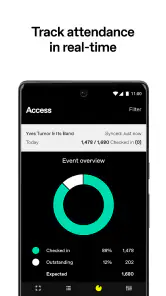
I would skip it if the venue needs ticketing across several unrelated providers, detailed guest-list management, advanced event reporting, or a single system that combines sales, communication, access, and customer support. A broader venue platform may be a better fit in that case. I would also avoid deploying it without a clear fallback procedure, because no mobile scanner should be the sole answer to every ticket dispute or device problem.
The app’s public reception is a caution worth acknowledging. It has an average rating of 1.0 from around 68 ratings, with around four written reviews. That does not tell me exactly why individual users were unhappy, and it should not be treated as a complete technical diagnosis. It does tell me to test the current release in the real venue, with real staff, before depending on it for a major event.
Its install base is over 10 thousand, which shows that it is in use beyond a single isolated setup. I still would not interpret that figure as a guarantee of suitability for every venue. A specialized tool can be useful to the right operator while being a poor choice for someone expecting a consumer event app or a universal ticket scanner.
My cautious verdict after looking at the whole workflow
The strongest reason to choose DICE Access is its narrow, practical role at the entrance. When the venue’s tickets and staff process align with it, that focus can reduce unnecessary steps and make routine admission checks easier to repeat. I like the idea of keeping the scanner separate from unrelated event features, because a busy door benefits from fewer distractions.
My reservation is not that the concept is unclear; it is that a narrow scanner still sits inside a complicated human process. Account ownership, device preparation, privacy around ticket screens, permission choices, and exception handling all matter. The app cannot make those decisions for the venue. A manager who treats installation as the whole deployment plan is likely to discover problems at the worst possible time.
For that reason, I would trial it with a small staff group, inspect every visible account and permission choice, run it at the actual entrance, and document what happens when a scan needs help. I would keep a human fallback and avoid storing extra ticket information outside the normal workflow. If that preparation fits the venue, DICE Access is worth considering as a focused access tool. If the venue needs a wider ticketing system or serves multiple ticket providers, I would choose a broader alternative instead.
In short, this is an app I would recommend selectively, not universally. It can be a sensible piece of a DICE-based door operation, but trust comes from the venue’s controls and staff habits as much as from the scanner itself. For a carefully managed entrance, it may do exactly the job it is intended to do; for everyone else, the limited scope is a clear signal to look elsewhere.
DICE Access Frequently Asked Questions
Is DICE Access intended for concertgoers or venue staff?
DICE Access is intended for venues to scan DICE tickets, rather than for browsing events or buying tickets as a concertgoer. If you are attending an event, the app you need may be the main DICE ticketing app, where tickets connected to your account can be accessed. Check that you are downloading the right DICE app for your role before installing it.
What devices can run DICE Access?
DICE Access is available for Android devices running Android 5.0 or later. Before downloading, check your device’s operating system version and make sure there is enough space for the installation. The app is free, and its content rating is Everyone. It is an events app developed by DICE FM, with a focused purpose of scanning DICE tickets at venues.
What is DICE Access and what can I use it for?
DICE Access is an event and ticketing app designed to help users discover selected concerts, club nights, festivals, and cultural events. After installing it, you can browse available listings, view essential event information, and access tickets connected to your account. Availability depends on your location and on whether participating venues or promoters use the DICE platform.
Do I need an account to use DICE Access?
In most cases, you need to create or sign in to a DICE account before purchasing or managing tickets. Registration generally requires basic personal information and a valid email address or supported sign-in method. An account allows the app to associate tickets with you, display order details, and provide event updates. Some browsing features may be available without signing in.
How do tickets work in DICE Access?
Tickets purchased through DICE are usually stored digitally in the app and may be accessed from your account before entering the event. Depending on the organizer, the ticket can include a QR code, an animated pass, or another security feature intended to prevent screenshots and unauthorized duplication. Keep your phone charged, use the correct account, and check the event instructions before arrival.
Pros
- Fast entry with digital tickets stored in the app.
- Useful event reminders help you keep track of upcoming shows.
- Supports mobile ticket transfers for eligible events.
- Official venue and event details are easy to verify.
- Tickets remain accessible without printing paper copies.
Cons
- Ticket availability depends heavily on your location.
- Some events add booking or service fees at checkout.
- Refunds and cancellations follow the individual event policy.
- Account verification may be required before purchasing tickets.
- The app offers limited usefulness outside supported DICE events.
- Category
- Events
- Version
- 8.7