DICE: Live Shows
- 1.77K
- 4.7
- Installs
- 1.00M
- Price
- Free

Screenshots

Analysis by Reviewed
If you’re deciding whether to try DICE, the clearest starting point is cost: DICE: Live Shows is free to download. That makes it easy to explore the app without paying just to get started, though it doesn’t mean every event or ticket is free. I’d treat the app as a way to browse and manage live-event plans, not as a promise of free entry.
What the app is useful for
Made by DICE FM, this music and audio app focuses on finding live events rather than replacing a streaming service. That distinction matters: if your main goal is listening to albums on demand, a music player is the better fit. If you want to turn an interest in artists into a night out, DICE has a more practical purpose. The app has a 4.7 average from around 86,000 ratings, and it has been installed over a million times.
I find the strongest value in having discovery and ticket planning in one place. Instead of hearing about a show, trying to remember the venue, and later searching for tickets elsewhere, you can use the app as a starting point for the whole decision. A useful habit is to check it when you already know the kind of night you want—an intimate gig, a club event, or a festival—rather than waiting until you have a specific artist in mind. That can make browsing feel more purposeful and help surface options you might otherwise overlook.
Cost, tickets, and a practical trade-off
The download costs nothing, but a ticket purchase is a separate decision, and event prices can affect whether a recommendation is actually good value for you. I’d compare the final ticket cost and event details with your budget before committing, especially when you’re weighing several nights out. The app’s convenience is useful, but it shouldn’t replace checking that the date, venue, and plan work for your group.
For an everyday example, imagine finishing work with no fixed plans for the weekend. I’d browse nearby events, save a couple of promising options mentally or in my planning routine, then check dates and ticket costs before inviting friends. The advantage is having a focused place to explore shows; the trade-off is that recommendations only help if you’re willing to make a decision and go out. For someone who prefers a ready-made playlist at home, that effort may not be worth it.
Discovering New Music and Events
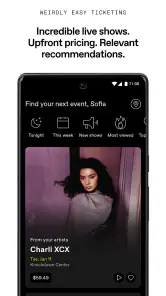
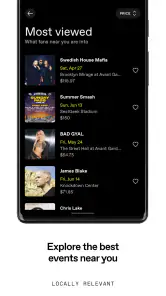
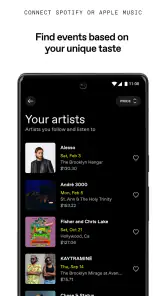
One of the coolest features of DICE: Live Shows is its ability to help you discover new music and events. It's not just about the mainstream gigs; the app excels at bringing you the hidden gems in your local area. I was amazed by the variety of artists and events it suggested based on my music taste. It felt like the app was a music guru, guiding me through a maze of melodies.
Seamless Ticket Purchasing
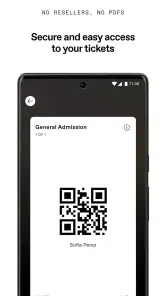
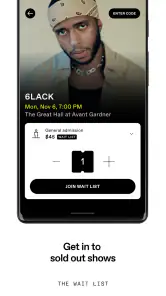
Buying tickets can often be a nightmare, right? But with this app, it's as smooth as your favorite jazz tune. The process is straightforward and hassle-free. You just find the event, click a button, and voila! You’ve got your ticket. Plus, they send you a QR code, which means no more worrying about losing your paper ticket.
More From Our News Desk

Weather by Xiaomi Review: Clear at a Glance, Less Clear Up Close

X Under Pressure: Can It Recover When Posting Goes Wrong?

Clash of Clans Is Won Between the Battles

Android Auto Makes the Case for Quieter Car Software

MobiOffice: Transforming Mobile Productivity with Seamless Integration

EA SPORTS FC™ Mobile Soccer: Redefining Mobile Sports Gaming
That digital-ticket approach is especially handy when plans change at the last minute: I can keep the ticket on my phone instead of relying on a printout. I’d still check that my phone is charged before leaving and make sure I can open the ticket when I arrive. A smooth purchase doesn’t remove the ordinary logistics of getting to a venue, coordinating with friends, or checking the event information again on the day.
User-Friendly Interface
Now, let's talk about the interface. It's clean, intuitive, and incredibly user-friendly. You don't need a degree in app navigation to find your way around. Everything is laid out in a way that makes sense, and the design is easy on the eyes. It’s like the app designers really thought about how to make it enjoyable for us users.
Compared with broad event-search tools, DICE feels more specifically aimed at people choosing live music and nightlife, while a general ticket marketplace may be more useful when you already know the exact event or want to compare a wider range of event types. I’d use DICE to explore, then slow down before buying: recommendations can be a good discovery prompt, but personal taste, travel time, and the full cost still decide whether a show is right. That small pause is a useful way to avoid buying simply because an event appeared in a feed.
Personalized Recommendations
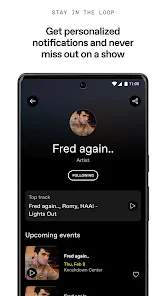
What I love about DICE is the personalized touch. The app learns from your musical preferences and recommends shows that align with your taste. It's like having a personal music assistant who knows exactly what you like. I discovered some amazing local bands through these recommendations that I wouldn't have found otherwise.
This approach is most rewarding if you’re open to trying unfamiliar artists and checking the app regularly enough to notice suitable events. If you only attend a few specific performers each year, or if you need a broad calendar covering every kind of local activity, a general event app may suit you better. DICE is also a less compelling choice if you don’t want to buy tickets through an app or prefer planning directly with a venue; its central convenience is tied to using it as part of the event search and purchase process.
Planning around real-life constraints
One useful way to browse is to set your practical limits before getting drawn into an appealing lineup. I’d decide how far I’m willing to travel, which evenings are genuinely free, and what I can spend on the whole night—not only the ticket. That last distinction matters because transport, food, and getting home can change the value of an event. DICE can help me find a reason to go out, but it can’t decide whether the surrounding logistics fit my week.
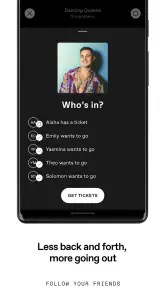
For a group plan, I’d share a couple of concrete options rather than sending friends a stream of possibilities. A venue, date, and ticket cost make it easier for everyone to answer quickly. This is a small workflow, but it prevents discovery from turning into an endless chat about what people might enjoy. If the group has different tastes, I’d use the app to find a compromise event first and only then compare it with other sources if no option feels right.
When recommendations help—and when they don’t
Personalized suggestions are most useful as prompts, not as a complete picture of what is happening nearby. I’d treat an unfamiliar recommendation as a chance to check the artist, event format, and venue before deciding. That little bit of research is particularly helpful when the appeal is the discovery itself: a new name can be exciting, but it does not automatically mean the performance suits your mood or the kind of evening you have in mind.
There is also a trade-off in relying on one app for discovery. A focused live-music feed can make browsing less noisy than a general events marketplace, but it may not be the best place to compare every possible activity or locate a show you already know is happening. When I have a specific venue or artist in mind, I’d search directly as well rather than assuming a recommendation feed is a complete calendar. For broad plans that include comedy, exhibitions, or other non-music events, a general ticketing service is often the more natural first stop.
Buying thoughtfully, not just quickly
A simple pre-purchase check can prevent the most avoidable disappointments: confirm the date, venue, event type, and total ticket cost, then make sure the timing works for the people you’re going with. I would also keep the phone-ticket detail in mind. Having a QR code on a device is convenient, but it shifts the last-mile responsibility to that device, so checking access and battery before leaving is sensible. The app can streamline the ticket part; it cannot remove the need to arrive prepared.
If you are deciding whether to commit to an event that you have only just discovered, I’d give yourself a moment to compare it with your actual plans. A recommendation can create urgency simply because it looks like a good fit, but the best purchase is one you can use without stretching your budget or rearranging a week that is already full. That is especially true when you are choosing between several nights out: browsing is free, while each ticket is its own spending decision.
Who gets the most from it
I’d recommend it to people who like finding smaller or less familiar live acts, want a convenient way to browse shows, and are happy to keep event tickets on their phone. It’s also a sensible free download for someone curious about the local live scene who isn’t ready to commit to a particular concert. The app is rated Teen, has been available since 2014, and its current version is 4.229.0 for devices running Android 10 or later.
It is less suited to someone who mainly wants a listening app, dislikes digital tickets, or only needs to buy entry for an event already chosen elsewhere. In those cases, a streaming service or the venue’s own ticketing route may be more direct. I’d also be cautious about treating a strong recommendation as proof that the event is a match: people who prefer familiar artists, quiet evenings, or carefully planned outings may get less out of a discovery-led approach than curious concertgoers do.
How I’d decide whether it earns a place on my phone
Because downloading it is free, I see little financial risk in trying it as a discovery tool, especially if live music already features in your plans. The value comes from whether the events it helps you find are relevant enough to turn into nights out. A large audience—around 1.8 thousand reviews alongside its ratings—suggests it is an established option, but popularity cannot tell you whether the local listings match your taste or whether you will use it often.
I’d give it a fair test by browsing with a specific intention: find one possible show for a free evening, check the venue and cost, and see whether the process helps you make a better plan than your usual search. If it does, keeping it around makes sense. If you open it only when you already have an event in mind, or if its focus on live music does not fit your habits, there is no need to force it into your routine just because the download is free.
In conclusion, DICE: Live Shows is not just an app; it’s a game-changer for anyone who loves live music. The ability to discover new artists, the ease of buying tickets, and the personalized recommendations make it a must-have. Whether you're a die-hard concert goer or just looking to dip your toes into the live music scene, this app is definitely worth checking out. So, what are you waiting for? Dive into the world of live shows with DICE!
DICE: Live Shows Frequently Asked Questions
Can I browse shows before deciding whether to download DICE: Live Shows?
DICE: Live Shows is built around discovering live music events and shows, so exploring what is available is a central part of using the app. You can browse events and consider whether its listings fit your interests before buying a ticket. The app itself is free to download; attending an event is a separate decision that involves reviewing the ticket details and terms.
What kind of events can I look for in DICE: Live Shows?
DICE focuses on shows, clubs, and festivals, with live music events at the heart of the experience. You can use it to explore events in your area or look more broadly, depending on what you are hoping to find. The range shown will depend on the events available to browse, so checking the app is the practical way to see whether it features the kinds of nights you enjoy.
Can I use DICE: Live Shows to find events near me?
Yes. DICE is designed to help users discover live music events and shows in their area, as well as explore events more broadly. It can be useful when you want to see what is happening locally or look for a particular kind of live experience. Browse the listings and event details to decide whether a show suits your plans before moving on to a ticket purchase.
What devices can run DICE: Live Shows?
DICE: Live Shows is a Music & Audio app from DICE FM, available for Android and iOS. Before downloading, check that your device runs a compatible operating system; the Android version requires Android 10 or later. The app is free to download, and its content rating is Teen, so it may not be suitable for every age group.
What is DICE: Live Shows and how does it work?
DICE: Live Shows is an innovative app that allows users to discover and book tickets for live music events and shows. By using DICE, you can explore a wide range of events happening in your area or globally, depending on your preference. The app offers a seamless ticket booking experience with transparent pricing and no hidden fees. Once you download the app, you can browse events, purchase tickets, and even access exclusive content and live streams from your favorite artists.
Pros
- High-quality live streaming.
- Interactive audience features.
- Wide variety of shows.
- Easy-to-use interface.
- Regular updates.
Cons
- Requires strong internet.
- Limited offline access.
- May have in-app ads.
- Subscription needed for full access.
- Not all shows are available globally.
- Category
- Music & Audio
- Version
- 4.229.0












