Netflix
- 910.21K
- 3.9
- Installs
- 1.00B
- Price
- Free

Screenshots



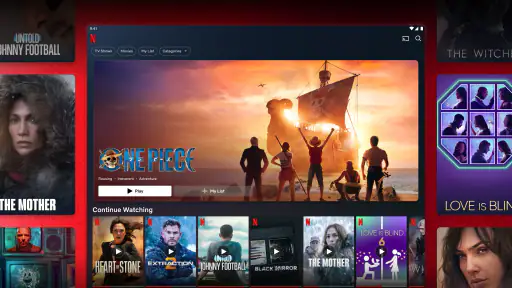
Analysis by Reviewed
I pay attention to how a streaming app works for people with different needs and in different situations, not just to how many titles it can display. Netflix is an entertainment app from Netflix, Inc., and it is free to install, while watching its shows and films is tied to a subscription. It has a 3.9 average from around 15 million ratings, and has been installed over a billion times. Those figures suggest how familiar it is to many viewers, but they don’t tell you whether its layout or viewing options suit you personally.
Finding a show without getting lost
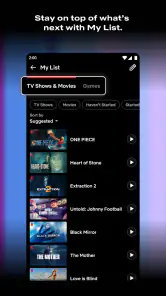
When I open Netflix, rows of recommendations and categories make browsing feel more like scanning a shelf than working through a complicated menu. That can be convenient when I have a title in mind, but less so when I’m unsure what I want: the same abundance that makes discovery enjoyable can also turn a quick search into a long scroll. I find it helps to use the search when I know a name or a subject, then save promising titles rather than relying on the home screen to bring them back later.
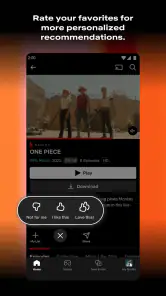
Recommendations can make it easier to find something close to what I already enjoy, though they can also keep serving familiar kinds of stories. For a household with different tastes, separate profiles are useful because one person’s viewing is less likely to dominate another person’s suggestions. I’d still treat recommendations as a starting point, not a neutral guide to everything worth watching.
The Latest on Netflix
Viewing comfort and control
For readability and navigation, the familiar rows and recognizable title artwork are easy to understand after a little use. The experience is visual, though, and browsing can take patience if you find dense screens, small labels, or fast-moving previews uncomfortable. I’d test it on the device and screen you plan to use, and look through the playback and account settings rather than assuming the default setup will suit everyone.
Motor and sensory needs also affect how comfortable a viewing session feels. Choosing a title and controlling playback requires interacting with the device, so anyone who has difficulty with precise taps may prefer a larger screen or a remote they find easier to handle. Sound, bright imagery, rapid editing, and intense scenes vary by title; I wouldn’t assume that a particular genre or recommendation will be comfortable just because the app itself is straightforward. Checking a title’s details before settling in can help avoid an unwelcome surprise.
When and where it fits
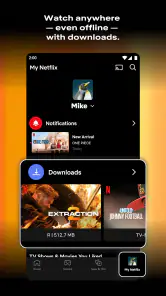
Offline downloads are one of the more practical options for planning around unreliable internet. Before a flight or a commute, I’d download an episode while connected and check that it appears ready to play before leaving home. That small habit matters: it’s much less frustrating than discovering you cannot stream after the connection has gone. Downloads also make the app useful in places where mobile reception is patchy, though they do require a bit of preparation.
For a realistic evening, I might browse on the sofa, save a film to my list when I’m short on time, and return to it at the weekend. If I’m watching with family, profiles help keep individual recommendations distinct, while parental controls give adults a way to manage what children can access. Those tools are helpful, but they don’t replace checking what a particular child is about to watch or agreeing on household viewing rules.
More From Our News Desk

Weather by Xiaomi Review: Clear at a Glance, Less Clear Up Close

X Under Pressure: Can It Recover When Posting Goes Wrong?

Clash of Clans Is Won Between the Battles

Android Auto Makes the Case for Quieter Car Software

MobiOffice: Transforming Mobile Productivity with Seamless Integration

EA SPORTS FC™ Mobile Soccer: Redefining Mobile Sports Gaming
Netflix is rated Teen, so it isn’t a service I’d hand to a younger child without adult guidance. Its broad range of entertainment means viewers still need to choose titles thoughtfully. If you’re setting it up for someone who benefits from a calmer, simpler viewing routine, I’d make the profile and playback choices together and keep a short list of familiar programs easy to find.
How it compares, and where it falls short
Compared with free, ad-supported video services, Netflix offers a more focused experience built around a paid subscription rather than casual clips and a stream of advertisements. Compared with renting or buying a single film, it can be a better fit if you regularly watch different series and movies; paying for access makes less sense if you only want one specific title. Its catalog and recommendations can encourage browsing, but they can also make it harder to decide what to watch, and the shows available may not match every viewer’s taste.
One useful approach is to search for a specific program before subscribing, rather than assuming that a familiar title will always be available. If your main goal is live events, a specialist service may suit you better; if you prefer choosing individual films without an ongoing subscription, a rental option may be clearer. Netflix works best for me when I expect to watch regularly and value having many kinds of programming in one place.
The app’s release date is May 5, 2011, and its long life has made it a familiar option, but familiarity doesn’t remove the main trade-off: you need an active subscription to watch, and the value depends on how often you use it. The app itself costs nothing to install, yet I wouldn’t confuse that with free access to its viewing catalog. It is a sensible choice for regular viewers, but an occasional movie watcher may prefer paying only for individual titles.
Endless Entertainment at Your Fingertips
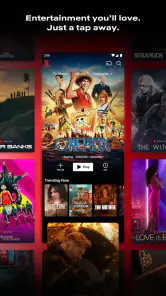
One of the first things you'll notice when you fire up Netflix is the vast library of content. From blockbuster movies to critically acclaimed TV series, the selection feels almost limitless. It's like having a cinema in your pocket. The app's user-friendly interface makes it super easy to navigate through genres, and the personalized recommendations often hit the mark, suggesting shows and movies that align with your taste.
Seamless Streaming Experience
If there's one thing Netflix nails, it's the streaming experience. Whether you're on a WiFi connection or using mobile data, the app adjusts the video quality seamlessly to ensure smooth viewing with minimal buffering. Plus, with the download feature, you can save your favorite episodes or movies to watch offline, perfect for those long flights or commutes where WiFi is a distant dream.
Original Content Galore
Netflix isn't just a hub for existing films and shows; it's a powerhouse for original content. Titles like "Stranger Things," "The Crown," and "Bridgerton" have become cultural phenomena, drawing viewers in with unique storytelling and high production values. The investment in diverse and inclusive content is evident and gives a voice to stories from around the world.
User Profiles and Parental Controls
Sharing your Netflix account with family or friends? No problem. The app allows you to create up to five individual profiles, so everyone's watchlist and recommendations stay personalized. For families, the parental controls are a lifesaver, ensuring that the little ones only access kid-friendly content, giving you peace of mind as they explore the world of streaming.
Subscription Plans for Every Need
Netflix offers a variety of subscription plans, ensuring there's something for every budget and viewing habit. Whether you opt for the basic plan or go all out with the premium option, the value you receive is undeniable. The flexibility to cancel anytime adds another layer of convenience, making it a low-commitment entertainment option.
Choosing thoughtfully for different routines
One practical question is whether Netflix suits a brief daily break or works better for longer viewing. I find it can do both, but the way I approach it changes: for a short pause, I search for a specific episode rather than browsing the home screen, while a planned evening is when the larger catalog is more useful. If you’re trying to keep screen time contained, deciding what to watch before opening the app can prevent the recommendation rows from turning a quick break into an extended session.
It also helps to think about who controls the account and device. In a shared home, agreeing on profiles and keeping children’s viewing separate can reduce accidental mixing of recommendations. If several people use one television, a profile choice at the beginning of a session is a small step that saves confusion later. For someone who finds menus difficult, a trusted family member can help set up a short list of familiar programs; that is often more manageable than asking them to explore the full catalog alone.
Small habits that make viewing easier
When I am choosing something for a group, I try to narrow the options before everyone sits down. Searching for a few likely titles and checking their descriptions ahead of time is less stressful than passing the device around while people wait. It is also a useful way to screen for themes or intensity that may not work for everyone. This is especially worthwhile when viewers have different ages, sensory preferences, or tolerance for suspense.
For travel, downloading is more reliable when treated as a checklist rather than a last-minute tap. I would connect to the internet, select the episode or film, wait until the app shows it is ready, and open it once before leaving. That final check can catch a problem while there is still time to choose another title. It is a simple workflow, but it makes offline viewing more dependable than assuming every selection will be available when needed.
Another trade-off is that a download is preparation for a particular plan, not a substitute for a stable connection during browsing. I would decide what I want before setting off, because searching and exploring are much less convenient when the network is poor. If you mainly want spontaneous viewing while out, a service centered on short clips may feel easier; if you like a full episode or film during a journey, Netflix’s offline option can be more satisfying.
Who will appreciate it, and who may not
I think Netflix is a strong fit for people who watch series and films regularly, enjoy exploring different genres, and want one familiar place for a range of entertainment. It is particularly useful when several people in a household have different tastes, because profiles can keep viewing histories and suggestions more distinct. The app can also suit someone who plans around commutes or trips and is willing to download content before going offline.
I would be less likely to recommend it to someone who watches only occasionally, wants one particular movie, or dislikes subscription-based access. In those cases, paying to rent or buy a specific title may be easier to understand and better matched to the actual habit. It may also frustrate anyone who expects the catalog to be permanent: I would check that a desired program is currently available before making it the reason to subscribe.
For viewers who need a low-stimulation or highly simplified experience, the app deserves a personal trial rather than an automatic recommendation. Browsing is largely visual, and artwork, previews, sound, and story content can all affect comfort. A larger screen or a physical remote may make selection easier for some people, but it will not resolve every sensory or navigation barrier. If accessibility needs are central to your decision, test the particular device and titles you expect to use, and see whether the controls feel manageable in practice.
What to expect from the subscription choice
Is installing the app enough to start watching? No: installation is free, but viewing the catalog requires a subscription. I would check the current plan choices and terms directly before deciding, since the right value depends on how often you watch and what you want to see. A household that watches throughout the week may judge the cost differently from someone who only wants an occasional film night.
Will a familiar show always be there? I would not count on that. Catalog availability can change, so searching for a title before joining is a sensible step, especially if it is the only program you intend to watch. And can the app guarantee a comfortable experience for every viewer? No single layout or title can do that: screen size, device controls, sound, visual effects, and personal preferences all matter. These are good reasons to try the app in the setting where you actually plan to use it, rather than judging it only from a phone in your hand.
My inclusive verdict
For me, Netflix is strongest when I want an easy way to find a series or film, keep separate viewing tastes organized, and prepare something to watch offline. I’d recommend it to people who watch often and are comfortable browsing a visual catalog, especially households that can make good use of profiles. I’d be more cautious if you need a highly simplified interface, have particular sensory requirements, rarely watch, or want access to one specific title without a continuing subscription. A little preparation—checking the program, adjusting the viewing setup, and downloading before travel—can make the experience more welcoming, but it cannot make every title or screen comfortable for every person.
Netflix Frequently Asked Questions
Can I watch Netflix on a television without using my phone?
Yes. Netflix can be watched on compatible smart TVs and gaming consoles, as well as through its app on mobile devices. Watching on a television can be more comfortable for shared viewing, while a phone or tablet offers a portable option. Before downloading, check that the television or other device you plan to use supports Netflix and that you have a suitable way to access the service.
Does Netflix have movies and TV shows, or only one type of content?
Netflix is a subscription service for watching both TV episodes and movies, so it is intended for viewers interested in more than one kind of entertainment. The available selection can vary by region, and individual titles may come and go. You can browse the app to see whether its current mix of movies and shows matches what you enjoy before deciding if the service is a good fit.
Can I create a separate Netflix profile for each person in my household?
Netflix supports individual profiles, which help people sharing access keep viewing activity and recommendations separate. Profiles make it easier for each viewer to find entertainment that suits their interests, and a Kids profile and maturity settings can help families manage what younger viewers see. Account and profile features can depend on the plan and current service terms, so check the options available to you.
Can I watch Netflix when I am away from home?
You can use Netflix on supported mobile devices and other compatible screens when you have an internet connection, which is convenient for watching away from home. If you expect to have unreliable connectivity, selected titles can be downloaded in the app for offline viewing. Title availability and playback options can vary, so it is useful to prepare any downloads before you leave.
Can I use Netflix if I do not want to watch in English?
Netflix titles may offer different audio and subtitle choices, which can be useful if you prefer another language or want captions while watching. These options are not necessarily the same for every movie or show, and availability can differ by region. Open the playback options for a specific title to see which audio and subtitle choices are offered before you start watching.
Pros
- High-quality original content
- Wide range of genres available
- User-friendly interface
- Offline viewing capability
- Multiple profiles for one account
Cons
- Requires monthly subscription
- Limited availability of some titles
- Content library varies by region
- Consumes significant data for streaming
- No live TV option
- Category
- Entertainment
- Version
- Varies with device