Google Play Games
- 201.52K
- 4.0
- Installs
- 5.00B
- Price
- Free

Screenshots

Analysis by Reviewed
I usually open Google Play Games when I want to get back into a game without having to remember where I left off or which challenge I was chasing. It is an entertainment app from Google LLC, built around Android gaming rather than serving as a game itself. The app is free, has a Teen age rating, and has been around since July 24, 2013. In my experience, its value is less about replacing the games on your phone and more about giving some of them a shared place for progress, achievements, and discovery.
Before you start: what the hub does
Google Play Games is most useful if you play several compatible Android games and like having a record of your activity. Its profile and achievement features can give casual play a small sense of momentum: a spare few minutes in a game can still count toward a longer goal. It is a lighter proposition than a dedicated gaming community, though. I would not choose it primarily to chat, arrange matches, or follow creators; its appeal is the connection to games and their progress.
The app has an average rating of 4.0 from around 13 million ratings, with roughly 202,000 written reviews and over 5 billion installs. That scale makes it a familiar part of Android gaming, but it does not mean every game uses every feature in the same way. I treat achievements and saved progress as useful when a particular game supports them, not as a guarantee that every title will behave identically.
All-in-One Gaming Hub
First things first, Google Play Games is not just another app; it's a comprehensive gaming hub. Imagine having a space where you can not only play games but also keep track of your achievements, compete with friends, and discover new games to play. That's exactly what this app offers. It's like having a personal gaming assistant right in your pocket.
A practical play session, from launch to return
Here is the workflow I find most helpful: browse for a game, install or open it through the usual Android process, then check whether its profile or achievements appear in the gaming hub. Once I know a title is connected, I can focus on playing and return later to see what I have unlocked. That last step is a simple but effective habit: checking the achievement list before a session can turn an aimless round into a specific, manageable goal.
For example, imagine waiting for a train with a few minutes to spare. I might open a game I already play, work toward one visible achievement, and close it when I need to board. Later, the profile gives me a quick way to see that the session contributed to something. This is a better fit for short, stop-and-start play than for someone who wants a long-form game launcher with extensive community tools.
Achievements and Leaderboards
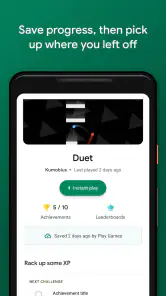
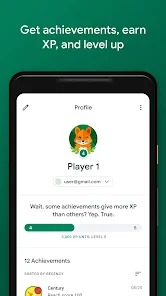
One of the coolest features of Google Play Games is the achievement system. As you play different games, you unlock achievements, which are then displayed in your profile. This adds an extra layer of excitement to gaming because, let's be honest, who doesn't like a good challenge? Plus, there's nothing like the satisfaction of seeing your name climb up the leaderboards, proving to your friends (and yourself) that you're the ultimate gaming guru.
A useful trade-off is that achievements work best as personal prompts, not as a universal measure of skill. Different games set different kinds of goals, and a leaderboard only matters if you enjoy comparing scores in that particular title. I would use the profile to keep track of what I have done, but I would not let a rank decide whether a game is worth playing. If competition and group coordination are the main reason you play, a game-specific community or multiplayer feature may be a better place to spend your time.
Finding the next game without losing the thread
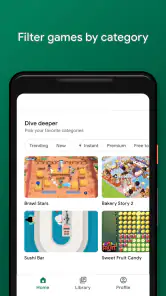
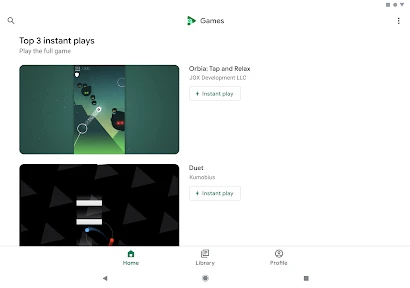
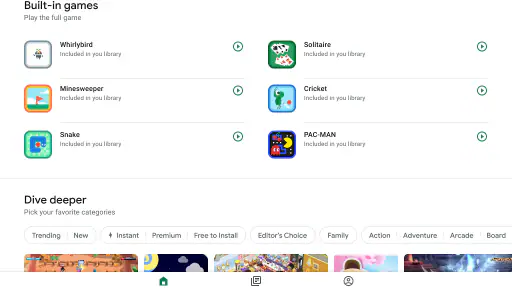
Another great thing about Google Play Games is its ability to help you discover new games. The app provides personalized recommendations based on your gaming history and preferences. It's like having a friend who knows exactly what kind of games you love and always has the perfect suggestion for you to try next. Say goodbye to endless scrolling and hello to your next favorite game!
I find recommendations most helpful when I use them as a starting point rather than a verdict. If a suggestion looks promising, I check whether its style suits the time and attention I actually have: a quick casual game is a different commitment from something I want to learn over many sessions. Browsing the app hub can be more convenient than jumping between unrelated discovery pages, while searching the wider Play Store may work better when I already know a precise title or genre. Neither route guarantees a perfect match, so I still make the final call based on the game itself.
Progress across devices: check the handoff
We all know the struggle of switching devices and losing game progress. With Google Play Games, you can kiss those worries goodbye. The app syncs your game progress across all your devices, making it easy to pick up right where you left off, whether you're on your phone, tablet, or even a different Android device. It's all about convenience and ensuring you never miss a beat in your gaming journey.
For a smoother handoff, I would check that the game is using the same account on each device and confirm that progress has appeared before deleting a game or changing phones. The hub can help connect a supported game's progress, but the actual save experience depends on that title's own integration. If a game opens at an earlier point, I would first check its in-game account and save settings rather than assume the hub can recover every session. That small precaution matters most before a device change, when a missing save is more frustrating than a brief delay.
Where it fits—and where it can fall short
This app makes the most sense for Android players who want a modest layer of organization around compatible games: a profile to revisit, achievements to chase, and recommendations that can spark an idea. It is less compelling if you play only one game and already manage everything inside that game's own menus, or if you want a platform built around voice chat, extensive social features, or organizing a large game library. Those needs are better served by the game itself or a dedicated community tool.
It is also worth keeping expectations practical. A hub can make supported features easier to find, but it cannot make every game share progress or present achievements in the same way. The handoff between the hub and an individual game is where the experience can feel uneven: a recommendation may lead to a title that does not use the features you care about, and a saved-game connection is only useful when the game recognizes it. I see this as a companion to Android games, not a replacement for their own menus or support.
Making it useful without adding another chore
I would keep the hub’s role deliberately small: use it to notice an achievement or find a possible next game, then spend most of the session inside the game itself. That division helps avoid treating a profile as a second task list. If I have a particular goal in mind, checking the achievement before opening a title can make a short break feel purposeful; if I am tired and only want to unwind, I can ignore the profile and play normally.
There is also a practical difference between using it to browse and using it to manage a game. Browsing is low-commitment: recommendations can give me a few ideas without deciding what I should install. Managing progress deserves more care. Before switching devices, I would open the game on the old device and make sure it is connected to the account I intend to use, then check the new device before removing anything. This is a simple workflow, but it reduces the chance of mistaking a game-specific save issue for a problem the hub can fix.
Who will get the most from it
The best match is someone who samples several Android games, enjoys checking off goals, and appreciates having a central profile rather than relying on memory. It can also suit a player who shares a device routine with another Android device and wants a convenient way to check whether supported progress has carried over. The benefit is modest but tangible: fewer small uncertainties about what to play next or what a previous session accomplished.
I would skip it as a main destination if I care more about coordinating a group than tracking my own play. A dedicated chat or community service is better for arranging sessions, while each game’s own menus remain the more direct place to understand its rules, events, or account-specific settings. Likewise, someone who plays one title and never looks at achievements may find that opening the game directly is simpler. The app earns its place through repeated small conveniences, not because every Android player needs another layer between them and a game.
How it compares with other ways to find and track games
Compared with opening each title separately, Google Play Games offers a shared view of supported achievements and activity; compared with browsing the Play Store, it gives game discovery a more gaming-focused context. Those are useful distinctions, but they do not make it a full replacement for either route. The Play Store is the natural option when I want to search broadly or inspect an app before installing it, and a title’s own interface is usually the place to handle its particular settings and content.
That makes the hub strongest as a bridge rather than a destination. I can use it to move from a general sense of “I want something to play” toward a specific game, then hand off to that game for the actual session. If I already know exactly what I want, going straight to the title or its Play Store page is more efficient. If I want a social space, the usual community tools offer a deeper focus than this lighter gaming layer.
What to expect from the experience
Google Play Games is a free entertainment app with a Teen rating, and its long presence in Android gaming helps explain why many players recognize it. Its average rating is 4.0, a broad signal that many people use it, not a promise that every feature will be equally useful to every player. I see its appeal as practical rather than essential: it can make compatible games feel more connected without changing how those games are played.
The main question I would ask before relying on it is whether the particular games I care about make use of its profile, achievements, or saved-progress handoff. If they do, the app can bring a little continuity to a scattered collection. If they do not, it may still help me discover something new, but it will not solve the reason I wanted a gaming hub in the first place. Keeping that distinction in mind makes expectations fair and avoids blaming the hub for a limitation that belongs to an individual title.
In conclusion, Google Play Games is a treasure trove for any Android gamer. From tracking achievements to discovering new games and syncing progress across devices, it's packed with features that enhance the gaming experience. So, if you haven't already, give it a try and take your mobile gaming to the next level. Happy gaming!
Google Play Games Frequently Asked Questions
Can Google Play Games help me find games that suit my interests?
Google Play Games is an entertainment app that helps you find and launch supported games. It can be a convenient starting point if you want to explore games available through Google Play, but the titles remain separate apps. Read each game’s page to learn about its content, cost, requirements, and features before deciding whether it suits you.
Can I use Google Play Games on a tablet as well as a phone?
Google Play Games is intended for Android users, so an Android tablet may be an option alongside an Android phone. Your experience can depend on the device and on the requirements of each game, since titles are installed and played separately. Check the game’s page for compatibility before downloading it, especially if you plan to use a larger-screen device.
Does Google Play Games support multiplayer gaming?
Google Play Games brings together features for supported games, but multiplayer availability is determined by each individual title. Some games may offer ways to play with others, while others focus on solo play. Check a game’s description for the features you want and whether it needs an internet connection, then install that title separately if it is suitable.
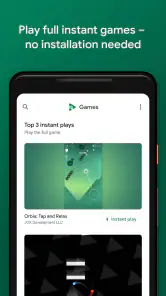
Can I use Google Play Games to play games instantly?
Google Play Games is designed to bring supported gaming features together, with its summary highlighting instant play, saved progress, and achievements. Whether a particular title can be played instantly depends on that game’s availability and how it works. The app also helps you find and launch supported games, while individual titles remain separate apps with their own requirements.
What age rating does Google Play Games have, and should parents check game ratings too?
Google Play Games has a Teen content rating, which gives families a general indication of the app’s intended audience. The games accessed through it may have their own content and age guidance, so parents should review each title before a child downloads or plays it. Checking the game itself is more useful than relying only on the platform’s rating.
Pros
- Seamless sync across devices
- Wide variety of games available
- Achievements and leaderboards
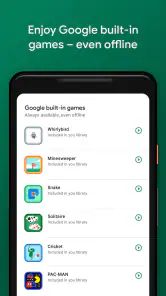
- Offline gaming supported
- User-friendly interface
Cons
- Requires Google account login
- Limited iOS availability
- Occasional app crashes
- Some games have in-app purchases
- High battery consumption

- Category
- Entertainment
- Version
- Varies with device