Talking Tom Cat 2
- 124.66K
- 4.2
- Installs
- 100.00M
- Price
- Free

Screenshots
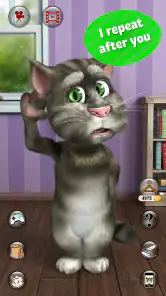

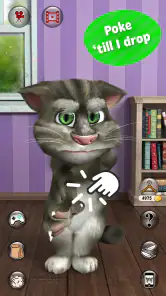
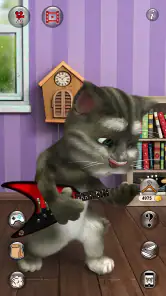



Analysis by Reviewed
I can see why Talking Tom Cat 2 works as a quick shared-device diversion: it gives a household something simple to laugh at without asking everyone to learn a complicated game. One person can speak to Tom, another can tap to see his reactions, and the fun comes from taking turns and reacting together. It suits short gaps, such as waiting for food to finish or passing a few minutes before leaving home, better than a long session that needs planning.
A familiar game for an ordinary pause
That short-session strength is useful when the alternative is handing a child a video and hoping they stay interested. Here, someone has to make a sound or choose what to tap, so the screen can become a small shared performance instead of background noise. I’d use it while waiting for a takeaway, during a quiet stretch on a rainy afternoon, or when a child wants to show a grandparent something funny without asking them to learn a complicated set of controls.
The activity also works across different ages in the same room. A younger player can enjoy the immediate reactions, while an older sibling or adult can invent phrases for Tom to repeat or help choose an outfit. That doesn’t make it a cooperative game with formal turns or roles; it simply gives people an easy reason to participate together. If the group is larger, keeping the phone with one person and inviting suggestions from others is often calmer than passing it around every few seconds.
What It’s Like to Share Tom at Home
The appeal is immediate, but shared use works best when expectations are clear. I’d treat the app as a casual activity on one device, not as a shared profile or a way to keep track of separate players. If several people take turns, agree whose turn it is and who gets to decide whether a recording is shared. That small bit of coordination prevents the usual tussle over the phone and keeps the joke in the room rather than sending a clip to someone by accident.
A simple setup, with sensible boundaries
There is no complicated routine needed to start: open the app and explore Tom’s reactions together. Still, I’d set a practical boundary before handing a device to a child. Explain that the app is for play, that recording and sharing are choices to make with an adult, and that purchases should not be tapped without permission. The app is free to download, with in-app purchases ranging from $0.99 to $24.99 per item, so it is worth keeping purchase decisions with the device owner.
For a shared phone or tablet, I would also avoid leaving the device unlocked and unattended after a play session. That is ordinary device housekeeping rather than a special feature of the app, but it matters when several people use the same screen. If a child wants to show a Tom video to relatives, review it together first and choose how to share it deliberately.
Keep the device, account, and audience in mind
On a household device, the main boundary is practical: the person holding the phone may be able to make choices that affect everyone who uses it. I’d keep the device owner in charge of purchases and any decision to send a recording outside the room. That approach is especially helpful when children share a tablet, because it avoids assuming that each person has a separate play space or separate settings inside the app.
More From Our News Desk

Weather by Xiaomi Review: Clear at a Glance, Less Clear Up Close

X Under Pressure: Can It Recover When Posting Goes Wrong?

Clash of Clans Is Won Between the Battles

Android Auto Makes the Case for Quieter Car Software

MobiOffice: Transforming Mobile Productivity with Seamless Integration

EA SPORTS FC™ Mobile Soccer: Redefining Mobile Sports Gaming
If a child asks to use Tom independently, I’d first decide what “independently” means in your home. They might be welcome to tap through reactions while an adult stays nearby, but not to make purchase or sharing decisions. The app can still be enjoyable under that arrangement; it just helps to make the boundary plain before the phone changes hands rather than correcting things after a tap.
What makes the interaction enjoyable
So, what's the fuss about Talking Tom Cat 2? Picture this: a virtual pet cat that not only responds to your touch but also repeats everything you say in a hilarious voice. Yes, you heard that right! The app is a sequel to the hugely popular original, and it certainly brings more to the table. Whether you're a kid or just a kid at heart, Tom's antics are guaranteed to bring a smile to your face.
Features That Stand Out
One of the coolest features of Talking Tom Cat 2 is the way Tom interacts with users. Tap on him, and he reacts in funny ways, each time making you chuckle. The app also allows you to record videos of Tom's hilarious antics and share them with your friends and family. It's like having a cat that never runs out of energy and loves to perform for an audience.
Another highlight is the ability to customize Tom. You can dress him up in various outfits and accessories, adding a personal touch to your virtual pet. It's entertaining to see how different costumes can change Tom's vibe entirely. Talk about a fashion-forward feline!
Make the short sessions feel fresh
A small trick that helps the repeatable interactions land is to give each turn a different job. One person can choose what to say, another can decide which reaction to try, and someone else can pick an outfit. It gives a group a loose structure without turning the app into a contest or requiring anyone to remember a score. If the joke has run its course, you can simply put the device away; there is no long session to finish.
For a child who wants to make a clip, I’d treat recording as a separate activity rather than an automatic next step. First decide what the clip is meant to show, then watch it together before deciding whether to keep or share it. That pause is a useful habit on any shared device, and it lets the family enjoy the performance without assuming every funny moment needs to leave the room.
Taking turns without turning it into a chore
A useful way to keep the app fresh is to give each player a tiny prompt: say a short phrase for Tom to echo, then let the next person choose an interaction or outfit. This makes the play feel shared rather than like one person is simply watching another use the phone. It also keeps sessions easy to end; there is no need to complete a long objective before handing the device back.
The trade-off is that the central joke is deliberately repetitive. Tom’s echo and physical reactions are the point, so children who enjoy trying the same phrase in different voices may stay entertained, while someone looking for story progression or a challenge may lose interest quickly. For that person, a puzzle or a more structured game is likely a better pick. Compared with passive cartoons, this is more participatory; compared with deeper pet games, it asks less of the player but offers less long-term variety.
How it compares with other ways to fill the gap
Among light entertainment apps, Tom sits between watching a cartoon and playing a goal-driven game. A cartoon is easier when the adult needs a few minutes without participating, while a puzzle is the stronger option for someone who wants rules, problem-solving, and a clear sense of progress. Tom makes more sense when the aim is to get a few laughs by speaking and tapping together, not to occupy a child for an extended stretch.
That distinction matters when choosing what to install. If your child loves repeating jokes and trying out silly voices, the interaction can feel more personal than simply watching a character on screen. If they prefer collecting achievements, following a story, or mastering increasingly difficult tasks, this is unlikely to replace their usual game. I’d think of it as a playful interlude rather than a mainstay for every spare moment.
Gameplay and User Experience
From the get-go, the user interface of Talking Tom Cat 2 is intuitive and user-friendly. The app is designed to be accessible for users of all ages, ensuring that even the youngest users can navigate through it with ease. The graphics are bright and colorful, creating a lively atmosphere that draws you in.
What's more, the app developers have cleverly incorporated mini-games within the app. These games are not only fun but also help keep the engagement levels high. Whether you're popping balloons or playing with a virtual ball, there's no shortage of activities to keep you entertained.
When the familiar joke is enough—and when it isn’t
The mini-games give someone who is ready for a change another thing to try, but I wouldn’t treat them as a substitute for a full game collection. The app’s appeal remains the character’s reactions and playful presentation. A useful way to judge whether it suits your household is to watch what a child does after the first few laughs: do they start experimenting with different phrases and interactions, or do they immediately ask for a new app? That quick test tells you more than assuming every child will respond the same way.
It is also worth separating “easy to use” from “right for every age and temperament.” A child who likes noisy, silly repetition may be delighted; a child who prefers quiet play or a clear task may find the same loop irritating. If you are choosing something for a calm waiting room or a shared space where sound would bother others, a quieter activity may be the more considerate option.
Age, trust, and who will enjoy it
The age rating is Everyone 10+, a helpful cue for adults deciding whether it fits their household, though I would still judge suitability by the child and how the device is used. Outfit7 Limited develops the app, and its long presence is reflected in an average rating of 4.2 from around 3.4 million ratings, with over 100 million installs. Those figures show broad reach, not a guarantee that every child will enjoy it or that every household will use it the same way.
The original Talking Tom Cat dates back to August 22, 2011; the current version is 6.1.1.366, and the stated minimum operating system is 6.0. I’d check that an older device can run it before planning a family activity around it. It is a better fit for people who enjoy silly voice play, quick reactions, dressing up a character, and short mini-games. It is less suitable if you want a quiet, hands-off screen activity, a substantial narrative, or a game that keeps building new goals over time.
A practical age-and-trust check
The Everyone 10+ age guidance is a starting point, not a substitute for knowing how a particular child handles interactive humor, sharing, and spending choices. I’d let a child try the app with an adult present first, especially on a device used by several people. That gives you a chance to see whether they understand the difference between playing with Tom and making a decision about a recording or purchase.
For a household that wants a completely independent activity with no adult involvement around device use, this may not be the easiest choice. The play itself is straightforward, but the surrounding decisions—who has the device, whether a clip is shared, and who approves purchases—still benefit from a clear adult boundary. If those expectations are already part of how your family uses a shared phone, the app is easier to fit into the routine.
Why You'll Love It
If you enjoy light-hearted fun and interactive games, Talking Tom Cat 2 is definitely worth a download. It's a great way to unwind after a long day, and Tom's infectious laughter is sure to lift your spirits. Plus, it's a fantastic app to share with kids, as it encourages creativity and interaction.
In conclusion, Talking Tom Cat 2 is more than just an app; it's an experience. Whether you're looking for a way to entertain the little ones or simply want a good laugh yourself, Tom is here to deliver. So go ahead, give it a try, and let the fun begin!
My household verdict
I’d recommend it as a low-commitment option for a shared screen, especially when an adult is nearby to guide recording, sharing, and purchase choices. A practical first session is to let everyone try one kind of interaction, explore an outfit, and sample a mini-game, then see whether the repeated humor still lands. If the household wants deeper progression or a game each person can pursue independently, I’d choose something more structured. For a quick laugh and a few coordinated turns, though, this playful cat has a clear place.
One last way to decide
If you are unsure whether to keep it on a family device, I’d base the decision on what happens after the novelty of the echo wears off. Does the child keep inventing phrases, asking others to join, or trying a different interaction? Then the app is doing what it is good at: turning a small moment into shared play. If they mainly want a longer story or a new challenge every time they open a game, there are better fits for that preference.
As an entertainment app, it is free to download, though optional in-app purchases are part of the experience. I’d make the purchase boundary clear before the first session and keep the device owner responsible for any spending choice. With that simple expectation, the household can focus on the silly performance rather than having to negotiate rules in the middle of a game.
Talking Tom Cat 2 Frequently Asked Questions
Is Talking Tom Cat 2 suitable for a quick, casual play session?
Talking Tom Cat 2 is an entertainment app centered on brief interactions with Tom, so it can suit a casual break rather than requiring a long, structured play session. You can spend time talking to the cat and exploring its activities at your own pace. Its playful virtual-pet format is easy to understand, making it approachable for users looking for lighthearted entertainment.
Who makes Talking Tom Cat 2, and what kind of app is it?
Talking Tom Cat 2 is an entertainment app developed by Outfit7 Limited. It focuses on interacting with a virtual cat, Tom, through playful activities. If you are deciding whether it fits your interests, expect a light, character-based experience rather than a complex simulation or a story-driven game. The original Talking Tom Cat is back - and better than ever.
Is Talking Tom Cat 2 free to download, and does it include in-app purchases?
Talking Tom Cat 2 is free to download, so you can try its virtual-pet activities without paying upfront. It also offers optional in-app purchases for virtual items, with individual purchases ranging from $0.99 to $24.99. If a child will use the app, consider enabling purchase approval or parental controls on the device to help prevent unintended spending.
What age is Talking Tom Cat 2 suitable for?
Talking Tom Cat 2 has an Everyone 10+ content rating, and its playful virtual-cat setup is aimed at light entertainment. Parents may still want to explore the app with younger children and review the device’s purchase and privacy controls, especially because the app offers optional purchases. The rating can help guide a decision, but each family can decide what is appropriate for its child.
Who developed Talking Tom Cat 2, and is it still a popular app?
Talking Tom Cat 2 is made by Outfit7 Limited. It has a 4.2 average rating from around 3.4 million ratings, with about 125,000 written reviews and over 100 million installs. Those figures suggest that it has reached a large audience, while the app itself remains a straightforward entertainment experience built around interacting with Tom.
Pros
- Engaging voice interaction feature.
- Funny animations delight users.
- Varied mini-games included.
- Easy-to-use interface.
- Free with optional in-app purchases.
Cons
- Contains ads that can be intrusive.
- In-app purchases can be costly.
- Requires internet for full features.
- Repetitive tasks may bore users.
- Privacy concerns with microphone access.
- Category
- Entertainment
- Version
- 6.1.1.366