Steam
- 36.10K
- 3.1
- Installs
- 100.00M
- Price
- Free

Screenshots

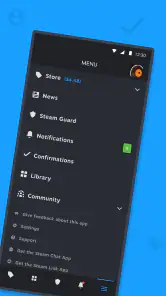
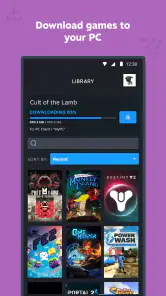





Analysis by Reviewed
I use the Steam mobile app as a companion to my PC gaming account, not as a replacement for the desktop client. That distinction matters: it’s most useful when I want to check in, handle a quick account task, or keep up with friends while away from my computer. Steam is a free entertainment app from Valve Corporation, and its long-running role in PC gaming makes it especially handy for people who already have a library and a circle of friends there.
What the mobile app is best at today
The app brings a few everyday Steam activities within reach on a phone: keeping in touch with friends, browsing the store, and managing account security. I find that mix more practical than trying to reproduce every desktop feature on a smaller screen. It suits quick visits between other tasks, while longer sessions spent exploring a library or managing games are still more comfortable on a computer.
For example, if I’m out and a friend messages about playing later, I can reply and check whether they’re online without opening my PC. If I spot a game I’m interested in, I can look it up and decide whether to buy it from my phone. That convenience is real, but I still prefer a larger screen when I want to compare several games or read through a lot of details before spending money.
How it has evolved, and what that means
The app was released on January 26, 2012, and version 3.10.9 is the current version. That gives the mobile companion a long history alongside Steam itself, though a version number alone doesn’t tell me exactly what has changed between updates. What matters in daily use is that the app remains a way to reach core account and community functions while away from the desktop.
Existing Steam users can treat it as an additional access point rather than a new gaming platform. I wouldn’t expect installing it to change how PC games run or replace the desktop client; its value is in handling small tasks around the edges of a gaming session. If you already use Steam Guard, keeping the authenticator on a phone can also make account sign-ins more convenient, provided you keep control of that device.
Who will get the most from it
The best fit is someone who already uses Steam and wants account access, store browsing, chat, and security tools while away from a computer. With more than 100 million installs, it is clearly a familiar companion for many users, but that reach doesn’t mean every player needs it. Someone who rarely checks messages, handles purchases only at a desk, and prefers to keep account tools off a phone may be perfectly happy with the desktop client alone.
Its Teen age rating is worth keeping in mind for families, especially when deciding whether a younger player should have access to a Steam account and its social features. The app has an average rating of 3.1 from around 1.1 million ratings, with roughly 36,000 written reviews. I take that as a reminder to judge it by the tasks I need rather than assuming a popular app will feel flawless on every phone.
More From Our News Desk

Clash of Clans Is Won Between the Battles

Android Auto Makes the Case for Quieter Car Software

MobiOffice: Transforming Mobile Productivity with Seamless Integration

EA SPORTS FC™ Mobile Soccer: Redefining Mobile Sports Gaming

How Microsoft OneDrive Became a Mobile Productivity Giant

How Google Translate Breaks Language Barriers Effortlessly
Limits, alternatives, and a useful routine
Compared with general messaging apps, Steam’s chat is valuable mainly because it connects to the friends and groups already tied to a Steam account. If your friends are elsewhere, a dedicated messaging app may be easier. Likewise, the mobile store is convenient for a quick look, but a web browser or desktop screen can be better for careful research and side-by-side comparisons. The app is a companion, not a universal gaming social network.
One practical habit is to review notification settings early. I’d keep alerts that help me respond to friends or notice account activity, then mute anything that turns casual browsing into a steady stream of interruptions. I also treat the phone authenticator as a security tool, not a reason to ignore basic account care: protect the phone itself and think ahead about account recovery before relying on it as the only convenient way to approve sign-ins.
The Gateway to Your Gaming Universe
First off, let me just say that the Steam app is like having a mini version of your gaming hub right in your pocket. Whether you're chilling on a couch or waiting in line at the grocery store, you can stay connected to your gaming community and keep track of all your favorite games. The app is available on both Android and iOS, which means pretty much anyone with a smartphone can jump in.
User Interface
If you're familiar with the desktop version of Steam, you'll find the mobile app to be quite intuitive. The interface is clean and straightforward. Navigating through the app is a breeze, thanks to its simple layout. Everything is just a tap away, whether you're browsing your library, checking the latest sales, or chatting with friends.
Features You’ll Love
One of the coolest features is the ability to stay connected with your gaming buddies. The app allows you to chat with friends, join group chats, and even check out what your friends are currently playing. It's like being at a virtual hangout, without the need for a gaming console.
Another standout feature is the Steam Guard Mobile Authenticator. This nifty tool adds an extra layer of security to your account, ensuring your gaming library stays safe and sound. Trust me, it's a lifesaver if you're paranoid about online security like I am.
And let's not forget the access to the Steam store. You can browse and purchase games directly from the app. Plus, with the notifications feature, you'll never miss out on sales or important updates about your favorite games.
Performance
In terms of performance, the app runs smoothly. It might not be as fast as the desktop version, but it gets the job done without any major hiccups. Loading times are reasonable, and I haven't experienced any crashes so far. Overall, it’s a solid performer.
Customization and Personalization
If you're anything like me, you love tweaking settings to make an app feel just right. The Steam app offers a range of customization options. You can adjust your notification settings, manage your account preferences, and more. It’s all about making your gaming experience as personalized as possible.
Final Thoughts
All in all, the Steam app is a fantastic extension of the desktop platform. It's perfect for gamers who want to stay connected and manage their gaming life on the move. From chatting with friends to securing your account, it covers all the bases. Sure, it may not replace the full desktop experience, but it's a great companion for any dedicated gamer.
Whether you're a casual gamer or a hardcore enthusiast, this app is worth checking out. So go ahead, give it a download. You might just find it becomes an essential part of your gaming routine.
A smoother routine for purchases and sign-ins
I find the phone version most useful when I separate quick decisions from considered ones. If a friend sends me a game recommendation, I can open the store, read enough to save it to my mental shortlist, and return later on a bigger screen before buying. That small pause is helpful: the convenience of purchasing from a phone can also make it easier to act on a passing impulse, especially when a sale notification catches my eye.
For account access, the authenticator is most valuable when I plan for the awkward moment in advance rather than waiting until I need it. I would make sure I understand the account recovery route and keep my phone protected before depending on it for sign-in approvals. This is not a reason to avoid the feature; it is a reminder that stronger account checks work best when recovery is considered part of the setup, not an emergency chore.
Where the phone form factor helps—and where it doesn’t
A phone is excellent for short, focused actions: answering a message, checking a friend’s status, glancing at a store page, or confirming an account step. It is less comfortable when I want to assess a collection of games, compare a lot of descriptions, or spend a long time navigating account and community information. I treat the mobile app as a quick-access layer, then move to the desktop client or a browser when the task grows beyond a few taps.
That division also helps set expectations for new users. The app does not turn a phone into a substitute for playing the PC games in a Steam library. If what you want is a portable way to launch and play those games, this is not the answer; its strength is keeping parts of the account and community within reach. People who want a dedicated mobile gaming experience should look at games designed for their phone instead.
Choosing the right social channel
Steam chat makes sense when the conversation is about playing together, coordinating with people already on your friends list, or keeping up with groups connected to the account. For a broader conversation with friends who do not use Steam, I would use the messaging service they already check. The practical advantage is context: Steam puts game-related contacts beside the account and store, while a general messenger usually works better for conversations that have nothing to do with PC gaming.
One realistic routine is to check messages during a commute, reply that I’ll be available later, and then leave the app alone until I’m back at my computer. That keeps the phone useful without turning it into a second gaming desk. If a group chat becomes noisy, adjusting alerts is more sensible than abandoning the app entirely; if the people I need to reach are not there, switching to another messenger is the simpler choice.
What the rating and long history tell me
The 3.1 average rating is a reason to approach the app with realistic expectations, not a verdict that every person will have a poor experience. A companion app can be valuable for a narrow set of tasks and still frustrate someone who expects a full desktop replacement. I would judge it against my own routine: do I want mobile chat and account access often enough to justify another app on my phone? If not, there is little reason to install it just because so many Steam users do.
Its release in 2012 and its current 3.10.9 version show that the app has continued through many years of change, but I would not infer a particular redesign or feature history from those figures alone. For someone already using it, the practical question is whether the current version on their device handles the tasks they care about. For someone considering it now, the safest expectation is a mobile companion for Steam, not a promise that every desktop workflow will feel equally natural on a small screen.
Compatibility and deciding whether to install
The minimum operating-system requirement is version 8.0, so I would check the phone’s software before planning to use it. The app is free, which makes trying it a low-cost decision, but setup still takes attention: account access and security tools deserve more care than a casual entertainment download. Its Teen rating is also relevant if a family is deciding which social and account features a younger user should handle independently.
I would recommend it to an established Steam user who checks messages away from home, wants a convenient account-security option, or likes browsing the store in spare moments. I would skip it if I rarely use Steam outside my computer, want a general-purpose chat app, or expect to play my PC library directly on my phone. Those are not shortcomings that a few settings can fix; they are mismatches between the app’s role and what the person needs.
What I would keep an eye on
For existing users, I would watch whether the app continues to make the essential mobile tasks—messages, store browsing, and account access—straightforward in the version installed on my phone. Version numbers can change, but the useful measure is whether a routine action stays quick and clear. I would also revisit notification choices as my Steam friend list and habits change, since settings that once felt helpful can become distracting over time.
My overall view is deliberately practical: this is a useful companion when Steam is already part of your gaming life, and an easy one to ignore when it is not. It gives me a reason to keep the account close without pretending that every task belongs on a phone. If you value quick contact and account access more than a complete desktop-style experience, it is worth trying; if you mainly want a place to play games or chat with everyone, another option will serve you better.
Steam Frequently Asked Questions
Is Steam only useful if I already have a Steam account?
The Steam Mobile App is most useful when you already use Steam, since its purpose is to bring parts of the platform to your phone. If you are new to Steam, the app can introduce you to the service, but it is not a standalone mobile game store experience in the sense of playing PC games directly on your phone. Consider whether you want mobile access to Steam before installing it.
Can I play Steam PC games directly on my phone with the mobile app?
The Steam Mobile App is not a replacement for a computer when it comes to playing PC games. Its focus is taking parts of Steam with you, rather than turning your phone into a device that runs the desktop game library. If your main reason for downloading is to play PC titles on your phone, keep in mind that the mobile app is intended for access to Steam, not as a substitute for a desktop computer.
What can I do with the Steam Mobile App?
Steam’s mobile app brings parts of the Steam experience to your phone, so you can take Steam with you anywhere. It is an entertainment app developed by Valve Corporation. It is useful for people who already use Steam and want access to the platform while away from a computer, though it is not a replacement for a desktop computer when it comes to playing PC games.
Is the Steam app compatible with my phone?
The Steam app is available for Android and iOS, and the minimum operating-system requirement is version 8.0. Before downloading, check that your phone’s operating system meets that requirement and that you are installing the official app by Valve Corporation. The app is free, and its content rating is Teen, so those details may help you decide whether it is suitable for your device and household.
What is Steam and how does it work?
Steam is a digital distribution platform developed by Valve Corporation, primarily used for purchasing, downloading, and playing PC games. It offers a vast library of games, community features, and digital rights management services. Users can join communities, participate in forums, and enjoy features such as cloud saves and automatic game updates.
Pros
- Extensive game library available.
- Regular sales and discounts.
- User-friendly interface.
- Community features and forums.
- Cross-platform support.
Cons
- Requires internet connection.
- Occasional app updates needed.
- Large storage space required.
- Limited customer support.
- Some games may lack offline mode.

- Category
- Entertainment
- Version
- 3.10.9