clickworker
- 2.40K
- 4.4
- Installs
- 5.00M
- Price
- Free

Screenshots


Analysis by Reviewed
I would treat clickworker as a flexible way to explore occasional small assignments, not as a substitute for reliable income. It is a free business app made by clickworker GmbH, and its appeal is the choice to look for work when you have time rather than follow a set shift. In practice, that freedom comes with a trade-off: the amount of useful work can vary, and you have to decide whether each task is worth the attention it needs.
Where people can get stuck
The first frustration may come after signing up, when the app does not immediately offer a task that feels like a good fit. I would treat the task list as something to check periodically rather than as a queue of guaranteed work. Availability can vary, and a survey or recording task may have requirements that make it unsuitable for a particular person or moment.
That makes this a better match for someone who can use ten quiet minutes between errands than for someone who needs a predictable amount of income by a specific date. If you are weighing it against a conventional part-time job, the difference is control versus certainty: you can choose when to look, but you should not assume there will always be a suitable assignment waiting.
Who benefits from a task-based routine
I can see this being useful for someone whose schedule has small, unpredictable gaps: a student between classes, a parent with a quiet window at home, or a remote worker taking a break from a screen-heavy day. The key is to have a natural stopping point. It is easier to check for a task when you already have spare time than to rearrange the day around the possibility that one might appear.
It is less suited to anyone who needs to earn a particular amount each week or wants work that begins immediately whenever they open an app. A task marketplace asks you to be selective and patient. If that uncertainty would make you repeatedly check your phone or feel pressured to accept work that does not suit you, a scheduled job or a more predictable source of income is likely a better fit.
Getting Started with Clickworker
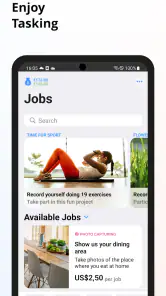
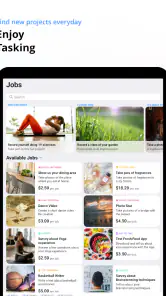
Jumping into the clickworker universe is as easy as pie. First things first, you’ll need to download the app from the Play Store or App Store, and bam – you’re all set to start earning. The sign-up process was a breeze, and I was up and running in no time. The app itself has a clean, user-friendly interface that makes navigating through the available tasks a walk in the park.
Setup checks that save time
Before settling into a task, I recommend reading its instructions all the way through and checking that you have enough uninterrupted time to finish it. A short survey can still be a poor fit if you need to stop halfway, while an audio or video recording calls for a quieter setting than a quick question does. Starting only when you can give the task proper attention is a simple way to avoid frustration and careless answers.
More From Our News Desk

Weather by Xiaomi Review: Clear at a Glance, Less Clear Up Close

X Under Pressure: Can It Recover When Posting Goes Wrong?

Clash of Clans Is Won Between the Battles

Android Auto Makes the Case for Quieter Car Software

MobiOffice: Transforming Mobile Productivity with Seamless Integration

EA SPORTS FC™ Mobile Soccer: Redefining Mobile Sports Gaming
It also helps to check that your connection is stable before you begin. If a page loads slowly or a task behaves unexpectedly, pause and retry when the connection is better rather than repeatedly tapping through. For anyone asking whether this is suitable for a first-time side earner, I think it can be: the tasks are approachable in concept, but the careful part is judging the instructions and conditions before committing your time.
Deciding which work fits the moment
Different task formats make different demands, so I would not choose by title alone. A survey is usually easier to fit into a quiet break than a recording, while research or categorization may call for more sustained attention than its short description suggests. Before starting, I would ask myself whether I can finish without rushing, whether I can provide the setting the task needs, and whether I am comfortable with the instructions.
That quick decision is one of the most useful habits here. If you have only a few minutes and are likely to be interrupted, browsing or waiting may be a better use of the break than opening a task you cannot complete carefully. If you have a calm stretch later, save the more attention-heavy work for then. This avoids turning a flexible app into another source of unfinished chores.
Diving into Tasks
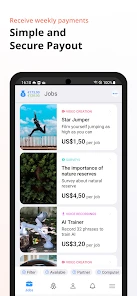
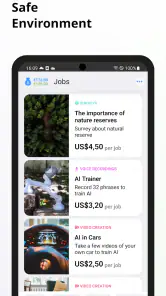
Once you're in, you’ll find a variety of tasks waiting for you. From surveys and data categorization to mystery shopping and app testing – there's a bit of everything. What I love about these tasks is the flexibility. You can pick and choose what fits your schedule and interest. Oh, and did I mention you can do this from anywhere? Whether you’re lounging at home or sipping coffee at a café, the world is literally your office.
A realistic way to use it is to check for suitable work during a lunch break, then leave recording tasks for when you get home and can focus. That small bit of planning matters: the most convenient task is not always the best use of your time. I would compare it with survey-only apps this way: a broader task mix gives you more kinds of work to consider, but it also means you need to pay attention to different instructions and settings instead of following one repeated format.
How it compares with other side-work apps
Compared with a survey-only app, this one can be more interesting if you prefer changing formats and do not want every opportunity to be a questionnaire. The broader mix is also a practical advantage when one type of task does not suit your surroundings: you might skip a recording in a noisy place but look at a different assignment later. The cost of that variety is extra judgment. You have to understand the requirements of each kind of work rather than rely on one familiar routine.
Compared with freelance marketplaces, the work here is oriented toward smaller assignments rather than building a client relationship around a longer project. That can make it easier to try in spare moments, but it is not a replacement for the control, continuity, or professional portfolio that longer freelance work can offer. I would choose clickworker for occasional, self-contained tasks; I would look elsewhere if I wanted to negotiate a larger project or develop an ongoing client base.
Recovering when a task goes wrong
If a task stalls, the sensible first step is to note what you were doing and check whether the app or your connection has recovered before trying again. Avoid submitting the same work repeatedly if you are unsure whether the first attempt went through. If the issue persists, use the app’s available support route and describe the task and the point where it stopped; clear details are more useful than a vague report.
For better decisions over time, I would keep a simple personal note of which task types felt straightforward and which took more concentration than expected. This is not about chasing every listing. It helps you recognize whether surveys, categorization, or recording work fits your routine, and makes it easier to skip tasks that repeatedly interrupt your day.
A low-effort way to organize your time
I would use a small routine rather than keep the app open all day. Check it when you have a genuine spare window, scan the instructions and conditions, and decide whether the task belongs in that window or should wait for a quieter one. Afterward, note whether the effort felt reasonable. Over time, those observations can help you make quicker choices without turning every spare minute into a search for work.
For example, someone waiting for a delayed appointment could browse for a short task but should avoid starting a recording if they may be called in at any moment. At home, that same person could set aside a calmer period for work that needs concentration. The useful insight is not simply that tasks differ; it is that matching the task to the place and the likely interruptions can matter more than squeezing it into the earliest available moment.
When the app may not be the cause
Not every failed or slow task points to a problem with the app itself. A weak connection, a noisy room, or trying to complete a detailed assignment while distracted can all get in the way. I would first move somewhere with a more reliable connection or wait until I can focus, then reopen the task and follow its instructions carefully. If the same problem continues, contacting support is more sensible than repeatedly restarting and risking duplicated effort.
This is also where expectations matter. The app is not the right choice if you need guaranteed hours, fixed earnings, or a task on demand. Someone who prefers predictable shifts may be better served by regular employment; someone who likes choosing occasional small assignments may find this more comfortable.
Questions worth considering before you rely on it
Can you use it without treating it as guaranteed income? That is the most important question. I would start with the expectation that opportunities may not line up with your schedule every time, and judge the app by whether the tasks that do suit you are worth the effort. If a particular week needs a fixed amount of money, this is not a sensible sole plan.
Can you complete tasks on a phone in the places you normally spend spare time? Some formats are easier in a quiet room with a stable connection, so “mobile” does not mean every assignment is practical on a crowded commute or in a noisy café. And if a task is interrupted, should you immediately try again? I would first check whether the original attempt has recovered or submitted, then seek help if the situation remains unclear rather than risk duplicated work.
Show Me the Money!
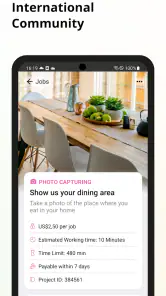
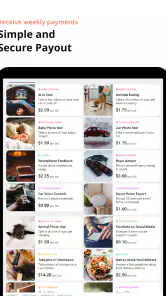
Now, let’s talk about the bottom line – getting paid. With clickworker, the payment system is straightforward. Most tasks have a clear price listed, so you know exactly what you're getting into. Once you’ve completed your tasks, you can cash out via PayPal. It’s as simple as that. I found the payment process to be quick and hassle-free, which is always a plus in my book.
My practical tip is to look at the offered amount alongside the effort and attention a task requires, not in isolation. A task that seems worthwhile at first glance may be less appealing if it needs a quiet room or several uninterrupted minutes. That quick check helps keep the app in its proper role: an occasional extra, rather than a plan that your budget depends on.
Community and Support
One of the things that stood out to me was the sense of community among users. There are forums and discussions where you can share tips, ask questions, and connect with fellow clickworkers. And if you ever run into any issues, the support team is just a click away. They’re responsive and helpful, which really adds to the overall positive experience.
The app has a 4.4 average from around 101,000 ratings, and more than five million installs. It is rated for Everyone, with version 1.22.23 requiring Android 6.0 or later. Those details make it easy to judge basic compatibility, but they do not change the practical question I would ask before installing: am I happy to earn in small, irregular bursts rather than count on a fixed schedule?
So, is clickworker worth your time? Absolutely! It’s a fun and flexible way to earn some extra cash without any major commitment. Plus, it’s kind of addictive once you get the hang of it. So, if you’re looking for a side hustle that fits into your lifestyle, give it a whirl. You might just find it’s exactly what you’ve been searching for!
clickworker Frequently Asked Questions
What types of work can I do through Clickworker’s mobile app?
Clickworker’s mobile offering is aimed at people who want to take on small online jobs while away from a computer. The work can include surveys, online research, and audio or video recordings, alongside other microtasks available through the platform. Which opportunities suit you will depend on your interests and skills, so it is worth checking the task descriptions before accepting work.
Can I use Clickworker if I am looking for a full-time job?
Clickworker is designed around individual online tasks rather than a conventional job arrangement. It may be useful if you want flexible work that can be accessed from a mobile device, but the tasks available and the time needed to complete them can vary. Consider it as a way to take on microtasks, rather than assuming it will provide a steady schedule or replace full-time employment.
Do I need experience or special skills to get started with Clickworker?
Clickworker includes different kinds of microtasks, so the skills needed depend on the work you choose. Some tasks may be straightforward, while others can call for particular abilities or careful attention to instructions. Completing your profile and considering any available training or skill assessments can help you find suitable opportunities. Read each task’s requirements before accepting it so you know what is expected.
Is Clickworker free to download and who is the app intended for?
Clickworker is a free Business app from clickworker GmbH, designed for people interested in completing small online jobs using a mobile device. Its general-audience age rating makes it suitable for Everyone, though users should still consider whether the available tasks and work style fit their needs. The app is one way to access the platform, which can also be used from a desktop.
What devices and operating systems can run Clickworker?
Clickworker is available for Android, and the current version is 1.22.23. Android users need version 6.0 or later to install it. The app is intended to let Clickworkers access tasks while on the go, and the service is also accessible from desktop computers. Checking that your device meets the minimum operating-system requirement before downloading can help avoid installation problems.
Pros
- User-friendly interface for easy navigation.
- Flexible working hours to suit your schedule.
- Diverse range of tasks available.
- Payment through secure and reliable methods.
- Opportunity to earn extra income from home.
Cons
- Limited availability of tasks sometimes.
- Earnings can be inconsistent.
- Tasks can be repetitive.
- Payout threshold may delay earnings.
- Dependence on internet connectivity.
- Category
- Business
- Version
- 1.22.23











