Boomplay: Music & Live Stream
- 5.04K
- 4.3
- Installs
- 100.00M
- Price
- Free

Screenshots

Analysis by Reviewed
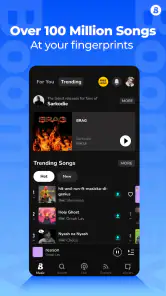
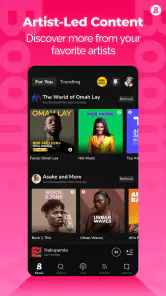
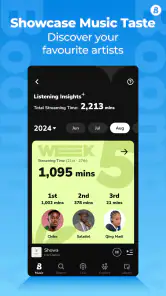
I’m drawn to music apps that help me get beyond the same familiar playlists, and Boomplay has a useful angle: it combines music discovery with an emphasis on African sounds and a large catalog. It is a free music and audio app from Transsnet Music Limited, with optional in-app purchases ranging from $0.49 to $299.99 per item. I’d treat it as a discovery-focused alternative rather than assuming it will work exactly like every streaming service.
What speed feels like in everyday use
With a music app, speed matters most when I’m trying to start a track quickly, browse while listening, or switch from a saved song to something new. Boomplay’s interface is described as intuitive, and the practical benefit is that music discovery does not need to feel like a separate task from listening. Still, browsing a broad catalog and loading audio both depend on the connection and the device, so I wouldn’t judge the experience from one slow moment alone.
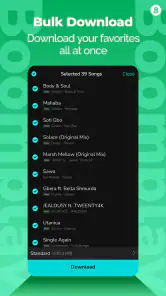
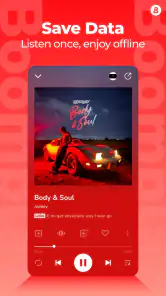
The app’s offline downloads are especially useful when I want to avoid relying on a live connection. A sensible routine is to prepare a few tracks or playlists while connected, then check that they are available offline before leaving home. That small habit can make a commute or a patchy-signal journey less frustrating than waiting for songs to load on the move.
The Latest on Boomplay: Music & Live Stream
When listening turns into heavier use
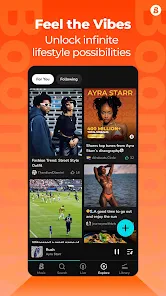
Boomplay can ask more of a session when I’m moving between music, lyrics, news, discovery pages, and live streams. I’d use those extras deliberately: find a stream or artist update when I have time to explore, then switch to downloaded music when I want uninterrupted listening. That separation is a practical way to keep a music session focused, especially if I’m using the app while doing something else.
For a realistic weekday example, I might browse for an unfamiliar artist at home, save tracks for offline listening, and play those songs during a commute. Later, if I have time, I can return to the app for a live session or music news. This workflow takes advantage of Boomplay’s mix of listening and discovery without requiring me to stay online for every part of the day.
Reliability, compatibility, and sensible expectations
No music app can make a weak connection behave like a strong one, and a live stream is naturally more dependent on a steady connection than a track already saved for offline use. If a stream pauses, I’d first switch to downloaded music rather than repeatedly reopening the same live session. Downloads are also worth checking before travel, since an offline plan only helps when the music has finished saving.
Boomplay runs on Android 6.0 and later, and its current version is 7.6.52. It has a Teen content rating, so it is not presented as an app exclusively for adults. I would still consider whether its discovery and live-content mix suits the person using it, particularly if I’m setting it up for a younger listener.
More From Our News Desk

X Under Pressure: Can It Recover When Posting Goes Wrong?

Clash of Clans Is Won Between the Battles

Android Auto Makes the Case for Quieter Car Software

MobiOffice: Transforming Mobile Productivity with Seamless Integration

EA SPORTS FC™ Mobile Soccer: Redefining Mobile Sports Gaming

How Microsoft OneDrive Became a Mobile Productivity Giant
A good fit for a varied listening day
The strongest reason I’d keep Boomplay nearby is that it can serve different moods without making every session feel like a search for the next song. I could use it for a quick familiar track while cooking, then spend a longer break following a new artist or exploring music news. That flexibility is more useful to me than a long menu of features on its own: the extras matter when I genuinely want to move between listening and discovery.
It is also a reasonable option for someone who wants to try a music service without paying upfront. I’d start by browsing the artists and styles I actually enjoy, rather than judging it by the size of its catalog alone. If the first few searches lead to appealing new finds, that is a better sign of fit than a headline number. Anyone who prefers a tightly curated routine can still use it selectively, but may not need to make it their main player.
A practical way to test downloads and discovery
When I’m deciding whether an app belongs in my everyday rotation, I like to test one complete routine rather than tap around randomly. In Boomplay, that could mean looking up a familiar artist, following a related discovery path, and saving a few songs I would realistically play again. I’d then check that those tracks are ready before going offline. This reveals whether the app’s discovery is personally useful and whether my download habit is manageable.
There is a small but important trade-off in that routine: saving music ahead of time takes a little planning, but it gives me a dependable choice when a connection is poor. I’d avoid filling a download queue with songs I have not listened to yet. Trying a new track while connected first helps me choose music I actually want for a commute, instead of using storage on a collection that sounded appealing only while browsing.
Have you ever found yourself scrolling endlessly through your music library, desperately trying to find something fresh and exciting? Yeah, me too. That's exactly why I was thrilled to stumble upon Boomplay: Music & Live Stream. Let me tell you, it’s like finding a hidden gem in the vast ocean of music apps.
Discovering a World of Music
From the moment I installed Boomplay, I felt like a kid in a candy store. The sheer variety of music available is nothing short of amazing. Whether you’re into pop, hip-hop, rock, or jazz, Boomplay has got you covered. They've even got a bunch of underrated artists that you probably haven’t heard of yet but definitely should. The app’s interface is super intuitive, which makes navigating through different genres and playlists a breeze.
Live Streams That Keep You Hooked
Now, let’s talk about one of the standout features of Boomplay: the live streams. I was pleasantly surprised by the quality and variety of live music sessions available. It's like having a front-row seat to a concert without leaving your couch. From live DJ sets to intimate acoustic sessions, there’s always something happening on Boomplay. Plus, the interaction with artists and other fans during these streams adds an extra layer of excitement.
Why Boomplay Stands Out
What sets Boomplay apart from other music apps is its focus on African music. The app does a fantastic job of showcasing talent from across the continent, giving users access to a rich tapestry of sounds and styles. It’s a refreshing change from the usual mainstream offerings and a great way to discover new favorites.
Another thing I love about Boomplay is how it caters to music lovers who want more than just listening. The app offers music news, lyrics, and even the ability to download tracks for offline listening. It’s like having a Swiss Army knife of music apps!
Final Thoughts
If you’re on the hunt for a music app that offers more than just the top 40 hits, Boomplay: Music & Live Stream is definitely worth checking out. It’s a fantastic platform for discovering new music, enjoying live performances, and connecting with artists and fans alike. So why not give it a try? You might just find your next favorite song or artist!
Who will get the most from it
I’d recommend Boomplay to listeners who want a stronger path into African music and enjoy finding artists beyond the usual chart rotation. Its combination of listening, lyrics, music news, and live sessions also suits someone who likes to explore around a song rather than simply press play and leave the app. The catalog is described as holding over 100 million MP3 songs, which gives discovery plenty of room to work with.
On the other hand, if I mainly want a minimal player for files I already own, or my listening revolves around a narrow set of albums and playlists in another service, Boomplay may add more browsing than I need. It is also not my first choice for someone who expects every listening situation to work offline automatically; I would plan downloads ahead instead of assuming that anything recently played is saved.
How it compares with familiar music apps
Compared with a conventional streaming app centered on personalized playlists and familiar global hits, Boomplay’s most distinctive value is the combination of African music discovery with streams and editorial extras. That makes it worth trying alongside another service if you want to broaden what you hear, rather than treating it as an automatic replacement. If your priority is a highly streamlined listening routine, a simpler player may be more comfortable; if you want to explore scenes and artists, Boomplay has a clearer reason to be on your phone.
Its reach is substantial: it has passed 100 million installs and holds a 4.3 average from around 978,000 ratings. Those figures suggest many people have tried it, but they don’t tell me whether its catalog, live content, or interface will match an individual listener’s taste. I’d use a short trial period to see whether the recommendations and discovery paths actually lead me to music I want to return to.
Practical trade-offs before settling in
One useful approach is to treat downloads as a small personal travel queue: choose a mix of familiar tracks and new discoveries, save them while connected, and then rely on that selection when reception is unreliable. This avoids the common mistake of saving only one mood of music and getting bored halfway through a long journey. It also gives me a fairer way to compare the app’s offline listening with a service I already use.
Live streams are a different kind of listening from a downloaded song: they are better when I can give them attention and have a dependable connection, while offline tracks fit walking, commuting, or background listening. I would not choose a live session as my only plan for a trip. For listeners who enjoy participation and the feeling of a shared event, though, that live element offers something a static playlist cannot.
What I would check before making it my main app
One practical question is whether Boomplay can replace the music service I already rely on. I would not decide that based only on the breadth of its catalog. I’d compare the artists I listen to every week, see whether its discovery leads me somewhere worthwhile, and try the offline routine I would use on a normal commute. If it complements my existing service but does not cover my core listening habits, keeping both may make more sense than forcing a full switch.
Another consideration is the difference between free access and optional purchases. The app is free to start, but purchases are available, so I’d pause at any purchase prompt and check exactly what I’m agreeing to before confirming. That is especially sensible if a younger listener uses the app. Its Teen rating is a useful starting point for parents, but I’d still take an interest in what live material and music content the listener chooses.
For a long journey, I’d prepare more than one kind of listening: a few known favorites, some new discoveries, and perhaps a separate plan for a live session when I have a stable connection. This helps avoid relying on a stream at the moment when reception is weakest. It also turns offline listening into a deliberate backup rather than an assumption that every song I have just browsed is already available without a connection.
My performance verdict
Boomplay’s performance is best judged by separating browsing, live listening, and prepared offline playback. The first two involve more moving parts, while downloaded tracks offer a more controlled option when connectivity is uncertain. I can’t assume every phone will handle long sessions the same way, so I’d pay attention to whether the app remains comfortable alongside the other tasks I use daily rather than expecting a universal result.
The app is free to start, but in-app purchases are available, and I’d check the purchase details carefully before confirming anything. With a Teen rating and support for Android 6.0 or later, it may suit a broad range of Android listeners, though device age and available storage can still shape how convenient downloads feel. Overall, I see Boomplay as a strong choice for music exploration and offline planning, especially for listeners curious about African artists; I’d skip it if I wanted nothing beyond a bare-bones player or preferred to keep all my music discovery in another service.
Boomplay: Music & Live Stream Frequently Asked Questions
How much storage should I set aside for Boomplay and downloaded music?
Boomplay combines music streaming with downloads for offline MP3 playback, so its storage needs can grow as you save tracks. The app itself also takes space, and downloaded music uses additional room on your device. Before installing, check your available storage and consider how many songs you plan to keep offline; you can manage downloads if you need to make room later.
Does Boomplay need an internet connection?
You’ll need an internet connection to stream music and explore online content in Boomplay. The app also supports offline listening through downloaded music, which can be useful when you expect to be without a connection. Plan ahead by saving the tracks you want while you’re online, then use those downloads when you need offline playback.
Can I make playlists and discover new artists in Boomplay?
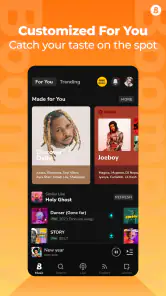
Yes. Boomplay lets users create playlists, and it offers recommendations based on listening habits and preferences. This gives you a way to organize tracks you already enjoy while also finding music that may suit your tastes. The app brings those discovery features together with streaming and offline listening, so you can explore and arrange music in one place.
Does Boomplay include music videos and live streaming?
Boomplay is described as a music and live streaming app, and it also offers access to music videos. These features add viewing and live content to its music-listening experience, alongside streaming songs and creating playlists. If you mainly want an app for audio, its other content options may still be useful when you feel like exploring music in a different format.
Can I use Boomplay on both Android and iOS?
Boomplay is available for Android and iOS devices, including smartphones and tablets. The Android version requires Android 6.0 or later. Before downloading, check that your device meets the relevant system requirements and that you have enough storage for the app and any music you choose to save for offline listening.
Pros
- Extensive music library available.
- User-friendly interface design.
- Offline listening feature.
- High-quality audio streaming.
- Regularly updated playlists.
Cons
- Contains in-app advertisements.
- Some features require subscription.
- Limited free music downloads.
- Occasional app crashes.
- Not available in all regions.
- Category
- Music & Audio
- Version
- 7.6.52











