VITA - Video Editor & Maker
- 6.47K
- 4.4
- Installs
- 100.00M
- Price
- Free

Screenshots
Analysis by Reviewed
I’d reach for VITA - Video Editor & Maker when I want to turn a handful of phone clips into something polished without settling in for a long editing session. It is a mobile video editor from SNOW Corporation, and its appeal is less about replacing a desktop suite than making quick, stylish edits feel approachable. The app is free, rated for Everyone, and has a 4.4 average from around 927,000 ratings, with over 100 million installs. That popularity makes it easy to see why it’s often considered, though it doesn’t tell you whether its workflow suits your own habits.
When connectivity becomes part of editing
VITA’s templates and music are a big part of its creative appeal, but they also make the experience feel more connected than a basic timeline editor. Browsing ready-made styles or looking for a track is a different kind of task from trimming clips already on your phone. I’d plan those choices while I have a reliable connection, especially before a commute or a trip, rather than assume every asset will be available wherever I happen to be editing.
A practical workflow is to choose the template and soundtrack early, then spend the rest of the session arranging footage, adjusting text, and checking the result. That order helps avoid building a cut around a style or song only to discover that I need to revisit the selection later. If I’m making something in a place with patchy reception, I’d keep the project simple and leave browsing for when I’m back online.
The Latest on VITA - Video Editor & Maker
Getting Started with Ease
From the moment you launch VITA - Video Editor & Maker, you’re greeted with a clean and intuitive interface. No more feeling like you’ve accidentally opened a spaceship control panel. The app guides you through every step, making the editing process feel more like a creative adventure than a chore. Whether you're trying to cobble together a montage of your recent trip or edit that vlog you’ve been meaning to upload, VITA's got your back.
Features That Make You Go "Wow!"
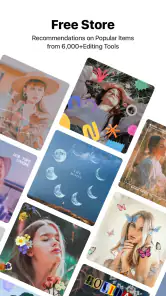
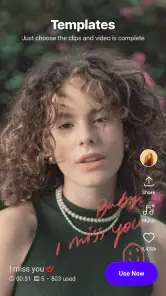
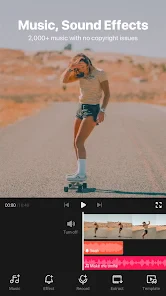
One of the first things I noticed was the sheer variety of templates available. Seriously, it’s like they have a template for every occasion. Birthdays, holidays, or even that random Tuesday night out – VITA has you covered. And let's not forget the music library. There's something about adding just the right track to your video that can elevate it from "meh" to "wow." With numerous royalty-free music options, you can set the perfect mood without worrying about copyright strikes.
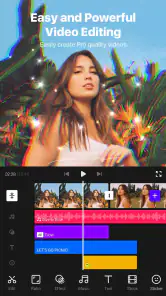
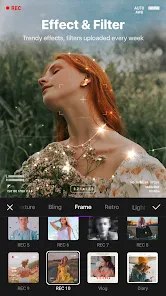
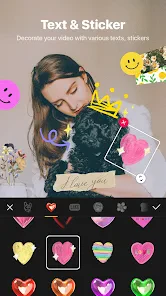
Now, for those who love to tweak every little detail, VITA offers a plethora of editing tools. You can trim, cut, and merge clips with a few taps. Fancy some text overlays? Done. Want to play around with different fonts and colors? Go wild. The app also lets you adjust video speed, add filters, and even insert stickers. The possibilities are endless, and the power is literally at your fingertips.
Working on a phone without wasting time
On a small screen, I find it helps to decide on the story before opening the editor: pick a clear beginning, one or two key moments, and a closing shot. That keeps a template from dictating the whole video and makes clip trimming less fiddly. For a family birthday recap, for example, I’d choose a few short reactions and details rather than include every recording; the result feels more personal and is easier to finish on a phone.
More From Our News Desk

Weather by Xiaomi Review: Clear at a Glance, Less Clear Up Close

X Under Pressure: Can It Recover When Posting Goes Wrong?

Clash of Clans Is Won Between the Battles

Android Auto Makes the Case for Quieter Car Software

MobiOffice: Transforming Mobile Productivity with Seamless Integration

EA SPORTS FC™ Mobile Soccer: Redefining Mobile Sports Gaming
VITA is a good fit for social posts, casual travel recaps, and quick invitations where a cohesive look matters more than frame-by-frame control. Someone who wants precise audio mixing, layered effects, or a carefully managed long-form project may be happier with a more advanced editor. Templates can speed up a first draft, but they can also make different videos feel alike, so I’d treat them as a starting point and change the order, pacing, or captions to make the edit my own.
Performance and Sharing
Now, let’s talk performance. The app runs smoothly, with zero hiccups on my mid-range device. Exporting videos is a breeze, and you can choose the resolution that suits your needs – whether it’s a quick social media post or a high-definition masterpiece. And speaking of social media, sharing your creations is seamless. With direct integration options, you can upload your videos to your favorite platforms without breaking a sweat.
Saving time, handling interruptions
Editing on a phone rarely happens in perfect conditions: a call comes in, the battery gets low, or a connection drops while I’m choosing online content. I’d save or check the project at natural milestones—after arranging the clips, after adding text, and before export—rather than rely on one long uninterrupted session. Before sharing, I’d also watch the finished video from start to end; small timing issues or a caption that sits awkwardly can be easy to miss while editing.
If an export or upload stalls, I’d first check whether the connection is stable and whether the phone has enough free space to handle the finished file, then try again rather than repeatedly tapping share. For a time-sensitive post, exporting first and sharing afterward gives me a chance to review the file before relying on a social upload. I’d keep a copy of important source clips until I know the final video is saved where I want it.
Data-conscious choices and alternatives
Video files can consume a lot of mobile data, particularly when you upload a finished edit away from Wi-Fi. When I’m watching usage, I’d do the creative work on the phone and wait for a trusted connection before sharing a large result. I’d also choose an export resolution that matches the destination: a casual clip doesn’t always need the largest available output, while footage intended for a larger screen may benefit from a higher setting. The useful trade-off is quality versus file size, not simply choosing the maximum every time.
Compared with a straightforward editor focused on a timeline, VITA leans more toward quick visual polish through templates, music, and ready-to-use creative touches. That can save time when I need a social-ready montage, but a conventional editor may suit someone who prefers to build every element manually or wants more detailed control. The app is available for Android with a minimum OS requirement of 8.0; its current version is 302.0.17. I’d still check that my device has enough room for source footage and exports before starting a larger project.
A practical routine for a quick edit
For an everyday example, imagine I’ve taken several clips at a weekend market and want to share a short recap before the day is over. I’d first pick the few moments that tell a small story—arriving, spotting something interesting, and ending with a favorite detail—rather than importing every clip and hoping a template will make them fit. I’d choose the overall look and music while connected, then trim and arrange the selected footage. This keeps the creative decisions manageable and avoids spending the whole evening scrolling through options.
Before export, I’d check that the opening makes sense without explanation, that any text stays readable over changing backgrounds, and that the ending doesn’t cut off abruptly. If the video is just for a phone feed, I’d avoid choosing a needlessly large output; if I expect someone to view it on a bigger display, I’d favor clarity instead. That quick review is a useful safeguard because a polished template can make an edit feel finished before its pacing actually works.
Choosing between templates and manual editing
The main decision is whether I want VITA to provide a visual framework or whether I want to construct the look myself. A template is helpful when I’m short on time or unsure how to pace a montage, but it can pull attention toward its own transitions and styling. I get a more personal result by changing the clip order, shortening sections that drag, and keeping only the text that adds context. A template should make the first draft easier, not become a reason to keep every suggested element.
That balance also explains who may prefer another kind of editor. If I were assembling a longer piece with carefully synchronized sound, multiple layers, or detailed control over each transition, I’d choose a tool designed around a more explicit timeline workflow. VITA is more appealing when speed and a ready-made visual direction matter more than managing every technical detail. It isn’t a weakness that it favors quick edits; it simply means the best choice depends on whether I value a guided start or complete manual control.
What to expect from sharing and recovery
It helps to separate finishing a video from sending it out. I’d export first, inspect the saved result, and share only when the connection is dependable. That gives me a chance to catch a missed clip or text that disappears too quickly without having to remake a post after it has already gone live. It also makes a weak connection less disruptive to the editing decisions themselves: I can finish the creative work and postpone the network-dependent step.
If something interrupts a session, I’d return to the project by checking the clip order and the last section I edited before making further changes. This is more reliable than immediately adding new effects or switching templates, which can make it harder to spot what changed. For an important event video, keeping the original clips until the final version is safely stored is sensible; for a casual post, a quick full playback is usually the check I would not skip.
Who benefits most from VITA
I’d put VITA on the shortlist for people who make short social videos, want an inviting route into editing, or regularly turn phone footage into quick recaps. It can also help someone who finds a blank timeline intimidating: templates and built-in creative options give them a place to begin, while trimming, text, filters, speed changes, and stickers provide room to personalize the result. The free price makes it easy to try the workflow before deciding whether it fits.
I would be less likely to recommend it to someone whose work depends on exact audio edits, extensive layer management, or a carefully repeatable production process. It is also a less comfortable choice if a person expects to browse assets and share large videos while relying on an unstable mobile connection. In those situations, a more manual editor or a desktop workflow may be a better match, particularly when precision matters more than finishing quickly on a phone.
Connectivity verdict
Connectivity shapes the parts of VITA that involve browsing creative material and sharing a finished video, so I’d treat those as deliberate steps rather than assume they will be equally convenient everywhere. Choosing assets ahead of time, keeping a simple edit plan, checking the finished file, and waiting for a suitable connection can make a mobile session feel much more predictable. The practical question is not whether every moment needs a network, but whether the parts I want to do now depend on one.
But what if you hit a snag or need some advice? VITA’s got a pretty responsive support team and a thriving online community. It's always nice to know you're not alone in your editing journey.
Who I’d recommend it to
I’d recommend VITA to someone who wants a presentable edit quickly, enjoys trying different looks, and is comfortable doing creative work on a phone. It also makes sense for a beginner who wants to learn basic pacing and text placement without first mastering a complicated interface. I’d steer away from it if my main goal were a precise, multi-layer production or if I needed a workflow built around dependable editing in places where connectivity is uncertain. For those cases, a more manual editor—and a plan to transfer or share files later—may be the less frustrating choice.
In conclusion, if you’re looking for a video editing app that’s both powerful and easy to use, VITA - Video Editor & Maker is definitely worth a try. Whether you’re crafting a professional-looking video or just having fun with your clips, this app gives you the tools to let your creativity shine. So go ahead, download it, and let your video editing adventures begin!
VITA - Video Editor & Maker Frequently Asked Questions
Can VITA - Video Editor & Maker help me make videos for social media?
VITA is a video-editing app built around making and enhancing videos, and its store summary describes it as a simple editor with trendy content. That makes it worth considering if you want to create clips for social platforms or give personal videos a more polished look. You can explore the available editing options and see whether they suit the style of videos you want to make.
Will VITA work smoothly on my phone or tablet?
Editing video can involve working with sizable files, so the experience may depend on your device as well as its operating system. VITA is intended for mobile editing, and checking your device’s compatibility before installing is a sensible first step. If you plan to work with longer or larger videos, leave enough storage available and allow time for editing and exporting.
Does VITA - Video Editor & Maker work on both Android and iOS?
VITA is available as a mobile video-editing app, so it may suit people who want to make and edit videos on a phone or tablet. Before downloading, check that your device meets the app’s operating-system requirements: the current Android minimum is version 8.0. Once installed, you can explore its editing tools and decide whether its workflow fits the way you like to create.
Who makes VITA, and is it widely used?
VITA - Video Editor & Maker is developed by SNOW Corporation. It has an average rating of 4.4 from around 927,000 ratings, and has been installed over 100 million times. Those figures suggest that it has reached a large audience, although individual experiences can differ depending on a person’s device and editing needs. Its content rating is Everyone.
What features does VITA - Video Editor & Maker offer?
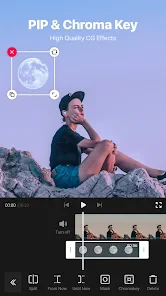
VITA - Video Editor & Maker is packed with a variety of features designed for both novice and experienced video editors. It offers tools for trimming, cutting, and splitting videos, along with options for adding transitions, effects, and text. Users can also explore a rich library of filters and music to enhance their videos. The app supports high-quality video export and sharing across social media platforms, making it a comprehensive solution for video editing.
Pros
- User-friendly interface for beginners
- Wide range of editing tools and effects
- High-quality video export options
- Regular updates with new features
- Supports multiple video formats
Cons
- Limited free version features
- Occasional app crashes
- Ads in free version
- Resource-intensive on low-end devices
- No direct social media sharing
- Category
- Video Players & Editors
- Version
- 302.0.17