SODA - Natural Beauty Camera
- 489.00
- 4.2
- Installs
- 10.00M
- Price
- Free

Screenshots
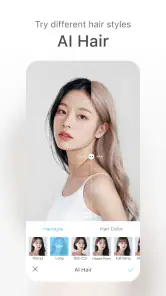
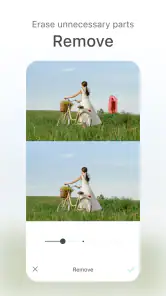
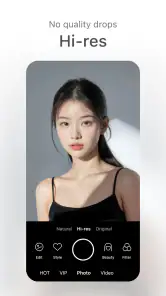
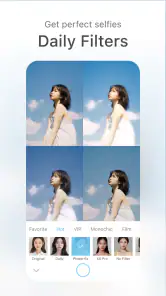
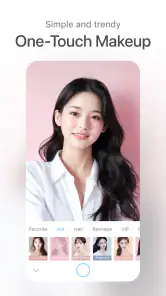
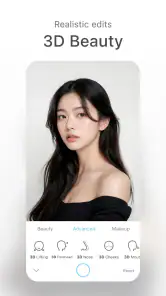
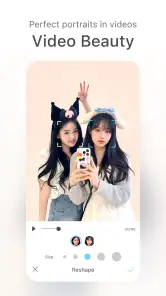
Analysis by Reviewed
I find SODA - Natural Beauty Camera most convincing when I treat it as a quick portrait camera, not a replacement for every tool in my photo library. Its appeal is the chance to preview a more polished look while framing a shot, then take the picture without stopping to learn a complicated editor. That makes it handy for casual selfies and social posts, though anyone chasing precise, natural-looking retouching will want to keep a light hand.
Decide what you want before opening the camera
The most useful question for a new user is not whether a beauty effect looks appealing in isolation, but whether it suits the photo’s purpose. A casual selfie for a chat can tolerate a more playful finish than a picture you plan to use across several profiles or keep as a personal record. I’d choose the intended use first, then decide how much styling fits it. That simple pause helps keep an enjoyable camera effect from becoming an automatic setting applied to every face and occasion.
If you are trying to get a profile image, take a moment to consider where it will appear and how often you might reuse it. A subtle treatment is easier to live with across different contexts; a strong look may feel right for one post but less appropriate elsewhere. I would keep the framing, expression, and lighting consistent while comparing options so that I’m judging the treatment itself, rather than confusing a better pose with a better filter.
A quick test that saves retakes
Before settling into a longer photo session, I’d make one test portrait near a window or in another reasonably even light. Then I’d inspect the result at full size and, if possible, view it on the screen where I expect to share or use it. This is a practical way to catch a finish that looks smooth in the live view but distracting once the picture is saved. It also helps me decide whether a setting is working for the light in front of me rather than relying on memory from another room or day.
For a group selfie, I would take a similar test with everyone in the frame. Effects that appear balanced on one person can feel uneven across several faces, especially when people are standing at different distances from the camera or facing different light. A quick check of the whole composition is more useful than judging only the person nearest the lens. If the result makes someone look noticeably different from how they appear in the rest of the picture, I’d switch to a plain camera shot instead.
When a separate original is worth keeping
There are times when I’d capture both a styled portrait and a regular-camera version. That is especially useful for a photo that may need to serve more than one purpose: I might want a polished image for a social post but also prefer a neutral one for a profile, family album, or future edit. Keeping the two approaches separate gives me a choice later, rather than asking one beauty-camera result to fit every situation.
This does mean taking an extra picture and spending a little longer choosing between them. For an unplanned moment, that may be unnecessary; for a portrait I expect to keep, the extra option is a sensible trade-off. I’d also avoid taking a large string of near-identical shots in the hope that one will somehow look more natural. A clear comparison between a lightly styled frame and an unaltered one usually tells me more than a pile of tiny variations.
More From Our News Desk

Weather by Xiaomi Review: Clear at a Glance, Less Clear Up Close

X Under Pressure: Can It Recover When Posting Goes Wrong?

Clash of Clans Is Won Between the Battles

Android Auto Makes the Case for Quieter Car Software

MobiOffice: Transforming Mobile Productivity with Seamless Integration

EA SPORTS FC™ Mobile Soccer: Redefining Mobile Sports Gaming
Who should choose another kind of camera
SODA is not the first camera I’d reach for when I want to photograph food, a landscape, a pet, or a fast-moving moment. In those cases, I care more about recording the scene as it is than previewing a beauty treatment. A phone’s standard camera is the simpler choice for that job, while a general editor makes more sense when I want to adjust a finished picture selectively. SODA’s particular strength is its portrait-first approach, so it is most useful when that is the result I’m actively looking for.
I’d also skip it if even mild face styling makes a picture feel unlike me, or if I need careful control over individual edits. In those situations, the live-preview convenience is less important than having a clean starting image or a more deliberate editing process. The fact that an app is easy to open does not mean it is the right tool for every photo, and I’d rather use a plain camera than force a beauty look onto a subject that doesn’t need one.
A portrait workflow that stays simple
Made by SNOW Corporation, SODA is a free photography app with optional in-app purchases priced from $8.99 to $59.99 per item. It is rated for Everyone, has a 4.2 average from around 180,000 ratings, and has passed 10 million installs. Those figures suggest a broad audience, but the more useful question is whether its beauty-camera approach fits the way you take pictures.
The practical advantage is seeing the effect before you shoot. When I want a quick profile photo, I can compare the live preview with the scene around me and decide whether a filter or touch-up is helping or simply making the image look processed. A useful habit is to begin with the least noticeable adjustment, take a test shot, and check it at full size before sharing. A face can look pleasing in a small preview while skin texture or edges feel less convincing on a larger screen.
Where the polished look has limits
Beauty effects are subjective, and a preset that suits one face or lighting situation may look too strong in another. Indoor light, bright windows, and mixed color temperatures can all change how a filter reads. I would avoid assuming that one look will work for every photo; checking the preview again when the setting changes is a small step that can prevent a batch of pictures from feeling overly uniform.
That distinction also helps when choosing between SODA and a regular camera app. The built-in camera is usually the more straightforward choice for everyday scenes, pets, or moments where you want the phone to capture things without a beauty treatment. A general photo editor is better if you prefer to take a clean image first and then make careful, selective changes. SODA makes more sense when the portrait look is part of the shot from the beginning.
Who will get the most from it
I would recommend SODA to people who take frequent selfies, want an easy preview rather than a long editing session, and are comfortable judging each result for themselves. It is less suitable if you dislike beauty filters, need detailed control over a finished photo, or want one camera app for every subject. The app’s free entry point makes it easy to try, but I would explore the basic workflow before considering any paid purchase.
What Makes SODA Stand Out?
First things first, the SODA - Natural Beauty Camera isn't your run-of-the-mill photo app. It's designed with simplicity and elegance, ensuring that even the most tech-unsavvy can navigate it with ease. The interface is sleek, intuitive, and user-friendly, making it perfect for quick snaps or detailed edits. This app seamlessly combines high-quality imagery with impressive beauty effects without overcomplicating the process.
Beauty Features Galore
One of the standout features of SODA is its comprehensive suite of beauty tools. From smoothing out blemishes to enhancing your natural glow, this app's got you covered. The real-time beautification feature allows you to see changes as they happen, giving you the power to adjust and perfect your look before even snapping the picture. And let's not forget the wide array of filters that cater to every mood and occasion. Whether you're feeling whimsical or sophisticated, there's something for everyone.
For a realistic everyday use, I’d open it before a video call profile update or a quick group selfie with friends, not after taking dozens of near-identical pictures. I’d settle on a subtle preview, take a couple of frames, and then compare them with a normal camera shot. That small comparison is useful: it shows whether the treatment adds the finish I want or distracts from the moment. In a group, I’d also check that the effect suits everyone rather than assuming a face-focused look will feel equally natural across different people.
High-Quality Imagery
What truly sets SODA apart is its commitment to maintaining high-quality imagery. Unlike other apps that compromise on picture clarity for beauty effects, SODA ensures that your photos are crisp and vibrant. The app's advanced algorithms work behind the scenes to balance all edits with the original photo's resolution, ensuring that you don’t lose out on detail.
Compared with a standard camera, SODA puts more emphasis on the finished portrait impression than on an unaltered record of a scene. Compared with an editor, it favors making a choice while composing the shot instead of building a careful sequence of edits afterward. Neither approach is automatically better: the live treatment is convenient when time is short, while editing later gives more room to reconsider. If you care about keeping an untouched version, take a separate standard-camera picture as well; that gives you a neutral option without relying on a beauty treatment to suit every future use.
Easy Sharing Options
In today’s digital age, sharing your photos is just as important as taking them. SODA makes this process a breeze. With just a few taps, you can share your creations on various social media platforms or send them directly to friends and family. The app supports multiple formats and resolutions, ensuring that your photos look stunning whether they're on a big screen or a tiny smartphone display.
My main reservation is that convenience can make it tempting to accept a filter without checking the result carefully. I’d inspect a saved portrait before posting, especially if the lighting is uneven or several people are in the frame. I’d also keep expectations focused: a beauty camera can change the appearance of a picture, but it cannot make a dim room or an awkward composition disappear. Good light and a relaxed expression still matter more than piling on effects.
Keeping the result personal
The best way I’ve found to use a beauty camera is to make the effect serve the picture, rather than letting the effect decide what the picture should look like. I’d start with the face and expression I want to capture, choose a sensible distance, and only then consider a filter. If I begin by hunting for the most dramatic look, it is easy to lose track of whether the photo still feels like a candid moment or has become an exercise in adjusting the image.
There is also a useful distinction between a camera preview and a finished photo. A live view helps me choose a direction, but I still want to review the saved image before I treat it as ready to share. That check is especially worthwhile when I’ve changed rooms, moved from daylight to indoor lighting, or switched from a close selfie to a wider group portrait. I would rather make one small correction to my approach than assume the same look will carry over unchanged.
In Conclusion, if you're on the hunt for a comprehensive beauty camera app that does it all, look no further than SODA. It's an app that doesn't just enhance photos but enriches the entire photo-taking experience. So, give it a try, and watch your photos transform from ordinary to extraordinary with just a few taps.
My verdict is more measured: SODA is worth trying if you want portrait styling built into the moment of capture, and its simple approach suits spontaneous selfies better than a complicated editing routine. I would skip it if you prefer untouched photos or dependable fine-grained edits. Start with a restrained look, compare a result with a regular camera photo, and decide whether that particular finish feels like you; that is a better test than assuming every filter will suit every occasion.
SODA - Natural Beauty Camera Frequently Asked Questions
What is SODA - Natural Beauty Camera mainly used for?
SODA is a photography app focused on taking and enhancing selfies. Its beauty effects and creative options let you adjust a portrait while taking a photo or during editing. If you want a camera experience centered on selfies rather than a general-purpose photo editor, its straightforward beauty-camera approach may suit your needs.
Is SODA - Natural Beauty Camera suitable for beginners?
Yes. SODA is designed as an easy and simple beauty camera, so its basic selfie and editing features are approachable even if you have not used a beauty-camera app before. You can explore the available effects and filters at your own pace, then keep the result natural or make more noticeable changes to suit your style.
Who develops SODA, and what kind of app is it?
SODA - Natural Beauty Camera is a photography app developed by SNOW Corporation. Its focus is on taking and enhancing selfies, with beauty effects and creative options that can be applied as you shoot or while editing. If you are looking for a camera app centered on portraits rather than general-purpose photo editing, SODA is built around that use.
What features does SODA - Natural Beauty Camera offer?
SODA - Natural Beauty Camera offers a range of features designed to enhance your selfies. These include real-time beauty effects that can smooth skin, adjust facial features, and apply makeup seamlessly. Additionally, it provides a variety of filters to suit different styles and moods, as well as AR effects to add creative elements to your photos.
When was SODA - Natural Beauty Camera released?
SODA - Natural Beauty Camera was released on October 10, 2018. It has remained focused on its simple beauty-camera purpose, giving users a way to take selfies and apply portrait-oriented effects. If you are considering downloading it, the release date is useful context, while the app’s suitability for your device and preferred editing style will matter more to your everyday experience.
Pros
- Intuitive user interface.
- Wide range of filters.
- High-quality photo output.
- Real-time beauty effects.
- Fast processing speed.
Cons
- Contains in-app purchases.
- Requires internet for some features.
- May drain battery quickly.
- Limited video editing options.
- Ads in free version.
- Category
- Photography
- Version
- Varies with device












