SNOW - AI Profile
- 8.11K
- 3.8
- Installs
- 100.00M
- Price
- Free

Screenshots
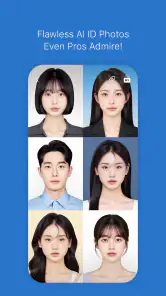
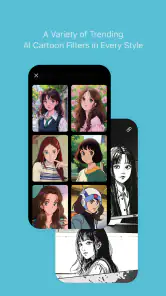
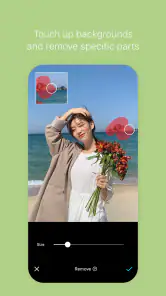
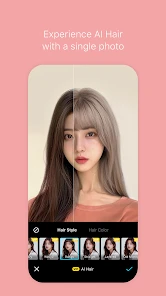
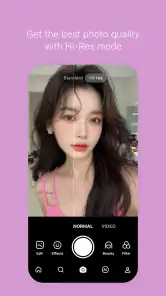
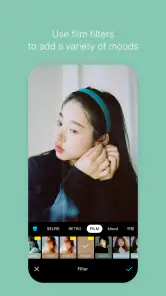
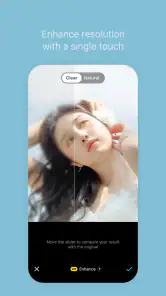
Analysis by Reviewed
When I first open SNOW - AI Profile, I treat it as a quick way to experiment with a portrait rather than a replacement for every photo tool on my phone. The main appeal is being able to try a different look and see whether it suits a profile picture before committing to it. If you’re new to photo editing, the best first goal is simple: choose a clear photo, make one change at a time, and keep the version that still looks like you.
What to expect from a portrait-focused editor
SNOW is a free photography app from SNOW Corporation, and it has been around since November 3, 2015. Its current version is 14.6.12, and it is rated for Everyone. I see it as a playful portrait-editing option: its effects can help a photo feel more polished or more stylized, but the result depends on the original image and how strongly you apply each change.
The app has an average rating of 3.8 from around 1.5 million ratings, with more than 100 million installs. Those figures suggest that it has reached a large audience, but they don’t guarantee that every effect will suit every face or taste. It is free to install, with in-app purchases ranging from $0.99 to $59.99 per item, so I’d explore the free experience first and check any purchase details before paying.
The Latest on SNOW - AI Profile
Unlocking the Magic of SNOW
Now, I know what you’re thinking: "Another photo app? What makes this one special?" Trust me, SNOW - AI Profile is not your run-of-the-mill photo editor. It’s like having a professional photographer and a graphic designer in your pocket. The app uses advanced AI algorithms to analyze your photos and suggest enhancements that bring out the best in every shot. Whether you want to highlight your best features or add a touch of artistic flair, SNOW has got you covered.
Features That Make You Go "Wow"
The feature set in SNOW is nothing short of impressive. First off, the AI-powered filters are a game-changer. They automatically adjust lighting, contrast, and tones to make your photos pop. Plus, there are a plethora of effects to choose from, ensuring you never run out of options to keep your profile fresh and engaging.
Another feature I absolutely love is the background editing tool. We’ve all had those moments when the perfect shot is ruined by a less-than-ideal background. With SNOW, you can effortlessly swap out backgrounds to create the vibe you’re going for, be it a serene beach or a bustling cityscape.
Getting from install to a usable profile photo
For a first attempt, I’d start with a well-lit photo where your face is easy to see, rather than a dim selfie or a crowded group shot. That gives you a better basis for judging the edit. Try the look you have in mind, then compare it with the original before saving or sharing. A useful check is to view the finished portrait at the small size it will appear on a social profile: details that seem subtle full-screen can look much stronger in a tiny circle.
More From Our News Desk

Clash of Clans Is Won Between the Battles

Android Auto Makes the Case for Quieter Car Software

MobiOffice: Transforming Mobile Productivity with Seamless Integration

EA SPORTS FC™ Mobile Soccer: Redefining Mobile Sports Gaming

How Microsoft OneDrive Became a Mobile Productivity Giant

How Google Translate Breaks Language Barriers Effortlessly
For example, if I’m taking a quick picture before meeting friends, I can choose a simple background and try a light effect without turning the image into a formal studio portrait. I’d keep the original photo too, so I can return to it if the edited version feels less natural later. This small habit also makes it easier to compare alternatives without having to recreate the same edit.
Easy Peasy, Lemon Squeezy
Using SNOW is as intuitive as it gets. The user interface is clean and straightforward, making it easy to navigate even for those who aren’t tech-savvy. Just upload your photo, let the AI work its magic, and voilà! Your new profile picture is ready to turn heads.
Moreover, the app offers a tutorial section for first-time users, which I found incredibly helpful. It walks you through the basics and gives tips on how to make the most of the app’s features. It's like having a mini photography course at your fingertips!
Small choices that make edits look more like you
My main tip is to avoid stacking several dramatic effects just because they are available. Start with one treatment, inspect the face and background separately, and only add another if it solves a specific problem. Background changes can be fun, but a strong replacement may draw attention away from the person in the picture; a calmer setting often works better for a profile image that needs to read clearly at a glance.
SNOW is a better fit for people who enjoy trying portrait styles and want a quick result than for someone who needs precise control over every detail. Compared with a basic camera editor, its appeal is the playful range of looks and background changes. If your priority is careful, natural color correction or detailed manual retouching, a conventional photo editor may feel more predictable. And if you simply want an untouched record of a moment, the phone’s regular camera and gallery tools are probably enough.
One point worth checking before you settle on a final picture is whether the result still feels appropriate for where you plan to use it. A lively, heavily stylized portrait can work well for a casual social account, while a restrained edit may be a safer choice for a work profile. The app is free to try, but optional purchases mean I wouldn’t assume every effect or item is included without charge.
Before sharing, make a quick second pass
I find it useful to pause after making an edit instead of posting immediately. Switch back to the original, then return to the edited portrait and ask what has actually improved: is the face easier to see, does the background distract less, or do you simply prefer the novelty? That quick comparison helps separate a genuinely useful change from an effect that feels exciting only because it is new.
For a profile picture, I would also check the crop before treating the job as finished. A portrait that looks balanced in a large preview can lose context when a social platform trims it into a circle or square. Keep the face comfortably inside the central area, and avoid placing an important part of the scene right at the edge. This is especially helpful when trying a replaced background, since a tight crop can make the edit look more artificial.
Where SNOW fits among photo apps
SNOW sits between a simple gallery editor and a more involved retouching app. The built-in tools on a phone are convenient when I only need a quick crop, brightness adjustment, or a faithful version of the original. A manual editor is the better choice when I want repeatable color settings or careful control over small details. SNOW makes more sense when the goal is to explore a portrait treatment quickly and see a noticeably different possibility without building the look from scratch.
That difference also affects how I would use it. I wouldn’t make it my only camera or archive, because its strongest appeal is experimentation rather than keeping an untouched record. I’d take the photo with the regular camera, preserve the original, and bring a copy into SNOW when I want to test a new profile style. Keeping those jobs separate gives me room to play without making the edited version the only version I have.
A realistic first session
Imagine you have a few minutes before a video call or a casual evening out and want a more current profile image. I’d pick a recent, evenly lit selfie, try one understated effect, and compare the result at thumbnail size. If the face remains recognizable and the background is not competing for attention, that may be enough. If every option seems too dramatic, I’d stop there rather than keep adding treatments just to justify using an editor.
If the first source photo is weak, the sensible next move is usually to take another one rather than trying to rescue it with stronger effects. Face-forward framing, a calm background, and light that reaches the face make the comparison fairer. This is a practical limit of any portrait app: processing can change the presentation, but a confusing pose or poor starting image can still make the final result feel off.
What to check before paying or sharing
A common first-time question is whether the free install means every option is free. It does not: SNOW includes optional in-app purchases, so I would check the price shown for a particular item before confirming anything. There is no need to buy something just to find out whether the app’s overall style suits you; try the available experience first and decide only if a specific paid option would solve a problem you actually have.
I would also make sharing a deliberate choice. A profile portrait can be more personal than a landscape or food photo, so consider where you intend to use it and whether the chosen effect still feels comfortable for that audience. For a casual account I might lean playful; for a work-facing profile I’d keep the treatment subtle. The same image does not have to serve every context, and a modest edit is often easier to reuse.
Final Thoughts
In a world where digital presence is everything, having a standout profile picture can make all the difference. SNOW - AI Profile not only makes it easy to create professional-looking images but also adds a fun element to the process. It's perfect for anyone looking to up their social media game without breaking the bank or spending hours in photo editing software.
So, if you’re ready to take your profile pictures from drab to fab, give SNOW a try. It's like having a personal stylist for your photos, and who doesn't need that kind of glow-up?
I’d recommend it most to first-time editors who want an approachable way to explore portrait effects, and to people who enjoy changing their profile image now and then. I’d skip it if you want a strictly natural look, prefer hands-on editing controls, or don’t want to spend time comparing stylized results. For everyone else, start with one clear portrait, keep the edit modest, and decide based on whether the final image feels like a version of you—not just a filter.
SNOW - AI Profile Frequently Asked Questions
Does SNOW - AI Profile need an internet connection to use its features?
A connection may be needed for some app content or features, while basic camera and editing use can depend on how the app handles resources on your device. If you plan to use SNOW away from Wi-Fi or with limited mobile data, check which tools are available in the app and whether they load before you leave. This can help you avoid surprises while taking or editing photos.
Can I use SNOW - AI Profile to edit photos I already have?
SNOW is designed around photography and photo enhancement, so it can be useful for more than taking a fresh picture. You can work with images to apply effects, beauty adjustments, and other editing options, then choose the result that suits your profile or social media style. The available tools may vary, so it is worth exploring the editing screen after installation.
What devices and operating system versions can run SNOW - AI Profile?
SNOW is a photography app from SNOW Corporation, available for Android and iOS. Before downloading, check that your device meets the platform’s requirements; the Android version requires Android 9 or later. Keeping your operating system current can also help with compatibility and performance when using the app’s camera and editing features.
Is SNOW - AI Profile free to download, and what should I know about its age rating?
SNOW is free to download and has an Everyone content rating, so it is presented as suitable for a broad audience. Optional purchases are available within the app, so it is worth checking those before using paid features. If a child will use SNOW, a parent or guardian can review the available purchase controls and decide what is appropriate.
What is SNOW - AI Profile and what are its main features?
SNOW - AI Profile is a cutting-edge application designed to enhance your photos with AI-driven effects and filters. It offers a variety of tools to create stunning profile pictures, including AI-powered filters, beauty effects, and customization options. The app is perfect for those looking to refresh their social media presence with eye-catching visuals.
Pros
- Intuitive interface for easy navigation
- Wide variety of filters and effects
- High-quality AI-generated profiles
- Regular updates with new features
- Strong community and social sharing
Cons
- Requires a stable internet connection
- In-app purchases for premium features
- Can be resource-intensive on older devices
- Limited offline functionality
- Privacy concerns with data usage
- Category
- Photography
- Version
- 14.6.12












