EPIK - AI Photo & Video Editor
- 1.13K
- 4.3
- Installs
- 50.00M
- Price
- Free

Screenshots





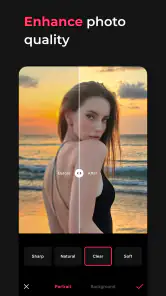

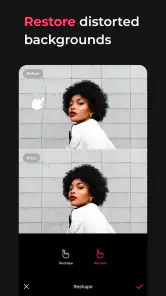
Analysis by Reviewed
I reach for EPIK - AI Photo & Video Editor when I want to tidy up a picture or shape a short video without turning the task into a full desktop editing session. It is a photography app from SNOW Corporation, and its appeal is the mix of approachable controls and creative tools. I like having adjustments and decorative edits in one place, though the broad feature set also means it helps to approach a project with a clear idea rather than tap through everything at once.
What to expect from the editing pace
For a simple job, such as cropping a photo, changing its tone, or trying a filter, the workflow feels direct: open an image, choose a tool, and judge the change on the same screen. That makes EPIK handy when I have only a few minutes before sharing a photo. More involved edits naturally take longer, especially when I am comparing several looks or fine-tuning a face. I would treat its AI tools as shortcuts to a first pass, not as a guarantee that every result will be finished exactly as I want.
My practical tip is to make the biggest correction first, then add style. If a photo is too dark or the framing is off, I fix that before trying decorative effects. This order makes it easier to see whether a filter genuinely improves the image or merely distracts from a basic issue. For portraits, I also prefer small retouching changes; subtle edits tend to look more believable than stacking several face adjustments.
When a project gets demanding
There is a meaningful difference between touching up one portrait and working through a batch of pictures or a longer video. The latter asks for more attention and can make the editing process feel heavier, particularly if I keep switching between tools and previewing alternate versions. EPIK brings photo and video work together, which is convenient, but that range is not the same as a dedicated timeline editor or a specialized photo workflow. For a quick social clip, a few cuts and a visual adjustment may be enough; for a carefully paced project, I would want more room to organize and review each edit.
I also recommend keeping an untouched copy of a favorite original before making a series of creative changes. That gives me an easy way to compare the edited result with the starting image and decide whether a retouch has gone too far. It is a useful habit in any editor, but especially in one where quick enhancements can make it tempting to keep adding polish.
Reliability and day-to-day use
My experience is best described as convenient for ordinary edits rather than something I would rely on blindly for every important project. A clean layout helps me find the kind of adjustment I need, while the range of tools gives me options for a casual image or clip. Still, I save and review work as I go when a project matters. That is sensible practice for mobile editing in general, and it avoids leaving a finished result until the last moment.
One realistic use is editing a family photo while waiting for a friend: crop out an awkward edge, make the lighting feel more balanced, and use a restrained filter before sharing. For a short video from the same outing, I might trim away the pauses and choose a simple transition. This is where having both kinds of editing in one app feels useful. If the job involves many clips, precise timing, or a carefully consistent look across a large set, I would plan extra review time rather than expect a quick one-tap finish.
More From Our News Desk

Weather by Xiaomi Review: Clear at a Glance, Less Clear Up Close

X Under Pressure: Can It Recover When Posting Goes Wrong?

Clash of Clans Is Won Between the Battles

Android Auto Makes the Case for Quieter Car Software

MobiOffice: Transforming Mobile Productivity with Seamless Integration

EA SPORTS FC™ Mobile Soccer: Redefining Mobile Sports Gaming
Device and workflow considerations
EPIK is free to download, with in-app purchases ranging from $0.99 to $51.99 per item, so I would check the cost of any paid option before building a routine around it. Its Teen content rating is worth noting for families choosing apps together. The current version is 6.5.1, and it supports devices running Android 9 or later. The app has a 4.3 average from around 631,000 ratings and more than 50 million installs, which suggests it has reached a broad audience, though popularity alone cannot tell me whether a particular device will feel quick with a demanding edit.
As with other mobile editors, available storage, memory, screen size, and the source file can affect how comfortable a long session feels. I would keep room for the images and videos I plan to edit, close unrelated work if the phone feels burdened, and avoid judging a complex export by how swiftly a basic crop responds. If my device is older or already short on space, I would start with one small project before committing to a large video or a stack of high-resolution photos. On a tablet or a larger phone, detailed adjustments may simply be easier to inspect, even when the tools are the same.
Who will get the most from it
I would recommend EPIK to someone who wants a flexible phone editor for portraits, everyday photos, and short clips, and who enjoys trying looks without learning a complicated desktop workflow. It is especially practical when the goal is to make a picture feel ready to share rather than to build a polished commercial production. If you mainly need straightforward exposure and color controls, a simpler photo editor may be quicker. If you need precise layers, extensive batch work, or close control over a complex video timeline, a more specialized alternative is likely a better fit.
Compared with the usual split between a photo-only app and a separate video editor, EPIK’s advantage is convenience: I can handle a quick still and a small clip in the same general environment. The trade-off is focus. A dedicated tool may offer a workflow better suited to one demanding task, while EPIK makes more sense when variety and accessibility matter more than deep control. I would also treat any automated face or object adjustment as a suggestion to inspect, not an unquestionable correction; zooming in before saving helps catch details that look fine at thumbnail size but odd when viewed closely.
First Impressions
Upon launching EPIK, you're greeted with a clean and intuitive interface. It's clear from the start that the developers wanted to make it as accessible as possible. Whether you're a seasoned pro or a newbie looking to dabble in editing, the layout doesn’t overwhelm you with options. Everything is neatly categorized, making it easy to find exactly what you need without any fuss.
Photo Editing Features
The photo editing suite is where EPIK really shines. With AI-enhanced tools, you can easily adjust everything from brightness to contrast, and even remove unwanted objects with a few taps. The app's real magic lies in its ability to apply filters that don’t just slap a color overlay on your image but adjust tones and highlights to create a cohesive look. It’s like having a professional editor in your pocket!
One feature that stood out to me was the "Magic Retouch" tool. It not only smooths skin but also enhances facial features subtly, making your photos Instagram-ready in seconds. The AI does a fantastic job of keeping things natural, which is often a challenge with automated editing tools.
Video Editing Capabilities
Switching over to video, EPIK doesn’t disappoint. The app offers a variety of editing tools that cater to both short clips and longer formats. You can trim, cut, and splice with ease, and the transition effects available add a professional touch to your videos. The AI-powered stabilization feature is particularly noteworthy, ensuring your shots look smooth even if your hands aren’t.
I also loved the background music library. It’s packed with royalty-free tracks that suit a variety of moods and genres, allowing you to add that extra layer of emotion to your videos without worrying about copyright issues.
User Experience
Using EPIK is a generally smooth experience. The app runs efficiently without lag, even when working on high-resolution files. The tutorials available are comprehensive and guide you through each tool, ensuring you get the most out of the app’s features. It’s clear that a lot of thought has gone into making this app as user-friendly as possible.
Final Thoughts
In conclusion, EPIK - AI Photo & Video Editor stands out as a powerful tool for anyone interested in photo and video editing. Its combination of AI-enhanced features and an easy-to-navigate interface makes it accessible to users of all skill levels. Whether you're looking to make quick edits or delve into more detailed projects, this app has you covered. It’s definitely worth a download if you’re serious about stepping up your editing game.
EPIK - AI Photo & Video Editor Frequently Asked Questions
Can I edit both photos and videos in EPIK?
Yes. EPIK is described as an all-in-one editor for retouching, adjusting, and decorating both photos and videos. That makes it a practical option if you want one app for different kinds of visual content rather than separate tools. Its focus is on editing, though, so it is best considered a creative editor rather than a general-purpose camera or media app.
Who makes EPIK, and what kind of app is it?
EPIK is developed by SNOW Corporation and belongs to the photography category. The app brings photo and video editing together, with tools intended for retouching, adjustments, and decoration. Its store description emphasizes an all-in-one editing experience, which may suit users who want to work on visual content in a single app.
Is EPIK suitable for someone who has never edited photos or videos before?
EPIK is presented as an all-in-one editor for retouching, adjusting, and decorating photos and videos, so it can appeal to people who want editing tools in one app. Its AI-assisted features are intended to make some adjustments easier, while the range of editing options also gives more experienced users room to refine their content. The app is free to download, with in-app purchases available.
What is EPIK - AI Photo & Video Editor?
EPIK - AI Photo & Video Editor is a versatile application designed for both Android and iOS devices, offering advanced editing features powered by artificial intelligence. It allows users to enhance photos and videos with a variety of tools, filters, and effects, making it suitable for both casual users and professional editors seeking to improve their visual content.
How does EPIK utilize AI in its editing features?
EPIK leverages artificial intelligence to provide users with smart editing features that simplify the process of enhancing images and videos. The AI technology in EPIK can automatically adjust lighting, detect and apply suitable filters, and even suggest edits that best fit the content of your media, making it easier to achieve professional-quality results without extensive manual effort.
Pros
- User-friendly interface for easy editing
- Wide range of filters and effects
- High-quality output for photos and videos
- Supports various file formats
- Regular updates with new features
Cons
- Requires in-app purchases for premium features
- Occasional ads might disrupt workflow
- Large app size takes significant storage
- Some features require a strong internet connection
- Limited free version capabilities
- Category
- Photography
- Version
- 6.5.1












