Amazon Seller
- 14.97K
- 3.9
- Installs
- 10.00M
- Price
- Free

Screenshots
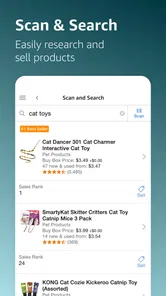
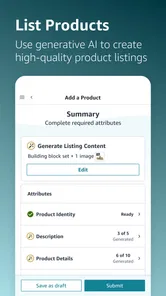
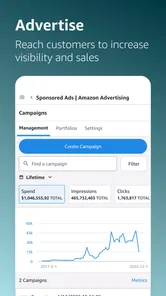
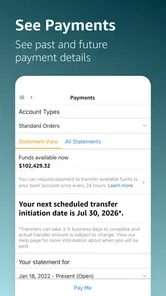
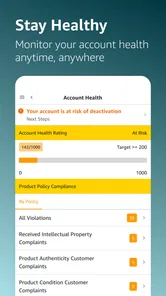
Analysis by Reviewed
I find a phone-based seller dashboard most useful when it helps me handle a small task quickly, rather than trying to replace every part of running a store. That’s the role Amazon Seller fills: it gives Amazon sellers a way to keep an eye on their business and deal with some day-to-day work while away from a computer. It is a free business app from Amazon Mobile LLC, so there is no app purchase price to weigh against its convenience.
Free access is a clear plus, but I would not treat that as the full cost of selling. The app is a tool for managing an Amazon seller account, not a promise that operating a business on the marketplace has no other costs. If you already sell there, the practical question is whether managing tasks on your phone saves enough time to be useful.
Where mobile management helps—and where it stops
For a seller who is already familiar with their products and account, the biggest value is being able to check in between other responsibilities. I would use a mobile dashboard for quick reviews and routine follow-up, then move to a larger screen when a task needs careful editing or a broader view of the business. That division keeps the phone useful without expecting it to do everything.
A practical routine for busy selling days
Picture a seller checking the business during a break: they can review how things are going, notice a listing that may need attention, and deal with a customer message rather than leaving it until they get home. The benefit is not that every task becomes effortless; it is that small interruptions do not have to turn into a backlog. I’d still set aside focused time for decisions that involve comparing several products or making substantial listing changes.
A useful habit is to treat quick checks as prompts, not as a substitute for reviewing the whole business. A sales snapshot can tell me that something deserves a closer look, but I would avoid changing prices or inventory based on a glance alone. Checking the relevant listing and the wider context first is a sensible safeguard against reacting to a brief fluctuation.
How it compares with a computer workflow
Compared with signing in through a desktop browser, a seller app is most compelling for convenience: the phone is close at hand when a message or an operational question comes up. A computer usually feels better for sustained work, because a larger screen makes it easier to inspect details and move between tasks. I see the mobile app as a companion to that workflow, not an automatic replacement for it.
It is also different from a general notes or spreadsheet app. Those can help organize a seller’s own plans, but they are not the same as a purpose-built way to manage an Amazon selling account. If your business spans several marketplaces and you mainly need one consolidated view, a broader commerce-management service may suit you better; the Amazon-focused approach is more relevant when your day-to-day work is centered on selling there.
More From Our News Desk

Weather by Xiaomi Review: Clear at a Glance, Less Clear Up Close

X Under Pressure: Can It Recover When Posting Goes Wrong?

Clash of Clans Is Won Between the Battles

Android Auto Makes the Case for Quieter Car Software

MobiOffice: Transforming Mobile Productivity with Seamless Integration

EA SPORTS FC™ Mobile Soccer: Redefining Mobile Sports Gaming
Good fit for some sellers, not every seller
I’d recommend trying it if you already sell on Amazon, need to check in while away from your desk, and are comfortable handling short tasks on a phone. It may be especially handy for an independent seller who wants to keep customer communication and routine account checks from piling up. Someone who is only researching how to start a business, or who does not sell through Amazon, is unlikely to get much value from an account-management tool built around that marketplace.
It is also not the right choice for anyone expecting a phone app to remove the need for careful business decisions. Small screens encourage quick actions, and quick actions are not always wise when stock, listing details, or customer concerns need context. I’d use it for monitoring and timely follow-up, but reserve complex work for a calmer session where I can check details properly.
What to know before installing
The app is rated for Everyone and has an average rating of 3.9 from around 189,000 ratings, with more than 10 million installs. It was released on July 31, 2014, and version 9.7.1 requires Android 8.0 or later. Those details make it easy to judge basic fit: check your device’s Android version, and remember that the app’s usefulness depends on having an Amazon seller account and a reason to manage it on the go.
For a new seller, I would not assume that installing the app alone is enough to set up a business; first get comfortable with the marketplace and the decisions involved in listing and fulfilling products. For an established seller, the more useful question is whether mobile access fits your routine. If you often need to respond or check account activity away from a computer, it is worth trying; if you do nearly all your work at a desk, the browser may remain your main tool.
Keeping mobile checks useful rather than distracting
I get the most from this kind of seller app when I decide in advance what deserves an immediate response and what can wait for a proper review. A customer concern or a listing issue may merit attention during the day; a small change in a sales snapshot may simply be a reason to inspect the account later. That distinction helps prevent the phone from turning every alert or number into a demand for instant action.
One practical approach is to use a quick check to make a short follow-up list: which listing needs a closer look, which customer conversation needs a considered reply, and which account question belongs in a desktop session. I would avoid trying to remember those items after closing the app. A separate task note can keep the next step clear without turning a brief mobile visit into a rushed attempt to do everything.
What a typical day can look like
Imagine an independent seller who has a few minutes between errands and wants to check whether anything needs attention. They open the app, review the business, and find a customer message that can be answered clearly on the spot. They also notice a product detail that may need revision. Rather than editing it while distracted, they note the issue and return to it later on a computer, where comparing the listing with their product information is easier.
That is the strongest everyday case for mobile management: it can separate urgent follow-up from work that deserves concentration. If the seller instead spends the entire day at a desk, opening a phone app may add another place to check without much benefit. The value depends less on how often the app is opened than on whether it helps close small loops without encouraging hurried decisions.
Questions worth settling before relying on it
A common practical question is whether the app makes sense before someone starts selling. In my view, not as a substitute for learning how the marketplace works. It is aimed at managing an existing seller account, so a prospective seller should first work out whether Amazon is the right place for their products and understand the responsibilities of listing and fulfilling orders. The app can support that work once there is an account to manage; it cannot make the business decisions for you.
Another question is whether it can replace the desktop browser. I would not plan around that assumption. The phone is handy for short checks and responses, while detailed comparisons, careful edits, and a broader review of the business are more comfortable on a larger screen. Sellers who need a unified view across multiple marketplaces should also compare dedicated multi-channel tools, since a marketplace-specific app is not the same as a cross-platform control center.
People also reasonably ask whether the free download means selling itself is free. It only confirms that there is no app purchase price; it does not settle the costs or terms of operating a seller business. I would evaluate the app separately from marketplace expenses and decide whether mobile access is useful for my workflow. That keeps the price question precise rather than treating a free management tool as a free route to running a store.
Finally, a phone-based workflow is not automatically convenient for everyone. If you find small-screen editing tiring, often work with long product details, or prefer to review decisions in one uninterrupted session, the app may be a secondary tool rather than part of your daily routine. There is no need to force it into every task: a browser, a personal planning system, or a broader commerce platform may be more suitable for those particular needs.
Hey there! Have you ever thought about selling your stuff online? Well, I’ve been diving headfirst into the world of online selling, and let me tell you about this app that’s been a game-changer for me – Amazon Seller. Whether you’re a seasoned seller or just starting out, this app is something you might want to consider.
Easy Peasy Listing and Management
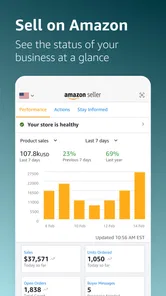
First off, let’s talk about how easy it is to list products. With just a few taps, you can create and edit your product listings. The app’s interface is pretty intuitive, so you don’t need a tech degree to navigate it. Plus, it allows you to monitor your inventory levels and sales metrics in real-time, which is super helpful when you’re juggling multiple products.
Stay on Top of Your Game
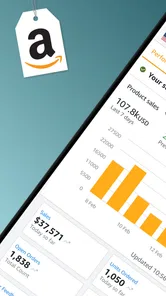
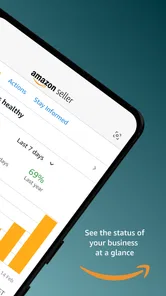
One of the features I truly appreciate is the sales analytics. The app provides detailed insights into your sales trends and performance. It’s like having a business analyst right in your pocket! These insights are crucial for tweaking your strategies and boosting your sales.
Communication Made Simple
Another aspect worth mentioning is the communication tools. You can easily respond to customer queries and feedback directly through the app. This feature helps in maintaining a good seller rating and keeps your customers happy and coming back for more.
Security and Support
Now, what about security? The app ensures your data is safe and secure, which is a big thumbs up for me. Plus, if you ever hit a snag or have questions, Amazon’s support team is just a few taps away.
My take on its day-to-day value
The appeal is practical rather than dramatic. A mobile seller tool earns its place when it helps me act on a real need at the moment it appears, without making me feel that I must monitor the business constantly. I would use it to keep customer communication moving and to spot issues that deserve a closer look, while protecting time for deliberate decisions about stock, product information, and pricing.
That distinction matters because a business dashboard can make activity feel like progress even when I am only refreshing figures. The useful question is not whether I can check the account from anywhere, but whether checking changes what I can do in a meaningful way. For a seller who is often away from a computer, that convenience can be valuable; for someone with a steady desk routine, the same access may be redundant.
Where I would be cautious
Listing and inventory work can affect what customers see and what the seller can fulfill, so I would not treat mobile convenience as a reason to make consequential edits casually. Before changing a product detail, I would verify the information against the product itself; before adjusting stock, I would consider what is available to fulfill. The benefit of being able to act quickly comes with a corresponding need to slow down when the action has business consequences.
Analytics also need interpretation. A change in sales is a signal to investigate, not proof that one particular adjustment caused it or will fix it. I would use the app’s performance view to identify a question, then check the surrounding context before changing a plan. That is a more reliable use of mobile insight than treating a short snapshot as a complete explanation.
My overall recommendation is straightforward: if you already sell on Amazon and would genuinely use mobile access for messages, routine monitoring, or simple account tasks, the free app is an easy option to try. If you need an all-marketplace dashboard, prefer long editing sessions, or have not decided where to sell, I would start with the tool or research that matches those needs instead. The app can make an existing Amazon selling routine more flexible, but it cannot replace a thoughtful workflow or a clear business plan.
In conclusion, if you’re looking to streamline your selling process and manage your store efficiently, the app is definitely worth a try. It’s packed with features that make selling a breeze, and the best part is, you can do it all from the palm of your hand. So, why not give it a shot and see how it can enhance your selling experience?
Amazon Seller Frequently Asked Questions
Do I need an Amazon seller account before using the app?
Amazon Seller is intended for people who sell on Amazon and want to manage their business from a mobile device. The app is a companion for seller tasks rather than a general shopping app, so it makes sense to have an Amazon selling business to manage before downloading it. Consider whether you already have access to the seller account and business information you plan to use.
Who develops Amazon Seller, and what kind of app is it?
Amazon Seller is a business app developed by Amazon Mobile LLC. Its purpose is to help sellers handle their Amazon business using a phone or tablet, with the store summary describing it as a way to sell online, grow, and manage a business on Amazon. If you are looking for an app for browsing or buying products, this seller-focused tool serves a different purpose.
Is the Amazon Seller app free, and who is it intended for?
Amazon Seller is a free business app from Amazon Mobile LLC for people who sell on Amazon and want to manage their work from a mobile device. Its store summary describes it as a way to sell online, grow, and manage a business on Amazon. The app is rated for Everyone, though sellers should consider whether its tools fit their own business needs.
What devices and operating systems are compatible with Amazon Seller?
Amazon Seller is available for Android and iOS devices, so sellers can use it on either platform. On Android, the listed minimum operating system is version 8.0. Before downloading, check that your device meets the requirements shown in its app store and has enough space for installation. The app is designed to help sellers manage their Amazon business while away from a computer.
What features does the Amazon Seller app offer for managing my online store?
The Amazon Seller app provides a comprehensive suite of tools to manage your online store effectively. Key features include real-time sales data, order management, inventory tracking, and pricing adjustments. Additionally, the app offers customer messaging, sales insights, and the ability to list new products directly from your mobile device, making it a versatile tool for sellers.
Pros
- User-friendly interface for sellers.
- Comprehensive analytics tools.
- Supports multiple languages.
- Access to a vast customer base.
- Efficient order management system.
Cons
- Requires a monthly subscription.
- Complicated for beginners.
- Limited customization options.
- High competition among sellers.
- Strict policies and regulations.